Solved Weird icon on desktop that cannot be deleted

stylize

New member
Local time
3:16 PM
Messages
5
Hey guys! I've got this problem of an internet explorer icon on my desktop that cannot be deleted.

I've tried dragging it to the recycle bin (nothing happens).

Tried searching for it in cmd (can't find it in /Default/desktop, /<User>/Desktop, or /Public/Desktop, even with the dir /a:h /b setting)

The context menu is weird (see image).
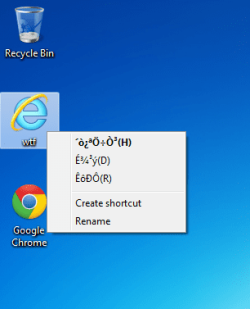
weird.png

Tried unlocker (unlocker option doesn't appear in the context menu of that file so i guess it doesn't work)

Tried MoveonBoot (can't find the file in desktop folder)

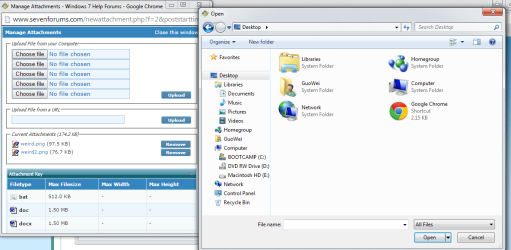
Basically that file appears on my computer's desktop folder (see image), but not when I access the Desktop folder from elsewhere, such as to upload on sevenforums (see image)
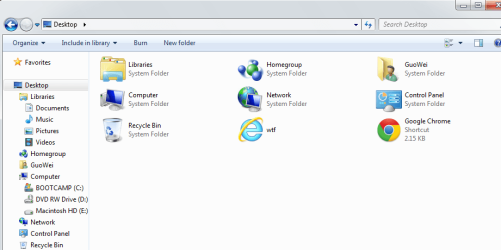
weird2.png
weird3.png

All I can do with the file is rename it (it was originally 'Internet Explorer' and, as you can see, I've named it 'wtf'). I cannot move it to a folder either (it creates a link in the folder instead of itself moving into the folder).

If you're wondering what happens when I run the file, basically internet explorer runs but the homepage is reset to some Chinese site

I would greatly appreciate help in removing this icon that hopefully doesn't involve reinstalling windows.

Cheers
 
Last edited by a moderator:

My Computer My Computer

Computer type
PC/Desktop
Computer Manufacturer/Model Number
Macbook
OS
Windoes 7 Home Premium 32bit
Any malware detected from any scans?
 

My Computer My Computer

Computer type
PC/Desktop
OS
Microsoft Windows 7 Professional 64-bit SP1
CPU
Intel(R) Core(TM) i5 CPU M 520 @ 2.40GHz
Motherboard
Dell Inc. 0K42JR
Memory
8.00 GB
Graphics Card(s)
NVIDIA NVS 3100M
Sound Card
(1) NVIDIA High Definition Audio (2) IDT High Definition A
Monitor(s) Displays
1
Screen Resolution
1440 x 900 x 32 bits (4294967296 colors) @ 59 Hz
Hard Drives
Samsung SSD 840 PRO Series ATA Device
Used malwarebytes before and cleaned everything up. Nothing else detected afterwards.
 

My Computer My Computer

Computer type
PC/Desktop
Computer Manufacturer/Model Number
Macbook
OS
Windoes 7 Home Premium 32bit
I seem to recall this problem a while ago from someone here

if you navigate in the registry to:

[HKEY_CURRENT_USER\Software\Microsoft\Windows\CurrentVersion\Explorer\HideDesktopIcons\NewStartPanel]

These are some of the common entries:
Network Places: {208D2C60-3AEA-1069-A2D7-08002B30309D}
My Computer: {20D04FE0-3AEA-1069-A2D8-08002B30309D}
My Documents: {450D8FBA-AD25-11D0-98A8-0800361B1103}
Internet Explorer: {871C5380-42A0-1069-A2EA-08002B30309D}
Recycle Bin: {645FF040-5081-101B-9F08-00AA002F954E}

Before you do any altering, is there a strange looking entry, perhaps with Asian langue?
 

My Computer My Computer

Computer type
PC/Desktop
OS
Microsoft Windows 7 Professional 64-bit SP1
CPU
Intel(R) Core(TM) i5 CPU M 520 @ 2.40GHz
Motherboard
Dell Inc. 0K42JR
Memory
8.00 GB
Graphics Card(s)
NVIDIA NVS 3100M
Sound Card
(1) NVIDIA High Definition Audio (2) IDT High Definition A
Monitor(s) Displays
1
Screen Resolution
1440 x 900 x 32 bits (4294967296 colors) @ 59 Hz
Hard Drives
Samsung SSD 840 PRO Series ATA Device
Thanks for your help so far!

It appears I do not have the HideDesktopIcons folder in [HKEY_CURRENT_USER\Software\Microsoft\Windows\CurrentVersion\Explorer]

However, I am able to find it in HKEY_LOCAL_MACHINE:
[HKEY_LOCAL_MACHINE\Software\Microsoft\Windows\CurrentVersion\Explorer\HideDesktopIcons\NewStartPanel]

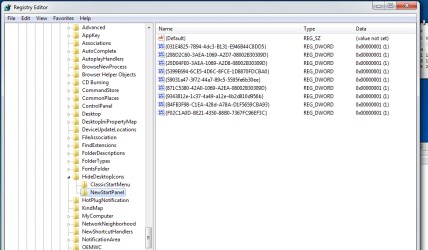
Here is the screenshot. It's all strings though.. No english/asian text.
registry.png

I've copied them out in a text file here View attachment rege.txt
 

My Computer My Computer

Computer type
PC/Desktop
Computer Manufacturer/Model Number
Macbook
OS
Windoes 7 Home Premium 32bit
HKEY_LOCAL_MACHINE\SOFTWARE\Microsoft\Windows\CurrentVersion\Explorer\Desktop\NameSpace

There will be a bunch of entries, which I recall being able to remove icons such as recycle bin, but I'll hav eto run a test to see if it will work with created shortcuts and other icons
 

My Computer My Computer

Computer type
PC/Desktop
OS
Microsoft Windows 7 Professional 64-bit SP1
CPU
Intel(R) Core(TM) i5 CPU M 520 @ 2.40GHz
Motherboard
Dell Inc. 0K42JR
Memory
8.00 GB
Graphics Card(s)
NVIDIA NVS 3100M
Sound Card
(1) NVIDIA High Definition Audio (2) IDT High Definition A
Monitor(s) Displays
1
Screen Resolution
1440 x 900 x 32 bits (4294967296 colors) @ 59 Hz
Hard Drives
Samsung SSD 840 PRO Series ATA Device

My Computer My Computer

Computer type
PC/Desktop
OS
Microsoft Windows 7 Professional 64-bit SP1
CPU
Intel(R) Core(TM) i5 CPU M 520 @ 2.40GHz
Motherboard
Dell Inc. 0K42JR
Memory
8.00 GB
Graphics Card(s)
NVIDIA NVS 3100M
Sound Card
(1) NVIDIA High Definition Audio (2) IDT High Definition A
Monitor(s) Displays
1
Screen Resolution
1440 x 900 x 32 bits (4294967296 colors) @ 59 Hz
Hard Drives
Samsung SSD 840 PRO Series ATA Device
Give this a shot too. I've had some great results finding things with this little gem
AdwCleaner Download
 

My Computer My Computer

Computer type
PC/Desktop
OS
Microsoft Windows 7 Professional 64-bit SP1
CPU
Intel(R) Core(TM) i5 CPU M 520 @ 2.40GHz
Motherboard
Dell Inc. 0K42JR
Memory
8.00 GB
Graphics Card(s)
NVIDIA NVS 3100M
Sound Card
(1) NVIDIA High Definition Audio (2) IDT High Definition A
Monitor(s) Displays
1
Screen Resolution
1440 x 900 x 32 bits (4294967296 colors) @ 59 Hz
Hard Drives
Samsung SSD 840 PRO Series ATA Device

My Computer My Computer

Computer type
PC/Desktop
OS
Microsoft Windows 7 Professional 64-bit SP1
CPU
Intel(R) Core(TM) i5 CPU M 520 @ 2.40GHz
Motherboard
Dell Inc. 0K42JR
Memory
8.00 GB
Graphics Card(s)
NVIDIA NVS 3100M
Sound Card
(1) NVIDIA High Definition Audio (2) IDT High Definition A
Monitor(s) Displays
1
Screen Resolution
1440 x 900 x 32 bits (4294967296 colors) @ 59 Hz
Hard Drives
Samsung SSD 840 PRO Series ATA Device
Found it! There's an entry which has the value "internet explorer". I just deleted it and refreshed my desktop. The icon's gone now.

Thanks for your help!
 

My Computer My Computer

Computer type
PC/Desktop
Computer Manufacturer/Model Number
Macbook
OS
Windoes 7 Home Premium 32bit
Found it! There's an entry which has the value "internet explorer". I just deleted it and refreshed my desktop. The icon's gone now.

Thanks for your help!

Glad I could help. I would still run the adwarecleaner tool to double check for any left overs. It's an exe so don't worry about installing.
 

My Computer My Computer

Computer type
PC/Desktop
OS
Microsoft Windows 7 Professional 64-bit SP1
CPU
Intel(R) Core(TM) i5 CPU M 520 @ 2.40GHz
Motherboard
Dell Inc. 0K42JR
Memory
8.00 GB
Graphics Card(s)
NVIDIA NVS 3100M
Sound Card
(1) NVIDIA High Definition Audio (2) IDT High Definition A
Monitor(s) Displays
1
Screen Resolution
1440 x 900 x 32 bits (4294967296 colors) @ 59 Hz
Hard Drives
Samsung SSD 840 PRO Series ATA Device
Will do. Thanks again mate.
 

My Computer My Computer

Computer type
PC/Desktop
Computer Manufacturer/Model Number
Macbook
OS
Windoes 7 Home Premium 32bit
Back
Top