
Solved Weird small screen at boot, malware related?

TheM4dHatter

New member
Local time
7:45 AM
Messages
33
Hey everybody,

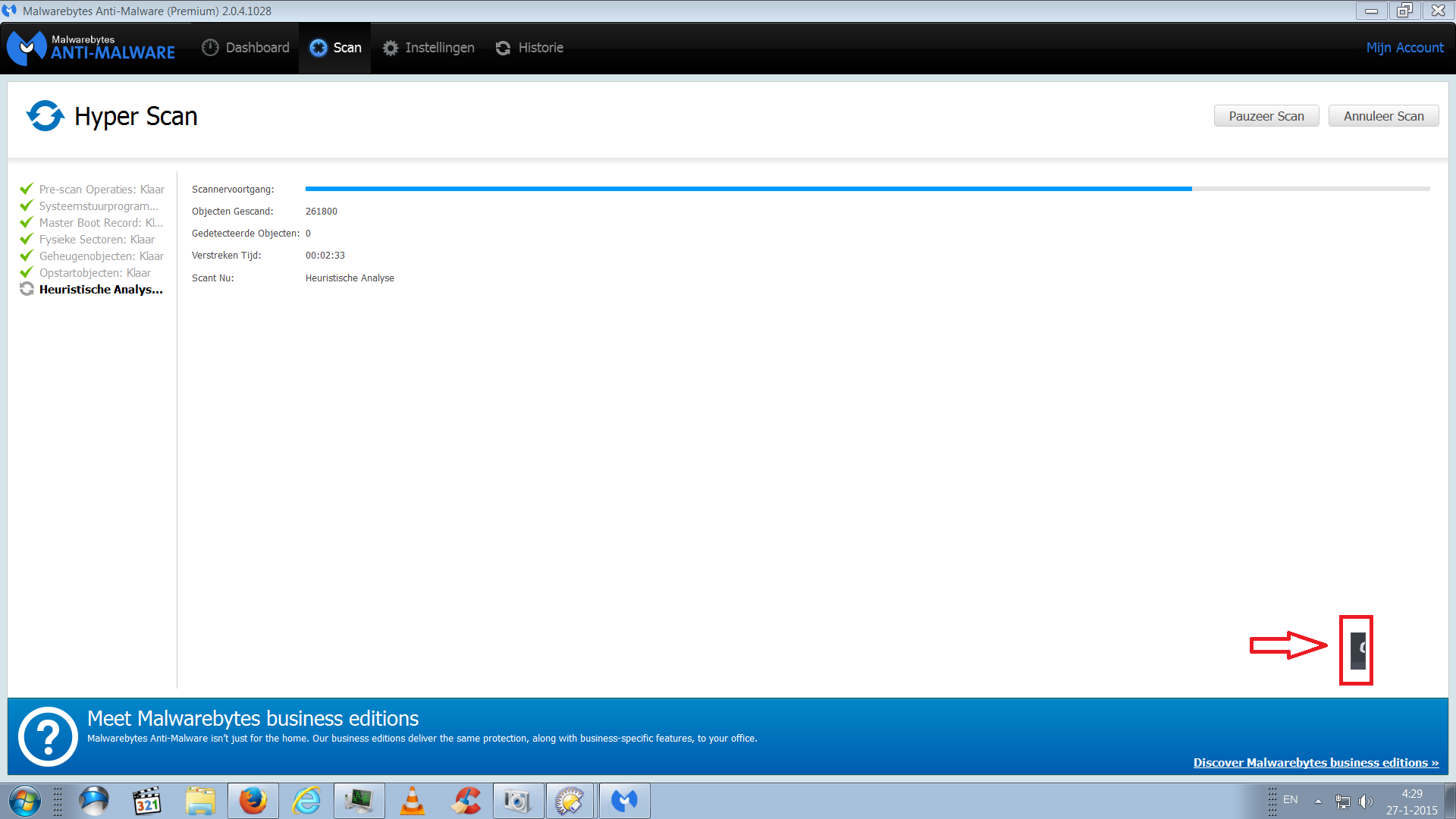
I've been getting this weird little window at boot it starts up all the way in the bottom corner (I moved it in the picture) so you don't really notice it at first.
I can easily close it by hitting alt+f4 and I can drag it around anywhere but it still bothers me.

MBAM doesn't find anything, Comodo doesn't find anything so I assume it's nothing really harmful but still, it's weird...

I can't find anything in the startup file list either so that's why it bothers me I think... Maybe this looks familiar to someone,

I can also post a full Hijackthis log and a full running processes log from Process hacker or something.
o7qotvZ.png
It's the little grey thing in the corner, the arrow and red border are obviously made by me to make it clearer where to look :P
 

My Computer My Computer

Computer type
PC/Desktop
Computer Manufacturer/Model Number
Alienware X51
OS
Win 7 x64
CPU
Intel core i7-2600 @3.40Ghz
Memory
8 GB
Graphics Card(s)
Nvidea Gforce GTX 555
Hard Drives
Seagate !TB ST31000524AS ATA
Antivirus
Comodo Internet Security
Browser
Firefox and Iron
Hi

is it thier in safe mode?
 

My Computer My Computer

Computer type
PC/Desktop
Computer Manufacturer/Model Number
dell xps 9000
OS
win 10
No idea, I can't boot into safe mode because my comp is connected with a HDMI cable (which doesn't work in safe mode) and the only monitor I have has a VGA output while my comp only has DVI-I inputs and I lack a converter :P.
 

My Computer My Computer

Computer type
PC/Desktop
Computer Manufacturer/Model Number
Alienware X51
OS
Win 7 x64
CPU
Intel core i7-2600 @3.40Ghz
Memory
8 GB
Graphics Card(s)
Nvidea Gforce GTX 555
Hard Drives
Seagate !TB ST31000524AS ATA
Antivirus
Comodo Internet Security
Browser
Firefox and Iron
Nothing showed up when booted in clean mode. I've been waiting a while now in normal mode but it looks like it isn't showing up right now either *shrugs* no idea what it is/was.
 

My Computer My Computer

Computer type
PC/Desktop
Computer Manufacturer/Model Number
Alienware X51
OS
Win 7 x64
CPU
Intel core i7-2600 @3.40Ghz
Memory
8 GB
Graphics Card(s)
Nvidea Gforce GTX 555
Hard Drives
Seagate !TB ST31000524AS ATA
Antivirus
Comodo Internet Security
Browser
Firefox and Iron
and it showed up again... so weird...
 

My Computer My Computer

Computer type
PC/Desktop
Computer Manufacturer/Model Number
Alienware X51
OS
Win 7 x64
CPU
Intel core i7-2600 @3.40Ghz
Memory
8 GB
Graphics Card(s)
Nvidea Gforce GTX 555
Hard Drives
Seagate !TB ST31000524AS ATA
Antivirus
Comodo Internet Security
Browser
Firefox and Iron
It continues to show up every time I boot. I turned off some services I don't really need manually already (might as well to speed things up a bit :) ) but it just keeps showing up and I can't seem to link it to a running program that shuts down in my process manager (Process Hacker).
 

My Computer My Computer

Computer type
PC/Desktop
Computer Manufacturer/Model Number
Alienware X51
OS
Win 7 x64
CPU
Intel core i7-2600 @3.40Ghz
Memory
8 GB
Graphics Card(s)
Nvidea Gforce GTX 555
Hard Drives
Seagate !TB ST31000524AS ATA
Antivirus
Comodo Internet Security
Browser
Firefox and Iron
Have you scanned your pc for maleware. Try running malwarebites
 

My Computer My Computer

Computer type
PC/Desktop
Computer Manufacturer/Model Number
dell xps 9000
OS
win 10
Yep I scanned with malwarebytes and Comodo, I'm currently running ESETs online scanner but so far it only found a couple of FP's (which I know are FP's because either I wrote them or someone I know did and makes the scanner go haywire lol).
 

My Computer My Computer

Computer type
PC/Desktop
Computer Manufacturer/Model Number
Alienware X51
OS
Win 7 x64
CPU
Intel core i7-2600 @3.40Ghz
Memory
8 GB
Graphics Card(s)
Nvidea Gforce GTX 555
Hard Drives
Seagate !TB ST31000524AS ATA
Antivirus
Comodo Internet Security
Browser
Firefox and Iron
I could post a hijackthis log once this is done? Maybe that'll help identify it?
 

My Computer My Computer

Computer type
PC/Desktop
Computer Manufacturer/Model Number
Alienware X51
OS
Win 7 x64
CPU
Intel core i7-2600 @3.40Ghz
Memory
8 GB
Graphics Card(s)
Nvidea Gforce GTX 555
Hard Drives
Seagate !TB ST31000524AS ATA
Antivirus
Comodo Internet Security
Browser
Firefox and Iron
You can do that. How long has this been their? Have you installed anything around the time this showed up
 

My Computer My Computer

Computer type
PC/Desktop
Computer Manufacturer/Model Number
dell xps 9000
OS
win 10
Suggestion

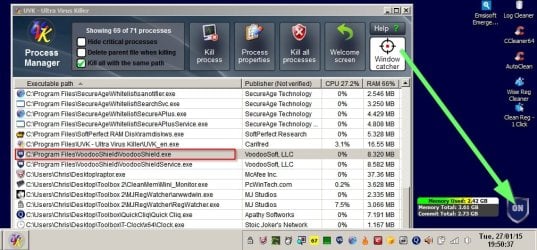
If you run software with a "Window Catcher" and drag the target over the icon it might identify it.

UVK.jpg

Software with this ability (that I know of)

UVK - Ultra Virus Killer

https://technet.microsoft.com/en-us/sysinternals/bb896653.aspx

Revo Uninstaller Pro - Uninstall Software, Remove Programs easily, Forced Uninstall, Leftovers Uninstaller, Portable Uninstaller - need Hunter Mode enabled in 64bit pro version for 64bit machines. If you've got a 32bit machine the free version works fine.
 

My Computer My Computer

Computer type
Laptop
Computer Manufacturer/Model Number
ASUS
OS
Microsoft Windows 7 Home Premium 64-bit 7601 Multiprocessor Free Service Pack 1
CPU
AMD C-60 APU with Radeon(tm) HD Graphics
Motherboard
ASUSTeK COMPUTER INC. X501U
Memory
4.00 GB
Graphics Card(s)
AMD Radeon HD 6290 Graphics
Sound Card
(1) AMD High Definition Audio Device (2) Realtek High Defi
Screen Resolution
1366 x 768 x 32 bits (4294967296 colors) @ 60 Hz
Hard Drives
Hitachi HTS545050A7E380 SATA Disk Device
Antivirus
Comodo CIS & FW, SecureAplus App Whitelisting, Threatfire
Browser
Cyberfox 64bit, Opera 64bit, Airfox
Other Info
Spy-The-Spy, HitmanPro.Alert, Norton Connect Safe, MJRegWatcher, BitDefender TrafficLight, Voodoo Shield, Zemana AntiMalware
I found the problem already, it's a comodo bug. I spoke with someone that happened to be running comod as well and was complaining about it and he was like "ooh I have the same thing, little grey box with half a C in it?" so I checked the comodo forum and found it mentioned (and solved) in the latest CIS bug corner. Nothing to worry about, just one of the billion little errors that sneak through with comodo's public updates, the beta testing really sucks IMO, the IS is good for a free service though so guess you just gotta live with those kind of things lol. Thanks for your help though guys! :) Small edit: Thanks for the suggestion btw callender, I didn't even think of throwing using something like that while I have Revo installed xD lol. Useful for in the future though.
 
Last edited:

My Computer My Computer

Computer type
PC/Desktop
Computer Manufacturer/Model Number
Alienware X51
OS
Win 7 x64
CPU
Intel core i7-2600 @3.40Ghz
Memory
8 GB
Graphics Card(s)
Nvidea Gforce GTX 555
Hard Drives
Seagate !TB ST31000524AS ATA
Antivirus
Comodo Internet Security
Browser
Firefox and Iron
Glad your all happy.
 

My Computer My Computer

Computer type
PC/Desktop
Computer Manufacturer/Model Number
dell xps 9000
OS
win 10
Back
Top