
What are the first two partitions for, can I BU them with Paragon...

gary777

New member
Member
Local time
3:51 PM
Messages
89
I am trying to figure out if I back up my c drive will it include the first two volumes, one I believe is for the drivers and the other for factory reset. I am not sure though, These partitions were put in by Dell.

I plan on using Paragon Backup & Recovery 2014. I have used Paragon before, it was the 2010 version, I BUed my XP system with it. The HDD crashed, I replaced the HDD with some help from my nephew, and used the paragon 2010 via snapshot to restore my OS, only problem was it did not copy the hidden partition on xp.

Will I have the same problem with my new Dell W-7 insprion premium 64 bit when I Back it up. I will use a snapshot, and also do a clone. Can these first two partitions which I believe are for factory restore & drivers be BUed & cloned in case of a HDD crash.
 

Attachments
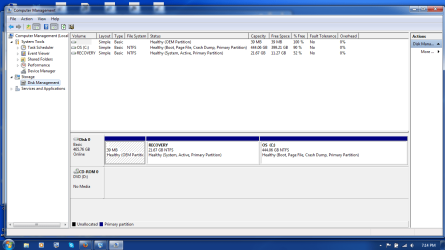
  • disk management.png
    disk management.png
    46 KB · Views: 12

My Computer My Computer

At a glance

windows -7 premium 64bitduocore4gb
Computer type
Laptop
Computer Manufacturer/Model Number
Dell insprion 15
OS
windows -7 premium 64bit
CPU
duocore
Memory
4gb
Hard Drives
500gb

My Computers My Computers

  • At a glance

    7 X64i5 84002x8gb 3200mhz
    Computer type
    PC/Desktop
    OS
    7 X64
    CPU
    i5 8400
    Motherboard
    gigabyte b365m ds3h
    Memory
    2x8gb 3200mhz
    Hard Drives
    various
    PSU
    pure power 11 400w cm
    Case
    Coolermaster
    Cooling
    cryorig m9i
  • At a glance

    7x64g54008gb ddr4 2400
    Computer type
    PC/Desktop
    OS
    7x64
    CPU
    g5400
    Motherboard
    ga b365m ds3h
    Memory
    8gb ddr4 2400
    PSU
    xfx pro 450w
Typical Dell setup. The bootmgr is in the recovery partition. So if you make images, you need both partitions in case your disk fails. If only the OS fails, recovering the C partition is usually enough.

If you want to always image c only, you can copy the bootmgr to C. But then you loose the ability to reinstall from the recovery partition.

As a first image, I would image all 3 partitions. Then you are on the safe side. Later you can decide on lesser options.
 

My Computer My Computer

At a glance

Vista, Windows7, Mint Mate, Zorin, Windows 8from 1.6GHz Duo to i7
Computer Manufacturer/Model Number
HP, Dell, Gateway, Toshiba - 4 laptops and 2 desktops
OS
Vista, Windows7, Mint Mate, Zorin, Windows 8
CPU
from 1.6GHz Duo to i7
Monitor(s) Displays
2x HP w2207
Hard Drives
5x HDD, 7x SSD, 12x Externals
Keyboard
with trackball - no mices
Mouse
Trackball mice
Internet Speed
DSL 6000
Agreed

As a first image, I would image all 3 partitions. Then you are on the safe side. Later you can decide on lesser options.
If your PC is running correctly at the moment, image the entire drive.
Make sure that you verify the image. :eek:

Also make sure that you have:

  • A verified copy of the image stored on an external device (e.g. USB HDD).
  • A recovery CD/USB for the imagining program you are using.

Then, it should be safe to experiment.
 

My Computer My Computer

At a glance

W7 Ultimate SP1, LM19.2 MATE, W10 Home 1703, ...AMD Phenom II x6 1100T, 3.3 GHz12GB DDR3 1333 G-Skill (4GB x 2), G-Skill (2G...NVIDIA GeForce GTX 660
Computer type
PC/Desktop
Computer Manufacturer/Model Number
n/a
OS
W7 Ultimate SP1, LM19.2 MATE, W10 Home 1703, W10 Pro 1703 VM, #All 64 bit
CPU
AMD Phenom II x6 1100T, 3.3 GHz
Motherboard
ASUS M4A88T-M/USB3 (AM3)
Memory
12GB DDR3 1333 G-Skill (4GB x 2), G-Skill (2GB x 2)
Graphics Card(s)
NVIDIA GeForce GTX 660
Sound Card
Realtek?
Monitor(s) Displays
Samsung S23B350
Screen Resolution
1920x1080
Hard Drives
WD Green 2TB (SATA), WD Green 3TB (SATA), WD Blue 4TB (SATA), WD Blue 6TB (SATA)
PSU
Cooler Master
Case
Antec GX300 Tower
Cooling
3x Antec TRICOOL 120mm Fans
Mouse
Wired Optical
Internet Speed
DSL
Antivirus
Avast
Browser
Pale Moon (64 bit)
Other Info
2018-12-27 Upgraded HDDs
2015-12-10 Upgraded case, graphics card, storage
2015-08-15 Upgraded motherboard & RAM
2015-07-15 Upgraded LM17.1 to LM17.2
OK, thanks, so far all good info. Still sorting this all out. W-7 a little different from XP. just wish W-7 Premium could create a computer image like W-7 Pro and Ultima, and not just my files....
 

My Computer My Computer

At a glance

windows -7 premium 64bitduocore4gb
Computer type
Laptop
Computer Manufacturer/Model Number
Dell insprion 15
OS
windows -7 premium 64bit
CPU
duocore
Memory
4gb
Hard Drives
500gb

My Computer My Computer

At a glance

Vista, Windows7, Mint Mate, Zorin, Windows 8from 1.6GHz Duo to i7
Computer Manufacturer/Model Number
HP, Dell, Gateway, Toshiba - 4 laptops and 2 desktops
OS
Vista, Windows7, Mint Mate, Zorin, Windows 8
CPU
from 1.6GHz Duo to i7
Monitor(s) Displays
2x HP w2207
Hard Drives
5x HDD, 7x SSD, 12x Externals
Keyboard
with trackball - no mices
Mouse
Trackball mice
Internet Speed
DSL 6000
^ Thanks whs for uploading the .iso file for all. Regarding my post, I was talking about W-7 Pro & Ultima having the capability to create a computer image, whereas W-7 Premium does not.

I am still don't understand exactly what is on the first two partitions.
 

My Computer My Computer

At a glance

windows -7 premium 64bitduocore4gb
Computer type
Laptop
Computer Manufacturer/Model Number
Dell insprion 15
OS
windows -7 premium 64bit
CPU
duocore
Memory
4gb
Hard Drives
500gb
The very first little partition contains some Dell tools that might be useful.

The second partition is the recovery partition that allows you to restore the system to how it was out of the box. You can also burn a recovery DVD from that. Most important though - it contains your bootmgr. Without it, your system would not boot.

That is a Dell approach. The installer usually creates a seperate 100 or 200MB partition to house the bootmgr. But Dell chose to place it into the recovery partition. Advantage is that it saves one partition on the disk. If you want, you can copy the bootmgr to C, but do that only after you burnt your recovery DVD.

http://www.sevenforums.com/tutorials/209885-bootmgr-move-c-easybcd.html
 

My Computer My Computer

At a glance

Vista, Windows7, Mint Mate, Zorin, Windows 8from 1.6GHz Duo to i7
Computer Manufacturer/Model Number
HP, Dell, Gateway, Toshiba - 4 laptops and 2 desktops
OS
Vista, Windows7, Mint Mate, Zorin, Windows 8
CPU
from 1.6GHz Duo to i7
Monitor(s) Displays
2x HP w2207
Hard Drives
5x HDD, 7x SSD, 12x Externals
Keyboard
with trackball - no mices
Mouse
Trackball mice
Internet Speed
DSL 6000
^ OK, got that part. So in order not to lose the data on the recovery partition I can back it up also on and ext drive via what ever back up program I use? I am asking because I lost the recovery partition the last time I had my HDD crash on me, I replace the HDD, It went fine copying from a Paragon snapshot of my c: drive on to the new HDD except for the ability to be able to use the f8 or was 12 to get a factory reset on said computer. I thought copying the C: drive would include the partitions, I see now that they are seen by the BU software as separate drives so to speak.

I did make recovery disks, it took three DVD's.

One more question/comment if I do a clone, will it clone the C: & both partitions.

What I am trying to end up with, is for me to be able to restore my computer exactly to how it was before a crash, where the HDD needs replacing, and also have the ability to set it to factory setting if desired via the F8 key
 

My Computer My Computer

At a glance

windows -7 premium 64bitduocore4gb
Computer type
Laptop
Computer Manufacturer/Model Number
Dell insprion 15
OS
windows -7 premium 64bit
CPU
duocore
Memory
4gb
Hard Drives
500gb
Back
Top