Playing Deus Ex....
Currently playing
Deus Ex – GOTY Edition (I have to retail boxed (disk) version).
Anyway I got it installed and running under Windows 7 64-bit (See my system specs) without any "Windows" tweaks. I did however have to download a Direct3D renderer as the game is horrid without an updated one. This one (
D3D10) allows you to render the game in DX10 with a capable DX10 card

Download the file and follow the instructions as outlined under the "Installation and Settings section"
One thing I want to clarify about the install instructions - First: when you extract the files you will get renderers for five games (Unreal, UT, Rune, Rune 100, and Deus Ex) you obviously want Deus Ex.
Please pay particuliar attention to this note....
Note that the files (d3d10drv.dll, etc) and the 'd3d10drv' subdirectory must be directly in the system directory; make sure not to accidentally keep them in the folder they came in in the zip (e.g. 'deusex' or 'unreal_226_gold').
All you do is cut the files (and "d3d10drv" folder) out of the "Deus Ex" sub-folder and place them directly in the "System" folder as is. DO NOT remove the files out of the "d3d10drv" folder or the game won't start and you'll get a missing files error

Now follow the setup instructions to use the renderer.
For those looking for the D3D9 renderer it can be found here -
An enhanced OpenGL renderer for Unreal Tournament
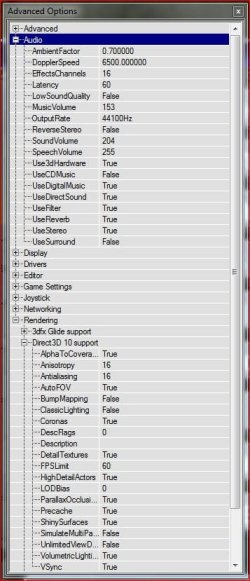
Two important things.... Under Advanced Settings (Start game, hit the 't' key, remove the "say" text, type "
preferences" (without quotes) and hit enter) If you do nothing else change these settings....
Under
Rendering click the + button and find Direct3D 10 Support. Find.....
FPS limit - This prevents the games from running too fast! Make sure you set this to 100 or less! Or you will feel like you're playing the game on hyper speed x 10. I have mine set to 60. I also have V-Sync enabled to keep from getting tearing issues.
Under
Audio click the + button and look for Latency and set it to either 40 or 60 if you're experiencing sound issues. I have mine set to 60.
That's it. Here's some of my Advanced settings......
Though this tweak guide is old it does give an idea of what those advance settings do -
3D SPOTLIGHT - Deus Ex tweak guide
Edit you can avoid that whole advanced settings thing by using the new Deus Ex exe....
 A guide for running on modern systems
 -
Deus Ex on modern systems - kentie.net 
So far no issues yet, though I've just started