Solved What internet bookmark manager SOFTWARE would you suggest?

mohab

New member
Local time
1:09 AM
Messages
130
I capitalized the word software because I'm not a fan of online -web based solutions.

Well?
 

My Computer My Computer

At a glance

Windows 7 Professional 64 bitsCore i5 3.3 GHz12GBoriginal (Intel HD graphics 4600
Computer type
PC/Desktop
Computer Manufacturer/Model Number
Dell Optiplex 7020
OS
Windows 7 Professional 64 bits
CPU
Core i5 3.3 GHz
Motherboard
original
Memory
12GB
Graphics Card(s)
original (Intel HD graphics 4600
Monitor(s) Displays
Samsung SyncMaster 713N
Screen Resolution
1280 x 1024
Hard Drives
Kingstone SSDnow 480GB
Antivirus
Kaspersky Internet security 2016
Browser
Opera
Hi,
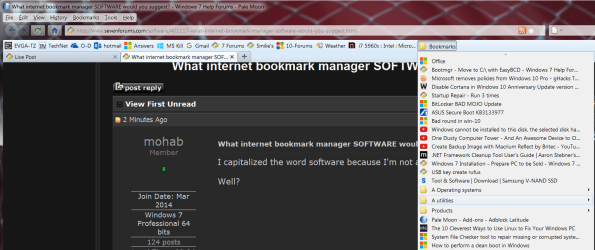
I don't use any software just a folder structure similar to windows explorer and drag to to my favorite bar in firefox and pale moon
I suppose it originated in ie9 using google toolbar and I just liked it.

Of course since I stopped using google toolbar and found I could simply drag the bookmarks folder to my favorite bar in firefox and in pale moon it is the same as having google toolbar without having it installed :)
my favorites bar.png
 

My Computer My Computer

At a glance

Win-7-Pro64bit 7-H-Prem-64biti7-5930K 2nd i9-9940x both water blocked VRM'...Trident-z 3200C14 2nd Trident-z 3600C16EVGA 1080ti ftw3 2nd Titan Xp both water blocked
Computer type
PC/Desktop
Computer Manufacturer/Model Number
Custom assembled by me :}
OS
Win-7-Pro64bit 7-H-Prem-64bit
CPU
i7-5930K 2nd i9-9940x both water blocked VRM's too
Motherboard
ASUS SABERTOOTH X99 2nd ASUS x299 Apex
Memory
Trident-z 3200C14 2nd Trident-z 3600C16
Graphics Card(s)
EVGA 1080ti ftw3 2nd Titan Xp both water blocked
Sound Card
Built-in Realtek
Monitor(s) Displays
1-AOC G2460PG 24"G-Sync 144Hz/ 2nd 1-ASUS VG248QE 24" 144Hz
Screen Resolution
1920 x 1080 144Hz
Hard Drives
2-Samsung M.2 Evo & Evo Plus
2-Samsung 850 EVO 500GB SSD's/ 3-2.5 W.D. Black 1tb-&3-1tb/3-3.5 WD Black 1tb hdd's
PSU
EVGA SuperNOVA 1000-P2 2nd 1200-P2
Case
2-Corsair Obsidian Series 450D Black ATX Mid Tower
Cooling
Custom water loops
Keyboard
Logitech G710+/ 2nd Logitech G910
Mouse
2-RedDragon M901 Perdition 16400 dpi Gaming mouse = wired
Internet Speed
Comcast Ping 19ms 89.31mbps download speed 6.12mbps upload
Antivirus
Malwarebytes Pro/ Superantispyware Pro
Browser
FireFox & Pale moon
Other Info
2nd ASUS X299 Apex/Intel i9-9940x with Custom water loop/7H-Prem-x64/Corsair 450D case/Ram Trident-z 3600C16 4x8gb / Samsung970Evo plus 500gb SSD/Dual ssd EZ swap evo/PSU EVGA SuperNova 1200w-P2 80+Platinum/GPU Titan Xp /8-ML-140 on push-pull on 2-280GTX rads
Hi, @Mohab:

We might be able to better assist you if we knew a wee bit more information:

  • What browser or browsers are you using?
  • What are you trying to accomplish -- in other words: sorting/organizing, eliminating duplicates, other customizations, etc.?
Firefox and related browsers offer a wide range of "bookmark" extensions and add-ons that can be installed to perform a wide range of bookmark functions.

They may be found here:


https://addons.mozilla.org/en-US/firefox/extensions/bookmarks/


If the native bookmarks organization and functionality does not meet your needs, perhaps one or more of those add-ons might help?


Other browsers, such as Chrome, offer similar add-ons.
IE, as a general rule, provides for less flexibility and customization. But there still might be some options.

One may not need thrid-party "software" if browser extensions will accomplish what you're trying to do.


Hope this helps,


MM
 
Last edited:

My Computer My Computer

At a glance

OEM Windows 7 Ult (x64) SP1Intel Core-i7 3770 @ 3.4 GHz16 GB DDR3 SDRAM @ 1333 MHzNVidia GeForce GT620 1 GB
Computer type
PC/Desktop
Computer Manufacturer/Model Number
Dell Studio XPS 8500
OS
OEM Windows 7 Ult (x64) SP1
CPU
Intel Core-i7 3770 @ 3.4 GHz
Motherboard
"Dell" branded
Memory
16 GB DDR3 SDRAM @ 1333 MHz
Graphics Card(s)
NVidia GeForce GT620 1 GB
Sound Card
THX TruStudio PC
Monitor(s) Displays
Dell U2410 Full HD
Hard Drives
2.0 TB SATA2 @ 7200 RPM
PSU
350W
Keyboard
MS 4000 Ergon - Wired
Mouse
Logitech Anywhere MX
Internet Speed
Cable HSI w/Turbo (router)
Antivirus
KIS-MBAM Premium-MBAE Premium
Browser
Fx (current version); IE
Other Info
And a Win7/64 Pro laptop; And a Win10/64 Pro desktop.
I use the Opera browser, and my intentions for using a bookmark manager is that when a new version of opera came out a few years back I tried every thing to copy or import my bookmarks but to no avail, so I thought a bookmark manager might be able to keep the bookmarks organized even if they are not being used on a browser. I'm looking for a bookmark manager that enables me to click th bookmark then it will open in my default browser
 

My Computer My Computer

At a glance

Windows 7 Professional 64 bitsCore i5 3.3 GHz12GBoriginal (Intel HD graphics 4600
Computer type
PC/Desktop
Computer Manufacturer/Model Number
Dell Optiplex 7020
OS
Windows 7 Professional 64 bits
CPU
Core i5 3.3 GHz
Motherboard
original
Memory
12GB
Graphics Card(s)
original (Intel HD graphics 4600
Monitor(s) Displays
Samsung SyncMaster 713N
Screen Resolution
1280 x 1024
Hard Drives
Kingstone SSDnow 480GB
Antivirus
Kaspersky Internet security 2016
Browser
Opera
What version of Opera are you using. I am using the current version of Opera, which is 40.0.2308.62. I have never had any trouble with bookmarks.

I imagine you use Speed Dial, if so, just look over on the left hand side of the screen towards the top you will see the Speed Dial icon & just below that is a Heart shaped icon which are you Bookmarks. If you run the mouse pointer over those items it will tell you this.
 

My Computer My Computer

At a glance

Windows 7 Home Premium 64 bit sp1Intel i5 3570 3.4Ghz Ivy Bridge SKT 1155 quad...G-Skill Rip Jaws 16Gb (8x2) DDR3 -1600 PC3 12...Gigabyte NVIDIA GT610 1Gb DDR3 810/1200 PCI-E...
Computer type
PC/Desktop
Computer Manufacturer/Model Number
Self built using existing case
OS
Windows 7 Home Premium 64 bit sp1
CPU
Intel i5 3570 3.4Ghz Ivy Bridge SKT 1155 quad core
Motherboard
Gigabyte Z77-HD3 SKT 1155 2xSata 3, 4x USB 3.0
Memory
G-Skill Rip Jaws 16Gb (8x2) DDR3 -1600 PC3 12800 CL 10 red
Graphics Card(s)
Gigabyte NVIDIA GT610 1Gb DDR3 810/1200 PCI-E 2.0 Silent
Sound Card
NVIDIA High Definition & Realtech High Definition Audio
Monitor(s) Displays
2 x Philips 226V4L 16:9 aspect ratio
Screen Resolution
1920 x 1080 HD
Hard Drives
Samsung 840 Pro 256gb SSD, SATA 3.
Hitachi Touro Portable 1tb, USB 3.0 HDD used for image b/ups.
PSU
Corsair VS450
Case
Codeng
Cooling
PSU fan & CPU fan
Keyboard
Logitech
Mouse
Logitech Wireless trackball M570
Internet Speed
Wireless 3G. 3mg down & 550kb up.
Antivirus
Bitdefender Internet Security 2020
Browser
Opera (Current Version) & Firefox
Other Info
MS Office 2013 Pro. Davis weather station software. MGE Nova 600 avr UPS.
I'm looking for a bookmark manager that enables me to click th bookmark then it will open in my default browser

You can use Link Warlock to do that but it's not user friendly. Basics are (from memory as I've stopped using it) - export bookmarks to a text file (or html then rename with .txt extension) and import into Link Warlock.

Configure Link Warlock to open links in any specified browser.

http://www.sevenforums.com/browsers...-opening-browser-post2976095.html#post2976095

RE: Opera bookmarks. I use v12.18 and don't have any issues with bookmarks. I used newer versions of Opera though and the bookmarks use the same files as Chrome.

See: http://www.sevenforums.com/browsers...dalone-browser-configuration.html#post2654328

Not sure if latest version of Opera has the same problem.

Had to install a bookmarks addon: http://www.sevenforums.com/browsers...firefox-released-post2962679.html#post2962679

In Firefox (or Cyberfox) I personally prefer the Bookmark Sorter addon.

See: Bookmark Sorter Is An Automation Tool For Sorting Bookmarks [Firefox]
 
Last edited:

My Computer My Computer

At a glance

Microsoft Windows 7 Home Premium 64-bit 7601 ...AMD C-60 APU with Radeon(tm) HD Graphics4.00 GBAMD Radeon HD 6290 Graphics
Computer type
Laptop
Computer Manufacturer/Model Number
ASUS
OS
Microsoft Windows 7 Home Premium 64-bit 7601 Multiprocessor Free Service Pack 1
CPU
AMD C-60 APU with Radeon(tm) HD Graphics
Motherboard
ASUSTeK COMPUTER INC. X501U
Memory
4.00 GB
Graphics Card(s)
AMD Radeon HD 6290 Graphics
Sound Card
(1) AMD High Definition Audio Device (2) Realtek High Defi
Screen Resolution
1366 x 768 x 32 bits (4294967296 colors) @ 60 Hz
Hard Drives
Hitachi HTS545050A7E380 SATA Disk Device
Antivirus
Comodo CIS & FW, SecureAplus App Whitelisting, Threatfire
Browser
Cyberfox 64bit, Opera 64bit, Airfox
Other Info
Spy-The-Spy, HitmanPro.Alert, Norton Connect Safe, MJRegWatcher, BitDefender TrafficLight, Voodoo Shield, Zemana AntiMalware
Hi Mohab,

I have the same problem. The only product I've found which could be a serious contender is Linkman, made by the German company Outertech.

I haven't really kicked its tires because I don't like the look of it, it has an XP style that I find depressing. Also, the publisher does not seem exceedingly dynamic, Linkman does not play very well with modern-day high-resolution screens, and the product has not been updated for more than a year.

However, the last time I did a bit of reasearch, it seemed to me that bookmarks managers were a dying breed, and that Linkman was the last man standing. You could do worse than give it a try. It's very powerful on paper, there's a free version which allows 2 x 5 000 bookmarks whatever that means, and the professional version is dirt cheap at 25 $ / 20 €.

I do agree its a shame bookmarks on the desktop seem to have gone the way of the dodo. I have 15 000 of them, I use them intensively and I'm certainly not giving them away to the cloud. The old Maxthon I used was jolly good with heaps of them, then I transitioned to the old-generation Opera (ugly but good with bookmarks), and when Opera reinvented itself with Chromium I thought they were a joke.

At the beginning they did not even have any at all ! Then they corrected their blunder but still, if you had more than ten it was a joke.

I presume you use the modern Opera ? How many bookmarks do you have ? How is Opera doing now on that matter ?

You could try Firefox. That's what I'm using now. At the beginning, coming from Maxthon, I could not believe how crude they were in their bookmark management. They still consider it permissible to deliver a browser which does not sort the bookmarks ! You have to do it yourself, manually, folder by folder ! And you can't even search for a folder...

Fortunately there are extensions which make the thing a bit more tolerable : for bookmarks, I use Add Bookmark Here, Auto Sort Bookmarks, Go Parent Folder, Manage Folders, Show Parent Folder, Sidebar Bookmarks Search Plus, and Zotero (entirely another beast, look it up if you're curious, it's worth it).

A third avenue would be to experiment with software tools that are not specifically made for bookmark management, If you're the tinkerer type, and would like to invent you own solution. After all, there are few things more low-tech than a bookmark manager...

For want of a better solution, I have taken to open a big a dirty Word document in plan mode, everytime I start a project. Word will take happily everything you throw at it, short of the kitchen sink. I file into such documents at least as many bookmarks that go into my Firefox. I'm not saying this is the solution, but Word has hyperlinks, and any Web address you drag into it becomes easily clickable.

You also could look in the direction of humble hierarchical note-managers such as Tree Line (sexy site, hey ?). You can save web links in there, annotate them, file them in a tree structure... I'm not saying for sure that what you want can be done with this tool, but it might be worth looking into it, or into similar products, if you have some time on your hands.

Anyway, good luck, and be sure to share the news if you find something interesting...

 
Last edited:

My Computer My Computer

At a glance

Windows 7 Home Premium 64-bit (OEM)AMD Athlon II X4 640 (3 GHz, 4 cores)Patriot 16Gb DDR3 1600 (2 kits of 2)ATI Radeon HD 4290 (integrated)
Computer type
PC/Desktop
Computer Manufacturer/Model Number
Custom build
OS
Windows 7 Home Premium 64-bit (OEM)
CPU
AMD Athlon II X4 640 (3 GHz, 4 cores)
Motherboard
Asus M4A 89 GTD Pro/USB3
Memory
Patriot 16Gb DDR3 1600 (2 kits of 2)
Graphics Card(s)
ATI Radeon HD 4290 (integrated)
Sound Card
AMD + Realtek HD Audio (integrated)
Monitor(s) Displays
Hewlett-Packard ZR2440w (24")
Screen Resolution
1920 x 1200
Hard Drives
Internal : Samsung SSD 860 EVO 250 Gb (system), Seagate Barrcuda 1 Tb (data), Western Digital Caviar Blue 500 Gb (archives).
External (USB) : 2 x 1 Tb 2,5" Seagate Barracuda (backups).
PSU
Corsair VX 450 W
Case
Antec Solo
Cooling
Cooler Master Hyper 212 Plus, 2 Nexus Real Silent Case fans
Keyboard
Cherry KC 1000
Mouse
Logitech M 90
Internet Speed
Fiber, 300 Mbit/s down, 200 Mbit/s up
Antivirus
Microsoft Security Essentials
Browser
Vivaldi, Tor
Other Info
BIOS Date: 07/18/11 Ver: 08.00.15.
Modem-router : provided by ISP
Back
Top