Solved What is the best method to backup my C/D partitioned drive

willythecat

New member
Member
Local time
8:09 AM
Messages
54
Location
SW France
Sorry everyone, be prepared to be bored once again.
Backups, imaging, rescue disks, restoring. All very confusing. Have been reading through all of the posts trying to glean info.
At the moment l have a partitioned C/D drive (60gb/440gb) and an E drive (500gb).
The C partition contains the W7 OS (pretty damn obvious!) plus all of my programs which have all been free downloads. There are no personal files on there, and if l lost all of the programs, then so be it, l'll just download them all again. That'll be quite easy to do.
However, l've made numerous tweeks to W7 and also to both my IE and FF browsers so losing everything will need a lot of donkey work to get it all back.
The D partition, believe it or not, is empty, but my 'E' drive contains everything (ie Music, Films, data files etc).
I suppose what l could do is to COPY all of the important data from 'E' to 'D' so if 'E' fails, at least all of the data is safe on the 'D' drive.
It's the 'C' drive that concerns me, so went into the W7 backup and restore. Created a system repair disk which worked fine, and then tried to create a system image of the 'C' drive which cancelled as it couldn't fit it on to the dvd disk? I would have thought it should ask for a next disk to be inserted, but it didn't! Have also found out that l should save both 'C' and 'D' as it will restore both to how they should be.
Anyway, with me so far? Sorry to be a bore!
There's loads of posts on here but a couple in the sticky's are for Macrium. Don't know whether this will do the trick or not. Whatever the replies, the free version doesn't include files and folders backup. Didn't understand that as if it's an ISO image, surely everything will be restored?
Also don't understand that if l save the ISO image to my E drive, then how do l boot from it?
I would have thought that you change the bios to boot from 'E' but then if the ISO is with loads of other files, can this be selected (or does the rescue disk sort this out).
Blimey, l'm rambling on too much (sorry).
Bottom line is that if my 'C/D' drive fails, how do l get it all back. I've never had to do this before, so it's all pretty new to me.
Regards
 

My Computer My Computer

At a glance

32bit Windows 7 UltimateAMD Athlon II X2 250 dual core4 x 1GB dual channel DDR3 @587MHz (7-7-7-20) ...Built in ATI graphics
Computer Manufacturer/Model Number
Home Built System
OS
32bit Windows 7 Ultimate
CPU
AMD Athlon II X2 250 dual core
Motherboard
MSI 760GM-E51
Memory
4 x 1GB dual channel DDR3 @587MHz (7-7-7-20) Crucial Ram
Graphics Card(s)
Built in ATI graphics
Sound Card
Sound Maker Value 5.1
Monitor(s) Displays
Acer P224W
Screen Resolution
1680 x 1050
Hard Drives
2 x 500gb Samsung HD502HJ Sata
PSU
Heden 480W ATX V2.2
Case
ATX Tower
Cooling
n/a
Keyboard
Logitech hard wired Qwerty Keyboard
Mouse
Microsoft Basic Optical hard wired
Internet Speed
ADSL Av.download - 2.10Mb/s Av.upload - 0.14Mb/s
Other Info
Matshita DVD-ROM SR-8584A
TSSTcorp CDDVDW SH-S202N

My Computer My Computer

At a glance

Windows 7 Ultimate SP1 64-BitIntel Core i7 870 @ 2.93GHz8Gb Dual-Channel DDR3 @ 664MHznVidia GeForce GTX 460 1024MB dedicated RAM
Computer Manufacturer/Model Number
HP Pavilion Elite 495UK
OS
Windows 7 Ultimate SP1 64-Bit
CPU
Intel Core i7 870 @ 2.93GHz
Motherboard
MSI 2A9C (CPU1)
Memory
8Gb Dual-Channel DDR3 @ 664MHz
Graphics Card(s)
nVidia GeForce GTX 460 1024MB dedicated RAM
Sound Card
Realtek HD Audio
Monitor(s) Displays
HP2310i
Screen Resolution
1920 x 1080
Hard Drives
1x1954GB Hitachi HDS22020ALA 330 (RAID), 1x1954GB Hitachi External for backup and storage
PSU
460W
Case
HP Elite
Cooling
Air cooled
Keyboard
Logitech K750 solar-powered keyboard
Mouse
Logitech Wireless M180 mouse
Internet Speed
2Mb
Other Info
Pure Avanti Flow Internet Radio with iPod Dock, 64Gb iPod, HP USB Speakers, Sony MDR-V500 Headphones, Sony Vaio F-Series Laptop
Willy:

See comments in bold


At the moment l have a partitioned C/D drive (60gb/440gb) and an E drive (500gb).
The C partition contains the W7 OS

The D partition, believe it or not, is empty, but my 'E' drive contains everything (ie Music, Films, data files etc).

I suppose what l could do is to COPY all of the important data from 'E' to 'D' so if 'E' fails, at least all of the data is safe on the 'D' drive.

I assume C, D, and E are on the same drive? If so this is not much help. If the drive dies, you lose C, D, and E.

It's the 'C' drive that concerns me, so went into the W7 backup and restore.

W7 backup and restore would not be my first choice. It "works", but is fussy and not easy to understand. I would use Macrium.

Created a system repair disk which worked fine, and then tried to create a system image of the 'C' drive which cancelled as it couldn't fit it on to the dvd disk?

Bad form to make images onto DVDs. Much greater chance of problems. Use a hard drive, probably external.


Have also found out that l should save both 'C' and 'D' as it will restore both to how they should be.

Why image D since you say it is empty?


Macrium. Don't know whether this will do the trick or not. Whatever the replies, the free version doesn't include files and folders backup. Didn't understand that as if it's an ISO image, surely everything will be restored?

Macrium does not create ISO files. It creates MRIMG files.

The free version will make an image of whatever partitions you choose. That image WILL include ALL files on that partition. Therefore ALL of those files would be restored if you restore that partition.

But imaging doesn't always work. For that reason, you are best advised to make a separate "file by file" backup with some other program, not using an image.

Also, if you rely on images to restore data (as opposed to Windows), you may not restore your most recent data. Imagine this scenario: you make an image of a partition on April 1. On April 3, you acquire a lot more data. On April 6, your hard drive fails, so you restore the April 1 image to a new drive. In that scenario, the data acquired on April 3 is lost.


Also don't understand that if l save the ISO image to my E drive, then how do l boot from it?

You don't boot from the Macrium image. You boot from a Linux recovery disk you make within Macrium before disaster strikes. You then "restore" the image file to the desired drive from within that Linux environment.


Bottom line is that if my 'C/D' drive fails, how do l get it all back. I've never had to do this before, so it's all pretty new to me.

You get Windows back through one of 2 ways: reinstalling or restoring a previously made image file. Imaging can fail, so have a plan B if your image backup doesn't work out.

You could make images of data partitions (D, E, etc), but I don't do it due to image fallibility. I use "file by file" programs to back up data.
 

My Computer My Computer

At a glance

Windows 7 Home Premium SP1, 64-bitIntel Skylake i5-6600K, not overclocked8 GB HyperX DDR4-2666 (2 x 4 GB)none; graphics are integrated on CPU
Computer type
PC/Desktop
Computer Manufacturer/Model Number
Ignatz Special; 4 speed manual gearbox; factory air conditioning; one of one
OS
Windows 7 Home Premium SP1, 64-bit
CPU
Intel Skylake i5-6600K, not overclocked
Motherboard
AsRock Z170M Extreme 4, micro ATX
Memory
8 GB HyperX DDR4-2666 (2 x 4 GB)
Graphics Card(s)
none; graphics are integrated on CPU
Sound Card
onboard: Realtek ALC1150; external: USB Behringer UF0-202
Monitor(s) Displays
Dell S2340M 23 inch IPS
Screen Resolution
1600 x 900
Hard Drives
System: Crucial MX100 series SSD, 128 GB;
Data: Samsung Spinpoint 103SJ, 1 TB;
Backup: WD Caviar Green WD30EZRX-00D8PB0, 3 TB
PSU
Rosewill SilentNight 500 watt fanless, semi-modular
Case
Antec Solo II
Cooling
Noctua NH-U12S; Noctua F12 intake, Noctua S12A exhaust
Keyboard
Microsoft 200 6JH-00001 USB
Mouse
Dell or Microsoft optical wired; USB
Antivirus
Microsoft Security Essentials and Malwarebytes Premium
Browser
Pale Moon
Other Info
All fans PWM; speeds at idle: CPU circa 500 rpm; intake circa 600 rpm; exhaust circa 600 rpm; CPU temps 27 idle and 47 C load in a warm room (27 C/81 F) when running Intel Extreme Tuning Utility stress test.
One thing I do here is create images with two different programs. 1) Create system option in Backup & Restore with 7 2) Acronis True Image Home version

Results on restoring images created over the last three year period: 100% success for each image created and restored.

Where were images stored? Internal drives used for storage and backup.
 

My Computers My Computers

  • At a glance

    W7 Ultimate x64/W10 Pro x64/W11 Pro Triple Bo...AMD Phenom II X4 975 Deneb 3.6ghz - 965 2nd r...Kingston Hyper X DDR3 1600 1.5v 16gb - Hyper ...MSI HD Radeon 5750 1gb - MSI HD Radeon 6450 o...
    Computer type
    PC/Desktop
    Computer Manufacturer/Model Number
    Custom builds = 2
    OS
    W7 Ultimate x64/W10 Pro x64/W11 Pro Triple Boot - Main PC W7 Remote PC Micro ATX W7 Pro x64/W11 Pro
    CPU
    AMD Phenom II X4 975 Deneb 3.6ghz - 965 2nd remote pc
    Motherboard
    Gigabyte GA-790XTA-UD4-Gigabyte GA-880GM-D2H remote pc
    Memory
    Kingston Hyper X DDR3 1600 1.5v 16gb - Hyper X Fury 8gb 2nd
    Graphics Card(s)
    MSI HD Radeon 5750 1gb - MSI HD Radeon 6450 on mini tower
    Sound Card
    Creative Labs X-Fi Xtreme Audio P - Realtek onooard 2nd case
    Monitor(s) Displays
    ASUS VW199T-P 19" HP 2082a Main-HP 2082a 20" remote pc
    Screen Resolution
    Asus 1440x900 - HP 1600x900
    Hard Drives
    WD Black 1TB HD per OS W7, W10, and pending W11 presently on 500gb OS Drive - Pending Triple 1TB HDs for Spanned Storage/backup volume
    Single 2TB external USB enclosure, single 1TB System 7 Host/Boot drive, Pending 8TB external HD for system image b
    PSU
    Corsair 750TX - primary / Corsair CX600 - second
    Case
    Antec 900-2 - SSD compatible / NZXT Vulcan mini tower
    Cooling
    Zalman CNPS9900A
    Keyboard
    AZIO L70 Backlit Letters Gaming - ONN Cordless/USB
    Mouse
    MSI DS200 Programmable, Logitech Cordless
    Internet Speed
    30mbps upgrade - primary hard wired - mini tower usb WiFi
    Antivirus
    GFI VIPRE Internet Security 2014 on W7 2016 beta on W10,
    Browser
    Cyberfox, WaterFox 64bit FF variants, FireFox x64, Pale Moon
    Other Info
    Accomdata fan cooled usb 2.0 PIDE/Sata II, III external enclosure.
    Sambient usb/eSata PATA/Sata II, III external enclosure.
  • At a glance

    W7 Pro x64/W11 ProAMD Deneb 3.6ghz - 965Kingston Hyper X Fury 8gbMSI HD Radeon 6450 DVI Output
    Computer type
    PC/Desktop
    System Manufacturer/Model Number
    CUSTOM ASSEMBLY
    OS
    W7 Pro x64/W11 Pro
    CPU
    AMD Deneb 3.6ghz - 965
    Motherboard
    Gigabyte GA-880GM-D2H remote pc
    Memory
    Kingston Hyper X Fury 8gb
    Graphics Card(s)
    MSI HD Radeon 6450 DVI Output
    Sound Card
    Realtek onooard Creative or Other separate PENDING
    Monitor(s) Displays
    VIZIO 32" LCD TV Separate LCD Pending
    Screen Resolution
    1600x1080
    Hard Drives
    WD 500GB OS Host/Boot WD Green 1TB Storage/Backup
    PSU
    Corsair 600W - THERMALTAKE 600W spare case
    Case
    NZXT Vulcan mini tower
    Cooling
    Twin 120mm Top Fans - 240mm Side Cover
    Keyboard
    ONN Cordless/USB Logitech Cordless
    Mouse
    ONN USB/Cordless - Logitech Cordless
    Internet Speed
    DSL 5G
    Browser
    MS Edge, FireFox, WaterFox x64, FireFox Nightly
    Other Info
    OS Testing-Remote Access to Main TeamViewer
Thanks everyone for the replies, sorry for the delay in replying.
SEAVIXEN
Aha, that explains it more fully, thanks.
IGNATZATSONIC
No, l have two 500gb drives. The first drive is partitioned as C:(60gb) and D:(440gb). The second drive is labelled as E:(500gb). The link given by SeaVixen makes the windows backup clearer to understand, but l'll certainly give Macrium a look into as you suggest.
My C: drive contains nothing apart from the OS, my Browsers info, and "free" programs which have been tailored accordingly to meet my requirements. Any data created that l want to keep is moved immediately to the separate E: drive.
Couldn't care if l lose the C:/D: drive as l'll just reinstall Windows, and download all the "free" programs again. It'll take time, so an "image" restore would be a lot quicker.
I use the D: partition for lots of data files l work on which are either then saved to the E: drive immediately or deleted. At the moment the D: drive is empty. (I only thought that if l backed up my main drive as C: and D: partitions then it will restore it as C: and D: partitions).
Actually you've got me blimmin' well thinking now. My E: drive should also be backed up somewhere!
Cloud seems interesting as they are all data files.
Anyway, thanks for taking the time to reply, appreciated.
NIGHT HAWK
Funnily enough, got a "dodgy" copy of Acronis way way back now, can't even remember what version it was. Created a rescue disk and backup of my old XP system and when l had to use it, it just said the disks were invalid so l had to rebuild the system from scratch. Needless to say l got rid of Acronis, but will take another look at it to see what's new.
So thanks again everyone, lots to go away and look at.
 

My Computer My Computer

At a glance

32bit Windows 7 UltimateAMD Athlon II X2 250 dual core4 x 1GB dual channel DDR3 @587MHz (7-7-7-20) ...Built in ATI graphics
Computer Manufacturer/Model Number
Home Built System
OS
32bit Windows 7 Ultimate
CPU
AMD Athlon II X2 250 dual core
Motherboard
MSI 760GM-E51
Memory
4 x 1GB dual channel DDR3 @587MHz (7-7-7-20) Crucial Ram
Graphics Card(s)
Built in ATI graphics
Sound Card
Sound Maker Value 5.1
Monitor(s) Displays
Acer P224W
Screen Resolution
1680 x 1050
Hard Drives
2 x 500gb Samsung HD502HJ Sata
PSU
Heden 480W ATX V2.2
Case
ATX Tower
Cooling
n/a
Keyboard
Logitech hard wired Qwerty Keyboard
Mouse
Microsoft Basic Optical hard wired
Internet Speed
ADSL Av.download - 2.10Mb/s Av.upload - 0.14Mb/s
Other Info
Matshita DVD-ROM SR-8584A
TSSTcorp CDDVDW SH-S202N
I'm still running the 2010 version while there's a newer 2012 release for Acronis TI available. Never ran any of the older versions since often ended up needing a clean install with XP but only a few with Vista.

The hard drive manufacturers Western Digital and Seagate with their rebranded Disk Wizard(Acronis under a different name) offer a free version of Acronis for their customers. Here I ended up trying both the freebie at first and then spotted the full version while in an office supply one day and had both on at one point.

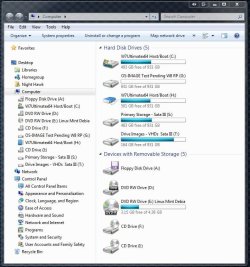
One of the tools included in the full retail version is the option to mount a full image backup as the second C drive. For mounting the first image just made from a clean install of 7 you will notice the blue colored hard disk icon making it accessible as an extra drive in order to add more to it as an incremental backup or edit files out you no longer want.

The image restorations, several since trying the 2010 version out, plus those made with the Windows option have all been sucessful without any errors. I still create an image with both however in case one image doesn't quite work out or preserves an unseen error at the time a newer image is created while I rarely have to restore any.

The option to restore any image does save a great deal of time while I already have all files backed up on one or two of the other drives would no worry about cleaing C off completely for the clean install that was a little over due. That replaced the last image restored back in October 2010 made with the option in 7! The image was first created when first getting the present build all set up back in May 2010 showing it was reliable months later and ran with for over 1 1 1/2yrs.!

The ability to mount a full system image however is a valuable asset since once I got everything I wanted back on I will now be eliminating a few things(some extras that never worked well) to shrink the image you can see in the image here being mounted as the H drive.
 

Attachments

  • Acronis Mounted Second C Drive.jpg
    Acronis Mounted Second C Drive.jpg
    84.6 KB · Views: 20

My Computers My Computers

  • At a glance

    W7 Ultimate x64/W10 Pro x64/W11 Pro Triple Bo...AMD Phenom II X4 975 Deneb 3.6ghz - 965 2nd r...Kingston Hyper X DDR3 1600 1.5v 16gb - Hyper ...MSI HD Radeon 5750 1gb - MSI HD Radeon 6450 o...
    Computer type
    PC/Desktop
    Computer Manufacturer/Model Number
    Custom builds = 2
    OS
    W7 Ultimate x64/W10 Pro x64/W11 Pro Triple Boot - Main PC W7 Remote PC Micro ATX W7 Pro x64/W11 Pro
    CPU
    AMD Phenom II X4 975 Deneb 3.6ghz - 965 2nd remote pc
    Motherboard
    Gigabyte GA-790XTA-UD4-Gigabyte GA-880GM-D2H remote pc
    Memory
    Kingston Hyper X DDR3 1600 1.5v 16gb - Hyper X Fury 8gb 2nd
    Graphics Card(s)
    MSI HD Radeon 5750 1gb - MSI HD Radeon 6450 on mini tower
    Sound Card
    Creative Labs X-Fi Xtreme Audio P - Realtek onooard 2nd case
    Monitor(s) Displays
    ASUS VW199T-P 19" HP 2082a Main-HP 2082a 20" remote pc
    Screen Resolution
    Asus 1440x900 - HP 1600x900
    Hard Drives
    WD Black 1TB HD per OS W7, W10, and pending W11 presently on 500gb OS Drive - Pending Triple 1TB HDs for Spanned Storage/backup volume
    Single 2TB external USB enclosure, single 1TB System 7 Host/Boot drive, Pending 8TB external HD for system image b
    PSU
    Corsair 750TX - primary / Corsair CX600 - second
    Case
    Antec 900-2 - SSD compatible / NZXT Vulcan mini tower
    Cooling
    Zalman CNPS9900A
    Keyboard
    AZIO L70 Backlit Letters Gaming - ONN Cordless/USB
    Mouse
    MSI DS200 Programmable, Logitech Cordless
    Internet Speed
    30mbps upgrade - primary hard wired - mini tower usb WiFi
    Antivirus
    GFI VIPRE Internet Security 2014 on W7 2016 beta on W10,
    Browser
    Cyberfox, WaterFox 64bit FF variants, FireFox x64, Pale Moon
    Other Info
    Accomdata fan cooled usb 2.0 PIDE/Sata II, III external enclosure.
    Sambient usb/eSata PATA/Sata II, III external enclosure.
  • At a glance

    W7 Pro x64/W11 ProAMD Deneb 3.6ghz - 965Kingston Hyper X Fury 8gbMSI HD Radeon 6450 DVI Output
    Computer type
    PC/Desktop
    System Manufacturer/Model Number
    CUSTOM ASSEMBLY
    OS
    W7 Pro x64/W11 Pro
    CPU
    AMD Deneb 3.6ghz - 965
    Motherboard
    Gigabyte GA-880GM-D2H remote pc
    Memory
    Kingston Hyper X Fury 8gb
    Graphics Card(s)
    MSI HD Radeon 6450 DVI Output
    Sound Card
    Realtek onooard Creative or Other separate PENDING
    Monitor(s) Displays
    VIZIO 32" LCD TV Separate LCD Pending
    Screen Resolution
    1600x1080
    Hard Drives
    WD 500GB OS Host/Boot WD Green 1TB Storage/Backup
    PSU
    Corsair 600W - THERMALTAKE 600W spare case
    Case
    NZXT Vulcan mini tower
    Cooling
    Twin 120mm Top Fans - 240mm Side Cover
    Keyboard
    ONN Cordless/USB Logitech Cordless
    Mouse
    ONN USB/Cordless - Logitech Cordless
    Internet Speed
    DSL 5G
    Browser
    MS Edge, FireFox, WaterFox x64, FireFox Nightly
    Other Info
    OS Testing-Remote Access to Main TeamViewer
Back
Top