What you hear sound blaster

pclov3r

New member
Local time
12:09 PM
Messages
8
I was wondering how I could get my sound blaster card to play what you hear on your pc over mic. I did this on XP
 

My Computer My Computer

At a glance

Windows 7 64-bit Build 7100Intel(R) Core(TM)2 Quad CPU Q6600 @ 2.40GHz (...4 GB G.Skill PC2-6400 DDR2-800Evga Nvidia GeForce 9800GT
Computer Manufacturer/Model Number
My Build
OS
Windows 7 64-bit Build 7100
CPU
Intel(R) Core(TM)2 Quad CPU Q6600 @ 2.40GHz (4 CPUs)
Motherboard
Asus
Memory
4 GB G.Skill PC2-6400 DDR2-800
Graphics Card(s)
Evga Nvidia GeForce 9800GT
Sound Card
Creative Sound Blaster SE
Monitor(s) Displays
Acer AL2223W
Hard Drives
1 TB Western Digital 7200 RPM
PSU
OCZ 500 Watt
Case
NZXT Guardian 921
hi pclov3r,

i don't understand your question - do you want to hear your microphone output on your speakers?

if so, you just have to up the mic volume in your sound mixer.

control panel >> hardware and sound >> sound >> select 'speakers' >> properties >> levels >> scroll down until you see microphone >> un-mute it or raise the volume level

be careful of raising it too high, otherwise you may get audio feedback if you aren't wearing headphones.

i hope i understood your problem correctly - good luck
 

My Computer My Computer

At a glance

ultimate 64 sp1i5 2500K [email protected]8 gigs GSkill Ripjaws 1600amd hd6950
Computer Manufacturer/Model Number
mickey megabyte 1234
OS
ultimate 64 sp1
CPU
i5 2500K [email protected]
Motherboard
MSI P67A-GD53
Memory
8 gigs GSkill Ripjaws 1600
Graphics Card(s)
amd hd6950
Sound Card
creative x-fi gamer
Monitor(s) Displays
samsung 24"
Screen Resolution
1920x1080
Hard Drives
ocz vertex 2e 60 gig, samsung f3 1tb, buffalo 2tb ext
PSU
antec 550
Case
antec three hundred
Cooling
i'm a cooling fan
Keyboard
saitek eclipse ii
Mouse
logitech g3
Internet Speed
about 4 Mbps
Other Info
i love win7
I want something like stereo mixer so that I can play pc sounds over the mic. Like if I play music on my pc I would like to have it play over my mic.
 

My Computer My Computer

At a glance

Windows 7 64-bit Build 7100Intel(R) Core(TM)2 Quad CPU Q6600 @ 2.40GHz (...4 GB G.Skill PC2-6400 DDR2-800Evga Nvidia GeForce 9800GT
Computer Manufacturer/Model Number
My Build
OS
Windows 7 64-bit Build 7100
CPU
Intel(R) Core(TM)2 Quad CPU Q6600 @ 2.40GHz (4 CPUs)
Motherboard
Asus
Memory
4 GB G.Skill PC2-6400 DDR2-800
Graphics Card(s)
Evga Nvidia GeForce 9800GT
Sound Card
Creative Sound Blaster SE
Monitor(s) Displays
Acer AL2223W
Hard Drives
1 TB Western Digital 7200 RPM
PSU
OCZ 500 Watt
Case
NZXT Guardian 921
I was wondering how I could get my sound blaster card to play what you hear on your pc over mic. I did this on XP

PC

Use a male to male mini cable. PLug headphnes into mic. I do it all the time for recording in audacity.

Ken
 

My Computer My Computer

At a glance

Win 8 Release candidate 8400[email protected]4 gigsNvidia 9600M
Computer Manufacturer/Model Number
HP Pavillion dv-7 1005 Tx
OS
Win 8 Release candidate 8400
CPU
[email protected]
Memory
4 gigs
Graphics Card(s)
Nvidia 9600M
Sound Card
HD built-in
Monitor(s) Displays
17" Wxga
Screen Resolution
1440x900
Cooling
none
Internet Speed
45Mb down 5Mb up
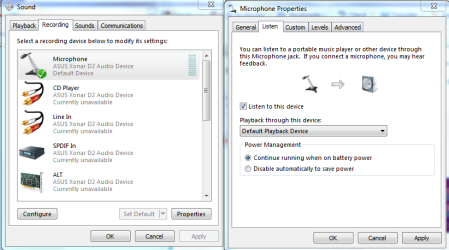
You can also open up mic properties and check the listen to this device feature.
 

Attachments

  • mic capture.PNG
    mic capture.PNG
    33.2 KB · Views: 605

My Computer My Computer

At a glance

Windows 7 Ult, Windows 8.1 Pro,Q9650-4.275GHz, E8600 4.5GHz, E6750-3.8GHzG.Skill PC2 9600 1200Mhz 5 5 5 15 2TGTX480
Computer type
PC/Desktop
Computer Manufacturer/Model Number
Home built
OS
Windows 7 Ult, Windows 8.1 Pro,
CPU
Q9650-4.275GHz, E8600 4.5GHz, E6750-3.8GHz
Motherboard
Evga 780i FTW
Memory
G.Skill PC2 9600 1200Mhz 5 5 5 15 2T
Graphics Card(s)
GTX480
Sound Card
Asus Xonar D2
Monitor(s) Displays
HannsG
Screen Resolution
1680X1050
Hard Drives
GSkill Phoenix Pro 120GB SSD
PSU
ThermalTake Toughpower 1000Watt modular
Case
ThermalTake XaserV
Cooling
Xigmatek S1283
Keyboard
Logitech G15
Mouse
Logitech G9
Internet Speed
T1
You can also open up mic properties and check the listen to this device feature.


Chev

Assuming his creative sound blaster has that. My creative doesn't but its a different model.

Ken
 

My Computer My Computer

At a glance

Win 8 Release candidate 8400[email protected]4 gigsNvidia 9600M
Computer Manufacturer/Model Number
HP Pavillion dv-7 1005 Tx
OS
Win 8 Release candidate 8400
CPU
[email protected]
Memory
4 gigs
Graphics Card(s)
Nvidia 9600M
Sound Card
HD built-in
Monitor(s) Displays
17" Wxga
Screen Resolution
1440x900
Cooling
none
Internet Speed
45Mb down 5Mb up
PC

Use a male to male mini cable. PLug headphnes into mic. I do it all the time for recording in audacity.

Ken
I don't understand why would you want to do that? record somethnig that your actually playing in the fist place?
 

My Computer My Computer

At a glance

Windows 7 7264x64(main), 7260x86(secendary), ...Intel Core 2 Duo E7400 2.8Mhz2GB DD2 667Intel(R) 82G33 Graphics and Memory Controller...
Computer Manufacturer/Model Number
home made
OS
Windows 7 7264x64(main), 7260x86(secendary), XP SP3 Triple Boot
CPU
Intel Core 2 Duo E7400 2.8Mhz
Motherboard
Intel G33 express chipset
Memory
2GB DD2 667
Graphics Card(s)
Intel(R) 82G33 Graphics and Memory Controller Hub
Sound Card
Realtek Built into the G31
Monitor(s) Displays
19"
Screen Resolution
1280x1024
Hard Drives
320GB SATA (Main), 160GB IDE (Backup)
Case
Gigabyte SETTO
Keyboard
Genius
Mouse
Logitech
Internet Speed
1MB Download, 128k Upload
I don't understand why would you want to do that? record somethnig that your actually playing in the fist place?


it's for the purpose of recording desktop usage with sounds, or broadcasting/up-streaming video/audio. i used to live-stream with sound of beta games.

sometimes- depending on OS, hardware, and drivers- stereo mixer is disabled and hidden in the windows sound menu, go to your recording tab (in sound), make sure you right click and check show disabled devices, then enable it (if it was disabled), and set it as your default recording device (so any programs that uses default recording device will now get sound from the stereo mixer) or alternatively if you can choose which recording device to use in whatever program you are using, then set it there. If stereo mixer is not listed in your recording sound devices then it's drivers issue.

using the "Use a male to male mini cable. PLug headphnes into mic." method (mentioned by zigzag3143) tends to degrade the sound quality a lot as it's not the original signal. but will work if there's no other way.
 
Last edited:

My Computer My Computer

At a glance

Windows 7 x64 (7600)Intel Core2Quad Q8200 @ 3.2 (457)G.Skill 4GB (2x2GB) PC8500 5-5-5-15 (914)BFG 8800 GT OC
Computer Manufacturer/Model Number
Custom
OS
Windows 7 x64 (7600)
CPU
Intel Core2Quad Q8200 @ 3.2 (457)
Motherboard
Asus P5Q SE Plus
Memory
G.Skill 4GB (2x2GB) PC8500 5-5-5-15 (914)
Graphics Card(s)
BFG 8800 GT OC
Sound Card
Onboard VIA
Monitor(s) Displays
LG 22" L226WTQ-BF 5ms
Screen Resolution
1680x1050
Hard Drives
Maxtor 6L300S0 300GB system drive,
SAMSUNG HD501LJ 500GB secondary
PSU
PC Power & Cooling Turbo-Cool 1kw
Case
Rosewill generic black
Cooling
Thermalright Ultra-120 + ThermalTake SmartFan II @100+ CFM
Keyboard
some old Memorex p/s2 keyboard
Mouse
Razer Copperhead
Other Info
SilenX 120mm rear exhaust, 2x SilenX 80mm Front inlet
oh I see why you do that now, so you can record your gaming sessions.. I used to see stuff like that on youtube lol.
 

My Computer My Computer

At a glance

Windows 7 7264x64(main), 7260x86(secendary), ...Intel Core 2 Duo E7400 2.8Mhz2GB DD2 667Intel(R) 82G33 Graphics and Memory Controller...
Computer Manufacturer/Model Number
home made
OS
Windows 7 7264x64(main), 7260x86(secendary), XP SP3 Triple Boot
CPU
Intel Core 2 Duo E7400 2.8Mhz
Motherboard
Intel G33 express chipset
Memory
2GB DD2 667
Graphics Card(s)
Intel(R) 82G33 Graphics and Memory Controller Hub
Sound Card
Realtek Built into the G31
Monitor(s) Displays
19"
Screen Resolution
1280x1024
Hard Drives
320GB SATA (Main), 160GB IDE (Backup)
Case
Gigabyte SETTO
Keyboard
Genius
Mouse
Logitech
Internet Speed
1MB Download, 128k Upload
I was recording audio with super mp3 recorder pro back on xp and the problem I ran into with 7 is that the option "what you hear" does not work in that program anymore.

I ended up using creative wave studio 7 to record audio being played because it was able to pick up whatever sound was being heard over the speakers or headset.

I would still like to find a better solution since sound blaster cards seem to be having this issue and that is all that I use.

For reference I am using an X-Fi Fatal1ty on this machine and an X-Fi Platinum on the other machine and both are having an issue like this.
 

My Computer My Computer

At a glance

Win7 64bit UltimateAMD Phenom II X6 1100T Black Edition Thuban 3...CORSAIR DOMINATOR GT 8GB (2 x 4GB) 1866 DDR3XFX HD-697A-CNDC Radeon HD6970 2GB 256-bit
Computer Manufacturer/Model Number
Custom
OS
Win7 64bit Ultimate
CPU
AMD Phenom II X6 1100T Black Edition Thuban 3.3GHz, 3.7GHz
Motherboard
Gigabyte GA-890FXA-UD5
Memory
CORSAIR DOMINATOR GT 8GB (2 x 4GB) 1866 DDR3
Graphics Card(s)
XFX HD-697A-CNDC Radeon HD6970 2GB 256-bit
Sound Card
Creative SoundBlaster X-Fi Platinum Fatal1ty Edition
Monitor(s) Displays
Dual 25 Inch Hanns-G HZ251
Screen Resolution
1920x1080 X 2
PSU
Corsair 850W Single Rail
Case
Thermaltake V9 BlacX w/ Dual HDD Docking Station
Cooling
Air lots and lots of air and copper...
Keyboard
Kensington (Low-Profile)
Mouse
Creative Fatal1ty
Internet Speed
15Gbit (15 Down 5 Up)
Other Info
XIGMATEK HDT-S1284F 120mm HYPRO Bearing CPU Cooler, LG Blu-Ray Burner.
"What you hear"
First sorry for my English but Spanish is my mother tongue
My audio card is Sound Blaster Audigy and two days ago I upgreated drivers in Windows 7 ultimate and I lost my What you hear option and I counldnt record any more with my StudioCam recorder and¨there was no way to recover what you hear option
I was reading all answers here and no one was functioning for me, but just I clicked the Speaker icon located in downbar at right and opened recording dispositives checking that the option that was there was Microfone so I checked in Properties and I found the option to go back to older drivers, once I did that I recovered the Option "what you hear" than I went back to check again speaker icon and there I configured back the audio volume.
Thanks God now I can record again with StudioCam but because my cam has also a speaker incorporated I must also to disconect my cam and speaker when I record.

I hope this will help to ppl who want to recover "What you hear"
Saludos
Ganador
 

My Computer My Computer

At a glance

I dont know
OS
I dont know
What you hear funcationality that was available in Vista is often not there in Windows 7 with the same hardware. The Windows 7 drivers don't support it in many cases.

In Vista, I could record what you hear with my Creative Labs card and with the onboard sound chip. In Windows 7, I cannot.

The alternatives are: use Ken's method, get a sound card that is known to have that functionality in Windows 7, or pray for a driver hack of some kind.
 

My Computer My Computer

At a glance

Windows 7 Home Premium SP1, 64-bitIntel Skylake i5-6600K, not overclocked8 GB HyperX DDR4-2666 (2 x 4 GB)none; graphics are integrated on CPU
Computer type
PC/Desktop
Computer Manufacturer/Model Number
Ignatz Special; 4 speed manual gearbox; factory air conditioning; one of one
OS
Windows 7 Home Premium SP1, 64-bit
CPU
Intel Skylake i5-6600K, not overclocked
Motherboard
AsRock Z170M Extreme 4, micro ATX
Memory
8 GB HyperX DDR4-2666 (2 x 4 GB)
Graphics Card(s)
none; graphics are integrated on CPU
Sound Card
onboard: Realtek ALC1150; external: USB Behringer UF0-202
Monitor(s) Displays
Dell S2340M 23 inch IPS
Screen Resolution
1600 x 900
Hard Drives
System: Crucial MX100 series SSD, 128 GB;
Data: Samsung Spinpoint 103SJ, 1 TB;
Backup: WD Caviar Green WD30EZRX-00D8PB0, 3 TB
PSU
Rosewill SilentNight 500 watt fanless, semi-modular
Case
Antec Solo II
Cooling
Noctua NH-U12S; Noctua F12 intake, Noctua S12A exhaust
Keyboard
Microsoft 200 6JH-00001 USB
Mouse
Dell or Microsoft optical wired; USB
Antivirus
Microsoft Security Essentials and Malwarebytes Premium
Browser
Pale Moon
Other Info
All fans PWM; speeds at idle: CPU circa 500 rpm; intake circa 600 rpm; exhaust circa 600 rpm; CPU temps 27 idle and 47 C load in a warm room (27 C/81 F) when running Intel Extreme Tuning Utility stress test.
Back
Top