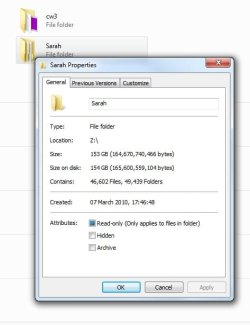
when i right click a folder on my network drive and choose properties the files and folders and the sizes just go up and up forever! see attached pic for example. there is no hope in hell theres almost the same amount of folders as there is files in there and the same goes for the size its nowhere near that.
First step...
Control Panel -> Folder Options -> View
Set it to show hidden files
Uncheck the "hide system files" option.
Now revisit that folder and confirm the numbers you are getting are wrong...
I agree the 49,000+ folders does sound a tad suspicious...
From there there are a couple of possibilities...
1) All those files and folders do, in fact, exist in which case you need to have a talk with Sarah...
2) They don't exist in which case you might have some scrambled directory indexes and can try fixing them with CHKDSK...
On the folder's host machine....
WinKey+R type
CMD and click OK.
In the shell window...
CHKDSK /F C:
If the files are not on drive C:, substitute the appropriate drive letter for the C...
The system may suggest you dismount the drive ... say Yes
It may also suggest running on the next reboot ... say Yes
Close the command shell when CHKDSK exits and restart your system.
Is it fixed?