Where is my disk space going?

ninetynine

New member
Apparently I only have 3.5gigs left on my 25gig partition for Windows7, but I can only find where like 10gigs are. These are the folders in the partition

2ecns6o.jpg


169reaw.jpg


shadowstorage is limited to less than 1gb

Any ideas?
 

My Computer

OS
Vista
go to control panel -> Folder Options -> Tab View and uncheck "Hide protected Operating System Files" as well as select "Show hidden files and folders" and then you'll see a lot more folders...
For example the folder "System Volume Information" (after taking ownership either via properties dialog or you can install a rightclick menu for that) shows some Gigs more (3.5 gigs for me) ... and there is the recycle bin ... so if you've never emptied that one a lot of space is used by it...
I don't know if you destroy anything by taking ownership of those files ... i just did it to see if it then shows the size of the folder (in the properties)... it does and hopefully everything works...

I'd say your "missing space" is somewhere in those hidden folders...
 

My Computer

OS
Windows 7 Professional x64
CPU
Intel i7 930 2.8 Ghz
Motherboard
Gigabyte GA-EX58-UD5
Memory
Mushkin Redline 3x2GB, DDR3-1600 CL6-8-6-24
Graphics Card(s)
Sapphire HD 5770 1G
Sound Card
Creative X-Fi XtremeGamer Fatal1ty Pro Series
Monitor(s) Displays
Samsung SyncMaster 226BW
Hard Drives
1x 500 GB System
2x 1TB
1x 1.5 TB
2x 2TB
PSU
be quiet! DARK POWER PRO, P8 900W
Case
Lian Li PCB-70 Black
Cooling
stock
Keyboard
Logitech G15 Blue Backlight
Mouse
Logitech G5 Laser Mouse
Internet Speed
100 mbit
Don't mess with the System Volume Information folder - you could screw up your OS. There's an easier and official way of dealing with that one - that's where restore point recovery files go.

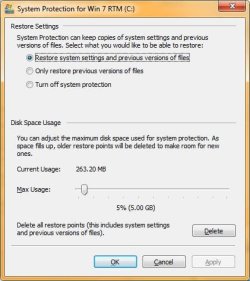
Go to System properties from the CP or right-click Computer/Properties. Click on System Protection link on the left.

When that pops up, click on the Configure button on the lower right. The pop-up has a slider that lets you set how much maximum space will be used for restore point information. If you turn System Protection off then nothing will be save in the System Volume Information, but you will not have any restore points.

You need to do this for each volume.
 

Attachments

  • SysProtection1.jpg
    SysProtection1.jpg
    47.3 KB · Views: 255
  • SysProtection2.jpg
    SysProtection2.jpg
    41.2 KB · Views: 263

My Computer

Computer Manufacturer/Model Number
Custom workstation /// Lenovo X61t tablet notebook
OS
Windows 7 RTM x64
CPU
Core i7 980X @ 4.04GHz OC /// Core Duo L7500 @ 1.6GHz
Motherboard
Asus P6T6 WS Revolution ///
Memory
12GB G. Skill @ DDR-1600 OC /// 4GB
Graphics Card(s)
Saphire HD4870 Toxic 1GB /// Intel Mobile GMA X3100
Monitor(s) Displays
Dual Eizo 24" SX2461W /// 12"
Screen Resolution
1920x1200 /// 1400x1050
Hard Drives
Workstation:
5x 750GB Barracuda-11 on Areca ARC-1220;
4x 1.5TB Barracuda-11 on Intel ICH10R;
Volumes:
300GB RAID 0, 2.7TB RAID 10 on Intel;
100GB RAID 0, 1.4TB RAID 10 on Areca ///
Notebook: G.Skill Titan 256GB SSD
PSU
Tagan ITZ 1100
Case
GHS-1500 ///
Cooling
Thermalright IFX-14 + a slew of stealth fans ///
Keyboard
Logitech Edge ///
Mouse
Logitech Wireless Optical Trackball
Internet Speed
5Mbps down / 820Kbps up
Other Info
Main use: photography;
DVD Drive: L.G GGW-H20L Blu-Ray / DVD;
OC: QPI/DRAM @ 1.33v, CPU @ 1.293v, DRAM Bus @ 1.65v, CPU PLL @ 1.88v, CPU mult = 25x, BCLK = 160, DDR3-1604 @ 7-8-7-24
well i said i dunno if i destroy anything, but by merely taking ownership it *should* be impossible to destroy anything...
i restarted once since I did that and everything worked like it did before (i rehid my operating system files because I don't wanna see that "System volume information" folder ...

but it's true, better do it your way than mine, mine is more dangerous but ... as it was a new win7 install it doesn't matter a lot I didn't configure much up to now :)
 

My Computer

OS
Windows 7 Professional x64
CPU
Intel i7 930 2.8 Ghz
Motherboard
Gigabyte GA-EX58-UD5
Memory
Mushkin Redline 3x2GB, DDR3-1600 CL6-8-6-24
Graphics Card(s)
Sapphire HD 5770 1G
Sound Card
Creative X-Fi XtremeGamer Fatal1ty Pro Series
Monitor(s) Displays
Samsung SyncMaster 226BW
Hard Drives
1x 500 GB System
2x 1TB
1x 1.5 TB
2x 2TB
PSU
be quiet! DARK POWER PRO, P8 900W
Case
Lian Li PCB-70 Black
Cooling
stock
Keyboard
Logitech G15 Blue Backlight
Mouse
Logitech G5 Laser Mouse
Internet Speed
100 mbit
Something to keep in mind: if you are the new owner because you wanted to do something only the owner can do, then the previous owner isn't, and may not be able to do what it has to :D.

But as long as you're just experimenting on a test system, who cares ... just have fun and keep those backups handy :D :D.
 

My Computer

Computer Manufacturer/Model Number
Custom workstation /// Lenovo X61t tablet notebook
OS
Windows 7 RTM x64
CPU
Core i7 980X @ 4.04GHz OC /// Core Duo L7500 @ 1.6GHz
Motherboard
Asus P6T6 WS Revolution ///
Memory
12GB G. Skill @ DDR-1600 OC /// 4GB
Graphics Card(s)
Saphire HD4870 Toxic 1GB /// Intel Mobile GMA X3100
Monitor(s) Displays
Dual Eizo 24" SX2461W /// 12"
Screen Resolution
1920x1200 /// 1400x1050
Hard Drives
Workstation:
5x 750GB Barracuda-11 on Areca ARC-1220;
4x 1.5TB Barracuda-11 on Intel ICH10R;
Volumes:
300GB RAID 0, 2.7TB RAID 10 on Intel;
100GB RAID 0, 1.4TB RAID 10 on Areca ///
Notebook: G.Skill Titan 256GB SSD
PSU
Tagan ITZ 1100
Case
GHS-1500 ///
Cooling
Thermalright IFX-14 + a slew of stealth fans ///
Keyboard
Logitech Edge ///
Mouse
Logitech Wireless Optical Trackball
Internet Speed
5Mbps down / 820Kbps up
Other Info
Main use: photography;
DVD Drive: L.G GGW-H20L Blu-Ray / DVD;
OC: QPI/DRAM @ 1.33v, CPU @ 1.293v, DRAM Bus @ 1.65v, CPU PLL @ 1.88v, CPU mult = 25x, BCLK = 160, DDR3-1604 @ 7-8-7-24
Well I regained 11 gigs by removing Norton Internet Security 2010. Idk how the hell it was taking so much. Thanks everyone
 

My Computer

OS
Vista
Well I regained 11 gigs by removing Norton Internet Security 2010. Idk how the hell it was taking so much. Thanks everyone
.
There are a couple of utilities that present graphic maps of disk space usage, ie SequoiaView and WinDirStat. Using these you will be able to easy see where the disk space is going. Both are freeware.
 

My Computer

Computer type
PC/Desktop
OS
Windows 7 x64
CPU
Intel Core2 Extreme Q6850 3.00GHz
Motherboard
EVGA 132-CK-NF79
Memory
8 GB
Graphics Card(s)
Radeon R7 260X
Sound Card
Xonar DS
Hard Drives
Hitachi Deskstar 1 tb
Back
Top