Solved Where is the system recovery partition on my Dell optiplex 780?

Zindar

New member
Local time
12:34 PM
Messages
18
Location
Austin, Texas
Hello, I was told by the seller who sold me my computer that there is a protected recovery partition on my Dell which is used to recover Windows 7 during emergencies. I figure that since I'm backing up the hard drive (using macrium reflect) to protect myself in case of any future hard drive crash, I should include this partition in case I have to build a new replacement hard drive in the future.

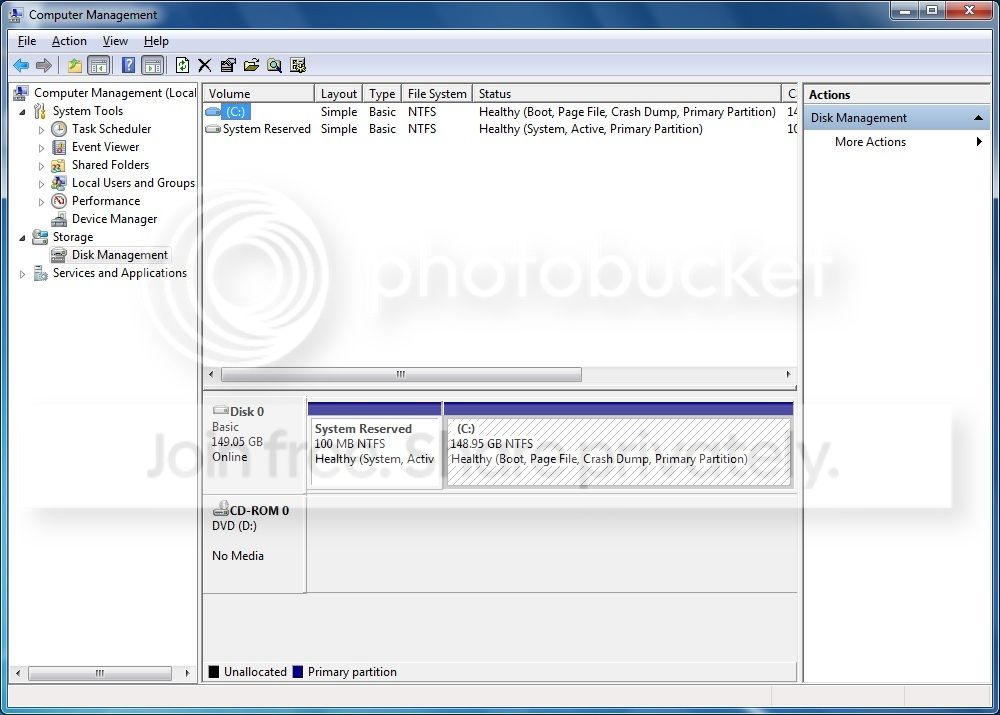
When I open macrium reflect it's just showing me one hard disk (Disk 0), with two partitions:

100 MB (system reserved partition)
150 GB (C drive).

So is this 100 MB partition the system recovery partition? That seems mighty small to me. How could the entirety of the Windows 7 OS be built from 100 MB?

Also, I wanted to make sure I'm not confusing this with what Macrium refers to as the "master boot record". This 100 MB isn't that master boot record is it? To me 100 MB seems too big to be that. So I just want to understand what I'm looking at here.
 

My Computer My Computer

At a glance

Windows 7 Home Premium 64 bit3.16GHz Core 2 Duo (E8500)4 GBATI Radeon HD2400
Computer type
PC/Desktop
Computer Manufacturer/Model Number
Dell OptiPlex 760 Mini Tower
OS
Windows 7 Home Premium 64 bit
CPU
3.16GHz Core 2 Duo (E8500)
Memory
4 GB
Graphics Card(s)
ATI Radeon HD2400
Hard Drives
250GB
Browser
Chrome
There is another partition, a hidden partition. Those two that you list are the standard partitions that Windows 7 installs, not the hidden partition.

Is the recovery partition still there? Press F8 at power on and then see if you can access PC Restore. If not, then that partition is gone.

Looking at Macrium, I don't see an option to include hidden partitions in the backup.
 

My Computer My Computer

At a glance

Windows 10 64 bitIntel i7 6700K16GB Corsair DominatorIntel CPU Graphics
Computer type
PC/Desktop
Computer Manufacturer/Model Number
My Own Build
OS
Windows 10 64 bit
CPU
Intel i7 6700K
Motherboard
ASUS ROG Maximus VIII Hero
Memory
16GB Corsair Dominator
Graphics Card(s)
Intel CPU Graphics
Sound Card
RealTek
Monitor(s) Displays
27" Dell S2719dgf
Screen Resolution
2560X1440
Hard Drives
1 TB Samsung 850 EVO SSD for Win 10 Pro
500GB Samsung 850 EVO SSD for Win 10 Insider
2 TB drive for backup
PSU
EVGA Supernova 750G2
Case
BeQuiet Silent Base 600
Cooling
Deepcool Captain 120EX
Keyboard
Microsoft Wireless 2000
Mouse
Microsoft wireless
Internet Speed
100 MB/sec (Cable)
Antivirus
Microsoft Defender and Malwarebytes
Browser
Edge/Firefox
Other Info
Cakewalk (Sonar) by BandLab and Studio One 4.1 Pro recording studio software. MOTU 896Mk3 Hybrid recording interface, Frontier Tranzport wireless control unit, Behringer X-Touch Control Surface.
Five USB connected optical drives for CD Audio production using Nero BurningROM
If it helps, here is the disk management screen I was looking at:

DiskManagement_zpsz5scsn0j.jpg


Hitting <F8> takes me to a black screen with a bunch of choices like "Repair computer", "Safe mode", "debug mode", "start windows normally", and others. Is this it?

But if Macrium can't back up a hidden partition, it's moot anyhow. Plus, maybe that's overkill on my part. Having a recovery partition seems redundant when I already have Macrium as a strategy for recovering from a hard disk crash. So maybe I should stop worrying about it.
 

My Computer My Computer

At a glance

Windows 7 Home Premium 64 bit3.16GHz Core 2 Duo (E8500)4 GBATI Radeon HD2400
Computer type
PC/Desktop
Computer Manufacturer/Model Number
Dell OptiPlex 760 Mini Tower
OS
Windows 7 Home Premium 64 bit
CPU
3.16GHz Core 2 Duo (E8500)
Memory
4 GB
Graphics Card(s)
ATI Radeon HD2400
Hard Drives
250GB
Browser
Chrome
That doesn't sound like the right area. You must press F8 at POWER ON, not at the point of Windows loading, which is a different F8 point.

I agree that its a "fault" in Macrium. I have the full paid version of Macrium, but as I have self built PC's I never had the need to backup a hidden partition.
 

My Computer My Computer

At a glance

Windows 10 64 bitIntel i7 6700K16GB Corsair DominatorIntel CPU Graphics
Computer type
PC/Desktop
Computer Manufacturer/Model Number
My Own Build
OS
Windows 10 64 bit
CPU
Intel i7 6700K
Motherboard
ASUS ROG Maximus VIII Hero
Memory
16GB Corsair Dominator
Graphics Card(s)
Intel CPU Graphics
Sound Card
RealTek
Monitor(s) Displays
27" Dell S2719dgf
Screen Resolution
2560X1440
Hard Drives
1 TB Samsung 850 EVO SSD for Win 10 Pro
500GB Samsung 850 EVO SSD for Win 10 Insider
2 TB drive for backup
PSU
EVGA Supernova 750G2
Case
BeQuiet Silent Base 600
Cooling
Deepcool Captain 120EX
Keyboard
Microsoft Wireless 2000
Mouse
Microsoft wireless
Internet Speed
100 MB/sec (Cable)
Antivirus
Microsoft Defender and Malwarebytes
Browser
Edge/Firefox
Other Info
Cakewalk (Sonar) by BandLab and Studio One 4.1 Pro recording studio software. MOTU 896Mk3 Hybrid recording interface, Frontier Tranzport wireless control unit, Behringer X-Touch Control Surface.
Five USB connected optical drives for CD Audio production using Nero BurningROM
I think there is no recovery portion
 

My Computer My Computer

At a glance

Android
OS
Android
Back
Top