
Which method of Erasure for using the Eraser program?

JohnnyScience

New member
Power User
Local time
8:14 AM
Messages
889
I've download the Eraser program to totally wipe an old HDD I had.

I also noticed it also has an option to Erase the Recycle bin.

Now Under the Add New Task, there are many Erasure options, just to name a few:

Default
Gutmann (35 passes)
Scheiner 7 (7 passes)
US Air Force 5020 (3 Passes)
US Army (3 passes)

Anyone know how many passes are done with the Default?

How long would it take to do the 35 pass option? What about the 7 pass option?

Thanks.
 

My Computer

Computer Manufacturer/Model Number
Built it myself
OS
Windows 7 64 & Ubuntu 64
CPU
Intel Quad Core Q6600 2.40GHz
Motherboard
Asus
Memory
8g
Graphics Card(s)
Nvidia 9600 GT & 9800 GT
Sound Card
Turtle Beach 5.1
Monitor(s) Displays
Three 19" Dell's & one 46" Samsung 750
Some will say one pass (Eraser default) others will say as many as possible. Personally I defer to Bruce Scheiner's (7 passes) security knowledge.

Time-wise it depends on the size of the drive. For 500G 7 passes will likely take up to 4 hours, 35 passes could take all day or more.

To be honest the Drive Wiper tool included in CCleaner is noticeably faster and will do the job just as well.
 

My Computer

Computer type
PC/Desktop
OS
Windows 7
Some will say one pass (Eraser default) others will say as many as possible. Personally I defer to Bruce Scheiner's (7 passes) security knowledge.

Time-wise it depends on the size of the drive. For 500G 7 passes will likely take up to 4 hours, 35 passes could take all day or more.

To be honest the Drive Wiper tool included in CCleaner is noticeably faster and will do the job just as well.

Ok thanks for that info. I'll go with the 7 passes and let it run through the night.

I already have Eraser ready to go, might as well just use it...
 

My Computer

Computer Manufacturer/Model Number
Built it myself
OS
Windows 7 64 & Ubuntu 64
CPU
Intel Quad Core Q6600 2.40GHz
Motherboard
Asus
Memory
8g
Graphics Card(s)
Nvidia 9600 GT & 9800 GT
Sound Card
Turtle Beach 5.1
Monitor(s) Displays
Three 19" Dell's & one 46" Samsung 750
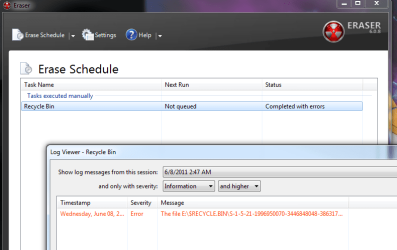
I tried running The Scheiner 7 option to clean my Recycle bin & it seems to time out right away & says "completed with errors"

I open up the log & see this:

So did it successfully erase the Recycle bin? It literally took like 15 seconds for it to start & complete/error out?

The recycle bin was already empty, but I wanted to give it a really good scrubbing...
 

Attachments

  • Untitled.png
    Untitled.png
    27.1 KB · Views: 44

My Computer

Computer Manufacturer/Model Number
Built it myself
OS
Windows 7 64 & Ubuntu 64
CPU
Intel Quad Core Q6600 2.40GHz
Motherboard
Asus
Memory
8g
Graphics Card(s)
Nvidia 9600 GT & 9800 GT
Sound Card
Turtle Beach 5.1
Monitor(s) Displays
Three 19" Dell's & one 46" Samsung 750
Sorry I can't help you very much at all with troubleshooting Eraser 6- I had nothing but aggro with it on Windows 7 and uninstalled it within a day or so. Wish I'd posted this in my previous post though I didn't want to knock it as I've not used V6 in over a year. I still use version 5 on an XP Pro rig which has always been reliable- never had an error message that I can recall.

My advice is to uninstall it and use the one in CCleaner.
 

My Computer

Computer type
PC/Desktop
OS
Windows 7
Sorry I can't help you very much at all with troubleshooting Eraser 6- I had nothing but aggro with it on Windows 7 and uninstalled it within a day or so. Wish I'd posted this in my previous post though I didn't want to knock it as I've not used V6 in over a year. I still use version 5 on an XP Pro rig which has always been reliable- never had an error message that I can recall.

My advice is to uninstall it and use the one in CCleaner.

Hmm I thought I had CCleaner, but I guess not.

Does CCleaner also have an option to clean the Recyle bin?
 

My Computer

Computer Manufacturer/Model Number
Built it myself
OS
Windows 7 64 & Ubuntu 64
CPU
Intel Quad Core Q6600 2.40GHz
Motherboard
Asus
Memory
8g
Graphics Card(s)
Nvidia 9600 GT & 9800 GT
Sound Card
Turtle Beach 5.1
Monitor(s) Displays
Three 19" Dell's & one 46" Samsung 750
It does...

Download CCleaner from FileHippo.com and it should not include installer options for any other soft/adware.

During installation it will give you the option to add Empty Recycle Bin to the context menu, among others. Which works with the Recycle Bin desktop shortcut, and also some docks/launchers. Otherwise it should be selected by default in the Windows tab of the interface for when you run the cleaning process.

You can optionally add the winapp2.ini file to the installation folder which will add a raft of other cleaning locations for both Windows and numerous applications. If you register at the developers forums you can download it there, once you are logged in. Otherwise, the portable freeware CCEnhancer can grab it for you and handle future updates.

For on-the-fly file destruction I'd recommend FileMenu Tools for it's built-in and configurable shredding tool.
 

My Computer

Computer type
PC/Desktop
OS
Windows 7
If you are trying to clean up old stuff and files Ccleaner is best
If you are trying to clean your hard drive any personal information, for a sale, eraser is best.
 

My Computer

Computer type
PC/Desktop
Computer Manufacturer/Model Number
Dell XPS 420
OS
Windows 10, Home Clean Install
CPU
Intel Core2 processsor Q8200(2.33Ghz 1333FSB) Quad Core Tech
Motherboard
Dell
Memory
6 gb
Graphics Card(s)
ATI Radeon 256MB HD3650
Sound Card
Intergrated 7.1 Channel Audio
Monitor(s) Displays
Dell SP2009W 20"
Hard Drives
640 GB Serial ATA Hard drive
Cooling
Fan
Keyboard
Dell USB Keyboard
Mouse
Dell Premium Optical USB
Internet Speed
DSL 2.85
Ok I will try downloading CCleaner again.

It would be nice if someone else was familiar with the Eraser program & can help with the problem of it not erasing the recycle bin since I already have it downloaded & installed...
 

My Computer

Computer Manufacturer/Model Number
Built it myself
OS
Windows 7 64 & Ubuntu 64
CPU
Intel Quad Core Q6600 2.40GHz
Motherboard
Asus
Memory
8g
Graphics Card(s)
Nvidia 9600 GT & 9800 GT
Sound Card
Turtle Beach 5.1
Monitor(s) Displays
Three 19" Dell's & one 46" Samsung 750
If you are trying to clean up old stuff and files Ccleaner is best
If you are trying to clean your hard drive any personal information, for a sale, eraser is best.

Ok, I've decided against selling it the HDD, giving it to a family member, but I'm still going to try to run Eraser on it, I hope I dont have the same problems I was having trying to clean the Recycle bin.

I will run the CCleaner for the Recycle Bin cleaning.
 

My Computer

Computer Manufacturer/Model Number
Built it myself
OS
Windows 7 64 & Ubuntu 64
CPU
Intel Quad Core Q6600 2.40GHz
Motherboard
Asus
Memory
8g
Graphics Card(s)
Nvidia 9600 GT & 9800 GT
Sound Card
Turtle Beach 5.1
Monitor(s) Displays
Three 19" Dell's & one 46" Samsung 750
Ccleaner has a free space wiper. Lower left. It will wipe $RecyleBin. At least it did for me. It left all restore points alone. If you want to remove restore points go to tools and restore and you can remove them there.
 

My Computer

Computer type
PC/Desktop
Computer Manufacturer/Model Number
Home made Desktop
OS
Windows 10 Pro. 64/ version 1709 Windows 7 Pro/64
CPU
Intel i7-6800K @ 4.3
Motherboard
ASUS X-99 Deluxe II
Memory
Corsair Platinum 16 gig @2400
Graphics Card(s)
EVGA GTX 1070 OC
Monitor(s) Displays
Asus 27" LED LCD/VE278Q
Screen Resolution
1920-1080 or 1280-720 HDMI
Hard Drives
INTEL SSD 730-240 Gb Sata 3.0/
PSU
EVGA Platium 1200W
Case
Phanteks Luxe Tempered Glass 8 fans/ one radiator
Cooling
XSPC/ Water Cooled CPU
Keyboard
Das 4 Professional
Mouse
Logitech M705/MX Anywhere 2-S
Internet Speed
100 mbits
Antivirus
Microsoft Security Essentials/ Malwarebytes Premium 3.0/ SAS
Browser
I.E. 11 default/Firefox/ ISP Time Warner Cable/Spectrum
Other Info
LG BluRay Burner/
Sound system-KLipsch-THX/
Icy Dock ssd Hot Swap bays.
Back
Top