Solved While telling Windows 7 to install on Disk 0

Otase

New member
Member
Local time
5:45 PM
Messages
50
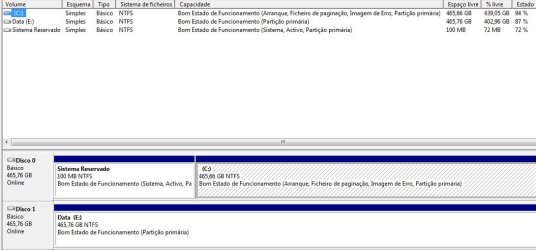
Why did Windows 7 make the 100MB "System Reserved" partition on my first hard drive only
then install windows on second hard drive? I clearly cleaned both HDD
and used Disk 0 for Windows 7 installation but he forces Windows 7 install on Disk 1 no mater what,
maybe this must be related to how Laptop hardware was designed? (Acer Aspire 7750G)
Untitled-1.jpg

Realy have no clue, what matters is that it works like any other Windows 7 with no single probs,
just wanted your opinion on this matter basicaly, thanks in advance.
 

My Computer My Computer

At a glance

Windows 7 Home Premium 64 bitIntel® Core™ i5-2430M Processor (3M Cache, 2....8gb DDR3Switchable Cards/ Intel HD 3000/ Radeon HD 66...
Computer Manufacturer/Model Number
Acer Aspire 7750G
OS
Windows 7 Home Premium 64 bit
CPU
Intel® Core™ i5-2430M Processor (3M Cache, 2.40 GHz)
Memory
8gb DDR3
Graphics Card(s)
Switchable Cards/ Intel HD 3000/ Radeon HD 6650M 2gb vram
Sound Card
Realtek
Monitor(s) Displays
Acer 17.3
Screen Resolution
1600x900
Hard Drives
Western Digital 500gb
Hello Otase,

Not sure unless you mistakenly selected Disk 1 to install to instead somehow. It'll be fine though.

I like to remove all hard drives except the drive that I'm installing Windows on before starting the installation to avoid any potential issues like this.
 

My Computer My Computer

At a glance

64-bit Windows 11 Pro for WorkstationsIntel i7-8700K OC'd to 5 GHz64 GB (4x16GB) G.SKILL TridentZ RGB DDR4 3600...ASUS ROG-STRIX-GTX1080TI-O11G-GAMING
Computer type
PC/Desktop
Computer Manufacturer/Model Number
Self built custom
OS
64-bit Windows 11 Pro for Workstations
CPU
Intel i7-8700K OC'd to 5 GHz
Motherboard
ASUS ROG Maximus XI Formula Z390
Memory
64 GB (4x16GB) G.SKILL TridentZ RGB DDR4 3600 MHz
Graphics Card(s)
ASUS ROG-STRIX-GTX1080TI-O11G-GAMING
Sound Card
Integrated
Monitor(s) Displays
2 x Samsung Odyssey G7 27"
Screen Resolution
2560x1440
Hard Drives
1TB Samsung 990 PRO M.2,
4TB Samsung 990 PRO PRO M.2,
TerraMaster F8 SSD Plus NAS
PSU
Seasonic Prime Titanium 850W
Case
Thermaltake Core P3
Cooling
Corsair Hydro H115i
Keyboard
Logitech wireless K800
Mouse
Logitech MX Master 4
Internet Speed
2 Gb/s Download and 100 Mb/s Upload
Antivirus
Malwarebyte Anti-Malware Premium
Browser
Google Chrome
Other Info
Logitech Z625 speaker system,
Logitech BRIO 4K Pro webcam,
HP Color LaserJet Pro MFP M477fdn,
APC SMART-UPS RT 1000 XL - SURT1000XLI,
Galaxy S23 Plus phone
Hello Otase,

Not sure unless you mistakenly selected Disk 1 to install to instead somehow. It'll be fine though.

I like to remove all hard drives except the drive that I'm installing Windows on before starting the installation to avoid any potential issues like this.

Nope i didnt make a mistake Brink, and reason i didnt take the 2nd HDD out it's cause
it would give lot work on this laptop, still thanks for the info.

I have yet to understand this paranoia of System having to go on Disk 0 instead of Disk 1
cause its working same way and never found problems related to that.
Maybe its different on Desktops?
 

My Computer My Computer

At a glance

Windows 7 Home Premium 64 bitIntel® Core™ i5-2430M Processor (3M Cache, 2....8gb DDR3Switchable Cards/ Intel HD 3000/ Radeon HD 66...
Computer Manufacturer/Model Number
Acer Aspire 7750G
OS
Windows 7 Home Premium 64 bit
CPU
Intel® Core™ i5-2430M Processor (3M Cache, 2.40 GHz)
Memory
8gb DDR3
Graphics Card(s)
Switchable Cards/ Intel HD 3000/ Radeon HD 6650M 2gb vram
Sound Card
Realtek
Monitor(s) Displays
Acer 17.3
Screen Resolution
1600x900
Hard Drives
Western Digital 500gb
Nar, it's the same whether it's a desktop or laptop.

I agree it doesn't really matter what disk the "System Reserved" partition is on, but it just makes it easier if it was on the same drive the OS was installed on. This way you don't have to worry about doing anything with the other drive.
 

My Computer My Computer

At a glance

64-bit Windows 11 Pro for WorkstationsIntel i7-8700K OC'd to 5 GHz64 GB (4x16GB) G.SKILL TridentZ RGB DDR4 3600...ASUS ROG-STRIX-GTX1080TI-O11G-GAMING
Computer type
PC/Desktop
Computer Manufacturer/Model Number
Self built custom
OS
64-bit Windows 11 Pro for Workstations
CPU
Intel i7-8700K OC'd to 5 GHz
Motherboard
ASUS ROG Maximus XI Formula Z390
Memory
64 GB (4x16GB) G.SKILL TridentZ RGB DDR4 3600 MHz
Graphics Card(s)
ASUS ROG-STRIX-GTX1080TI-O11G-GAMING
Sound Card
Integrated
Monitor(s) Displays
2 x Samsung Odyssey G7 27"
Screen Resolution
2560x1440
Hard Drives
1TB Samsung 990 PRO M.2,
4TB Samsung 990 PRO PRO M.2,
TerraMaster F8 SSD Plus NAS
PSU
Seasonic Prime Titanium 850W
Case
Thermaltake Core P3
Cooling
Corsair Hydro H115i
Keyboard
Logitech wireless K800
Mouse
Logitech MX Master 4
Internet Speed
2 Gb/s Download and 100 Mb/s Upload
Antivirus
Malwarebyte Anti-Malware Premium
Browser
Google Chrome
Other Info
Logitech Z625 speaker system,
Logitech BRIO 4K Pro webcam,
HP Color LaserJet Pro MFP M477fdn,
APC SMART-UPS RT 1000 XL - SURT1000XLI,
Galaxy S23 Plus phone
Nar, it's the same whether it's a desktop or laptop.

I agree it doesn't really matter what disk the "System Reserved" partition is on, but it just makes it easier if it was on the same drive the OS was installed on. This way you don't have to worry about doing anything with the other drive.

ok so as long "System Reserved" is on same Disk, doesnt matter if its Disk 0 or 1 right?
 

My Computer My Computer

At a glance

Windows 7 Home Premium 64 bitIntel® Core™ i5-2430M Processor (3M Cache, 2....8gb DDR3Switchable Cards/ Intel HD 3000/ Radeon HD 66...
Computer Manufacturer/Model Number
Acer Aspire 7750G
OS
Windows 7 Home Premium 64 bit
CPU
Intel® Core™ i5-2430M Processor (3M Cache, 2.40 GHz)
Memory
8gb DDR3
Graphics Card(s)
Switchable Cards/ Intel HD 3000/ Radeon HD 6650M 2gb vram
Sound Card
Realtek
Monitor(s) Displays
Acer 17.3
Screen Resolution
1600x900
Hard Drives
Western Digital 500gb
It's easy to click Next to install without realizing that the Unallocated Space chosen at the moment is on another HD. You really have to pay attention. But since you planned to install to Disk0 anyway, DISk1 shouldn't have interfered otherwise.

I see you have Data partition on Disk0 now, but you said you had wiped both HD's first. So did you create that partition later?

Your first choice would be to leave it since it will work fine unless you remove Disk0.

If you'd like to have Win7 on Disk 0 then you can reinstall. I would define an Active partition for install after cleaning Disk0, using Step 2.2 in http://www.sevenforums.com/tutorials/91339-ssd-hdd-optimize-windows-reinstallation.html. You would also need to clean Disk1 or it will configure a Dual boot.

If you want to keep Win7 on Disk1 but bring the System boot files onboard the same HD, what I would do is either disable Disk0 then Mark C Partition as Active (Method Two) and run http://www.sevenforums.com/tutorials/105541-startup-repair-run-3-separate-times.html until it starts and C holds the System Active flags.

You can then re-enable DIsk0, wipe and reformat it Logical so that the System boot files can never be derailed to it during repairs or reinstall again. http://www.sevenforums.com/tutorials/146694-partition-extended-logical-drives.html

The reason it needs to be done this way is to make sure C will accept the boot files and boot itself flagged System Active, before getting rid of System REserved partition. But to keep it from interfering you will have to physically remove or disable Disk0 in BIOS setup.
 
Last edited:
In addition, it really doesn't matter what disk "System Reserved" gets put on, but that it's just preferred to have it on the same disk that Windows is installed on. That's all.

Since it's working just fine for you Otase, I would personally not worry about it. You could take care of it the next time you decide or need to reinstall Windows. :)
 

My Computer My Computer

At a glance

64-bit Windows 11 Pro for WorkstationsIntel i7-8700K OC'd to 5 GHz64 GB (4x16GB) G.SKILL TridentZ RGB DDR4 3600...ASUS ROG-STRIX-GTX1080TI-O11G-GAMING
Computer type
PC/Desktop
Computer Manufacturer/Model Number
Self built custom
OS
64-bit Windows 11 Pro for Workstations
CPU
Intel i7-8700K OC'd to 5 GHz
Motherboard
ASUS ROG Maximus XI Formula Z390
Memory
64 GB (4x16GB) G.SKILL TridentZ RGB DDR4 3600 MHz
Graphics Card(s)
ASUS ROG-STRIX-GTX1080TI-O11G-GAMING
Sound Card
Integrated
Monitor(s) Displays
2 x Samsung Odyssey G7 27"
Screen Resolution
2560x1440
Hard Drives
1TB Samsung 990 PRO M.2,
4TB Samsung 990 PRO PRO M.2,
TerraMaster F8 SSD Plus NAS
PSU
Seasonic Prime Titanium 850W
Case
Thermaltake Core P3
Cooling
Corsair Hydro H115i
Keyboard
Logitech wireless K800
Mouse
Logitech MX Master 4
Internet Speed
2 Gb/s Download and 100 Mb/s Upload
Antivirus
Malwarebyte Anti-Malware Premium
Browser
Google Chrome
Other Info
Logitech Z625 speaker system,
Logitech BRIO 4K Pro webcam,
HP Color LaserJet Pro MFP M477fdn,
APC SMART-UPS RT 1000 XL - SURT1000XLI,
Galaxy S23 Plus phone
I agree Shawn. I'm always torn between suggesting to just leave it, and giving all of the options so others also have the chance to understand fully what we've learned here. We are the only place on the web that provides this.

That said, I just realized I left out the first choice to leave it as it is since there's no problem unless Disk0 is removed. So thanks for the heads up, Shawn. :eek:
 
Options are always good. :)
 

My Computer My Computer

At a glance

64-bit Windows 11 Pro for WorkstationsIntel i7-8700K OC'd to 5 GHz64 GB (4x16GB) G.SKILL TridentZ RGB DDR4 3600...ASUS ROG-STRIX-GTX1080TI-O11G-GAMING
Computer type
PC/Desktop
Computer Manufacturer/Model Number
Self built custom
OS
64-bit Windows 11 Pro for Workstations
CPU
Intel i7-8700K OC'd to 5 GHz
Motherboard
ASUS ROG Maximus XI Formula Z390
Memory
64 GB (4x16GB) G.SKILL TridentZ RGB DDR4 3600 MHz
Graphics Card(s)
ASUS ROG-STRIX-GTX1080TI-O11G-GAMING
Sound Card
Integrated
Monitor(s) Displays
2 x Samsung Odyssey G7 27"
Screen Resolution
2560x1440
Hard Drives
1TB Samsung 990 PRO M.2,
4TB Samsung 990 PRO PRO M.2,
TerraMaster F8 SSD Plus NAS
PSU
Seasonic Prime Titanium 850W
Case
Thermaltake Core P3
Cooling
Corsair Hydro H115i
Keyboard
Logitech wireless K800
Mouse
Logitech MX Master 4
Internet Speed
2 Gb/s Download and 100 Mb/s Upload
Antivirus
Malwarebyte Anti-Malware Premium
Browser
Google Chrome
Other Info
Logitech Z625 speaker system,
Logitech BRIO 4K Pro webcam,
HP Color LaserJet Pro MFP M477fdn,
APC SMART-UPS RT 1000 XL - SURT1000XLI,
Galaxy S23 Plus phone
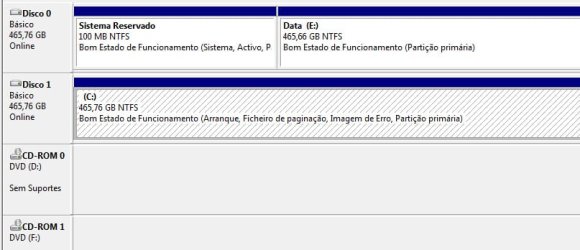
Curiosity made me format again, since it only acepts "system reserved" on Disk 0
by choosing to format windows 7 on Disk 0 so instead did format the system on Disk 1 this time.
(both "system reserved" and windows 7 OS ended up on same HDD)

After that i change boot order of "Disk 0/ Disk 1" to "Disk 1/ Disk 0" on Bios
and look what became of Disk 1 lol... Windows 7 reads it as Disk 0 :p

Untitled-1.jpg

Thanks for the info Brink, everything done as it should be now :)
 

My Computer My Computer

At a glance

Windows 7 Home Premium 64 bitIntel® Core™ i5-2430M Processor (3M Cache, 2....8gb DDR3Switchable Cards/ Intel HD 3000/ Radeon HD 66...
Computer Manufacturer/Model Number
Acer Aspire 7750G
OS
Windows 7 Home Premium 64 bit
CPU
Intel® Core™ i5-2430M Processor (3M Cache, 2.40 GHz)
Memory
8gb DDR3
Graphics Card(s)
Switchable Cards/ Intel HD 3000/ Radeon HD 6650M 2gb vram
Sound Card
Realtek
Monitor(s) Displays
Acer 17.3
Screen Resolution
1600x900
Hard Drives
Western Digital 500gb
:thumbsup:
 

My Computer My Computer

At a glance

64-bit Windows 11 Pro for WorkstationsIntel i7-8700K OC'd to 5 GHz64 GB (4x16GB) G.SKILL TridentZ RGB DDR4 3600...ASUS ROG-STRIX-GTX1080TI-O11G-GAMING
Computer type
PC/Desktop
Computer Manufacturer/Model Number
Self built custom
OS
64-bit Windows 11 Pro for Workstations
CPU
Intel i7-8700K OC'd to 5 GHz
Motherboard
ASUS ROG Maximus XI Formula Z390
Memory
64 GB (4x16GB) G.SKILL TridentZ RGB DDR4 3600 MHz
Graphics Card(s)
ASUS ROG-STRIX-GTX1080TI-O11G-GAMING
Sound Card
Integrated
Monitor(s) Displays
2 x Samsung Odyssey G7 27"
Screen Resolution
2560x1440
Hard Drives
1TB Samsung 990 PRO M.2,
4TB Samsung 990 PRO PRO M.2,
TerraMaster F8 SSD Plus NAS
PSU
Seasonic Prime Titanium 850W
Case
Thermaltake Core P3
Cooling
Corsair Hydro H115i
Keyboard
Logitech wireless K800
Mouse
Logitech MX Master 4
Internet Speed
2 Gb/s Download and 100 Mb/s Upload
Antivirus
Malwarebyte Anti-Malware Premium
Browser
Google Chrome
Other Info
Logitech Z625 speaker system,
Logitech BRIO 4K Pro webcam,
HP Color LaserJet Pro MFP M477fdn,
APC SMART-UPS RT 1000 XL - SURT1000XLI,
Galaxy S23 Plus phone

My Computer My Computer

At a glance

Windows 7 Home Premium 64 bitIntel® Core™ i5-2430M Processor (3M Cache, 2....8gb DDR3Switchable Cards/ Intel HD 3000/ Radeon HD 66...
Computer Manufacturer/Model Number
Acer Aspire 7750G
OS
Windows 7 Home Premium 64 bit
CPU
Intel® Core™ i5-2430M Processor (3M Cache, 2.40 GHz)
Memory
8gb DDR3
Graphics Card(s)
Switchable Cards/ Intel HD 3000/ Radeon HD 6650M 2gb vram
Sound Card
Realtek
Monitor(s) Displays
Acer 17.3
Screen Resolution
1600x900
Hard Drives
Western Digital 500gb
Back
Top