
white dropdown items

paulsellers

New member
Hey,
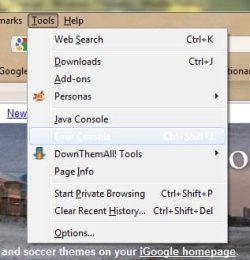
recently my dropdowns have started showing the list, but when I over over a selection, it turns white and can not be read. It is like the item has a background and font color of white. I have looked at color configs and I don't see anything that will help. I have also googled the problem and I don't see anything that addresses the issue.
Has anyone seen this before and have any suggestions on fixing it?

You can see it on the attached - between "Java Console" and "downThemAll! Tools" It should be "Error Console" - if you click on it, then it works fine, you just can't read it. The example is from firefox, but it is almost all programs that do this.
Thanks
 

Attachments
  • Clipboard01.jpg
    Clipboard01.jpg
    62.1 KB · Views: 4

My Computer

OS
Win 7

My Computer

Computer Manufacturer/Model Number
HP Pavilion dm3 (netbook) *** 27" iMac (Dual-Boot)
OS
Windows 7 Home Premium (64-bit) *** Windows XP SP3 (32-bit), OSX 10.6
CPU
AMD Athlon Neo X2 1.6GHz *** Intel Core i7 Quad Core 2.8GHz
Memory
4.00 GB *** 4.00 GB
Graphics Card(s)
ATI Radeon HD 3200, 384MB *** ATI Radeon HD 4850, 1GB
Sound Card
ATI High Definition Audio *** ATI High Definition Audio
Monitor(s) Displays
LG Flatron W2053TX
Screen Resolution
1600 x 900 (monitor), 1266 x 768 (laptop) *** 2560 x 1440
Hard Drives
300 GB SATA (internal), 500 GB HP SimpleSave (external) *** 1 TB SATA (internal), 160 GB LaCie (external)
Mouse
Logitech Cordless Optical Mouse for Notebooks
Internet Speed
Broadband
sorry, no that does not solve the problem. I have done some more testing and it looks like it is only Mozilla products. I will hunt along that path and see what I can find.
 

My Computer

OS
Win 7
how about if you uninstall your mozilla. and then fresh install it.
 

My Computer

Computer Manufacturer/Model Number
built up
OS
windows 7
CPU
Phenom II AMD Dragon 3.5Ghz
Memory
DDR3 4GB
Graphics Card(s)
ATI Radeon 512Mb
Monitor(s) Displays
HP L1506
Screen Resolution
1152 x 864
Hard Drives
WDC 1 TB SATA-II Green Power
Keyboard
HP wireless keyboard
Mouse
HP Optic
Internet Speed
1GB
Uninstall and reinstall did not work, BUT I did find the problem.. This was happening when the program was started through rocketdock.. if I start the program from the start menu, then the issue went away.. So it's not windows and it's not the mozilla products, it's rocketdock.

My solution, don't use rocketdock.

Thanks for the help and the suggestions.
 

My Computer

OS
Win 7
thanks for the update. if you want to mark as solved. click on triangle and type it solved.
 

My Computer

Computer Manufacturer/Model Number
built up
OS
windows 7
CPU
Phenom II AMD Dragon 3.5Ghz
Memory
DDR3 4GB
Graphics Card(s)
ATI Radeon 512Mb
Monitor(s) Displays
HP L1506
Screen Resolution
1152 x 864
Hard Drives
WDC 1 TB SATA-II Green Power
Keyboard
HP wireless keyboard
Mouse
HP Optic
Internet Speed
1GB
Thanks for returning to post your solution, Paul. Please let us know if there's anything else we can do.

Cheers,

Walker
Windows Outreach Team
 

My Computer

Computer Manufacturer/Model Number
HP Pavilion dm3 (netbook) *** 27" iMac (Dual-Boot)
OS
Windows 7 Home Premium (64-bit) *** Windows XP SP3 (32-bit), OSX 10.6
CPU
AMD Athlon Neo X2 1.6GHz *** Intel Core i7 Quad Core 2.8GHz
Memory
4.00 GB *** 4.00 GB
Graphics Card(s)
ATI Radeon HD 3200, 384MB *** ATI Radeon HD 4850, 1GB
Sound Card
ATI High Definition Audio *** ATI High Definition Audio
Monitor(s) Displays
LG Flatron W2053TX
Screen Resolution
1600 x 900 (monitor), 1266 x 768 (laptop) *** 2560 x 1440
Hard Drives
300 GB SATA (internal), 500 GB HP SimpleSave (external) *** 1 TB SATA (internal), 160 GB LaCie (external)
Mouse
Logitech Cordless Optical Mouse for Notebooks
Internet Speed
Broadband
Back
Top