why cant we copy users folder

DonM123

New member
Member
VIP
Local time
3:56 PM
Messages
140
I copy my users folder so I get all the information in it and windows somehow has the ability to have 2 folders named USERS that must be merged. How is it that two folders with the name users exists. Why is it when I copy a group of files and folders that the computer wants to overwrite one file with another. THis just baffles. me IN dos you cant have two folders or files with the same name It wont let you. So how does this work out like this.
 

Attachments
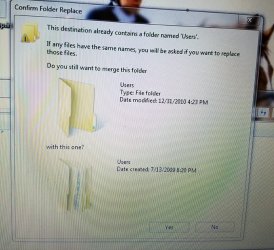
  • users.jpg
    users.jpg
    517.6 KB · Views: 12

My Computer

Computer type
PC/Desktop
Computer Manufacturer/Model Number
Gigibyte Custom build
OS
win7pro
CPU
i7
Memory
16
Graphics Card(s)
GTX 980 TI
Hard Drives
ssd 4t 750gig
Antivirus
norton pain
I get that error all the time when I accidentally highlighted the same folder in both the copy board and the paste board -- simply reject the offer to merge.
 

My Computer

Computer type
PC/Desktop
Computer Manufacturer/Model Number
Antec desktop; Acer Aspire laptops
OS
Windows 7 Professional 64-bit
CPU
Desktop i5; Acers i5 & i7
Memory
desktop 16GB; 1 Acer 8GB & 1 Acer 16GB
Hard Drives
1TB split into 2 equal partitions [OS and data] usable by RJS
Internet Speed
AT&T DSL
Browser
FF, GChrome, msIE
Other Info
Windows 7 Firewall, Emsisoft AM/AV, MSE [scan-only], SpywareBlaster, Ruiware/BillP combine
This was the second time I copied the users folder- thinking WHAT how can this be. I rightclickdrag the "users" folder to a thumb drive. Then when I went to retreive the files it turned out the windows hid the folder and so I had to reclone back the old os then renistal win 10 and now finally copy the files. This time I copied the desktop and the libraries. I guess it does not really matter how I do it but I hope to find a good way to copy all information from all users. Of course if someone makes directory and saves their files there like I do ... I still cant stand to put a file someplace that I can not find in windows explorer readily.

I am not sure how one would highlight something in both copy board and paste board..
 

My Computer

Computer type
PC/Desktop
Computer Manufacturer/Model Number
Gigibyte Custom build
OS
win7pro
CPU
i7
Memory
16
Graphics Card(s)
GTX 980 TI
Hard Drives
ssd 4t 750gig
Antivirus
norton pain
You will have a problem copying all users files as you won't have permission to access some they will be owned by the user
 

My Computer

Computer type
PC/Desktop
OS
win 8 32 bit
"...I am not sure how one would highlight something in both copy board and paste board..."
Picture this: I goto folder Barkies, wanting to copy the contents of source Barkies onto/into target Barkies elsewhere.
Not watching what I'm doing, I highlight target Barkies to Copy. Now, Paste operations: I go to another area, the area where the target Barkies reside -- highlight target Barkies and click Paste. Because both source Barkies and target Barkies were highlighted, Windows asks me if I want to merge both Barkies, I simply reject the offer.
Now, if one highlighted target Barkies in one area, and forgot where the explorer should be going, and instead accidentally attempt to copy Barkies in that original target area -- Windows will give an error that X cannot be copied onto X, a folder cannot be copied onto itself.
 
Last edited:

My Computer

Computer type
PC/Desktop
Computer Manufacturer/Model Number
Antec desktop; Acer Aspire laptops
OS
Windows 7 Professional 64-bit
CPU
Desktop i5; Acers i5 & i7
Memory
desktop 16GB; 1 Acer 8GB & 1 Acer 16GB
Hard Drives
1TB split into 2 equal partitions [OS and data] usable by RJS
Internet Speed
AT&T DSL
Browser
FF, GChrome, msIE
Other Info
Windows 7 Firewall, Emsisoft AM/AV, MSE [scan-only], SpywareBlaster, Ruiware/BillP combine
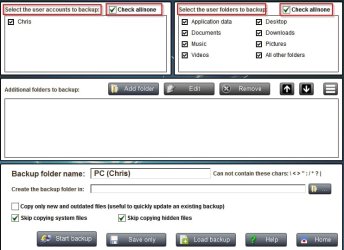
I actually use software to backup User profiles but as I have only one user profile on my machine I cannot test it for multiple user profile backups.

Create or Update a Backup - Users.jpg

EDIT: As someone has gone to the trouble of writing software to backup user profiles it does suggest that copy/ paste might present issues. Maybe it's a permissions/ locked files/ system files thing.
 

My Computer

Computer type
Laptop
Computer Manufacturer/Model Number
ASUS
OS
Microsoft Windows 7 Home Premium 64-bit 7601 Multiprocessor Free Service Pack 1
CPU
AMD C-60 APU with Radeon(tm) HD Graphics
Motherboard
ASUSTeK COMPUTER INC. X501U
Memory
4.00 GB
Graphics Card(s)
AMD Radeon HD 6290 Graphics
Sound Card
(1) AMD High Definition Audio Device (2) Realtek High Defi
Screen Resolution
1366 x 768 x 32 bits (4294967296 colors) @ 60 Hz
Hard Drives
Hitachi HTS545050A7E380 SATA Disk Device
Antivirus
Comodo CIS & FW, SecureAplus App Whitelisting, Threatfire
Browser
Cyberfox 64bit, Opera 64bit, Airfox
Other Info
Spy-The-Spy, HitmanPro.Alert, Norton Connect Safe, MJRegWatcher, BitDefender TrafficLight, Voodoo Shield, Zemana AntiMalware
Callender, I couldn't find a hot-link to your nifty program idea -- where do I download that program from?
 

My Computer

Computer type
PC/Desktop
Computer Manufacturer/Model Number
Antec desktop; Acer Aspire laptops
OS
Windows 7 Professional 64-bit
CPU
Desktop i5; Acers i5 & i7
Memory
desktop 16GB; 1 Acer 8GB & 1 Acer 16GB
Hard Drives
1TB split into 2 equal partitions [OS and data] usable by RJS
Internet Speed
AT&T DSL
Browser
FF, GChrome, msIE
Other Info
Windows 7 Firewall, Emsisoft AM/AV, MSE [scan-only], SpywareBlaster, Ruiware/BillP combine
Callender, I couldn't find a hot-link to your nifty program idea -- where do I download that program from?

I will send you a PM with the link.
 

My Computer

Computer type
Laptop
Computer Manufacturer/Model Number
ASUS
OS
Microsoft Windows 7 Home Premium 64-bit 7601 Multiprocessor Free Service Pack 1
CPU
AMD C-60 APU with Radeon(tm) HD Graphics
Motherboard
ASUSTeK COMPUTER INC. X501U
Memory
4.00 GB
Graphics Card(s)
AMD Radeon HD 6290 Graphics
Sound Card
(1) AMD High Definition Audio Device (2) Realtek High Defi
Screen Resolution
1366 x 768 x 32 bits (4294967296 colors) @ 60 Hz
Hard Drives
Hitachi HTS545050A7E380 SATA Disk Device
Antivirus
Comodo CIS & FW, SecureAplus App Whitelisting, Threatfire
Browser
Cyberfox 64bit, Opera 64bit, Airfox
Other Info
Spy-The-Spy, HitmanPro.Alert, Norton Connect Safe, MJRegWatcher, BitDefender TrafficLight, Voodoo Shield, Zemana AntiMalware
Got 'em! Callender, good stuff :)
 

My Computer

Computer type
PC/Desktop
Computer Manufacturer/Model Number
Antec desktop; Acer Aspire laptops
OS
Windows 7 Professional 64-bit
CPU
Desktop i5; Acers i5 & i7
Memory
desktop 16GB; 1 Acer 8GB & 1 Acer 16GB
Hard Drives
1TB split into 2 equal partitions [OS and data] usable by RJS
Internet Speed
AT&T DSL
Browser
FF, GChrome, msIE
Other Info
Windows 7 Firewall, Emsisoft AM/AV, MSE [scan-only], SpywareBlaster, Ruiware/BillP combine
Windows don't allow you to copy a file that is in use. As many files are in use on the logged in account, you can't copy them.

If you want to copy a users account, log in on another Administrator account (if you don't have, create one).

As the user folder has system and hidden files, modify the folder options to show them.
 

My Computers

System One System Two

  • Computer type
    PC/Desktop
    Computer Manufacturer/Model Number
    custom build
    OS
    Windows 7 HP 64
    CPU
    i5 6600K - 800MHz to 4200MHz
    Motherboard
    GA-Z170-HD3P
    Memory
    4+4G GSkill DDR4 3000
    Graphics Card(s)
    IG - Intel 530
    Monitor(s) Displays
    Samsung 226BW
    Screen Resolution
    1680x1050
    Hard Drives
    (1) -1 SM951 – 128GB M.2 AHCI PCIe SSD drive for Windows 7 and Lubuntu
    (2) -1 WD SATA 3 - 1T for Data
    (3) -1 WD SATA 3 - 1T for backup
    PSU
    Thermaltake 450W TR2 gold
    Keyboard
    Old and good Chicony mechanical keyboard
    Mouse
    Logitech mX performance - 9 buttons (had to disable some)
    Internet Speed
    500Mb/s
    Browser
    Firefox 64
    Other Info
    TinyWall firewall
  • Computer type
    Laptop
    System Manufacturer/Model Number
    Asus Q550LF
    OS
    Windows 7 Pro
    CPU
    i7-4500U 800MHz to 3.0GHz
    Motherboard
    Asus Q550LF
    Memory
    (4+4)G DDR3 1600
    Graphics Card(s)
    IG intel 4400 + NVIDIA GeForce GT 745M
    Sound Card
    Realtek
    Monitor(s) Displays
    LG Display LP156WF4-SPH1
    Screen Resolution
    1920 x 1080
    Hard Drives
    BX500 120G SSD for Windows and programs +
    1T HDD for data
    Internet Speed
    500 Mb/s
    Browser
    Firefox
    Other Info
    TinyWall firewall
Thank you for your Replies. I also would like to know the name of this utility that someone made for backing up users accounts.
I went to
Geeks Toolbox and did not find anything there. Nice website though.
 

My Computer

Computer type
PC/Desktop
Computer Manufacturer/Model Number
Gigibyte Custom build
OS
win7pro
CPU
i7
Memory
16
Graphics Card(s)
GTX 980 TI
Hard Drives
ssd 4t 750gig
Antivirus
norton pain
Who uses DataGrab ? Do you like it
 

My Computer

Computer type
PC/Desktop
Computer Manufacturer/Model Number
Gigibyte Custom build
OS
win7pro
CPU
i7
Memory
16
Graphics Card(s)
GTX 980 TI
Hard Drives
ssd 4t 750gig
Antivirus
norton pain
Back
Top