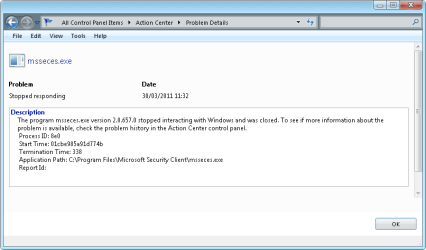
I have Microsoft Security Essentials on most of my multiboot Windows installations. I usually leave a system on standby, and only reboot when I need to change OSs.
I am surprised at the number of times I need to turn on MSE. Is it the standby that turns it off and why does it not restart itself?
I don't recall AVG turning itself off without warning.
I also do not recall opting into SpyNet - yet apparently, MSE has enrolled me as a basic member - what do other user's think of this? Do you even know?
My Computer
Computer Manufacturer/Model Number
Acer 7520, Packard Bell dot se, Acer travelmate 2423
OS
Win 7 Ult + Starter, XP Pro +Home, 2kAS, Linux Mint 8, SuperOS
CPU
AMD 64 Athlon X2 , Intel Atom N450, Intel Celeron M 1.50 Ghz
Motherboard
Acer Fuquene
Memory
2.5GB ; 1GB; 2GB
Graphics Card(s)
Nvidia GeForce7000m; Intel; Intel
Sound Card
Realtek AC57
Monitor(s) Displays
17" ;10.1"; 19"
Screen Resolution
1440x900;1024x600;1440x900;
Hard Drives
WD 80, WD 320;
PSU
19v
Case
Laptop
Cooling
Air
Internet Speed
9.7Mb/s down 0.99Mb/s up
Other Info
ISP VIRGINMEDIA 10M cable broadband - D-Link DIR615 wireless router, 3Com OfficeConnect ASDL router used as wireless extender switch
I notice that you are using a Netbook, On my friends netbook, MSE can take a while to switch itself on, because of the relatively slow processor. Might be worth waiting a little while (I have seen it take up to 5 minutes) to see if it sorts itself out.
Of course a malware scan is always a good idea anyway just in case, but you may not have a problem.
I also do not recall opting into SpyNet - yet apparently, MSE has enrolled me as a basic member - what do other user's think of this? Do you even know?
On MSE 1.* you didn't even get a choice. You had to have at least basic membership. With 2 though at least you now do have the option, although it will automatically sign you up for basic membership unless you change it. MSE does actually tell you about this when you're installing it, but most people don't bother to read it.
My Computer
Computer type
PC/Desktop
Computer Manufacturer/Model Number
Medion Erazer (note to self: insert model number) - with custom additions
I get that once in a while, I'm running Comodo and occasionally it see's that MSE wants to make changes to a reg key or a system file. If I'm not around to click the OK button, then I get the warning that MSE is off and needs to be turned on.
I've seen some other posts in places where MSE shuts off when they system goes into standby, or doesn't finish the scan.
So Comodo turns off MSE to protect the system? I wonder what MSE is actually doing? I don't run any other AV than MSE. I used AVG in the past, but the last update put me off for life, once I had rebuilt the system I had installed it on!
My Computer
Computer Manufacturer/Model Number
Acer 7520, Packard Bell dot se, Acer travelmate 2423
OS
Win 7 Ult + Starter, XP Pro +Home, 2kAS, Linux Mint 8, SuperOS
CPU
AMD 64 Athlon X2 , Intel Atom N450, Intel Celeron M 1.50 Ghz
Motherboard
Acer Fuquene
Memory
2.5GB ; 1GB; 2GB
Graphics Card(s)
Nvidia GeForce7000m; Intel; Intel
Sound Card
Realtek AC57
Monitor(s) Displays
17" ;10.1"; 19"
Screen Resolution
1440x900;1024x600;1440x900;
Hard Drives
WD 80, WD 320;
PSU
19v
Case
Laptop
Cooling
Air
Internet Speed
9.7Mb/s down 0.99Mb/s up
Other Info
ISP VIRGINMEDIA 10M cable broadband - D-Link DIR615 wireless router, 3Com OfficeConnect ASDL router used as wireless extender switch