http://s14.postimage.org/fd9nl4xi7/Capture.jpg
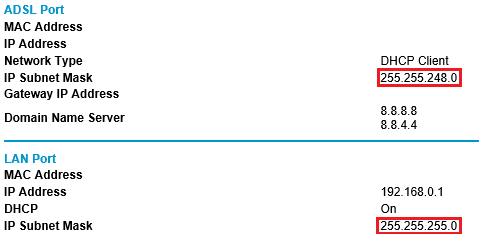
As shown in the screen shot above, I have my router settings set for a subnet mask of 255.255.255.0 and DHCP Range of 192.168.1.100 - 192.168.1.149 which is default I believe, I haven't changed either setting the only thing I changed is in the Port Range Forward to open ports for my Xbox 360's static IP which I've set to "192.168.1.2" out of my routers DHCP range.
But in this screen shot --> http://s14.postimage.org/n6nqt73bz/image.jpg
Its actually giving me a subnet mask of 255.255.248.0 and I dont see why.
I've always had my XBOX 360's static IP settings set to a 255.255.255.0 subnet and have had a Open NAT Type. But I recently started up COD: Black Ops and saw it at Moderate. Thats why I decided to check on my router settings and found out my subnet was different.
Can anybody please explain this to me and if it affects me in any way? Thank you
--------------
Also, as you can see in this screenshot: http://s17.postimage.org/pszjbngal/settings.jpg
I have set manual DNS Servers to bypass Comcast's activation screen and have IP settings set to automatic including the subnet mask.
I have the DNS servers applied to the router settings as well.
I dont know anything about subnet masks but seeing this the option to change subnet on my computer network settings made me wonder if every device applies its own subnet? so just because my router says its 255.255.248.0 is it different on other devices connected to it? For example my Xbox? I'm assuming too much hopefully someone could clear this up for me lol Thanks in advance for any help.
----------------------------
Err i just checked my computers connection status with my router connected as you can see here ---> http://s15.postimage.org/et63ytqll/image.jpg
and it shows a subnet mask of 255.255.255.0, so I'm guessing the subnet mask for every device is different therefore whatever setting I apply to my Xbox is the subnet its going to get? Its not that it has to match my routers setting? Then why if my router setting is set to a "255.255.255.0" setting is it giving me a 255.255.248.0? Its not even in my routers range as u can see here: http://s16.postimage.org/5be644a0j/Untitled_1.jpg So why is my Xbox's NAT Type moderate now if it's always been OPEN and my ports are open on a static IP?
My router only has a 255.255.255.x range, holy crap im over thinking this lol ill just wait for a response -.- Think I gave enough info to receive an accurate response lol.
-----------------------------------------
Hmm, i think i confused myself even more lol
1) Router Status: http://s8.postimage.org/vdlnxfsvn/router.jpg
2) Local Network Status: http://s18.postimage.org/4zl8b1k53/local_network.jpg
Router status says 255.255.248.0 yet the Local Network says 255.255.255.0
Errr is the one on the Router tab masked? I dont get it lol..
As shown in the screen shot above, I have my router settings set for a subnet mask of 255.255.255.0 and DHCP Range of 192.168.1.100 - 192.168.1.149 which is default I believe, I haven't changed either setting the only thing I changed is in the Port Range Forward to open ports for my Xbox 360's static IP which I've set to "192.168.1.2" out of my routers DHCP range.
But in this screen shot --> http://s14.postimage.org/n6nqt73bz/image.jpg
Its actually giving me a subnet mask of 255.255.248.0 and I dont see why.
I've always had my XBOX 360's static IP settings set to a 255.255.255.0 subnet and have had a Open NAT Type. But I recently started up COD: Black Ops and saw it at Moderate. Thats why I decided to check on my router settings and found out my subnet was different.
Can anybody please explain this to me and if it affects me in any way? Thank you
--------------
Also, as you can see in this screenshot: http://s17.postimage.org/pszjbngal/settings.jpg
I have set manual DNS Servers to bypass Comcast's activation screen and have IP settings set to automatic including the subnet mask.
I have the DNS servers applied to the router settings as well.
I dont know anything about subnet masks but seeing this the option to change subnet on my computer network settings made me wonder if every device applies its own subnet? so just because my router says its 255.255.248.0 is it different on other devices connected to it? For example my Xbox? I'm assuming too much hopefully someone could clear this up for me lol
Thanks in advance for any help.----------------------------
Err i just checked my computers connection status with my router connected as you can see here ---> http://s15.postimage.org/et63ytqll/image.jpg
and it shows a subnet mask of 255.255.255.0, so I'm guessing the subnet mask for every device is different therefore whatever setting I apply to my Xbox is the subnet its going to get? Its not that it has to match my routers setting? Then why if my router setting is set to a "255.255.255.0" setting is it giving me a 255.255.248.0? Its not even in my routers range as u can see here: http://s16.postimage.org/5be644a0j/Untitled_1.jpg So why is my Xbox's NAT Type moderate now if it's always been OPEN and my ports are open on a static IP?
My router only has a 255.255.255.x range, holy crap im over thinking this lol ill just wait for a response -.- Think I gave enough info to receive an accurate response lol.
-----------------------------------------
Hmm, i think i confused myself even more lol
1) Router Status: http://s8.postimage.org/vdlnxfsvn/router.jpg
2) Local Network Status: http://s18.postimage.org/4zl8b1k53/local_network.jpg
Router status says 255.255.248.0 yet the Local Network says 255.255.255.0
Errr is the one on the Router tab masked? I dont get it lol..
Last edited:
My Computer
At a glance
Windows 7 Ultimate 64bit
- Computer type
- Laptop
- OS
- Windows 7 Ultimate 64bit