Wifi hogging girlfriend!! argh!!

BleepingCrazy

New member
Member
Local time
7:26 AM
Messages
27
is there any way to limit the speed of my girlfriends laptop connection?

(I work as freelance....so I need speed when necessary)

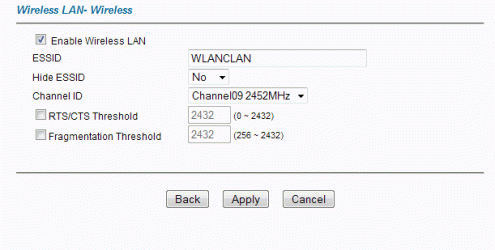
I've attached my router wireless config screen...not sure where to even start with this.

max download speed i get normally is like 512kbps.....and she always gets like 650...i mean what gives!!! LOL

anyways....how could i set it so its 50/50 at something like 300kbps for her laptop?
 

Attachments
  • router_wireless.gif
    router_wireless.gif
    7.5 KB · Views: 279

My Computer My Computer

Computer Manufacturer/Model Number
Custom Build
OS
Windows 7 Ultimate x64
CPU
Intel Core 2 Quad Q6600
Motherboard
ASUS P5K-E
Memory
8GB DDR2
Graphics Card(s)
GeForce 8800 GTS 512
Believe me .... let her have all the speed she wants, the rewards will be priceless!! :D
 

My Computer My Computer

Computer type
PC/Desktop
Computer Manufacturer/Model Number
LENOVO K450 @3.0GHZ
OS
64-bit Windows 8.1 Pro
CPU
Core(TM) i5 CPU 4330 Haswell @ 3.20GHz
Motherboard
LENOVO
Memory
12.00 GB
Graphics Card(s)
Intel(R) HD Graphics
Sound Card
Intel HD integtrated
Monitor(s) Displays
HP 25' ISP Monitor
Screen Resolution
1900/1020
Hard Drives
(1) ST1000DM003-1CH162 (2) Generic STORAGE DEVICE USB Device (3) Generic STORAGE DEVICE USB Device
Internet Speed
100mb down/10mb up
there is an app called "girlfriendlimiter" but they call it net limiter to disguise it
 

My Computer My Computer

Computer Manufacturer/Model Number
HP Pavillion dv-7 1005 Tx
OS
Win 8 Release candidate 8400
CPU
[email protected]
Memory
4 gigs
Graphics Card(s)
Nvidia 9600M
Sound Card
HD built-in
Monitor(s) Displays
17" Wxga
Screen Resolution
1440x900
Cooling
none
Internet Speed
45Mb down 5Mb up
is there any way to limit the speed of my girlfriends laptop connection?

(I work as freelance....so I need speed when necessary)

I've attached my router wireless config screen...not sure where to even start with this.

max download speed i get normally is like 512kbps.....and she always gets like 650...i mean what gives!!! LOL

anyways....how could i set it so its 50/50 at something like 300kbps for her laptop?

Hi BleepingCrazy,

Better not mess with the CEO, but if you insist :D, give me the brand and type of the router. I'll check it out.

greetz
 

My Computer My Computer

OS
Win7 Build 7600 x86
CPU
Pentium II 300MHz
Motherboard
Asus
Memory
32mb EDO RAM
Graphics Card(s)
Diamond Viper
Sound Card
Soundblaster 16
Monitor(s) Displays
14" AOC CRT 16K color
Screen Resolution
800x600
Hard Drives
300mb Quantum fireball
PSU
110 Watts
Cooling
Passive
Keyboard
Trust Ergonomic
Mouse
Generic
Internet Speed
256K u 128K d
there is an app called "girlfriendlimiter" but they call it net limiter to disguise it

Hey Ken, I've heard about it.

It seems to have a bug that will limit the amount of sex you'll get, so I wouldn't recommend it. :D
 

My Computer My Computer

OS
Win7 Build 7600 x86
CPU
Pentium II 300MHz
Motherboard
Asus
Memory
32mb EDO RAM
Graphics Card(s)
Diamond Viper
Sound Card
Soundblaster 16
Monitor(s) Displays
14" AOC CRT 16K color
Screen Resolution
800x600
Hard Drives
300mb Quantum fireball
PSU
110 Watts
Cooling
Passive
Keyboard
Trust Ergonomic
Mouse
Generic
Internet Speed
256K u 128K d
You know I thought they ironed that bug out in the newest release. Guess its still in beta
 

My Computer My Computer

Computer Manufacturer/Model Number
HP Pavillion dv-7 1005 Tx
OS
Win 8 Release candidate 8400
CPU
[email protected]
Memory
4 gigs
Graphics Card(s)
Nvidia 9600M
Sound Card
HD built-in
Monitor(s) Displays
17" Wxga
Screen Resolution
1440x900
Cooling
none
Internet Speed
45Mb down 5Mb up
hahah you guys are priceless! xD

squonksc, it's a "ZyXEL P-660HW-D1".

EDIT: Argh! its driving me nuts....I just had a call with a client in the US (over skype) and it was coming and going like crap. the ideal solution would be a toggle preference....if my tower is using the net then /50%....otherwise let her have it! hahah here's to hoping!

BTW....isn't win7 the biz! xD
 

My Computer My Computer

Computer Manufacturer/Model Number
Custom Build
OS
Windows 7 Ultimate x64
CPU
Intel Core 2 Quad Q6600
Motherboard
ASUS P5K-E
Memory
8GB DDR2
Graphics Card(s)
GeForce 8800 GTS 512
Well, i have good new and bad news.

The good news is that your router is quite sophisticated and it has a section called "Bandwidth Management".
Also good is that you can give different types of traffic, different priorities.
Types being WWW, FTP, VOIP, Email and Video.

So at least you can give Voip high priority, the rest of the traffic will automatically get less bandwidth.
It's wise to shut down the Voip program when not needed to prevent it from hogging your bandwidth when not needed.

There is also subnet priority.
This is where the bad news starts. You can not give a single IP priority in this modem, only a subnet.
That would mean you would have to put your computer in a different subnet as your girlfriend's.

Example. Your computer 192.168.1.20 and girfriend's computer 192.168.2.20

It isn't a real problem, but it could take some extra effort to make a network between your comps because they are on different subnets.

Here you can download your router's manual:
http://www.devicemanuals.com/downloadguide.php

You will have to do the reading yourself.

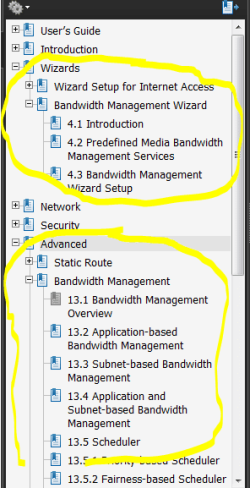
Read up on the "advanced - bandwidth management" section first,
and then the "wizard, bandwidth management wizard" section.

See the screenshot.

router.PNG

Good luck

.
 

My Computer My Computer

OS
Win7 Build 7600 x86
CPU
Pentium II 300MHz
Motherboard
Asus
Memory
32mb EDO RAM
Graphics Card(s)
Diamond Viper
Sound Card
Soundblaster 16
Monitor(s) Displays
14" AOC CRT 16K color
Screen Resolution
800x600
Hard Drives
300mb Quantum fireball
PSU
110 Watts
Cooling
Passive
Keyboard
Trust Ergonomic
Mouse
Generic
Internet Speed
256K u 128K d
Back
Top