Will Microsoft ever implement Smooth Scrolling?

SputnikNYC

New member
Local time
5:25 AM
Messages
1
Hi all, new guy here....

I was wandering, will Microsoft ever implement (maybe upcoming SP?) Smooth Scrolling to Windows Explorer, in other words, windows and folders have jerky scrolling and i think SS would be nice!?
 

My Computer

OS
Windows 7 Ultimate x64
CPU
Intel Core i7-930 3.8Ghz
Motherboard
EVGA x58 e758 SLI
Memory
Mushkin RedLine 6GB DDR3 1.6Ghz
Graphics Card(s)
EVGA GTX580
Sound Card
ASUS D2
Monitor(s) Displays
SAMSUNG PX2370 "23 LED
Screen Resolution
1920x1080
Hard Drives
Main: OCZ Vertex 2 120GB SSD
Storage: Seagate 750GB
PSU
Corsair HX1000w
Case
CoolerMaster Cosmos S
Cooling
Corsair H50/Factory
Keyboard
Logitech Slim Eliminated
Mouse
Logitech G500
Internet Speed
30Mb UP / 5Mb DOWN
Hi all, new guy here....

I was wandering, will Microsoft ever implement (maybe upcoming SP?) Smooth Scrolling to Windows Explorer, in other words, windows and folders have jerky scrolling and i think SS would be nice!?

Hello SputnikNYC and welcome to the Forum. Perhaps I'm misunderstanding your question but isn't smooth scrolling a mouse or touchpad function? On my laptop I have a Synaptics touchpad and it supports smooth scrolling in Windows 7.

enablecoasting.png


http://www.thewindowsplanet.com/1014/configure-synaptics-touchpad-settings-windows-7.htm
 

My Computer

Computer type
Laptop
Computer Manufacturer/Model Number
Sony Vaio VPCEB47GM Laptop
OS
Win 7 Pro 64-bit
CPU
Intel i5 2.4 Ghz
Memory
8GB DDR3
Graphics Card(s)
Intel HD 3000
Sound Card
IDT High Definition
Monitor(s) Displays
15.6 WGXA Anti-Glare LED
Screen Resolution
1280x800
Hard Drives
640Gb 7200rpm
Antivirus
MSE
Browser
Opera (primary) with IE9 backup
Hi all, new guy here....

I was wandering, will Microsoft ever implement (maybe upcoming SP?) Smooth Scrolling to Windows Explorer, in other words, windows and folders have jerky scrolling and i think SS would be nice!?

If you don't have any additional mouse drive utilities installed, then click the Start Orb, right-click Computer, then select Properties:
  1. Click "Advanced system settings"
  2. Click "Advanced"
  3. Click "Settings" under Performance
  4. Make sure "Smooth-scroll list boxes" is checked
Image1.jpg

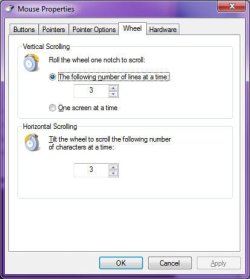
You also need to remember that when you scroll views in Windows Explorer, it scrolls on a line-by-basis, the default of which is 3. This is sometimes perceived as "jerky". You can adjust the number of lines that are scrolled by doing the following:
  1. Open Control Panel
  2. Click "Hardware and Sound"
  3. Under "Devices and Printers", click "Mouse"
  4. Click the "Wheel" tab
  5. Adjust "Vertical Scrolling" according to your preferences
  6. Click OK
Image2.jpg
 

My Computer

Computer type
PC/Desktop
Computer Manufacturer/Model Number
Virtual Machine
OS
Windows 7 Professional 32-bit SP1
CPU
AMD A4/A6
Motherboard
Intel Corporation 440BX Desktop Reference Platform
Memory
3.00GB EDO
Graphics Card(s)
VMware SVGA 3D
Sound Card
High Definition Audio Device
Monitor(s) Displays
Generic Non-PnP Monitor on VMware SVGA 3D
Screen Resolution
1440x900
Hard Drives
1 x 60GB VMware Virtual SATA Hard Drive ATA Device
Antivirus
Kaspersky Total Security
Back
Top