Solved Win 7 Cannot find internal system backup drive

gnored

New member
Local time
2:57 PM
Messages
6
System Mechanic fixed some problems for me and everything is working great now. I want to create a system image on another hard drive dedicated to the purpose. I've used the drive in the past, but now Win does not see the backup drive (F) at all. How can I make this drive visible, or force win to place the backup where I want it?
 

My Computer

Computer Manufacturer/Model Number
white box
OS
Windows 7 x64
From Control Panel >> Backup and Restore >> Change Settings you can select a backup location.

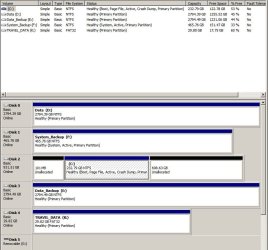
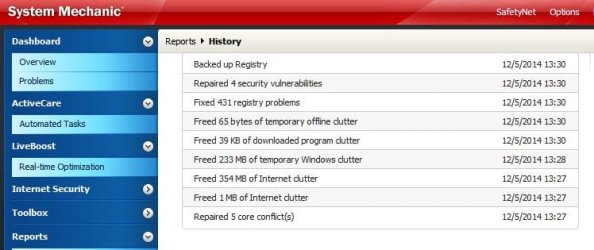
Post up a snip of your disk manager so we can see your hard drive configuration. What "problems" did System Mechanic fix?
 

My Computer

Computer type
PC/Desktop
Computer Manufacturer/Model Number
Custom
OS
7 x64 Ultimate
CPU
AMD Ryzen 5
Motherboard
Gigabyte GA-AB350-Gaming
Memory
16GB DDR4
Graphics Card(s)
Radeon R7 360
Monitor(s) Displays
2 x Dell U2518D
Screen Resolution
2560x1440 2560x1440
Hard Drives
WD 500GB x2
Samsung SSD 128MB (OS)
XPG SX8200 Pro M.2 2280 1TB
PSU
Antec 500
Cooling
Hyper 212 EVO
Keyboard
Logitech cordless K800
Mouse
Logitech M510
Antivirus
Avira
Control Panel backup or restore from location does not see drive F: though I have been using this drive for images in the past.

System Mechanic fixed "5 core conflicts" among other things (report attached). During analysis phase it said conflicts were in the I/O system. All the random problems I had been having (system crashes), disc corruption, file system errors have disappeared.
 

Attachments

  • DM Capture.JPG
    DM Capture.JPG
    112.4 KB · Views: 0
  • SM Capture.JPG
    SM Capture.JPG
    56.6 KB · Views: 0

My Computer

Computer Manufacturer/Model Number
white box
OS
Windows 7 x64

My Computer

Computer type
PC/Desktop
Computer Manufacturer/Model Number
Pauly Special
OS
Win7 Ultimate X64
CPU
Intel i5 3570K
Motherboard
Gigabyte Z77X-DS3H
Memory
8GB DDR3 1600
Graphics Card(s)
Onboard
Sound Card
Onboard
Screen Resolution
1280x1024
Hard Drives
Samsung 840 Evo SSD (OS)
1TB Spinner (Data)
PSU
800W Arctic
Case
Cooler Master
Cooling
3x120mm Fans
Keyboard
MS Wireless
Mouse
MS Wireless
Internet Speed
20M
Drive f is not a partition -- it's a separate physical hard drive.

I agree with you about these utilities. But I was desperate and it seemed worth a try. The improvement has been spectacular. There's just this pesky imaging problem...
 

My Computer

Computer Manufacturer/Model Number
white box
OS
Windows 7 x64
Ok I recommend you mark your drive as inactive
The one occupied with a primary partition designated F
 

My Computer

Computer type
PC/Desktop
Computer Manufacturer/Model Number
Pauly Special
OS
Win7 Ultimate X64
CPU
Intel i5 3570K
Motherboard
Gigabyte Z77X-DS3H
Memory
8GB DDR3 1600
Graphics Card(s)
Onboard
Sound Card
Onboard
Screen Resolution
1280x1024
Hard Drives
Samsung 840 Evo SSD (OS)
1TB Spinner (Data)
PSU
800W Arctic
Case
Cooler Master
Cooling
3x120mm Fans
Keyboard
MS Wireless
Mouse
MS Wireless
Internet Speed
20M
Good advice - get rid of that system mechanic if you want to avoid more trouble.
 

My Computer

Computer Manufacturer/Model Number
HP, Dell, Gateway, Toshiba - 4 laptops and 2 desktops
OS
Vista, Windows7, Mint Mate, Zorin, Windows 8
CPU
from 1.6GHz Duo to i7
Monitor(s) Displays
2x HP w2207
Hard Drives
5x HDD, 7x SSD, 12x Externals
Keyboard
with trackball - no mices
Mouse
Trackball mice
Internet Speed
DSL 6000
Thanks Pauly. I never would have thought of that. System image is now being created, on the drive that I want it to be!
 

My Computer

Computer Manufacturer/Model Number
white box
OS
Windows 7 x64
Back
Top