Win 7 is so damn slow when transfering files

So... Who is your Antivirus provider? Are you also running an AntiMalware product at the same time?

Perhaps disable 'real time' monitoring - and then do your copy, but I would stay off the internet till done :p

Typically when moving files, the AV will inspect the files in transfere. Also, a highly cranked up FWall will slow things down too! If you are running an AntiVirus Suite, this may be what you are up against... Might not be windows at all.

Another free copy product - From Microsoft - is RichCopy. Here is my little blog entry on Richcopy:
Free Backup Utility – Introducing RichCopy!

Hope that helps you out...
Patrick
 

My Computer My Computer

At a glance

Windows 7 Pro, Vista Business, Vista Ultimate...Core 2 Extreme
Computer Manufacturer/Model Number
Custom Creation
OS
Windows 7 Pro, Vista Business, Vista Ultimate, Windows XP
CPU
Core 2 Extreme
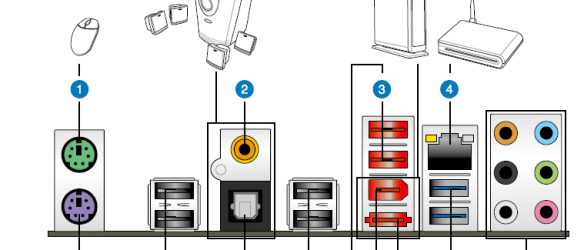
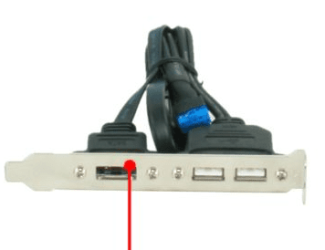
How are you hooking up the esata......port on the back of motherboard or using the bracket that came with the motherboard? You'll need to experiment with those. I found that when I was using esata, the bracket worked flawlessly. But like I said, you'll need to experiment.

Capture.PNG

Capture2.PNG
 

My Computer My Computer

At a glance

Windows 7 Home Premium 64 bitIntel Core i7-4790G.SKILL 8GB (2 x 4GB) DDR3 F3-10666CL9D-8GBNTAMD Radeon R7 250
Computer type
PC/Desktop
Computer Manufacturer/Model Number
Custom Build
OS
Windows 7 Home Premium 64 bit
CPU
Intel Core i7-4790
Motherboard
GA-Z87X-D3H
Memory
G.SKILL 8GB (2 x 4GB) DDR3 F3-10666CL9D-8GBNT
Graphics Card(s)
AMD Radeon R7 250
Sound Card
Realtek ALC892
Monitor(s) Displays
Samsung UN32EH5000, Dell 1703FPT
Screen Resolution
1920 x 1080, 1280 x 1024
Hard Drives
WD5003AZEX
WD10EZEX
Samsung HD103SJ
Samsung 128 GB 840 PRO
PSU
SeaSonic M12II SS-500GM
Case
Fractal Design Define R4
Cooling
Zalman CNPS9900ALED
Keyboard
Logitech K800
Mouse
Logitech M705
Internet Speed
16 Mbps
Antivirus
Avast
Browser
Firefox
Other Info
Bose Companion 2 Multimedia Speakers
How are you hooking up the esata......port on the back of motherboard or using the bracket that came with the motherboard? You'll need to experiment with those. I found that when I was using esata, the bracket worked flawlessly. But like I said, you'll need to experiment.

View attachment 156188

View attachment 156189

Thanks I'll give that a try
 

My Computer My Computer

At a glance

Windows 7 ultimate SP1Intel Core i7-870 Lynnfield 4.00GHzCorsair Vengeance 16GB (2x8GB) DDR3 1600 MHz ...MSI NX8600GTS T2D256EZ
Computer type
PC/Desktop
Computer Manufacturer/Model Number
Home made :)
OS
Windows 7 ultimate SP1
CPU
Intel Core i7-870 Lynnfield 4.00GHz
Motherboard
ASUS Z97-A ATX DDR3 2600 LGA 1150 Motherboards Z97-A
Memory
Corsair Vengeance 16GB (2x8GB) DDR3 1600 MHz (PC3 12800) Des
Graphics Card(s)
MSI NX8600GTS T2D256EZ
Sound Card
intergraded on MB
Monitor(s) Displays
Two 24" Samsung
Screen Resolution
1920 X1200
Hard Drives
3 of: Seagate 2TB Desktop HDD SATA 6Gb/s 64MB Cache 3.5-Inch Internal Bare Drive
1 of: Seagate 1TB Desktop HDD SATA 6Gb/s 64MB Cache 3.5-Inch Internal Bare Drive
PSU
OCZ GameXStream OCZ700GXSSLI 700W ATX12V
Case
Antec Performance TX640B ATX Mini Tower Case
Cooling
Thermalright Ultima 90
Keyboard
Logitech
Mouse
Logitec
Internet Speed
10 Mbps cable
I have 3 500 GB drives internal connected by esata
If the drives are internally connected, you aren't using eSATA right, they are just connecting to the straight up SATA ports directly on the mobo, right?

Are you getting decent transfer times when you copy files from 1 internal hard drive to the other internal hard drive? If not, go into Device Manager and ensure that Write Caching is enabled on each of those drives. It's under the properties of the drive themselves in Device Manager.

We aren't trying to rub it in your face that we aren't having problems, but we don't like the tone of "Windows 7 sucks because it transfers files slow". We disagree that this is the way that it's supposed to be. We are acknowleging that something is wrong in your setup and will hopefully be able to figure out what it is and get you back to fast file transfers.

Have you made any "tweaks" to the OS to make it before better, i.e. disabling any services, etc?

You also mention this started happening once you "Upgraded". Any chance you could back up data, take your Windows disk and do a flat out reinstall from scratch. Often times, this can resolve strange anomolies that just aren't normal.
 

My Computer My Computer

At a glance

Windows 7 Ultimate x64Intel Q9550 2.83Ghz OC'd to 3.40Ghz8GB G.Skill PI DDR2-800, 4-4-4-12 timingsEVGA 1280MB Nvidia GeForce GTX570
Computer Manufacturer/Model Number
Self-Built in July 2009
OS
Windows 7 Ultimate x64
CPU
Intel Q9550 2.83Ghz OC'd to 3.40Ghz
Motherboard
Gigabyte GA-EP45-UD3R rev. 1.1, F12 BIOS
Memory
8GB G.Skill PI DDR2-800, 4-4-4-12 timings
Graphics Card(s)
EVGA 1280MB Nvidia GeForce GTX570
Sound Card
Realtek ALC899A 8 channel onboard audio
Monitor(s) Displays
23" Acer x233H
Screen Resolution
1920x1080
Hard Drives
Intel X25-M 80GB Gen 2 SSD
Western Digital 1TB Caviar Black, 32MB cache. WD1001FALS
PSU
Corsair 620HX modular
Case
Antec P182
Cooling
stock
Keyboard
ABS M1 Mechanical
Mouse
Logitech G9 Laser Mouse
Internet Speed
15/2 cable modem
Other Info
Windows and Linux enthusiast. Logitech G35 Headset.
eaglepi;1412832synctoy doesn't work like other backup software because of the goofy permissions in Win7 Wish I never upgraded I'm trying Teracopy now so I will give it a try[/QUOTE said:
Each unto his own, I guess.

But if you say the "goofy" permissions of Windows 7 gets in the way of backup software, then there's something more going on here than we already know.

Your original post stated that your copy speeds are slow when when using your external eSata connected drive. Perhaps you're looking in the wrong place for the cause of your slow file copies? It's entirely reasonable to believe that the drive itself may be faulty, as slow access times are indeed a symptom of a failing drive.

If the external drive is Seagate, then ou may want to use a utility like Seagate SeaTools to determine the problem. If you us some other drive manufacturer, like Western Digital, Samsum or Maxstor, then you'll need to contact them to find out if they have similar non-data-destructive utilities to test their drives.

If you cannot gain access to manufacturer specific diagnostic tools, then I would suggest you do the following:
  1. Right-click the drive in Explorer, then select Properties
  2. Click the Tools tab
  3. Under the Error Checking section, click Check Now.
  4. Turn on the option to Automatically fix file system errors.
  5. Click Start.
  6. Allow the test to finsih uninterupted, then close Checkdisk.

If after running checkdisk on your external drive, you still experience slow transfer speeds, then run the test again, but this time include the option to Scan for and attempt recovery of bad sectors. If it turns out that the drive file system contained errors, then you should get into the habit of using the "Safely Remove Hardware" option to remove the drive first before turning it off, as not doing so can cause damage to both the hardware and the data it stores. If your SATA ports have had their hot-swap capability turned off in the BIOS by setting them to IDE compatibility mode, then the only safe way to remove an eSATA drive is to first shut down the whole computer before removing it.

Oh, and even if you do to solve the speed issues you're having, you should really consider using Microsoft SyncToy 2.1 like I mentioned earlier, because it greatly reduces the time it takes to perform backups. After recently purchasing two Seagate 2TB external drive specifically for the purpose of making backups, it took about 27 hours to initially copy over nearly 3.5TB of data from 15 specified folder pairs. Now, I once a week run all 15 folder pairs to perform a complete backup update in about 20 minutes.
 

My Computer My Computer

At a glance

Windows 7 Professional 32-bit SP1AMD A4/A63.00GB EDOVMware SVGA 3D
Computer type
PC/Desktop
Computer Manufacturer/Model Number
Virtual Machine
OS
Windows 7 Professional 32-bit SP1
CPU
AMD A4/A6
Motherboard
Intel Corporation 440BX Desktop Reference Platform
Memory
3.00GB EDO
Graphics Card(s)
VMware SVGA 3D
Sound Card
High Definition Audio Device
Monitor(s) Displays
Generic Non-PnP Monitor on VMware SVGA 3D
Screen Resolution
1440x900
Hard Drives
1 x 60GB VMware Virtual SATA Hard Drive ATA Device
Antivirus
Kaspersky Total Security
Back
Top