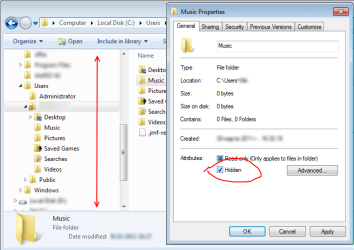
Please, before anyone suggests using the "favorite folder links" view-type in the left-navigation panel instead of tree-navigation, I like moving files around my hardrive by dragging into the left-nav and having them dynamically open up so I can maintain a large sub-folder listing.
That being said, there are some utterly useless folders that I could love to stop seeing. I have, of course, already removed Control Panel, Favorite, HomeGroup, Libraries, and Network.
I am very interested in removing the following from my left-nav tree, because even though I never need to drag files into them they are always there taking up space in my left-nav panel:
"User Folder" Sub-Folders:
- AppData
- Contacts
- Desktop
"Computer\C:" Sub-Folders:
- MSOCache
- ProgramData
- Users (I already have this listed in the Nav-Tree)
That being said, there are some utterly useless folders that I could love to stop seeing. I have, of course, already removed Control Panel, Favorite, HomeGroup, Libraries, and Network.
I am very interested in removing the following from my left-nav tree, because even though I never need to drag files into them they are always there taking up space in my left-nav panel:
"User Folder" Sub-Folders:
- AppData
- Contacts
- Desktop
"Computer\C:" Sub-Folders:
- MSOCache
- ProgramData
- Users (I already have this listed in the Nav-Tree)
My Computer
At a glance
Windows 7
- OS
- Windows 7