I have Samsung P2370 with native res 1920x1080@60Hz and Ati radeon 4830 graphic card with latest drivers specially for windows 7 32bit or 64bit, but win7 can't recognize right native resolution and set it wrong to 1600x900??
I can't set it manually to 1920x1080 because max. available resolution is 1600x900. After installing catalyst 9.3 and activate 1080p60Hz I manage to set it to 1920x1080, but recommended resolution is still 1600x900.. I reinstall win7, try different options on catalyst 9.3, then delete 32bit (format) and install win 7 64bit, but problem is still here.. Samsung monitor driver doesn't work on w7 64bit, but thats not problem because when I install 32bit for first time it also recognize it as 1600..even catalyst info show 1600x900@75Hz as max. resolution?? I use dvi cable.
update: find similar threads, I try with vga to dvi cable, samsung p2370 have only dvi port.
I have been seeing reports that Catalyst 9.3 is flaky - try using Catalyst 9.1 instead....
Also, that is a brand new monitor (street date at Best Buy was my birthday, so I know) and it's driver should work jsut fine in Win7 x64 b/c the driver works in Vista...
If you have trouble for setting up the Monitor under Windows 98/Me/2000/XP/X64/Vista/Vista64, this program will help you to install Windows Monitor Driver. You can install the most suitable Windows driver for your monitor.
System Requirements : Windows 98/Me/2000/XP/X64/Vista/Vista64
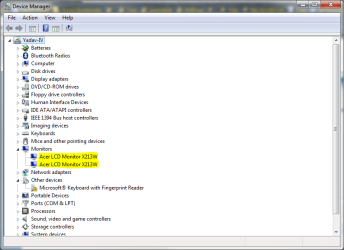
Verified - using any ZIP utility, don't run the self extractor but manually extract them to a folder, then go to Device Manager--> Right Click your monitor --> Update Device Software --> Browse my computer for driver software --> Let me pick from a list of device drivers on my computer --> Have disk --> Browse to where you extracted the files.
Voila.
Also, you should be able to get them installed if you manualyl extract the files, then right click the setup.exe and run it in compatibility mode for Windows Vista.
Thnx, but I already try all that (expand with winrar and then right click on driver and install, driver from samsung cd or web doesn't work with win 7 x64 7068. But it works with win7 32bit, and also doesn't recognize correct native resolution.
I never said anything about right clicking the driver and selecting install. In fact, when you do that you get this:
That doesn't mean that the driver cannot be used by Win7, that means that you cannot install driver in this method. Driver installation requires elevation - something that right clicking a file and selecting Install is unable to accomplish. It is a security feature in Win7.
However, if you go back and follow my method up above *explicitly it should work. My Acer drivers are well over a year old - and they have worked in every single x64 install in Vista and Win7 I have tried them on.
i originally had my Samsung LNT-655F connected via VGA and when i installed a fresh copy of W7 7068 x86 once it got to the installation part of completing installation.. my TV switched to "Mode Not Supported". i used a DVI > HDMI adapter and used the HDMI port on the TV and it worked fine. Sound doesn't work through HDMI though. Works in Vista.
My Computer
OS
Windows 7 x86 build 7077
CPU
Intel Core 2 Duo E8400
Motherboard
ASUS P5Q-EM
Memory
G.Skill PC2-8000 2GB x 4
Graphics Card(s)
Visiontek Radeon AIW HD
Sound Card
Realtek ALC1200
Monitor(s) Displays
Samsung LN32A650
Screen Resolution
1920x1080
Hard Drives
2 x 640GB RAID0
WD 2TB My Book Mirror Edition
WD 1TB My Book Essential Edition
Thecus N2100 300GB Seagates
I get message approx. "driver corrupted, check dvd", but that's not important because I succeed to install it like you told me! Thnx!
ps. now I know that problem is something else, because win7 still force 1600x900 as native resolution, and I have artifacts. Ati drivers - catalyst 9.3 for windows 7 x64 are trashy.. each time after reboot I have to apply format NTSC (1080p60) at HDTV support thread in catalyst menu to fix that problem.





 Thnx!
Thnx!