WIN very slow, CPU close to 100% all of the time.

Over heating some how is the inside for dust ...pet fur....Bhad ram....
 

My Computer My Computer

At a glance

Window pro 8 64bitAMD PHENON 1090T 6 core16.00 GB mushkin 1333mhzATI RADEON HD 6850 1GB DDR5
Computer type
PC/Desktop
Computer Manufacturer/Model Number
Home Built Media Center PC
OS
Window pro 8 64bit
CPU
AMD PHENON 1090T 6 core
Motherboard
Gigabyte GA-890GPA-UD3H
Memory
16.00 GB mushkin 1333mhz
Graphics Card(s)
ATI RADEON HD 6850 1GB DDR5
Sound Card
On Board Realtec ALC880
Monitor(s) Displays
Samsung 27Inch IPS LED & LG 42 Inch Plasma
Screen Resolution
1920 - 1080
Hard Drives
C:/Windows Drive = Corsair Force III Series Solid State Drive, 240GB

2 X Hitachi 1TB Deskstar 7K1000.C SATA II Internal Drive Kit w/ 32MB Cache
2 X Hitachi 2TB Deskstar 7K1000.C SATA II Internal Drive Kit w/ 64MB Cache
LG Super-Multi 22x DVD Wri
PSU
Corsair 650
Case
Full Tower Antec ARMOR
Cooling
3 x 120 Fans
Keyboard
Microsoft Curve Keyboard
Mouse
Logitec T650 Touch pad
Internet Speed
Shaw 50 Mbs
Antivirus
Microsoft security Essentials
Browser
Crome
Other Info
A few updates March 2013
Here are few tips::

1. Press "Ctrl," "Alt" and "Delete" at the same time to display the Windows Task Manager.

2. Go to the Process tab to see a list of currently running processes on your computer.

3. Look in the CPU column and locate programs that are using many CPU cycles. High CPU cycles can cause the CPU usage of a program to increase.

4. Right-click on the program and highlight "Set Priority" from the context menu. Select the "low" or "below normal" option to change the priority of the program.

5. Repeat Steps 3 and 4 to change the priority of other programs with high CPU usage.

Hope problem is fixed.
 

My Computer My Computer

At a glance

Windows 7 Ultimate x64
OS
Windows 7 Ultimate x64
Here are few tips::

1. Press "Ctrl," "Alt" and "Delete" at the same time to display the Windows Task Manager.

2. Go to the Process tab to see a list of currently running processes on your computer.

3. Look in the CPU column and locate programs that are using many CPU cycles. High CPU cycles can cause the CPU usage of a program to increase.

4. Right-click on the program and highlight "Set Priority" from the context menu. Select the "low" or "below normal" option to change the priority of the program.

5. Repeat Steps 3 and 4 to change the priority of other programs with high CPU usage.

Hope problem is fixed.
Thank you, trying now.
 

My Computer My Computer

At a glance

Windows 7ATI
Computer Manufacturer/Model Number
Gateway NV52
OS
Windows 7
Graphics Card(s)
ATI
It just starts again all of a sudden? Everything is slow. No CPU over use, no over heating. Just slow everything. Video playback simply does not work, my MALWARE Antimalware bits after a full scan found nothing. All of a sudden, after a resent my computer goes slow. After I shut it down and start it back up it is VERY fast, but then it slows down again. I am certain I have some sort of a virus but I cannot even detect it.

Help?

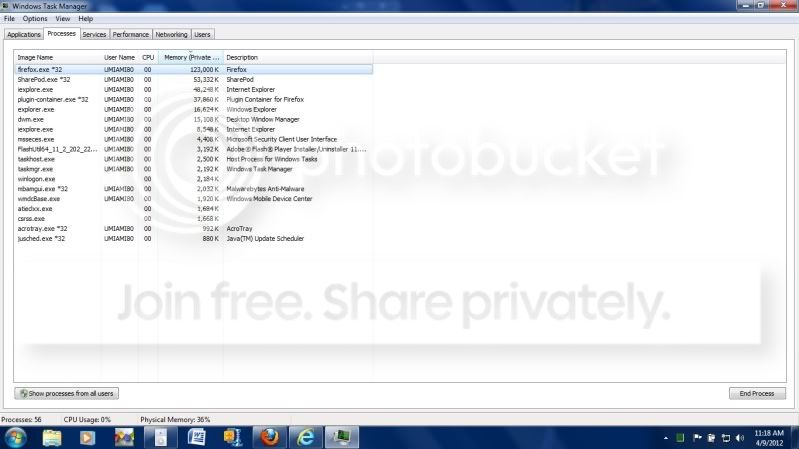
Yes I know I am haveing the same issues over and over again but I am not sure how to correct it this time. Even typing in this box has slow down, my CPU YSage while this slowdown is 3%!!!!!!!!!!!!!

SlowComputer.jpg
 

My Computer My Computer

At a glance

Windows 7ATI
Computer Manufacturer/Model Number
Gateway NV52
OS
Windows 7
Graphics Card(s)
ATI
Work through these Troubleshooting Steps for Windows 7 which will find clues, utilize System Resources, test hardware, establish a Clean Boot, check for infection (again), and teach you a lot about your computer. Ask back any questions you have as you work through them.

At a minimum I'd boot into Safe Mode to run Malwarebytes full scan again to double-check infection is cleaned up. It still might not be. What were the results of running SFC repeatedly? Post up the exact name of infection found in our Security forum for expert advice on special removal tools needed.

Next I would test the RAM and HD thoroughly. But any of the steps in blue link can help.
 
Disable system restore, run mbam on safe mode and run kaspersky tdss killer too.
 

My Computer My Computer

At a glance

Microsoft Windows 10 Professional / Windows 7...Intel i5-357016GB DDR3AMD Radeon HD 7850 2GB
Computer type
PC/Desktop
OS
Microsoft Windows 10 Professional / Windows 7 Professional
CPU
Intel i5-3570
Motherboard
Lenovo Mahobay
Memory
16GB DDR3
Graphics Card(s)
AMD Radeon HD 7850 2GB
Sound Card
(1) Realtek HD Audio (2) AMD HD Audio
Monitor(s) Displays
LG LS192WS
Screen Resolution
1440 x 900 @ 32bit color
Hard Drives
(1) SUV300S37A/120G (2) ST3500413AS SATA Disk Device AHCI mode enabled.
PSU
Corsair HX620
Case
Thermaltake V4 Black Edition
Cooling
Cooler Master Hyper 212 + Artic Silver 5 on CPU/GPU
Keyboard
Dell SK-8115
Mouse
Razer Copperhead with MAPED mat (awesome!)
Internet Speed
100 Mbps up/down
Browser
Chrome
Thanks Trying now.
 

My Computer My Computer

At a glance

Windows 7ATI
Computer Manufacturer/Model Number
Gateway NV52
OS
Windows 7
Graphics Card(s)
ATI
I think the issue is heat. Last night the system couldn't even play video. I lifted up the computer and it felt very hot underneith. After I lifted it the CPU usage dropped from 97% to 56%. I guess I have to open and clean it.
 

My Computer My Computer

At a glance

Windows 7ATI
Computer Manufacturer/Model Number
Gateway NV52
OS
Windows 7
Graphics Card(s)
ATI
I'd suggest an inexpensive cooling pad like what I see on buy.com frequently for a good price.

Short of that I always elevate the rear of the laptop using a small block of wood or something similar in size, even on a table. If you're using it on a bed or any cloth surface chances are the vents are being blocked.

I'd also try to get it cleared of dust buildup as shown in this video and tutorial:
Cleaning Your Laptop Cooling System

 
I'm having the same problem, check your highest CPU uses, and see if it's SVChost.exe (atleast that's what I got)
 

My Computer My Computer

At a glance

Windows 7 home Premium x64 bit SP1, Ubuntu 11...AMD Athlon 64 x2 Dual Core Processor 6000+ 3....3GB DDR2 (temp)ATI Radeon 4200 onboard
OS
Windows 7 home Premium x64 bit SP1, Ubuntu 11.1/10.1/8.2
CPU
AMD Athlon 64 x2 Dual Core Processor 6000+ 3.1GHz
Motherboard
Asus M4A785-M rev X.0x
Memory
3GB DDR2 (temp)
Graphics Card(s)
ATI Radeon 4200 onboard
Sound Card
6.1 onboard.
Monitor(s) Displays
EMachines (couldnt find model number, their site was down)
Screen Resolution
1366x768
Hard Drives
1) 1TB black
2) 500GB green
3) *ONLY SOMETIMES* PS2 thick 40GB HDD (for loading games)
Cooling
Hyper 212 Plus - Coolermaster
Keyboard
backlit generic from newegg (no brand name)
Mouse
(gaming mouse died) JumiMouse APP
Internet Speed
15MB/s Down 1MB/s Up
Other Info
Wiresscard B/G/N/A 350MB/s
Tv tuner card, winhapague.
Floppy drive, for the hell of it. (only in the case, not hooked up)
Back
Top