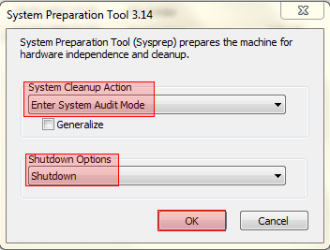
win7 after sysprep reboot always with sysprep box

docinfo49

New member
Local time
11:40 PM
Messages
3
hello,

1st sorry for my english (i'm french guy).

I made a sysprep and all parameters are corrects.
but after the reboot I have always the sysprep preparation tools box.
for me the sysprep is correct but I don't know what's happended.


in attachment my unattend.xml

regards,
and thanks by advance.
didier
 

My Computer

OS
64
Hi Didier, welcome to the Seven Forums.

It looks you have sysprepped your PC in Audit Mode. When Audit Mode starts the sysprep window is always shown. Also, if you have not chosen to exit Audit Mode, PC will after reboot be back in Audit Mode and the sysprep window shown.

To exit Audit Mode and enter the normal setupmode (OOBE or Welcome mode), you need to select System Cleanup Action: Enter System Out-of-Box Experience (OOBE) and Shutdown Options: Shutdown (or reboot) and click OK:

SysPrep.png

Kari
 
Last edited:

My Computer

Computer type
Laptop
Computer Manufacturer/Model Number
HP ENVY 17-1150eg
OS
Windows 10 Pro x64 EN-GB
CPU
1.6 GHz Intel Core i7-720QM Processor
Memory
6 GB
Graphics Card(s)
ATI Mobility Radeon HD 5850 Graphics
Sound Card
Beats sound system with integrated subwoofer
Monitor(s) Displays
17" laptop display, 22" LED and 32" Full HD TV through HDMI
Screen Resolution
1600*900 (1), 1920*1080 (2&3)
Hard Drives
Internal: 2 x 500 GB SATA Hard Disk Drive 7200 rpm
External: 2TB for backups, 3TB USB3 network drive for media
Cooling
As Envy runs a bit warm, I have it on a Cooler Master pad
Keyboard
Logitech diNovo Media Desktop Laser (bluetooth)
Mouse
Logitech Performance Mouse MX
Internet Speed
50/10 Mbps VDSL
Antivirus
Windows Defender 4.3.9431.0
Browser
Maxthon 3.5.2., IE11
hi Kari,

thanks but I did the same thing.
I will search again and i let you know.
 

My Computer

OS
64
There are only two possibilities for SysPrep window to appear by itself when you boot your PC. First, the computer is booted in Audit Mode, in which case you exit Audit Mode as I told in my first post.

Second alternative is that SysPrep is set to to start automatically. I can not understand why because it is not a program you would use regularly. Anyway, check Startup folders both for your user account and for all users and remove SysPrep shortcut if it is present in either one.

Your personal Startup folder is here:
C:\Users\Your_Username\AppData\Roaming\Microsoft\Windows\Start Menu\Programs\Startup
Here are the shortcuts for programs set to start automatically when you boot to Windows desktop using your user account. Remove Sysprep shortcut if found here.

Startup folder for all users is:
C:\ProgramData\Microsoft\Windows\Start Menu\Programs\Startup
Also here remove Sysprep shortcut if found.

Notice that both AppData and ProgramData folders are hidden by default.

If you have exited the Audit Mode as I told you in my previous post, and if you have removed the possible Sysprep shortcut from both locations described above, Sysprep will not open after your next boot. That's 100% sure!

Kari
 

My Computer

Computer type
Laptop
Computer Manufacturer/Model Number
HP ENVY 17-1150eg
OS
Windows 10 Pro x64 EN-GB
CPU
1.6 GHz Intel Core i7-720QM Processor
Memory
6 GB
Graphics Card(s)
ATI Mobility Radeon HD 5850 Graphics
Sound Card
Beats sound system with integrated subwoofer
Monitor(s) Displays
17" laptop display, 22" LED and 32" Full HD TV through HDMI
Screen Resolution
1600*900 (1), 1920*1080 (2&3)
Hard Drives
Internal: 2 x 500 GB SATA Hard Disk Drive 7200 rpm
External: 2TB for backups, 3TB USB3 network drive for media
Cooling
As Envy runs a bit warm, I have it on a Cooler Master pad
Keyboard
Logitech diNovo Media Desktop Laser (bluetooth)
Mouse
Logitech Performance Mouse MX
Internet Speed
50/10 Mbps VDSL
Antivirus
Windows Defender 4.3.9431.0
Browser
Maxthon 3.5.2., IE11
Kari,

I made a mistake.
in my unattend.xml I had in pass 7 , windows deployment the field reseal and the mode was "audit".
--> each reboot I had the message box with sysprep.
I removed this field and all works fine.
THANKS A LOTS FOR YOUR ANSWERS:)

didier
 

My Computer

OS
64
Back
Top