Solved Win7 Desktop URL shortcuts open blank page in IE10

rwhite1

New member
Local time
1:25 PM
Messages
10
The title says it all. When I open a URL shortcut from the desktop, IE opens it to a blank page. All links opened from within IE and other programs, however, open fine.

I have spent two days searching for a solution everywhere I can locate and tried all of the solutions I found (short of a reinstall of WIN7) and nothing has worked. I have uninstalled IE 10 back to IE8 and reinstalled it twice, but each reinstall of IE8, 9, and 10 have not gotten rid of the problem. I must stay with WIN7 and IE10 for now for various reasons so I need to find a solution.

I would appreciate any suggestions.
 

My Computer My Computer

At a glance

Windows 7 Home Premium 32bitIntel P54 gbNvidia 6200
Computer type
PC/Desktop
Computer Manufacturer/Model Number
custom build
OS
Windows 7 Home Premium 32bit
CPU
Intel P5
Motherboard
Asus P8P88
Memory
4 gb
Graphics Card(s)
Nvidia 6200
Hard Drives
WD 1 TB
Antivirus
MS Essentials
Browser
IE10

My Computer My Computer

At a glance

W7 Pro SP1 64biti78GBIntel HD Graphics
Computer type
Laptop
Computer Manufacturer/Model Number
Employer provided Dell Latitude
OS
W7 Pro SP1 64bit
CPU
i7
Memory
8GB
Graphics Card(s)
Intel HD Graphics
Hard Drives
crappy SSD
Antivirus
Employer mandated Symantec Endpoint Protection
Browser
Pale Moon 64bit, IE11 64bit & Chrome 64bit
Sure. Thank you.
 

Attachments

My Computer My Computer

At a glance

Windows 7 Home Premium 32bitIntel P54 gbNvidia 6200
Computer type
PC/Desktop
Computer Manufacturer/Model Number
custom build
OS
Windows 7 Home Premium 32bit
CPU
Intel P5
Motherboard
Asus P8P88
Memory
4 gb
Graphics Card(s)
Nvidia 6200
Hard Drives
WD 1 TB
Antivirus
MS Essentials
Browser
IE10
Thanks for that. It looks normal.

Attached to this post is a simplified version.

Please copy it from the compressed folder and place it on your desktop.

Double click on it and let me know what happens.

Also, open IE and make it a small enough window and that you can drag/drop the attached URL shortcut file into the body of IE (into the client area - the part that shows the web page content).

Here is the text inside of your shortcut file:
Code:
[{000214A0-0000-0000-C000-000000000046}]
Prop3=19,11
[InternetShortcut]
URL=https://www.google.com/
IDList=
HotKey=0
IconFile=https://www.google.com/favicon.ico
IconIndex=1

Here is what I changed it to:
Code:
[{000214A0-0000-0000-C000-000000000046}]
Prop3=19,11
[InternetShortcut]
URL=https://www.google.com/

I doubt that you will see any change in the way that IE works, but it is worth a try.
 

Attachments

My Computer My Computer

At a glance

W7 Pro SP1 64biti78GBIntel HD Graphics
Computer type
Laptop
Computer Manufacturer/Model Number
Employer provided Dell Latitude
OS
W7 Pro SP1 64bit
CPU
i7
Memory
8GB
Graphics Card(s)
Intel HD Graphics
Hard Drives
crappy SSD
Antivirus
Employer mandated Symantec Endpoint Protection
Browser
Pale Moon 64bit, IE11 64bit & Chrome 64bit
Results:
1. Double clicking on new shortcut on Desktop still opens blank page.
2. Dragging new Desptop shortcut to IE client area opens page okay.
3. Dragging new Desptop shortcut to blank IE client area that was opened by double clicking new shortcut opens page okay.
4. Right clicking new Desptop shortcut and clicking on Open also opens blank page.

New related information:
1. Trying to re-associate URL file type with IE crashes windows:

To reproduce: Click on Control Panel >> Default Programs >> Associate file type with protocol or program.

New dialog opens. Screen "wait" icon spins. A few seconds later a new dialog appears and declares,
"Windows has stopped working". Windows then quits and restarts.

I also explored that avenue hopeing that re-associating the file type might help, but found nothing that fixed that problem either.

Thanks for your help.
 
Last edited:

My Computer My Computer

At a glance

Windows 7 Home Premium 32bitIntel P54 gbNvidia 6200
Computer type
PC/Desktop
Computer Manufacturer/Model Number
custom build
OS
Windows 7 Home Premium 32bit
CPU
Intel P5
Motherboard
Asus P8P88
Memory
4 gb
Graphics Card(s)
Nvidia 6200
Hard Drives
WD 1 TB
Antivirus
MS Essentials
Browser
IE10

My Computer My Computer

At a glance

Win7 Ultimate X64Intel i5 3570K8GB DDR3 1600Onboard
Computer type
PC/Desktop
Computer Manufacturer/Model Number
Pauly Special
OS
Win7 Ultimate X64
CPU
Intel i5 3570K
Motherboard
Gigabyte Z77X-DS3H
Memory
8GB DDR3 1600
Graphics Card(s)
Onboard
Sound Card
Onboard
Screen Resolution
1280x1024
Hard Drives
Samsung 840 Evo SSD (OS)
1TB Spinner (Data)
PSU
800W Arctic
Case
Cooler Master
Cooling
3x120mm Fans
Keyboard
MS Wireless
Mouse
MS Wireless
Internet Speed
20M
Yes. I've tried it three times. Problems were found, but most were repaired successfully. I've attached a heavily edited shortened version of the CBS.LOG file of the remaining non-repaired problems, but they appear to only be language pack issues (I don't really need Mandarin chinese anyway).

I've also tried recovery as far back as I could go, but the problem must have been there, too.
 

Attachments

My Computer My Computer

At a glance

Windows 7 Home Premium 32bitIntel P54 gbNvidia 6200
Computer type
PC/Desktop
Computer Manufacturer/Model Number
custom build
OS
Windows 7 Home Premium 32bit
CPU
Intel P5
Motherboard
Asus P8P88
Memory
4 gb
Graphics Card(s)
Nvidia 6200
Hard Drives
WD 1 TB
Antivirus
MS Essentials
Browser
IE10
FOUND IT!

But I still can't explain why and the other problem with the file association dialog crash remains to be fixed.

This registry key exists in the problem system, but not in another system that works okay:

[HKEY_CURRENT_USER\Software\Microsoft\Windows\CurrentVersion\Explorer\FileExts\.url\UserChoice]
"Progid"="IE.AssocFile.URL"

When I removed it, the Desktop URL shortcuts work okay.

Thanks for your help on that one. It was the discussion that kept me going instead of giving up. I am greatful.

----------------------------------------
Here are a couple of ideas for others who may be looking for information like I was.

1. The link problem occured sometime after I had installed Chrome and FireFox. I uninstalled the two programs for this troubleshooting exercise and then mounted a search and destroy expedition and galloped through the registry to exterminate any last remenants of those programs. Maybe the uninstall routines weren't thorough enough.

2. One of the solutions I tried was running a file called "File Association Fixer" from "The Windows Club" website. That file trashed all of the icons associated with the file types and I had to do a system restore.

The only problem left besides the file association dialog (which, now that I think about it, kinda relates to the File Association Fixer) is that IE won't stop asking me if I want to make IE my default browser even if it already is.

I'm getting another headache.

Thanks again.
 

My Computer My Computer

At a glance

Windows 7 Home Premium 32bitIntel P54 gbNvidia 6200
Computer type
PC/Desktop
Computer Manufacturer/Model Number
custom build
OS
Windows 7 Home Premium 32bit
CPU
Intel P5
Motherboard
Asus P8P88
Memory
4 gb
Graphics Card(s)
Nvidia 6200
Hard Drives
WD 1 TB
Antivirus
MS Essentials
Browser
IE10
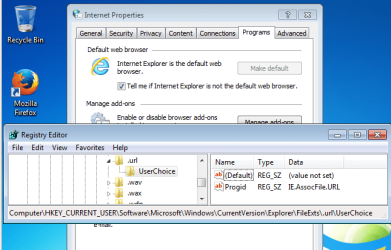
The reg key that you mentioned is created when you tell the operating system to make IE the default browser. It is not on the other computer because that computer probably never had a different default browser. When you tell IE to be the default browser, this is what that key should look like:

IE-default.PNG
The fact that IE keeps asking to be made the default browser - seems to point to something (permissions? antivirus?) preventing changes to that area in the registry. It would seem that IE is not allowed to put the key back that you removed. When you try to manually associate the .URL file extension with IE, other keys are created under that key. Explorer might crash if it cannot write to that key.

If you want to live with you system that way that it is, you can uncheck the option shown in the screenshot above and IE should stop checking/asking.

Your system spec section lists MSE as your antivirus app. MSE won't prevent IE from writing to that key. Do you have other security apps? Perhaps ones designed to prevent browser hijacking?


Using regedit, please export HKEY_LOCAL_MACHINE\SOFTWARE\Classes\IE.AssocFile.URL to a reg file and attach it to your next post.
 

My Computer My Computer

At a glance

W7 Pro SP1 64biti78GBIntel HD Graphics
Computer type
Laptop
Computer Manufacturer/Model Number
Employer provided Dell Latitude
OS
W7 Pro SP1 64bit
CPU
i7
Memory
8GB
Graphics Card(s)
Intel HD Graphics
Hard Drives
crappy SSD
Antivirus
Employer mandated Symantec Endpoint Protection
Browser
Pale Moon 64bit, IE11 64bit & Chrome 64bit
Good. We seem to be in sync now.

I did un-check the "make it your default box". That stopped the notice without adding the offending IE.Assoc...ect. key.

The reg key export I've uploaded matches one from the other machine that works okay so I'd be surprised if it were the problem.

I found an MS community post for a problem like I have:

"Internet Shortcuts aren't working - file associations are correct."

http://answers.microsoft.com/en-us/...ciations/a1969466-5cf6-4da1-88cb-47afd2a75d00

It had a hot fix "Fix 319299" for it, but I thought it was might be too soon to use it.
 

Attachments

My Computer My Computer

At a glance

Windows 7 Home Premium 32bitIntel P54 gbNvidia 6200
Computer type
PC/Desktop
Computer Manufacturer/Model Number
custom build
OS
Windows 7 Home Premium 32bit
CPU
Intel P5
Motherboard
Asus P8P88
Memory
4 gb
Graphics Card(s)
Nvidia 6200
Hard Drives
WD 1 TB
Antivirus
MS Essentials
Browser
IE10
Thanks for the reg file. As you noted, it looks good. I compared it to a Virtual Machine with a fresh install of W7pro64bit with IE11 and updates. Even though you are using IE10, there should be no difference for that key.

Do you know what might be preventing IE from changing the key that you removed?

You can run either or both of the hot fixes mentioned if you want... but I would sure feel better about the hot fixes if the webpage offering them said that they applied to IE10. Having a MS person say that they apply to IE11 is of some value, but if that is true, then MS should update those two web pages.

I've seen the hot fix mentioned under method 1 in that post applied to IE11 in threads in this forum. No harm seemed to come from it. I'm not sure if it fixed anything that a complete IE reset would not have fixed. You might try a reset first - including step 5. If that does not fix the issue, it is up to you if you want to try the hot fixes :-)
 

My Computer My Computer

At a glance

W7 Pro SP1 64biti78GBIntel HD Graphics
Computer type
Laptop
Computer Manufacturer/Model Number
Employer provided Dell Latitude
OS
W7 Pro SP1 64bit
CPU
i7
Memory
8GB
Graphics Card(s)
Intel HD Graphics
Hard Drives
crappy SSD
Antivirus
Employer mandated Symantec Endpoint Protection
Browser
Pale Moon 64bit, IE11 64bit & Chrome 64bit
I don't know. If you mean the "UserChoice" key, IE puts it back if I tell it to make itself the default browser so it's not prevented from doing that.

I've done every reset I can. Let's try the hotfix.

*******************************
Tried the Hotfix:

It wouldn't install. It said it was not applicable to my computer. MS support strikes again. Sometimes I think they should rename the "Start menu" world icon in the taskbar to "The Death Star".

It looks like more reseach is required. It may be best to fix the File Association dialog problem first. We'll see.

**************************
UPDATE:

The file association dialog problem has been fixed. MS Access 97 left behind an icon handler file that has been a problem for the windows shell ever since it came out - soa800.dll. I used ShellExView to disable it and all was well again. From my past recollection, if the file is needed, the problem can be managed by choosing where in an app install sequence Access 97 is installed. BUT, Access 97 is recognized as not WIN7 compatible. One could try using it in WINXP compat mode, but I have no idea how that would turn out.

Back to the shortcut problem. Isn't this fun? Actually, it is. UNI... don't give up hope.
 
Last edited:

My Computer My Computer

At a glance

Windows 7 Home Premium 32bitIntel P54 gbNvidia 6200
Computer type
PC/Desktop
Computer Manufacturer/Model Number
custom build
OS
Windows 7 Home Premium 32bit
CPU
Intel P5
Motherboard
Asus P8P88
Memory
4 gb
Graphics Card(s)
Nvidia 6200
Hard Drives
WD 1 TB
Antivirus
MS Essentials
Browser
IE10
SevenForums suggests that the final answer to the problems discussed here be posted, so here goes.

1. No answer was found to the IE desktop shortcuts opening blank pages; however, UNI's workaround in his post 9 above works and was found to be a good substitute. I implemented it by removing the "UserChoice" registry subkey shown in his post. Note, though: the problem will return if another browser is set as the default and then later replaced by IE. I also found six missing registry entries which I corrected, but it didn't help.

2. The broken "Associate file type with protocol or program" process was fixed by disabling the offending "soa800.dll" file from Access 97 as described in my post 12 above. Doing this, however, broke Access 97.

Access 97 hasn't been one of the best programs to survive OS upgrades. One may recall that Registry entries blocked MSA97's installation and needed manual intervention to install it after WINXP-Sp2 broke .OCX registration. Documentation for that is elsewhere.

Many thanks to UNI for his help. I respect his wealth of knowledge.
 

My Computer My Computer

At a glance

Windows 7 Home Premium 32bitIntel P54 gbNvidia 6200
Computer type
PC/Desktop
Computer Manufacturer/Model Number
custom build
OS
Windows 7 Home Premium 32bit
CPU
Intel P5
Motherboard
Asus P8P88
Memory
4 gb
Graphics Card(s)
Nvidia 6200
Hard Drives
WD 1 TB
Antivirus
MS Essentials
Browser
IE10
You could run Process Monitor on the working computer and compare the events with the flawed one. There is nothing to install, just unzip it and run it.

Double click on a URL shortcut file on the desktop.

Let IE go to a blank page.

Stop the data collection by Process Monitor.

Use Ctrl-F to find the first entry for the shortcut's name. It will probably be Explorer passing the shortcut to the OS. You can use filters to only include Explorer and IE. Let me know if you need help using Process Monitor. There are lots of YouTube videos showing its use. Here are two of mine.

There will be lots of entries. Hopefully, the difference between the two computers will jump out at you.
 

My Computer My Computer

At a glance

W7 Pro SP1 64biti78GBIntel HD Graphics
Computer type
Laptop
Computer Manufacturer/Model Number
Employer provided Dell Latitude
OS
W7 Pro SP1 64bit
CPU
i7
Memory
8GB
Graphics Card(s)
Intel HD Graphics
Hard Drives
crappy SSD
Antivirus
Employer mandated Symantec Endpoint Protection
Browser
Pale Moon 64bit, IE11 64bit & Chrome 64bit
SOLVED!

I used PROCMON as you suggested and something did pop (or is it poop?) out at me. PROCMON's output from the successful system contained the shortcut's name. The output from the problem system did not...anywhere. Not in the output from the configuration that worked (with IE NOT as the default browser) nor the output from the configuration that did not work (with IE set as the default browser).

To shorten a huge amount of detailed data sifting (as you know 10's of thousands of data entries), I found two CSLID references early in the bad listing that weren't in the good one: B722BCC4... (for DOCOBJ.DLL) and C9025F3... Okay I'll stop.

Googling found they were more left over crap from Office 97. I uninstalled Office 97 and everything is working fine. I know it's common knowledge that Office 97 was not fully compatible with WIN7, but I don't remember anyone saying it would break some of it too.

Well hopefully that's over. This had to be one of the more complex ones to solve. Good job. Thanks again.

On a related matter:
As I'm sure you know, PROCMON has problems on some 64 bit systems. One of mine for one. They say the fix is to copy and run the 64 bit extension PROCMON creates and puts in a temp directory. But, how do you do that when the extension is created and is then just as quickly deleted when PROCMON fails and closes? Nirsoft's Resource_Extractor has been recommended to extract it directly from PROCMON, but I don't see that RE extracts an executable binary resource. Any ideas?
 
Last edited:

My Computer My Computer

At a glance

Windows 7 Home Premium 32bitIntel P54 gbNvidia 6200
Computer type
PC/Desktop
Computer Manufacturer/Model Number
custom build
OS
Windows 7 Home Premium 32bit
CPU
Intel P5
Motherboard
Asus P8P88
Memory
4 gb
Graphics Card(s)
Nvidia 6200
Hard Drives
WD 1 TB
Antivirus
MS Essentials
Browser
IE10
Glad that you got it fixed. Good detective work.

I have not run across any problems with Process Monitor on 64bit system.
Perhaps because I only use the 64bit version on 64bit systems.

Each time that there is a new version of Process Monitor released...
...I extract the files to the folder where I keep it
...run the 32bit version
...stop the data collection
(leave the 32bit version running)
...copy the 64bit version from the temp folder to the folder with the 32bit version.

Process Monitor has an option to replace Task Manager. It has been a while since I tested that, but that swap failed if the process is started while running the 64bit version.
 

My Computer My Computer

At a glance

W7 Pro SP1 64biti78GBIntel HD Graphics
Computer type
Laptop
Computer Manufacturer/Model Number
Employer provided Dell Latitude
OS
W7 Pro SP1 64bit
CPU
i7
Memory
8GB
Graphics Card(s)
Intel HD Graphics
Hard Drives
crappy SSD
Antivirus
Employer mandated Symantec Endpoint Protection
Browser
Pale Moon 64bit, IE11 64bit & Chrome 64bit
PROGMON doesn't work on my 64 bit system. Here's what I'm reacting to:

Process monitor 3.1 will not work in Windows 7 X 6 - Sysinternals Forums

Apparently the 32 and 64 bits of the new 3.1 and 3.2 versions of PROCMON are now contained in the same program. When PROCMON detects a 64 bit system, it extracts a 64 bit version to the user's temp directory and runs the 64 bit version from there. But some 64 bit systems won't do it - mine being one.

On those systems, they recommend you get the 64 bit system from the temp directory and just run it directly. Only problem is PROCMON opens, creates the 64 bit file, fails, deletes the file, and then closes all faster than you can blink. Therefore the 64 bit program isn't available long enough to get it.

Take care.

UPDATE: Redwood file extractor got it out. The embeded resource is 1308. The binary will extract as binary.bin. It will run if the file extension is changed to ".exe"
 
Last edited:

My Computer My Computer

At a glance

Windows 7 Home Premium 32bitIntel P54 gbNvidia 6200
Computer type
PC/Desktop
Computer Manufacturer/Model Number
custom build
OS
Windows 7 Home Premium 32bit
CPU
Intel P5
Motherboard
Asus P8P88
Memory
4 gb
Graphics Card(s)
Nvidia 6200
Hard Drives
WD 1 TB
Antivirus
MS Essentials
Browser
IE10
Thanks for the link. I cannot imagine what would cause the 64bit version not to extract/run correctly.

At least you got the file extracted :-)
 
Last edited:

My Computer My Computer

At a glance

W7 Pro SP1 64biti78GBIntel HD Graphics
Computer type
Laptop
Computer Manufacturer/Model Number
Employer provided Dell Latitude
OS
W7 Pro SP1 64bit
CPU
i7
Memory
8GB
Graphics Card(s)
Intel HD Graphics
Hard Drives
crappy SSD
Antivirus
Employer mandated Symantec Endpoint Protection
Browser
Pale Moon 64bit, IE11 64bit & Chrome 64bit
Back
Top