Win7 PC Can't Access Files on Win7 Wireless Laptop and Vice Versa

doomie22

New member
Local time
5:31 PM
Messages
13
I can't for the life of me figure out how to share files between my Win7 desktop PC and my Win7 wireless laptop. both machines have network discovery turned on, file and print sharing turned on and public sharing folder turned on. I set a few folders to be shared yet I can't seem to access any files from either machine.

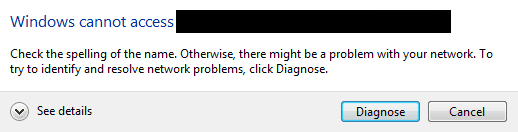
When I try to access the laptop from my Desktop pc using the Network link in an Explorer window I get a "Network Error" window which reads "Windows cannot access \\(laptop name). Check the spelling of the name. Otherwise there might be a problem with your network. To try to identify and resolve the network problems, click diagnose".

Here is something that is odd. I can share and access files from my Win7 desktop PC to my WinXP desktop PC and vice versa but my Win7 desktop PC and Win7 wireless laptop refused to share files between each other.
 

My Computer My Computer

At a glance

WinXp
OS
WinXp

My Computer My Computer

At a glance

Windows 7 Ultimate x64 Service Pack 1 (Build ...Intel Core 2 Quad Q6600 (G0 Kentsfield) LGA77...Corsair TW3X4G1333C9A 4GB PC-10600 (2x XMS3 2GB)ASUS nVIDIA GeForce 560
OS
Windows 7 Ultimate x64 Service Pack 1 (Build 6.1.7601)
CPU
Intel Core 2 Quad Q6600 (G0 Kentsfield) LGA775 (FC-LGA6)
Motherboard
GIGABYTE GA-EP35C-DS3R (Rev. 2.1)
Memory
Corsair TW3X4G1333C9A 4GB PC-10600 (2x XMS3 2GB)
Graphics Card(s)
ASUS nVIDIA GeForce 560
Sound Card
RealTek ALC885/889A/890
Monitor(s) Displays
ChiMei CMV CT-730D 17inch (LCD Monitor)
Screen Resolution
1280-1024 60Hertz (Ture Colour 32bit)
Hard Drives
2x Barracuda 7200.10 SATA 3.0Gb/s 160-GB Hard Drive ST3160815AS (AHCI)
PSU
ANTEC 750w Earthwatts
Case
Thermaltake Shark (VA7000SWA ATX) Full Tower
Cooling
Front 120mm fan (1400 RPM) /Rear 120mm (1400 RPM) blue LED
Keyboard
Labtec Media Desktop Y-SAD65
Mouse
Razer DeathAdder 3G Infrared Sensor (1800DPI)
Internet Speed
Telstra BigPond Elite Liberty ADSL2+ 24Mbps/256kbps
Other Info
ASUS PCE-N13 802.11n Wireless LAN card
Thanks for the guide! I'll give it a thorough read.
 

My Computer My Computer

At a glance

WinXp
OS
WinXp
No problem hope it works out for you.
 

My Computer My Computer

At a glance

Windows 7 Ultimate x64 Service Pack 1 (Build ...Intel Core 2 Quad Q6600 (G0 Kentsfield) LGA77...Corsair TW3X4G1333C9A 4GB PC-10600 (2x XMS3 2GB)ASUS nVIDIA GeForce 560
OS
Windows 7 Ultimate x64 Service Pack 1 (Build 6.1.7601)
CPU
Intel Core 2 Quad Q6600 (G0 Kentsfield) LGA775 (FC-LGA6)
Motherboard
GIGABYTE GA-EP35C-DS3R (Rev. 2.1)
Memory
Corsair TW3X4G1333C9A 4GB PC-10600 (2x XMS3 2GB)
Graphics Card(s)
ASUS nVIDIA GeForce 560
Sound Card
RealTek ALC885/889A/890
Monitor(s) Displays
ChiMei CMV CT-730D 17inch (LCD Monitor)
Screen Resolution
1280-1024 60Hertz (Ture Colour 32bit)
Hard Drives
2x Barracuda 7200.10 SATA 3.0Gb/s 160-GB Hard Drive ST3160815AS (AHCI)
PSU
ANTEC 750w Earthwatts
Case
Thermaltake Shark (VA7000SWA ATX) Full Tower
Cooling
Front 120mm fan (1400 RPM) /Rear 120mm (1400 RPM) blue LED
Keyboard
Labtec Media Desktop Y-SAD65
Mouse
Razer DeathAdder 3G Infrared Sensor (1800DPI)
Internet Speed
Telstra BigPond Elite Liberty ADSL2+ 24Mbps/256kbps
Other Info
ASUS PCE-N13 802.11n Wireless LAN card
Tried the guide and still no go :cry:
 

Attachments

  • capture_20022011_172812.png
    capture_20022011_172812.png
    4 KB · Views: 30

My Computer My Computer

At a glance

WinXp
OS
WinXp
Are you typing the IP address in the address window to access the other computer or are you trying to click on the PC in the Network? Another thing it could be is your firewall, do you know what one you are running?
 

My Computer My Computer

At a glance

Windows 7 Ultimate x64 Service Pack 1 (Build ...Intel Core 2 Quad Q6600 (G0 Kentsfield) LGA77...Corsair TW3X4G1333C9A 4GB PC-10600 (2x XMS3 2GB)ASUS nVIDIA GeForce 560
OS
Windows 7 Ultimate x64 Service Pack 1 (Build 6.1.7601)
CPU
Intel Core 2 Quad Q6600 (G0 Kentsfield) LGA775 (FC-LGA6)
Motherboard
GIGABYTE GA-EP35C-DS3R (Rev. 2.1)
Memory
Corsair TW3X4G1333C9A 4GB PC-10600 (2x XMS3 2GB)
Graphics Card(s)
ASUS nVIDIA GeForce 560
Sound Card
RealTek ALC885/889A/890
Monitor(s) Displays
ChiMei CMV CT-730D 17inch (LCD Monitor)
Screen Resolution
1280-1024 60Hertz (Ture Colour 32bit)
Hard Drives
2x Barracuda 7200.10 SATA 3.0Gb/s 160-GB Hard Drive ST3160815AS (AHCI)
PSU
ANTEC 750w Earthwatts
Case
Thermaltake Shark (VA7000SWA ATX) Full Tower
Cooling
Front 120mm fan (1400 RPM) /Rear 120mm (1400 RPM) blue LED
Keyboard
Labtec Media Desktop Y-SAD65
Mouse
Razer DeathAdder 3G Infrared Sensor (1800DPI)
Internet Speed
Telstra BigPond Elite Liberty ADSL2+ 24Mbps/256kbps
Other Info
ASUS PCE-N13 802.11n Wireless LAN card
Are you typing the IP address in the address window to access the other computer or are you trying to click on the PC in the Network?
I tried both ways.

Another thing it could be is your firewall, do you know what one you are running?
I think I disabled my firewall but I will try again and make sure that it is disabled on both machines.

One thing I thought of but never tried was to ping each machine so I will try that as well.
 

My Computer My Computer

At a glance

WinXp
OS
WinXp
Back
Top