TwinkleToes16
New member
I just got a new HD, copied the contents of my old HD onto the new one, and then created a new partition and installed Windows 7 on the new HD, which already contains Windows XP and a couple of Linux distributions. I got the boot managers all set up and everything seemed to be working ok. I turn on my computer and I get the option to boot into:
Debian
Arch
Window 7 (loader)
...
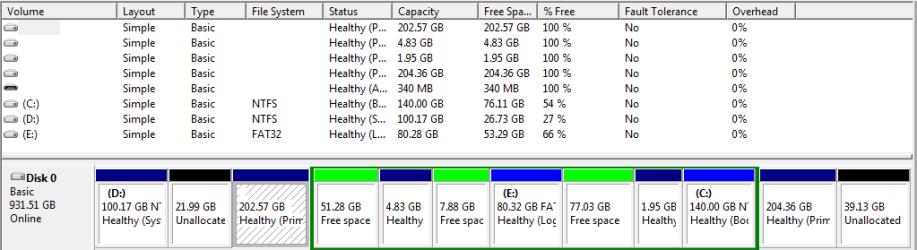
When I select Window 7 (loader), I got the options to boot into Windows 7 or XP. I had no problems booting into any OS. Everything seemed good. After booting into XP, and then back into 7, the next time i restarted my computer and selected Windows 7 (loader), I got a disk read error, press ctrl alt del to restart, and I could not boot into either Windows operating systems. So I booted into Linux and discovered that XP had vanished. The partition was still there, but all data on it was gone. I then copied the XP partition from my old HD back to the new one, and ran the recovery from the Windows 7 install disk a few times, and got it working again. I then restored my saved BCD backup, and everything was back to normal. Everything seemed good again, but then after booting back and forth between XP and 7 a couple times, when I restarted from Windows 7, and selected Windows 7 (loader), I got the disk read error, press ctrl alt del to restart again. So I boot back into Linux, and again I see that Windows XP has been deleted. I thought it might be a bad HD, but all the diagnostic tests I have ran on the drive have passed, and XP only gets deleted when I boot into Windows 7. It appears to me that Windows 7 is for some reason deleting/erasing XP. Does anyone have any ideas why this is happening, and how I can stop it.
Debian
Arch
Window 7 (loader)
...
When I select Window 7 (loader), I got the options to boot into Windows 7 or XP. I had no problems booting into any OS. Everything seemed good. After booting into XP, and then back into 7, the next time i restarted my computer and selected Windows 7 (loader), I got a disk read error, press ctrl alt del to restart, and I could not boot into either Windows operating systems. So I booted into Linux and discovered that XP had vanished. The partition was still there, but all data on it was gone. I then copied the XP partition from my old HD back to the new one, and ran the recovery from the Windows 7 install disk a few times, and got it working again. I then restored my saved BCD backup, and everything was back to normal. Everything seemed good again, but then after booting back and forth between XP and 7 a couple times, when I restarted from Windows 7, and selected Windows 7 (loader), I got the disk read error, press ctrl alt del to restart again. So I boot back into Linux, and again I see that Windows XP has been deleted. I thought it might be a bad HD, but all the diagnostic tests I have ran on the drive have passed, and XP only gets deleted when I boot into Windows 7. It appears to me that Windows 7 is for some reason deleting/erasing XP. Does anyone have any ideas why this is happening, and how I can stop it.
My Computer
- OS
- Windows 7 Ultimate x64, Windows XP Professional, Linux