Window and Text size in Command Prompt, Windows XP Mode

oggie

New member
Local time
5:34 AM
Messages
7
Anybody know how to change the text size in Windows XP Mode at the command prompt? I've tried right clicking on the DOS shortcut that I set up and changing it there, but it doesn't do anything.

Also, I've set it to Full Screen, but everytime I execute a program, it shrinks to a smaller window. Has anyone encountered that? Any fixes to force it to remain full screen?
 

My Computer My Computer

At a glance

Windows 7
OS
Windows 7
It is changed the same way as in Windows 7:

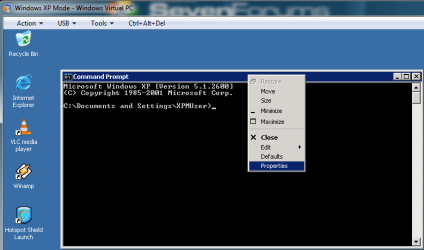
1. Right click command prompt icon or its shorcut, or if you already have command prompt window open right click on the titlebar of it

dos_font_0.PNGdos_font_1.PNG

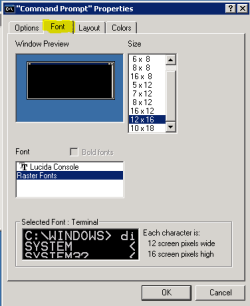
2. Choose Properties, choose Font tab, change the size of the font, click OK

dos_font_2.PNG

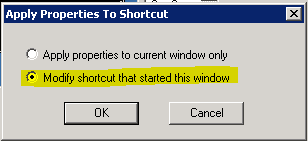
3. Choose Modify shortcut that started this window, click OK
(this step only in XP Mode, not in Seven)

dos_font_3.PNG

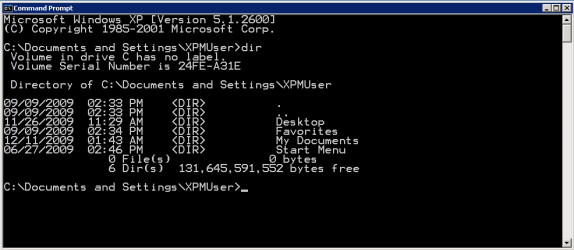
Your command prompt font size is now changed.

dos_font_4.PNG

Kari
 

My Computer My Computer

At a glance

Windows 10 Pro x64 EN-GB1.6 GHz Intel Core i7-720QM Processor6 GBATI Mobility Radeon HD 5850 Graphics
Computer type
Laptop
Computer Manufacturer/Model Number
HP ENVY 17-1150eg
OS
Windows 10 Pro x64 EN-GB
CPU
1.6 GHz Intel Core i7-720QM Processor
Memory
6 GB
Graphics Card(s)
ATI Mobility Radeon HD 5850 Graphics
Sound Card
Beats sound system with integrated subwoofer
Monitor(s) Displays
17" laptop display, 22" LED and 32" Full HD TV through HDMI
Screen Resolution
1600*900 (1), 1920*1080 (2&3)
Hard Drives
Internal: 2 x 500 GB SATA Hard Disk Drive 7200 rpm
External: 2TB for backups, 3TB USB3 network drive for media
Cooling
As Envy runs a bit warm, I have it on a Cooler Master pad
Keyboard
Logitech diNovo Media Desktop Laser (bluetooth)
Mouse
Logitech Performance Mouse MX
Internet Speed
50/10 Mbps VDSL
Antivirus
Windows Defender 4.3.9431.0
Browser
Maxthon 3.5.2., IE11
Kari,

Thank you for replying. I took me a bit to get back to this. I tried what you suggested and one way did work. Clicking on the shortcut and clicking properties did not work, but opening the command prompt, right clicking the titlebar and making changes did work!

I still have one issue though. When I open the window, it opens to full screen (or at least filling out the extents of the XP Mode window, which is what I want). However, when I execute any application from the command prompt, it always shrinks. At that point, it cannot be made larger again! Any thoughts on how to force it to stay full screen?
 

My Computer My Computer

At a glance

Windows 7
OS
Windows 7
I discovered that the command.com box in Windows 7 Ultimate runs old Dos software perfectly! You can even resize the window with the properties option! So don't use CMD, but command.com !!

Rob
 

My Computer My Computer

At a glance

Windows 7 Ultimate US
OS
Windows 7 Ultimate US
Thank you for that Rob :) Actually that helps me with another post. Thanks for taking the time to sign up and give us that solution :)
 

My Computer My Computer

At a glance

Windows 10 Pro x64Intel Core i5 7400 @ 3.00GHz8GB 2133Mhz DDR4 (OEM supplied)Gygabyte Windforce GTX 1050Ti (Factory Overcl...
Computer type
PC/Desktop
Computer Manufacturer/Model Number
Medion Erazer (note to self: insert model number) - with custom additions
OS
Windows 10 Pro x64
CPU
Intel Core i5 7400 @ 3.00GHz
Motherboard
OEM supllied with PC
Memory
8GB 2133Mhz DDR4 (OEM supplied)
Graphics Card(s)
Gygabyte Windforce GTX 1050Ti (Factory Overclocked)
Sound Card
Realtek
Monitor(s) Displays
Acer Al1980 + HKC
Screen Resolution
1360*768(HKC) / 1280*1024(Acer)
Hard Drives
1TB Toshiba
1TB WD Caviar Green
120GB Samsung Evo 840
PSU
OEM supplied (no power rating on case)
Case
OEM Supplied
Cooling
Stock
Keyboard
Logitech Wireless
Mouse
Logitect Wireless
Internet Speed
40Mb/s Down 10Mb/s Up
Antivirus
Defender
Browser
Firefox
I was very happy with it too. I think Microsoft has solved this issue after complaints of others. So old DOS software doesn't "hang" any more in the Command.com box from Windows 7 Ultimate itself. So i even don't need the XP mode anymore!!

Rob
 

My Computer My Computer

At a glance

Windows 7 Ultimate US
OS
Windows 7 Ultimate US
Back
Top