Windows 07 Cannot See Windows XP Machine

NicholasRoge

New member
I've been trying for about four hours to figure out what is wrong here. The workgroup is set the same on both machines, and I can view and ping my windows 07 computer and any shared folders from the XP one, but when I try to view my XP computer it isn't there. Even if I type it's network name in the adress bar it doesn't work. If I ping it, it returns "Request timed out".
 

My Computer

OS
Windows 07 RC
I've been trying for about four hours to figure out what is wrong here. The workgroup is set the same on both machines, and I can view and ping my windows 07 computer and any shared folders from the XP one, but when I try to view my XP computer it isn't there. Even if I type it's network name in the adress bar it doesn't work. If I ping it, it returns "Request timed out".


Hi Nicholasroge,

It sounds like a firewall issue, Have you tried disabling Windows firewall on both machines? Do you also use any other Anti-Virus/firewall software besides WF?

Steven
 
I've been trying for about four hours to figure out what is wrong here. The workgroup is set the same on both machines, and I can view and ping my windows 07 computer and any shared folders from the XP one, but when I try to view my XP computer it isn't there. Even if I type it's network name in the adress bar it doesn't work. If I ping it, it returns "Request timed out".
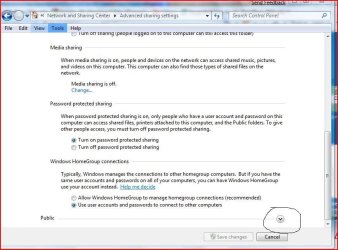
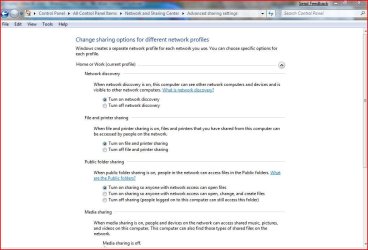
Do you have all the permisions set in advance sharing?

advance2.JPG

advance.JPG
 

My Computer

Computer Manufacturer/Model Number
Gateway GT5692
OS
Windows 7 Ulti. x64
CPU
AMD Phenom 8450 triple-core 2.10 ghz
Memory
4GB
Graphics Card(s)
ATI Radion HD 3200
Monitor(s) Displays
Gateway FPD1775W
Screen Resolution
1280x720
Hard Drives
465.6613 Gibibytes
*epic facepalm* I turned off the firewall in McAfee on XP and 7 and sure enough, I can see the XP computer in my network display. However when I try to go into it, I now get a pop-up dialogue telling me to enter my network password... No idea what to put there.
 

My Computer

OS
Windows 07 RC
NicholasRoge" said:
*epic facepalm* I turned off the firewall in McAfee on XP and 7 and sure enough, I can see the XP computer in my network display. However when I try to go into it, I now get a pop-up dialogue telling me to enter my network password... No idea what to put there.

If your working from 7, type your logon credentials from the XP-PC, if it's doesn't work, click on add another user (or similar) and re-type them
If it still doesn't work, try enabling the admin account in XP and try accessing XP from 7 using the admin credentials(worked for me). :)
 

My Computer

Computer Manufacturer/Model Number
HP Touchsmart IQ771.uk
OS
Windows 7 Ultimate x64
CPU
AMD Turion(tm) 64 X2 Mobile Technology TL-56
Motherboard
ASUS Pheonix
Memory
3GB Nanya PC2-6400 DDR2-SDRAM SO-DIM (400MHz)
Graphics Card(s)
NVIDIA GeForce Go 7600 256MB GDDR3 SDRAM
Sound Card
High Definition Intergrated NVIDIA MCP51
Monitor(s) Displays
46" Sony Bravia HDTV
Screen Resolution
1600x1200
Hard Drives
1.5TB Samsug
320GB Seagate ST3320820AS - SATA 3Gb/s 8MB
500GB Maxtor Basics STM305003EHD301-RK
Internet Speed
↓6.32 Mb/s ↑0.35 Mb/s ↔26ms
Other Info
BIOS - American Megatrends Inc. 5.07
Ethernet Port - NVIDIA nForce 10/100/1000 Mbps
DVD Drive - TSSTcorp DVDR/RW TS-T632L

My Computer

Computer Manufacturer/Model Number
HP Touchsmart IQ771.uk
OS
Windows 7 Ultimate x64
CPU
AMD Turion(tm) 64 X2 Mobile Technology TL-56
Motherboard
ASUS Pheonix
Memory
3GB Nanya PC2-6400 DDR2-SDRAM SO-DIM (400MHz)
Graphics Card(s)
NVIDIA GeForce Go 7600 256MB GDDR3 SDRAM
Sound Card
High Definition Intergrated NVIDIA MCP51
Monitor(s) Displays
46" Sony Bravia HDTV
Screen Resolution
1600x1200
Hard Drives
1.5TB Samsug
320GB Seagate ST3320820AS - SATA 3Gb/s 8MB
500GB Maxtor Basics STM305003EHD301-RK
Internet Speed
↓6.32 Mb/s ↑0.35 Mb/s ↔26ms
Other Info
BIOS - American Megatrends Inc. 5.07
Ethernet Port - NVIDIA nForce 10/100/1000 Mbps
DVD Drive - TSSTcorp DVDR/RW TS-T632L

My Computer

Computer type
PC/Desktop
Computer Manufacturer/Model Number
my own build
OS
xp/vista/win7/win8/10 tech preview
CPU
PHENOM II X4 Quad Core 965 Black Edition CPU, 3.40 GHz
Motherboard
GA-MA790FXT-UD5P
Memory
G.Skill 8GB (4x XMS3 2GB) PC-12800 (1600MHz
Graphics Card(s)
nvidia 9500 gt
Sound Card
on board
Monitor(s) Displays
T231H / X243H ACER
Screen Resolution
1980/1080
Hard Drives
Hitachi 500 samsung1terabyte wd 750
PSU
550 watt
Case
cooler master
Cooling
stock
Keyboard
microsoft
Mouse
logitech
Internet Speed
20000 dl 1020 ul exetel
Other Info
booting xp32 2x dual pci-e digital tv tuners
xp pro v 1xusb2 digital tv tuner
vista ultimate 64
win7 64 win8 64
Make a screenshot with advanced sharing settings and post it here!
 

My Computer

Computer Manufacturer/Model Number
Fujitsu Siemens
OS
XP SP2
CPU
Intel Celeron D 3.07 GHz
Motherboard
/
Memory
1GB
Graphics Card(s)
Nvidia GeForce 6200 SE 256mb
Sound Card
Realtek
Monitor(s) Displays
17 "
Screen Resolution
1280x1024
Hard Drives
160GB
Internet Speed
2mb
To be honest, I couldn't tell you. Where would I see that at?

open the network and sharing center
then top right hand side click on change advanced sharing settings
 

My Computer

Computer type
PC/Desktop
Computer Manufacturer/Model Number
my own build
OS
xp/vista/win7/win8/10 tech preview
CPU
PHENOM II X4 Quad Core 965 Black Edition CPU, 3.40 GHz
Motherboard
GA-MA790FXT-UD5P
Memory
G.Skill 8GB (4x XMS3 2GB) PC-12800 (1600MHz
Graphics Card(s)
nvidia 9500 gt
Sound Card
on board
Monitor(s) Displays
T231H / X243H ACER
Screen Resolution
1980/1080
Hard Drives
Hitachi 500 samsung1terabyte wd 750
PSU
550 watt
Case
cooler master
Cooling
stock
Keyboard
microsoft
Mouse
logitech
Internet Speed
20000 dl 1020 ul exetel
Other Info
booting xp32 2x dual pci-e digital tv tuners
xp pro v 1xusb2 digital tv tuner
vista ultimate 64
win7 64 win8 64
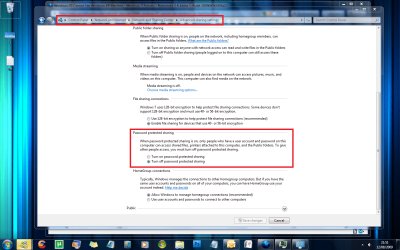
ok i just tried it on mine you have to turn off password protected sharing under the public tab
and then you will not get the user and password pop up box it should let you straight in
 

My Computer

Computer type
PC/Desktop
Computer Manufacturer/Model Number
my own build
OS
xp/vista/win7/win8/10 tech preview
CPU
PHENOM II X4 Quad Core 965 Black Edition CPU, 3.40 GHz
Motherboard
GA-MA790FXT-UD5P
Memory
G.Skill 8GB (4x XMS3 2GB) PC-12800 (1600MHz
Graphics Card(s)
nvidia 9500 gt
Sound Card
on board
Monitor(s) Displays
T231H / X243H ACER
Screen Resolution
1980/1080
Hard Drives
Hitachi 500 samsung1terabyte wd 750
PSU
550 watt
Case
cooler master
Cooling
stock
Keyboard
microsoft
Mouse
logitech
Internet Speed
20000 dl 1020 ul exetel
Other Info
booting xp32 2x dual pci-e digital tv tuners
xp pro v 1xusb2 digital tv tuner
vista ultimate 64
win7 64 win8 64
I've decided just to install windows 07 on this computer as well. The homegroup thing seems awfully convenient.
 

My Computer

OS
Windows 07 RC
You do not need to set up homegroup in order to share files. In fact it's easier if you don't use it.
 

My Computer

Computer type
PC/Desktop
Computer Manufacturer/Model Number
Home built
OS
Windows 7 Ult, Windows 8.1 Pro,
CPU
Q9650-4.275GHz, E8600 4.5GHz, E6750-3.8GHz
Motherboard
Evga 780i FTW
Memory
G.Skill PC2 9600 1200Mhz 5 5 5 15 2T
Graphics Card(s)
GTX480
Sound Card
Asus Xonar D2
Monitor(s) Displays
HannsG
Screen Resolution
1680X1050
Hard Drives
GSkill Phoenix Pro 120GB SSD
PSU
ThermalTake Toughpower 1000Watt modular
Case
ThermalTake XaserV
Cooling
Xigmatek S1283
Keyboard
Logitech G15
Mouse
Logitech G9
Internet Speed
T1
If the XP machine is prompting you for a usename and password, that means you need to do one of two things: enable the guest account (less secure) on the xp machine, or add a password for the account on the xp machine that you want to connect with. Hope this helps.
 

My Computer

Computer Manufacturer/Model Number
Gigabyte
OS
Windows 7 Ultimate
CPU
Intel Core(TM)2 Quad- Q9550, 2.83GHz
Motherboard
G31M-ES2L
Memory
4GB
Graphics Card(s)
ATI Radeon HD4600
Sound Card
On Board:
Monitor(s) Displays
Acer AL2223W, Acer AL1916
Screen Resolution
1680 x 1050, 1280 x 1024
Hard Drives
160GB
350GB
250GB
250GB
PSU
600W
Case
Cooler Master
Keyboard
Microsoft Laser 6000
Mouse
Logitech Optical Trackman
Internet Speed
1.5MB
Other Info
I am also running a quasar gamatron flux capacitor with twin pulse tronic phasers......jk, I have no such stuff.
No, no. It's the Windows 07 machine that's prompting me for the username and password.

Enter the username and password(create one if you don't have) of XP machine!
 

My Computer

Computer Manufacturer/Model Number
Fujitsu Siemens
OS
XP SP2
CPU
Intel Celeron D 3.07 GHz
Motherboard
/
Memory
1GB
Graphics Card(s)
Nvidia GeForce 6200 SE 256mb
Sound Card
Realtek
Monitor(s) Displays
17 "
Screen Resolution
1280x1024
Hard Drives
160GB
Internet Speed
2mb
I have tried that. I created a new account (on the XP machine) with the username externAdmin and the password test, however when I try to use these credentials on the Windows 7 machine, they don't work.
 

My Computer

OS
Windows 07 RC
I have tried that. I created a new account (on the XP machine) with the username externAdmin and the password test, however when I try to use these credentials on the Windows 7 machine, they don't work.

you just enter the username and password for the win7 machine that you log on with

and if its prompting for that you have not turned off password protected sharing
 

My Computer

Computer type
PC/Desktop
Computer Manufacturer/Model Number
my own build
OS
xp/vista/win7/win8/10 tech preview
CPU
PHENOM II X4 Quad Core 965 Black Edition CPU, 3.40 GHz
Motherboard
GA-MA790FXT-UD5P
Memory
G.Skill 8GB (4x XMS3 2GB) PC-12800 (1600MHz
Graphics Card(s)
nvidia 9500 gt
Sound Card
on board
Monitor(s) Displays
T231H / X243H ACER
Screen Resolution
1980/1080
Hard Drives
Hitachi 500 samsung1terabyte wd 750
PSU
550 watt
Case
cooler master
Cooling
stock
Keyboard
microsoft
Mouse
logitech
Internet Speed
20000 dl 1020 ul exetel
Other Info
booting xp32 2x dual pci-e digital tv tuners
xp pro v 1xusb2 digital tv tuner
vista ultimate 64
win7 64 win8 64
Back
Top