

Dragovichz
Banned
Hi Guys, good day & I'm sorry if this thread is already created but I don't have much time to look for it. 
I'm just confuse!, about the admin privilege that affects my whole computer system, I have a two computer, one is a desktop, and one is a laptop.
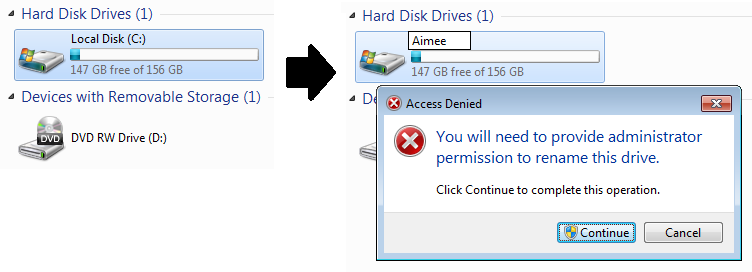
When I changed the name of my Local Disk (C) from the default to new one, it doesn't ask a permission to change like the picture below
NOTE: THE IMAGE SHOWN BELOW IS FROM MY DESKTOP

And the Ownership of my Disk is set to default [TrustedInstaller].

And this is the list of all permission.
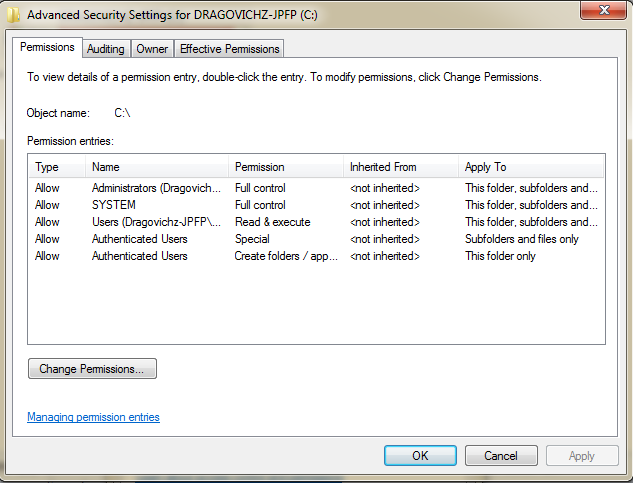
As you can see, all of the settings are set to default and nothing changed!!
but when it comes in my laptop, something is wrong :sarc: :huh:
:huh:
NOTE: THE IMAGE SHOWN BELOW IS FROM MY LAPTOP
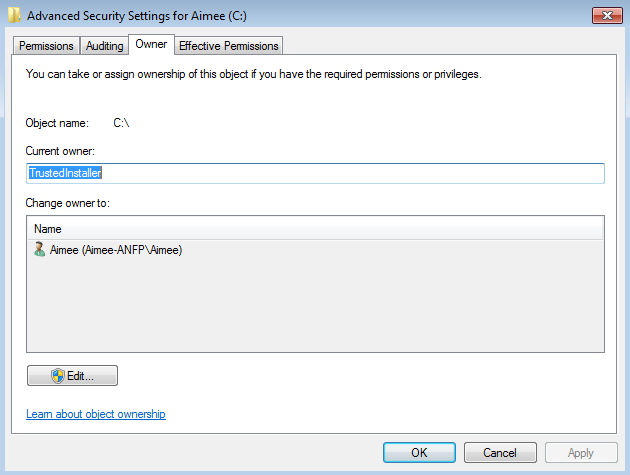
And the Ownership of my Disk in Laptop is set to default [TrustedInstaller] too!!. :sarc:
And the list of the permission are the same.
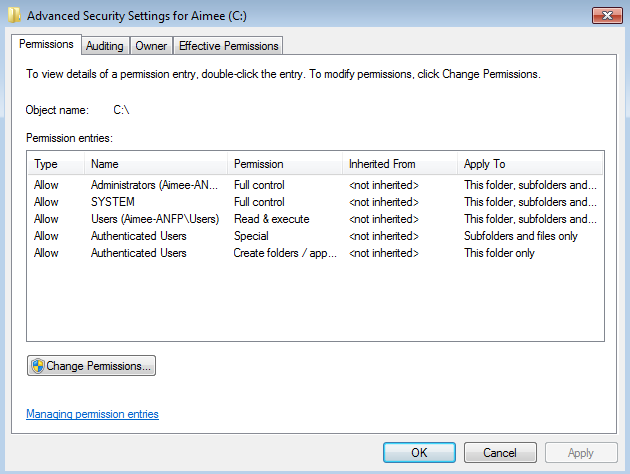
As you can see, all the settings from my two computers are the same, the only difference from them are the operating system which my LAPTOP IS WINDOWS 7 STARTER 32bit and my DESKTOP IS WINDOWS 7 ULTIMATE 64bit, It matters to me, to know why isn't working the same, please help me! I need to know why??
GOD BLESS AND THANK YOU!
I'm just confuse!, about the admin privilege that affects my whole computer system, I have a two computer, one is a desktop, and one is a laptop.
When I changed the name of my Local Disk (C) from the default to new one, it doesn't ask a permission to change like the picture below
NOTE: THE IMAGE SHOWN BELOW IS FROM MY DESKTOP
And the Ownership of my Disk is set to default [TrustedInstaller].
And this is the list of all permission.
As you can see, all of the settings are set to default and nothing changed!!
but when it comes in my laptop, something is wrong :sarc:
:huh:NOTE: THE IMAGE SHOWN BELOW IS FROM MY LAPTOP
And the Ownership of my Disk in Laptop is set to default [TrustedInstaller] too!!. :sarc:
And the list of the permission are the same.
As you can see, all the settings from my two computers are the same, the only difference from them are the operating system which my LAPTOP IS WINDOWS 7 STARTER 32bit and my DESKTOP IS WINDOWS 7 ULTIMATE 64bit, It matters to me, to know why isn't working the same, please help me! I need to know why??
GOD BLESS AND THANK YOU!
My Computer
At a glance
Windows 7 Ultimate 64bit SP1AMD A4-3400 Llano 32nm8GBATI AMD Radeon HD 5570 2GB
- Computer type
- PC/Desktop
- Computer Manufacturer/Model Number
- Custom Build
- OS
- Windows 7 Ultimate 64bit SP1
- CPU
- AMD A4-3400 Llano 32nm
- Motherboard
- EMAXX A55GT-iCAFE FM1
- Memory
- 8GB
- Graphics Card(s)
- ATI AMD Radeon HD 5570 2GB
- Monitor(s) Displays
- 1 Monitor AOC
- Screen Resolution
- 1366x768
- Hard Drives
- 465GB Hitachi HDS721050CLA660 ATA Device (SATA)
- PSU
- 600 watts
- Case
- Powerlogic V12
- Keyboard
- BLOODY B120 Backlight Gaming Keyboard
- Mouse
- A4tech
- Antivirus
- None
- Browser
- Google Chrome


