nicoricarte
New member
Hi guys. Sorry to bother anyone, and/to revive already solved topics, but I'm having this annoying problem that I can't seem to find on the net.
Weeks ago, I got back from my trip to the states. And when I got home, I could connect to the internet no problem. At one point, I was just using LAN, rather than wireless. And I didn't start to notice a problem until a friend and I wanted to share files.
The only problem we had then was me not being in a "Home" kind of network. It was always set to Public, but I didn't know why. I remember that when you connect to a new network, windows asks you how to treat it, as Public or Home. And the window didn't pop up. So, naturally, we couldn't transfer files using HomeGroup. We did it in a rather taxing manner.
And I tried it with another friend and when I got to his house I noticed that the wireless icon on the taskbar says I'm connected, but I am.
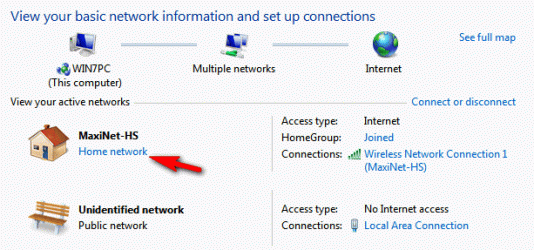
When I got back home, I plugged in the LAN and noticed also that Network and Sharing doesn't show that I'm connected to the internet, which is very annoying.
And now I'm at another friend's house, the only thing different here is that rather than it showing that there are connections available, there is just a red X on it.
NOTE: I mention that trip to the US because maybe it's relevant in some way. And I bought the laptop there. I can connect to the internet just fine, it's just not showing it.
I have a Windows 7 Home Premium x64.
Someone please help.
Thanks.
Weeks ago, I got back from my trip to the states. And when I got home, I could connect to the internet no problem. At one point, I was just using LAN, rather than wireless. And I didn't start to notice a problem until a friend and I wanted to share files.
The only problem we had then was me not being in a "Home" kind of network. It was always set to Public, but I didn't know why. I remember that when you connect to a new network, windows asks you how to treat it, as Public or Home. And the window didn't pop up. So, naturally, we couldn't transfer files using HomeGroup. We did it in a rather taxing manner.
And I tried it with another friend and when I got to his house I noticed that the wireless icon on the taskbar says I'm connected, but I am.
When I got back home, I plugged in the LAN and noticed also that Network and Sharing doesn't show that I'm connected to the internet, which is very annoying.
And now I'm at another friend's house, the only thing different here is that rather than it showing that there are connections available, there is just a red X on it.
NOTE: I mention that trip to the US because maybe it's relevant in some way. And I bought the laptop there. I can connect to the internet just fine, it's just not showing it.
I have a Windows 7 Home Premium x64.
Someone please help.
Thanks.
Attachments

My Computer
- OS
- Windows 7 Home Premium x64
- Graphics Card(s)
- Intel HD Graphics
- Screen Resolution
- 1366 x 768