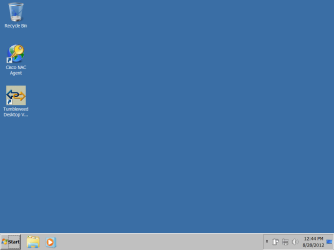
Windows 7 Enterprise gray desktop after installation

kr0wnage

New member
Local time
1:52 AM
Messages
11
Hi,

I hope someone has seen this issue before. When I install Windows 7 Enterprise on a laptop, occasionally this happens, the desktop is a generic gray desktop and lacks the standard three symbols on the taskbard; IE, Media Player, and Libraries icons (IE needs to be manually set on Taskbar). Computers that end up with this weird installation have issues with some software such as Lotus Notes and just end up being quirky. I use the same installation disc that I always use, usually there are no issues and Windows 7 installs normally. We are trying to find out what is causing this weird install and if anyone knows a way to correct it if it happens. Yes we do know that you can change the Theme to resemble the normal desktop, but these computers still end up having quirky issues.

Attached is a screenshot.

thanks
 

Attachments
  • grayscale.png
    grayscale.png
    10.1 KB · Views: 11

My Computer My Computer

OS
Windows 7 Enterprise
Welcome to the Seven Forums

Do the computers meet the aero requiremenys?
   Note
You will not have the Transparency option if you have a Basic and High Contrast Theme instead of a Aero Theme.

Aero Requirements to be Enabled in Windows 7
NOTE: If Aero is not enabled, then Transparency will not work even when enabled.
  • 1 GHz 32-bit or 64-bit processor
  • 1 GB of system memory
  • A graphics card with support for DirectX 9 graphics with at least 128 MB of memory.
  • The graphics card must support Pixel Shader 2.0 and the Windows Display Driver Model (WDDM).
  • You must be have True Color (32 bit) set instead of High Color (16 bit).
  • Be sure to have the correct Windows 7 driver version installed for your graphics card/chip.
  • The desktop composition and Animate controls and elements inside windows options enabled in Visual Effects.
  • Refresh or update your WEI score.
  • The Desktop Window Manager Session Manager and Themes Services need to be set to Start and Automatic.


Jerry
 

My Computer My Computer

Computer type
Laptop
Computer Manufacturer/Model Number
Sager NP9170
OS
Win 7 Pro x64 / Win 10 Pro
CPU
Intel(R) Core(TM) i7-3630QM CPU @ 2.40GHz
Motherboard
CLEVO P170EM
Memory
12 GB
Graphics Card(s)
(1) Intel(R) HD Graphics 4000 (2) NVIDIA GeForce GTX 675M
Sound Card
(1) Realtek High Definition Audio (2) Intel(R) Display Aud
Monitor(s) Displays
17.3
Screen Resolution
1920x1080
Hard Drives
(1) Samsung 860 EVO 500GB(OS) (1) Samsung 860 EVO 500GB(Data)
Keyboard
Backlite
Antivirus
MSE, Malwarebytes Pro
Browser
Firefox
Other Info
DESKTOP: Custom-built.
OS: Win 10 Pro x64.
CASE: Rosewill R5.
CPU: Intel I5 4670K CPU @ 3.40GHz.
CPU COOLER: Cool Master Hyper 212 EVO.
MOTHERBOARD: Asus Z87-A.
MEMORY: Kingston HyperX 2x4 GB.
GPU: Nvidia Geforce 650 TI.
PSU: Corsair TX750.
DRIVES: (1) Samsung 840 120 GB SSD (2) Western Digital blue 500 GB 7200 RPM.
They do meet the Aero requirements. I could take and re-install Windows 7 and it would most likely work. The problem is, it can be time consuming to just re-install when this happens.
 

My Computer My Computer

OS
Windows 7 Enterprise
Does this happen right from the beginning of a install with no Aero? Or does it start out with Aero and then it turns gray?
Have you tried reinstalling on one of the troubled computers to see if that corrects it or not?
I am just trying to understand this is why I am asking.
Jerry
 

My Computer My Computer

Computer type
Laptop
Computer Manufacturer/Model Number
Sager NP9170
OS
Win 7 Pro x64 / Win 10 Pro
CPU
Intel(R) Core(TM) i7-3630QM CPU @ 2.40GHz
Motherboard
CLEVO P170EM
Memory
12 GB
Graphics Card(s)
(1) Intel(R) HD Graphics 4000 (2) NVIDIA GeForce GTX 675M
Sound Card
(1) Realtek High Definition Audio (2) Intel(R) Display Aud
Monitor(s) Displays
17.3
Screen Resolution
1920x1080
Hard Drives
(1) Samsung 860 EVO 500GB(OS) (1) Samsung 860 EVO 500GB(Data)
Keyboard
Backlite
Antivirus
MSE, Malwarebytes Pro
Browser
Firefox
Other Info
DESKTOP: Custom-built.
OS: Win 10 Pro x64.
CASE: Rosewill R5.
CPU: Intel I5 4670K CPU @ 3.40GHz.
CPU COOLER: Cool Master Hyper 212 EVO.
MOTHERBOARD: Asus Z87-A.
MEMORY: Kingston HyperX 2x4 GB.
GPU: Nvidia Geforce 650 TI.
PSU: Corsair TX750.
DRIVES: (1) Samsung 840 120 GB SSD (2) Western Digital blue 500 GB 7200 RPM.
It starts out right from the first login.
 

My Computer My Computer

OS
Windows 7 Enterprise
If I'm correct in saying this is a fresh install.
I have just one question have you reinstalled your display drivers?
If not it would be worth ago, you can do this one of two ways go to your computer manufacturer web site and download the latest driver for your particular model,
or you can have windows updates check for recommended software/driver. Display drivers are normally optional updates so if you system as installed all critical update already it is worth looking at the optional one's.


Best of luck Dan
 

My Computer My Computer

Computer Manufacturer/Model Number
Custom Build
OS
Win7 64bit Ult
CPU
Intel Q8200 Skt 775
Motherboard
Asus
Memory
8gb Corsair DDR3 @ 1333mhz
Graphics Card(s)
Nvidia 9500gt 1gb
Sound Card
Onboard
Monitor(s) Displays
Acer Daul 22"
Screen Resolution
1600 * 900
Hard Drives
O/S 500gb 3x 1tb bkups
PSU
1000w
Case
Icute jet terbine
Cooling
Air Cooled mainly Zalmans
Keyboard
Microsoft Media
Mouse
Rat 9
Internet Speed
Talk Talk upto 10mb
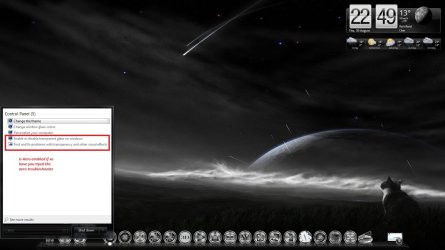
Also have you tryed the Windows Aero trouble shooter image below
Just type Aero into the search area.
 

Attachments

  • aero.jpg
    aero.jpg
    106.4 KB · Views: 10

My Computer My Computer

Computer Manufacturer/Model Number
Custom Build
OS
Win7 64bit Ult
CPU
Intel Q8200 Skt 775
Motherboard
Asus
Memory
8gb Corsair DDR3 @ 1333mhz
Graphics Card(s)
Nvidia 9500gt 1gb
Sound Card
Onboard
Monitor(s) Displays
Acer Daul 22"
Screen Resolution
1600 * 900
Hard Drives
O/S 500gb 3x 1tb bkups
PSU
1000w
Case
Icute jet terbine
Cooling
Air Cooled mainly Zalmans
Keyboard
Microsoft Media
Mouse
Rat 9
Internet Speed
Talk Talk upto 10mb
Back
Top