Windows 7 Hang

...
The freeze just occurred right now but once again no error was logged....any way to debug this sort of error without xperf or anywhere where i can get xperf?

I think the WPT - and the Xperf installation MSIs - are buried somewhere in that SDK, but if you haven't been able to find it then I don't know. I suspect there'll be an uproar and the WPT will be made available as a separate download again, but you probably don't want to wait that long.

Xperf is excellent for two main reasons:
a) It "sees" deep into the action. In other words, it collects a massive amount of detailed data.
b) It is a relatively lightweight logging mechanism. You could configure it to run all day without greatly impacting your machine's performance or resulting in a 4TB logfile!

Still, no point crying over spilt milk.

There's an in-built mechanism which can also produce a useful log, though I fear it may not be enough in your case. Only one way to find out...

1) Create a counters.txt file somewhere on your machine with the following contents:

Code:
\process(*)\*
\processor(*)\*
\memory\*
\PhysicalDisk(*)\*
\system\*


2) On an elevated (run as admin) CMD prompt (change <path> to location of counters.txt): logman create counter hangLog -cf c:\<path>\counters.txt -si 1 -max 10 -cnf 10:00

3) Then this (on the same CMD prompt): logman start hangLog

4) Wait for the hang to happen again.... then wait say 2 minutes more.

5) On an elevated CMD prompt again: logman stop hangLog


In the \Perflogs\Admin folder there should be a whole bunch of BLG files by then. They're Binary LoG files containing some info about what your machine was doing at the time, broken up into smaller chunks for easier handling.

If you zip up and upload say the last 5 somewhere, it may be possible to tell you what the box is doing during the "freeze". Or not :)
 

My Computer

Computer Manufacturer/Model Number
Multiple machines in various stages of decomposition.
OS
Win7x64
Hi H2SO4,
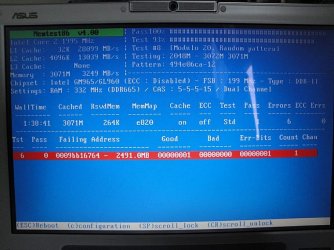
I may be leading to something here. Curious about how everything would just start lagging I thought that maybe it might be a RAM issue. So I downloaded the latest version of Memtest86+ and ran the complete test. Surely enough at Test 6 I had errors show up. I had upgraded my computer with OCZ2MV6672G 2GB RAM a while back and it worked just fine. So trying to narrow down the issue, I removed the 2GB stick so I had only the 1GB stick (soldered RAM) on my laptop and ran the same test that failed again. This time it passed! I inserted a 512MB RAM that came originally with my laptop so I would get a total of 1.5GB and ran Test 6 again. It passed again! Then I removed the stick and added my 2GB one back to get a total of 3GB back. When I ran Test 6 again I came across the same errors at a specific block in the memory (same block always).
Could this be the cause of the freezing? I have limited lifetime warranty on the OCZ 2GB RAM, should I get it repaired or could something else be causing the error and the freezing?

Here is a picture of the error:
 

Attachments

  • RAM error.JPG
    RAM error.JPG
    414 KB · Views: 33
Last edited:

My Computer

OS
Windows 7
So H2SO4,
I was able to get the log during the crash using the method you suggested above.
Let me describe to you what exactly I did before and after the crash happened:
The first thing I did was uninstall the SDK, the Debugger Tools, and some Application Verification Program (these are all things installed by the SDK installer). I turned on iTunes and started playing a song because its easiest for me to determine the hang because the song also stops playing. I opened up google chrome and started browsing for my daily fix on IGN and Gamespot. Surely enough, after a few minutes of browsing the song stopped playing midway and the hard drive light remained on without any sounds as usual. To verify this was the crash I started randomly opening up programs and windows. Everything that was in RAM would open, but anything that seemed to require hard drive access such as opening a new program would not happen. 10-15 seconds after the hang subsided and all the windows and programs that I opened suddenly loaded and popped up with my hard drive returning to normal.
Here is the log file and I hope that it gives us a more definite answer :(

PS: I can confidently say that the SDK somehow makes the computer a LOT LESS crash prone for some reason. Either that or a crash always occurs within 5 minutes of uninstalling the SDK lol.
 

Attachments

My Computer

OS
Windows 7
Hey H2SO4,
I was also able to find the xperf files. All they did was rename it! Once you install the SDK if you go into the bin directory of the installed files you will see a file called wpt_x64.msi which was previously called xperf_x64.msi!
So anyways I was able to install and run the xperf log using the circular method. I was also able to get my computer to hang but it was a fairly short one which lasted about 4-5 seconds probably.
The file was too big to attach so I have uploaded it to my skydrive, here's the link:
xperf HangLog.zip
 
Last edited:

My Computer

OS
Windows 7
Another update,
I uninstalled the SDK again so that I could get the longer hang which lasts for about 10-15 seconds and surely enough it happened a bit after I uninstalled it. I started the xperf log right after uninstalling was finished. Hopefully this is more accurate than the last and gives a better picture as to what is going on. You can see that the hard drive is loaded during the hang to the max. Also you'll see that I tried opening random programs while it was hung just to see if it was hung or not (like WMplayer and IE).

Heres the log:
xperf Hanglog 2.zip

PS: Sorry for the post spam. Just wanted to give you as much information as I can to assess this problem thoroughly :)
 

My Computer

OS
Windows 7
Another update,
I uninstalled the SDK again so that I could get the longer hang which lasts for about 10-15 seconds and surely enough it happened a bit after I uninstalled it. I started the xperf log right after uninstalling was finished. Hopefully this is more accurate than the last and gives a better picture as to what is going on. You can see that the hard drive is loaded during the hang to the max. Also you'll see that I tried opening random programs while it was hung just to see if it was hung or not (like WMplayer and IE).

Heres the log:
xperf Hanglog 2.zip

PS: Sorry for the post spam. Just wanted to give you as much information as I can to assess this problem thoroughly :)

Bear with me - this stuff can be tricky to analyse.

I think I see the effect of the hang in the log, but I want to make sure I'm looking at the right thing before I get too carried away.

Can you please do another one of those, but this time try to note, as accurately as possible, the time between when the "freeze" appeared to end and the time you stopped the logging. In other words, if it went from say 20:35:17 to 20:35:30, and you stopped the Xperf log at 20:35:45, then I'd want to know that the log was stopped "15 seconds after the event cleared itself up, and roughly 28 seconds after it started".

As accurate as possible anyway. I know it's fiddly to do, let alone to time.
 

My Computer

Computer Manufacturer/Model Number
Multiple machines in various stages of decomposition.
OS
Win7x64
Hi H2S04,
I've noticed that the hang occurs at evening or mainly night time. I have never really experienced it during the daytime. Also I changed my RAM module to the one that I was given with the laptop (because it had no errors in Memtest86+) and it was running fine until now. I have issued an RMA for the other RAM since it has errors anyway but now I know that the issue isn't with the RAM itself.

Here are the logs for the latest hang:
xperf Hanglog 3.zip
The hang lasted for around 30-40 seconds, I wasn't able to get an extremely accurate result however since it occurred as a suprise. Also I stopped the log roughly 12 seconds after the hang subsided (which I can say fairly accurately). So therefore, the log was stopped "12 seconds after the event cleared itself up, and roughly 42-52 seconds after it started"

Also the error regarding "The driver detected a controller error on \Device\Ide\IdePort1." seems to occur a few minutes or even hours before the hang occurs. What is this error referring to in the event log? Could this be contributing to the hangs?
 

My Computer

OS
Windows 7
Ok so this hang definitely is more frequent during the night, it just happened again and now its starting to tick me off!!...I hope this issue can be solved!

Here is the log once again for the 4th time!
xperf Hanglog 4.zip
This one I counted much more precisely. The hang lasted for about 40 seconds and I stopped the log around 15 seconds after the hang subsided. So therefore, the log was stopped "15 seconds after the event cleared itself up, and around 55 seconds after it started"

I don't understand how I never had any of these problems when I was running Windows 7 Ultimate RC before clean installing to RTM Professional....
 

My Computer

OS
Windows 7
Yet again,
heres another one...:@
xperf Hanglog 5.zip
Around 45 seconds hang, and I stopped it about 10 seconds after that.
Man it renders my computer useless now...

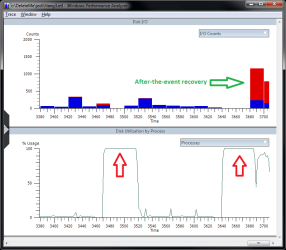
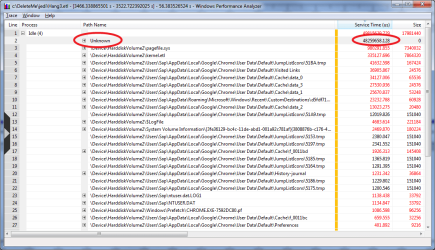
It's like your entire disk is locked up, for reasons I don't understand yet. The controller error is certainly omnious, and it is almost beyond doubt linked to a hardware problem. I'm therefore tempted to tell you to not bother troubleshooting further but to instead treat this as a broken disk/controller issue, but if you're game it would probably be useful to troubleshoot a bit more first.

The attached images show relevant data from your Xperf logs. The "system" process (PID = 4) appears to monopolise the disk for roughly 50 seconds at a time a few minutes apart. Unfortunately, no info is recorded as to what it's actually doing ("unknown" path). The second plateau is the one which you perceive as the freeze, and apparently the rest of the OS feels neglected too because you can see that massive backlog of I/O activity getting fulfilled (green arrow) once the freeze is over.

Can you please do another one of those, but use these settings to start the log this time:

xperf -on PROC_THREAD+LOADER+DISK_IO+HARD_FAULTS+FILE_IO+FILE_IO_INIT+DISK_IO+DISK_IO_INIT+DRIVERS -MaxFile 30 -FileMode circular

Sorry, it's fiddly to try to understand something like this, especially over a web forum :)
 

Attachments

  • Plateaus.png
    Plateaus.png
    56.5 KB · Views: 39
  • ByPath.png
    ByPath.png
    147.4 KB · Views: 53

My Computer

Computer Manufacturer/Model Number
Multiple machines in various stages of decomposition.
OS
Win7x64
I followed the method you posted above...hopefully this gives you a clear picture. What piece of hardware do you think is failing exactly? When I installed Windows 7, I formatted my C partition and installed it on there since my D partition had all my files on it. Could that have anything to do with it and should I fully format my hard drive and partition it again? Or is this clearly a hardware issue...the reason I ask is that its kinda weird how it just shows up after I clean installed Windows and never showed up before :S

Here's the log:
xperf Hanglog 6.zip
I made the max file size to 70MB just in case I don't have enough time to stop the log...the funny thing is that it froze TWICE as I was typing this post :'(
 

My Computer

OS
Windows 7
Another hang log using the 2nd method....just happened right now
xperf Hanglog 7.zip

I worked hard to try to find evidence to justify any diagnosis other than "I think your hardware is broken", but unfortunately it wasn't to be.

I think your hardware is broken :(

Probably the disk, although it's impossible to tell for sure - it could also be the controller. The entire OS pauses because it's waiting for the completion of an operation known as an NtfsWaitSync, and it's taking far longer than it should on your machine.

In order to ensure consistency, NTFS periodically synchronises certain metadata structures, and while that's happening the rest of the OS may sometimes be forced to take a little breather. It normally takes milliseconds though - at most - and you wouldn't notice anything untoward. However, your disk/controller combination periodically stop responding to the OS for a number of seconds, and when that happens to coincide with an NtfsWaitSync the result is the freeze that you feel.

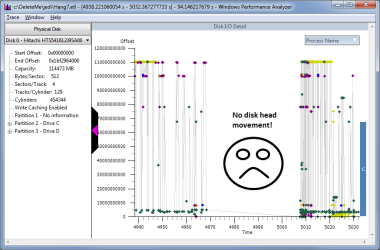
The image I've attached represents movement of the disk head across the surface of the disk to service various read and write requests. It's plain that in the middle of the selected period there is a ~35sec window with no movement at all - or at least no movement being reported to the OS. Coupled with your observation that the HDD activity light seems constatly on during the freeze, it looks like the disk/controller combo just has a little holiday for hardware reasons.

Personally, at this stage I'd be reinstalling the OS from scratch. If the problem manifests itself again immediately, even before you install any updates or apps, you can be virtually certain that the laptop needs hardware servicing.

Sorry, I do wish I had some better news to tell you, but on the positive side at least it works most of the time and you can get your data backed up securely.

Good luck with it.
 

Attachments

  • NoMovement.png
    NoMovement.png
    66.7 KB · Views: 68

My Computer

Computer Manufacturer/Model Number
Multiple machines in various stages of decomposition.
OS
Win7x64
Hi H2SO4,
Thank you so much for all of your help! You are truly a genius with debugging computers!
I have already reinstalled Windows three times and have had the same problems! I even tried running the computer without many of the drivers installed (only mouse and the ASUS hotkey utilities) and it still hung on me. Its really wierd how a reinstall could trigger such a problem when before I was running Windows 7 RC there were no issues whatsoever. Should I try completely formatting my hard drive and remaking the partitions to see if that solves the problem?
I'm not sure how to explain this issue to ASUS if I do need to replace the unit either. The thing is, I have already had this unit repaired once before since my video card had fried. They gave me a brand new motherboard so I really hope that the controllers isn't the issue. What would you suggest I do next since I've already done the reinstall multiple times!
 

My Computer

OS
Windows 7
...
I have already reinstalled Windows three times and have had the same problems! I even tried running the computer without many of the drivers installed (only mouse and the ASUS hotkey utilities) and it still hung on me.

Unfortunately, if the same symptom is evident after multiple clean installations, that seals the "hardware" verdict.

Its really wierd how a reinstall could trigger such a problem when before I was running Windows 7 RC there were no issues whatsoever.

I doubt that the reinstall was the cause, even though it may have started happening subsequently. If there is a link, it's more likely that the installation workload was the straw that broke the disk's back. Work should never damage a healthy disk though.

Should I try completely formatting my hard drive and remaking the partitions to see if that solves the problem?

Yes, absolutely. Try a full format and reinstall, and then don't install anything at all - don't even connect it to the internet. Presumably, given your earlier experiences, the symptom will simply come back again, and then you can use the fact that the laptop is in a clean state but experiencing issues to convince the shop to take a look at it.

I'm not sure how to explain this issue to ASUS if I do need to replace the unit either. The thing is, I have already had this unit repaired once before since my video card had fried. They gave me a brand new motherboard so I really hope that the controllers isn't the issue. What would you suggest I do next since I've already done the reinstall multiple times!

I hope that they'll be able to run hardware diagnostics on the unit which will reveal the nature of the problem without you having to do very much convincing. Otherwise, if they say "we can't see a problem" and yet you can, a few minutes after they stop looking, then the hard part will be trying to convince them that there really is something wrong.

In situations like that it comes down to the company's sense of fair play - are they going to absolutely force you to prove to them that there's something wrong, even if it means hanging around the shop for 23 hours a day trying to repro the problem, or will they demonstrate good customer service standards by replacing the relevant hardware once they decide that you've done enough to convince them that there might be a problem? I don't know how they'll react in this instance. Let's hope their hardware diagnostics detect a problem.

If not, and you're forced to prove that "sometimes at night, when I'm all alone, it freezes for ~30sec", I'd suggest running that Perfmon log on the (cleanly reinstalled) machine for several days if necessary. They may not be familiar with Xperf but their senior techs have probably come across Perfmon and they should know how to view the logs. There's no diagnosis in there, but to have a clean machine behave that way is indicative of a hardware fault.
 

My Computer

Computer Manufacturer/Model Number
Multiple machines in various stages of decomposition.
OS
Win7x64
Thanks for all your help!
How can I remove all my partitions and do a full format? I can remove partitions with the Windows 7 disc but it only does a quick format (formats in like 2 seconds).
 

My Computer

OS
Windows 7
Thanks for all your help!
How can I remove all my partitions and do a full format? I can remove partitions with the Windows 7 disc but it only does a quick format (formats in like 2 seconds).

What TeeRex said in your other thread - run CHKDSK /R and that'll have the same effect as a full format in terms of hunting down bad sectors on the drive.
 

My Computer

Computer Manufacturer/Model Number
Multiple machines in various stages of decomposition.
OS
Win7x64
Thanks!
Ya I had run that previously (I had mentioned it in one of my previous posts on this thread) and I completed without any errors. So I guess theres no need for a full format then.
I just updated my computer BIOS which I held off for a long time because the update makes my computer fans louder and more annoying. Now my fan just won't be quiet but lets see if it has an effect on the hang.
 

My Computer

OS
Windows 7
Have you tried fine-tuning the settings in BIOS? Usually there is a setting that enables/disables the CPU power management (in my BIOS, this setting is named Dynamically Switchable :sarc: ), which then allows Windows to lower the voltage, the clock frequency and thus the temperature when the CPU usage is low..

I have a Core 2 Duo and it is really quiet. A long time ago I had an Athlon XP 2400 - well, that one was loud, oh boy..

On the other hand, if your newer BIOS makes the fans spin more, maybe there is a reason for it..
 

My Computer

Computer Manufacturer/Model Number
Asus N73SV
OS
Windows 7 x64 Ultimate SP1
CPU
Core i7-2630QM
Motherboard
Intel HM 65
Memory
6 GB DDR3
Graphics Card(s)
Nvidia GT 540M / Intel HD 3000 - Optimus switching
Sound Card
HD Audio (Intel Azalia/Realtek) ALC269
Monitor(s) Displays
LED flat panel
Screen Resolution
1920 x 1080
Hard Drives
2x Seagate Momentus 640 GB - 1,28 TB in total
Internet Speed
4 MB/256 kbps
Other Info
External HDs

WD Elements 1,5 TB
WD MyBook 500 GB
Hi Teerex,
I wish there was a setting like that, but this issue is on my laptop so the BIOS is VERY limited. I can't even check my S.M.A.R.T data on there!
Ya there is a reason for it actually...which is why my laptop died the first time in fact, I'm sure you guys are aware of how the 8400m and 8600m chipsets overheated. Well mine inevitably died so once I got it repaired it came with a newer motherboard and everything. The new BIOS was made to sort of offset the inevitable with the fan running constantly lol
 

My Computer

OS
Windows 7
Back
Top