Windows 7 installer sets its own path as C:\ - cannot install to C:\

Okay, look. When you reboot during the repair process, you reboot into the Windows 7 installer. It is mounted as C. It will continue that repair and potentially ruin my installation because it will apparently be writing data with paths that are not C:\ to the registry. It will be writing paths pertaining to D:\ which is NOT WHERE MY OPERATING SYSTEM IS INSTALLED!

I apologize if I sound rude when I'm accused of not reading when it feels as though nobody is reading what I'm saying. I've linked this thread in 3 IRC channels for a sanity check as to how I'm articulating my problem, and everybody gets what I'm saying - they just don't have an answer because the problem itself is absurd. Please re-read all of my posts thoroughly.

Anyway, I'll take pictures of the Windows 7 installer in the morning as promised. Thanks for staying with the topic thus far.
 

My Computer My Computer

At a glance

Windows 7 Ultimate x64Intel i5 2500k8GB PC3-12800Radeon HD 6870 1GB
Computer type
PC/Desktop
Computer Manufacturer/Model Number
custom build
OS
Windows 7 Ultimate x64
CPU
Intel i5 2500k
Motherboard
ASRock P67 Professional
Memory
8GB PC3-12800
Graphics Card(s)
Radeon HD 6870 1GB
Hard Drives
1: WD Raptor 74 GB
2: Seagate Barracuda 320 GB
3: WD Caviar 500 GB
4: Seagate 1 TB
5: WD Blue 2 TB
6: WD Blue 3 TB
Antivirus
Microsoft Security Essentials
Browser
Firefox
I told you we are reading it, but it is not fitting the process you say you want to do. You are correct the problem is absurd which is why we are asking you what may seem obvious to you but we can't see.

And calm down with the caps, we're just trying to understand. Again, we are reading so lose that too.
 

My Computer My Computer

At a glance

Win 10 Pro x64Intel I5-2500K @3.3GHz16GB G.Skill Ripjaws X (4x4GB)EVGA GeForce 750 Ti SC 2GB
Computer type
PC/Desktop
Computer Manufacturer/Model Number
Self Built
OS
Win 10 Pro x64
CPU
Intel I5-2500K @3.3GHz
Motherboard
Asrock P67 Extreme4
Memory
16GB G.Skill Ripjaws X (4x4GB)
Graphics Card(s)
EVGA GeForce 750 Ti SC 2GB
Sound Card
ASUS Xonar DG 5.1 Channels 24-bit 96KHz PCI Interface Sound
Monitor(s) Displays
auria eq2367
Screen Resolution
1920 x 1080
Hard Drives
250GB Samsung 850 EVO SSD
1TB WD Blue
1TB Hitachi
PSU
SeaSonic X 650W 80 Plus Gold
Case
Corsair Obsidian 750D
Cooling
Corsair H60, Three 140mm case fans
Keyboard
Logitech Wireless Keyboard K520
Mouse
Logitech Wireless Mouse M310
Internet Speed
Wave Broadband ~ 100 dn 5 up
Antivirus
Windows Defender, Malwarebytes Premium
Browser
Edge, IE11, Chrome
Other Info
Laptop specs: HP g7-1365dx /
CPU: AMD A6-3420M APU with Radeon(tm) HD Graphics /
RAM: Crucial 8Gb (2x4Gb) /
SSD: Crucial M4-CT128M4SSD2 ATA Device/ FW 000F /
GFX: AMD Radeon HD 6520G /
OS: Windows 10 Pro x64
Please read the tutorial I suggested.

In a Repair Install you DO NOT boot into your installer.

You boot into Windows 7 as normal. Then you use (in my case) the Microsoft DVD (media) and use it to do a Repair install while the system is booted in Windows 7.

You cannot do a Repair Install if you are not booted into Windows 7 first.

The reason I mention you reading something is clear.
If you follow the tutorial I posted exactly it will work if the media you using is not corrupt. If you follow the other step I post it will work if the hardware is good and the installation media is proper.

When you get rested, read the tutorial again. Take your time.
If you do as instructed you will not be offered a partition D.
You can't add steps or delete step. You follow steps. This tutorial has guided thousands and thousands of people.
I know it works because I personally use it several times.

Repair Install
 

My Computer My Computer

At a glance

Windows 10 Pro. 64/ version 1709 Windows 7 Pr...Intel i7-6800K @ 4.3Corsair Platinum 16 gig @2400EVGA GTX 1070 OC
Computer type
PC/Desktop
Computer Manufacturer/Model Number
Home made Desktop
OS
Windows 10 Pro. 64/ version 1709 Windows 7 Pro/64
CPU
Intel i7-6800K @ 4.3
Motherboard
ASUS X-99 Deluxe II
Memory
Corsair Platinum 16 gig @2400
Graphics Card(s)
EVGA GTX 1070 OC
Monitor(s) Displays
Asus 27" LED LCD/VE278Q
Screen Resolution
1920-1080 or 1280-720 HDMI
Hard Drives
INTEL SSD 730-240 Gb Sata 3.0/
PSU
EVGA Platium 1200W
Case
Phanteks Luxe Tempered Glass 8 fans/ one radiator
Cooling
XSPC/ Water Cooled CPU
Keyboard
Das 4 Professional
Mouse
Logitech M705/MX Anywhere 2-S
Internet Speed
100 mbits
Antivirus
Microsoft Security Essentials/ Malwarebytes Premium 3.0/ SAS
Browser
I.E. 11 default/Firefox/ ISP Time Warner Cable/Spectrum
Other Info
LG BluRay Burner/
Sound system-KLipsch-THX/
Icy Dock ssd Hot Swap bays.
Repairing an installation reboots the computer multiple times. In that time, it looks for the Windows 7 installer. You should know this.
 

My Computer My Computer

At a glance

Windows 7 Ultimate x64Intel i5 2500k8GB PC3-12800Radeon HD 6870 1GB
Computer type
PC/Desktop
Computer Manufacturer/Model Number
custom build
OS
Windows 7 Ultimate x64
CPU
Intel i5 2500k
Motherboard
ASRock P67 Professional
Memory
8GB PC3-12800
Graphics Card(s)
Radeon HD 6870 1GB
Hard Drives
1: WD Raptor 74 GB
2: Seagate Barracuda 320 GB
3: WD Caviar 500 GB
4: Seagate 1 TB
5: WD Blue 2 TB
6: WD Blue 3 TB
Antivirus
Microsoft Security Essentials
Browser
Firefox
Correct. Which is also why he said you should have all other drives disconnected.

In the process it moves files to a Windows.old but that is in the root of C: so if you are getting a D: somewhere we must start at disconnecting other drives.

If that does not change anything then further explanation and the promised pictures would enlighten us.
 

My Computer My Computer

At a glance

Win 10 Pro x64Intel I5-2500K @3.3GHz16GB G.Skill Ripjaws X (4x4GB)EVGA GeForce 750 Ti SC 2GB
Computer type
PC/Desktop
Computer Manufacturer/Model Number
Self Built
OS
Win 10 Pro x64
CPU
Intel I5-2500K @3.3GHz
Motherboard
Asrock P67 Extreme4
Memory
16GB G.Skill Ripjaws X (4x4GB)
Graphics Card(s)
EVGA GeForce 750 Ti SC 2GB
Sound Card
ASUS Xonar DG 5.1 Channels 24-bit 96KHz PCI Interface Sound
Monitor(s) Displays
auria eq2367
Screen Resolution
1920 x 1080
Hard Drives
250GB Samsung 850 EVO SSD
1TB WD Blue
1TB Hitachi
PSU
SeaSonic X 650W 80 Plus Gold
Case
Corsair Obsidian 750D
Cooling
Corsair H60, Three 140mm case fans
Keyboard
Logitech Wireless Keyboard K520
Mouse
Logitech Wireless Mouse M310
Internet Speed
Wave Broadband ~ 100 dn 5 up
Antivirus
Windows Defender, Malwarebytes Premium
Browser
Edge, IE11, Chrome
Other Info
Laptop specs: HP g7-1365dx /
CPU: AMD A6-3420M APU with Radeon(tm) HD Graphics /
RAM: Crucial 8Gb (2x4Gb) /
SSD: Crucial M4-CT128M4SSD2 ATA Device/ FW 000F /
GFX: AMD Radeon HD 6520G /
OS: Windows 10 Pro x64
Okay. Where is it looking for that installer?
Where should that installer be located?

If you do as I suggested their would only be two places to look. Your USB connected media and the Drive/partition Windows 7 is already on.
 

My Computer My Computer

At a glance

Windows 10 Pro. 64/ version 1709 Windows 7 Pr...Intel i7-6800K @ 4.3Corsair Platinum 16 gig @2400EVGA GTX 1070 OC
Computer type
PC/Desktop
Computer Manufacturer/Model Number
Home made Desktop
OS
Windows 10 Pro. 64/ version 1709 Windows 7 Pro/64
CPU
Intel i7-6800K @ 4.3
Motherboard
ASUS X-99 Deluxe II
Memory
Corsair Platinum 16 gig @2400
Graphics Card(s)
EVGA GTX 1070 OC
Monitor(s) Displays
Asus 27" LED LCD/VE278Q
Screen Resolution
1920-1080 or 1280-720 HDMI
Hard Drives
INTEL SSD 730-240 Gb Sata 3.0/
PSU
EVGA Platium 1200W
Case
Phanteks Luxe Tempered Glass 8 fans/ one radiator
Cooling
XSPC/ Water Cooled CPU
Keyboard
Das 4 Professional
Mouse
Logitech M705/MX Anywhere 2-S
Internet Speed
100 mbits
Antivirus
Microsoft Security Essentials/ Malwarebytes Premium 3.0/ SAS
Browser
I.E. 11 default/Firefox/ ISP Time Warner Cable/Spectrum
Other Info
LG BluRay Burner/
Sound system-KLipsch-THX/
Icy Dock ssd Hot Swap bays.
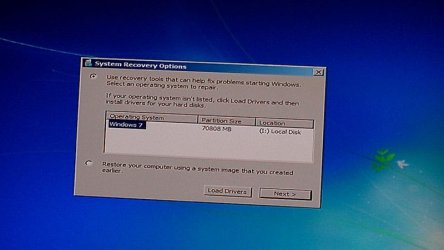
Before I pass out, with drive path changed to I: rather than D: because cables are all switched around:

Edit: with all cables unplugged, drive path is D: rather than I:.
 

Attachments

  • win7installer.jpg
    win7installer.jpg
    45.1 KB · Views: 10
Last edited:

My Computer My Computer

At a glance

Windows 7 Ultimate x64Intel i5 2500k8GB PC3-12800Radeon HD 6870 1GB
Computer type
PC/Desktop
Computer Manufacturer/Model Number
custom build
OS
Windows 7 Ultimate x64
CPU
Intel i5 2500k
Motherboard
ASRock P67 Professional
Memory
8GB PC3-12800
Graphics Card(s)
Radeon HD 6870 1GB
Hard Drives
1: WD Raptor 74 GB
2: Seagate Barracuda 320 GB
3: WD Caviar 500 GB
4: Seagate 1 TB
5: WD Blue 2 TB
6: WD Blue 3 TB
Antivirus
Microsoft Security Essentials
Browser
Firefox
With only the one drive hooked up that has Windows 7 install why are you choosing any path. A proper install media takes care of all that.
 

My Computer My Computer

At a glance

Windows 10 Pro. 64/ version 1709 Windows 7 Pr...Intel i7-6800K @ 4.3Corsair Platinum 16 gig @2400EVGA GTX 1070 OC
Computer type
PC/Desktop
Computer Manufacturer/Model Number
Home made Desktop
OS
Windows 10 Pro. 64/ version 1709 Windows 7 Pro/64
CPU
Intel i7-6800K @ 4.3
Motherboard
ASUS X-99 Deluxe II
Memory
Corsair Platinum 16 gig @2400
Graphics Card(s)
EVGA GTX 1070 OC
Monitor(s) Displays
Asus 27" LED LCD/VE278Q
Screen Resolution
1920-1080 or 1280-720 HDMI
Hard Drives
INTEL SSD 730-240 Gb Sata 3.0/
PSU
EVGA Platium 1200W
Case
Phanteks Luxe Tempered Glass 8 fans/ one radiator
Cooling
XSPC/ Water Cooled CPU
Keyboard
Das 4 Professional
Mouse
Logitech M705/MX Anywhere 2-S
Internet Speed
100 mbits
Antivirus
Microsoft Security Essentials/ Malwarebytes Premium 3.0/ SAS
Browser
I.E. 11 default/Firefox/ ISP Time Warner Cable/Spectrum
Other Info
LG BluRay Burner/
Sound system-KLipsch-THX/
Icy Dock ssd Hot Swap bays.

My Computer My Computer

At a glance

Win 10 Pro x64Intel I5-2500K @3.3GHz16GB G.Skill Ripjaws X (4x4GB)EVGA GeForce 750 Ti SC 2GB
Computer type
PC/Desktop
Computer Manufacturer/Model Number
Self Built
OS
Win 10 Pro x64
CPU
Intel I5-2500K @3.3GHz
Motherboard
Asrock P67 Extreme4
Memory
16GB G.Skill Ripjaws X (4x4GB)
Graphics Card(s)
EVGA GeForce 750 Ti SC 2GB
Sound Card
ASUS Xonar DG 5.1 Channels 24-bit 96KHz PCI Interface Sound
Monitor(s) Displays
auria eq2367
Screen Resolution
1920 x 1080
Hard Drives
250GB Samsung 850 EVO SSD
1TB WD Blue
1TB Hitachi
PSU
SeaSonic X 650W 80 Plus Gold
Case
Corsair Obsidian 750D
Cooling
Corsair H60, Three 140mm case fans
Keyboard
Logitech Wireless Keyboard K520
Mouse
Logitech Wireless Mouse M310
Internet Speed
Wave Broadband ~ 100 dn 5 up
Antivirus
Windows Defender, Malwarebytes Premium
Browser
Edge, IE11, Chrome
Other Info
Laptop specs: HP g7-1365dx /
CPU: AMD A6-3420M APU with Radeon(tm) HD Graphics /
RAM: Crucial 8Gb (2x4Gb) /
SSD: Crucial M4-CT128M4SSD2 ATA Device/ FW 000F /
GFX: AMD Radeon HD 6520G /
OS: Windows 10 Pro x64
No. No it is not.

I'm not choosing a path, that is what the installer shows. If I plug the same exact USB key into my netbook, I see C: for Windows.

I do not have an image back up. I have never made a back up. My C drive is a meager 74 GB, which is hardly enough for Windows 7 x64 with a modest number of programs in C:\Program Files (which is what my G and R drives are for; most of my programs, games, utilities, etc are installed to those two drives), and I have not made a back up since the XP days.
 

My Computer My Computer

At a glance

Windows 7 Ultimate x64Intel i5 2500k8GB PC3-12800Radeon HD 6870 1GB
Computer type
PC/Desktop
Computer Manufacturer/Model Number
custom build
OS
Windows 7 Ultimate x64
CPU
Intel i5 2500k
Motherboard
ASRock P67 Professional
Memory
8GB PC3-12800
Graphics Card(s)
Radeon HD 6870 1GB
Hard Drives
1: WD Raptor 74 GB
2: Seagate Barracuda 320 GB
3: WD Caviar 500 GB
4: Seagate 1 TB
5: WD Blue 2 TB
6: WD Blue 3 TB
Antivirus
Microsoft Security Essentials
Browser
Firefox
Show us a picture of Disk Management with only disc 2 with the Reserve and C partitions.
 

My Computer My Computer

At a glance

Windows 10 Pro. 64/ version 1709 Windows 7 Pr...Intel i7-6800K @ 4.3Corsair Platinum 16 gig @2400EVGA GTX 1070 OC
Computer type
PC/Desktop
Computer Manufacturer/Model Number
Home made Desktop
OS
Windows 10 Pro. 64/ version 1709 Windows 7 Pro/64
CPU
Intel i7-6800K @ 4.3
Motherboard
ASUS X-99 Deluxe II
Memory
Corsair Platinum 16 gig @2400
Graphics Card(s)
EVGA GTX 1070 OC
Monitor(s) Displays
Asus 27" LED LCD/VE278Q
Screen Resolution
1920-1080 or 1280-720 HDMI
Hard Drives
INTEL SSD 730-240 Gb Sata 3.0/
PSU
EVGA Platium 1200W
Case
Phanteks Luxe Tempered Glass 8 fans/ one radiator
Cooling
XSPC/ Water Cooled CPU
Keyboard
Das 4 Professional
Mouse
Logitech M705/MX Anywhere 2-S
Internet Speed
100 mbits
Antivirus
Microsoft Security Essentials/ Malwarebytes Premium 3.0/ SAS
Browser
I.E. 11 default/Firefox/ ISP Time Warner Cable/Spectrum
Other Info
LG BluRay Burner/
Sound system-KLipsch-THX/
Icy Dock ssd Hot Swap bays.
You can call it what you want but this,

370113d1440736668-windows-7-installer-sets-its-own-path-c-cannot-install-c-win7installer.jpg


Is a step from a recovery operation, not an install.
 

My Computer My Computer

At a glance

Win 10 Pro x64Intel I5-2500K @3.3GHz16GB G.Skill Ripjaws X (4x4GB)EVGA GeForce 750 Ti SC 2GB
Computer type
PC/Desktop
Computer Manufacturer/Model Number
Self Built
OS
Win 10 Pro x64
CPU
Intel I5-2500K @3.3GHz
Motherboard
Asrock P67 Extreme4
Memory
16GB G.Skill Ripjaws X (4x4GB)
Graphics Card(s)
EVGA GeForce 750 Ti SC 2GB
Sound Card
ASUS Xonar DG 5.1 Channels 24-bit 96KHz PCI Interface Sound
Monitor(s) Displays
auria eq2367
Screen Resolution
1920 x 1080
Hard Drives
250GB Samsung 850 EVO SSD
1TB WD Blue
1TB Hitachi
PSU
SeaSonic X 650W 80 Plus Gold
Case
Corsair Obsidian 750D
Cooling
Corsair H60, Three 140mm case fans
Keyboard
Logitech Wireless Keyboard K520
Mouse
Logitech Wireless Mouse M310
Internet Speed
Wave Broadband ~ 100 dn 5 up
Antivirus
Windows Defender, Malwarebytes Premium
Browser
Edge, IE11, Chrome
Other Info
Laptop specs: HP g7-1365dx /
CPU: AMD A6-3420M APU with Radeon(tm) HD Graphics /
RAM: Crucial 8Gb (2x4Gb) /
SSD: Crucial M4-CT128M4SSD2 ATA Device/ FW 000F /
GFX: AMD Radeon HD 6520G /
OS: Windows 10 Pro x64
You are correct Derek.
If one follows the instruction that have been given I don't know how one get to using the Recovery option.
 

My Computer My Computer

At a glance

Windows 10 Pro. 64/ version 1709 Windows 7 Pr...Intel i7-6800K @ 4.3Corsair Platinum 16 gig @2400EVGA GTX 1070 OC
Computer type
PC/Desktop
Computer Manufacturer/Model Number
Home made Desktop
OS
Windows 10 Pro. 64/ version 1709 Windows 7 Pro/64
CPU
Intel i7-6800K @ 4.3
Motherboard
ASUS X-99 Deluxe II
Memory
Corsair Platinum 16 gig @2400
Graphics Card(s)
EVGA GTX 1070 OC
Monitor(s) Displays
Asus 27" LED LCD/VE278Q
Screen Resolution
1920-1080 or 1280-720 HDMI
Hard Drives
INTEL SSD 730-240 Gb Sata 3.0/
PSU
EVGA Platium 1200W
Case
Phanteks Luxe Tempered Glass 8 fans/ one radiator
Cooling
XSPC/ Water Cooled CPU
Keyboard
Das 4 Professional
Mouse
Logitech M705/MX Anywhere 2-S
Internet Speed
100 mbits
Antivirus
Microsoft Security Essentials/ Malwarebytes Premium 3.0/ SAS
Browser
I.E. 11 default/Firefox/ ISP Time Warner Cable/Spectrum
Other Info
LG BluRay Burner/
Sound system-KLipsch-THX/
Icy Dock ssd Hot Swap bays.
I've said already that I'm trying to repair Windows, not do a clean install.

I do not have a restore point or a back up or any such thing. I am picking the option to attempt to repair Windows from the installer.

It is finding my Windows installation at an erroneous location because the installer itself is screwing up the drive paths by insisting that the installer is drive C.

Also, you've seen my disk management screenshot with every disk there is, the rest are daemon drives and my physical yet not functional DVD drive.

I'm guessing I'm asking in the wrong place and should take it up with support from my motherboard manufacturer.

---

Edit: For giggles, I decided to see if the in-Windows repair method would actually behave properly despite the wonky behavior of USB mounting, and I hit a much more significant wall:

"There is not enough free space on partition (C:). A total of 16480 megabytes (MB) of free disk space is required. Try Disk Cleanup, or moving files to an external location such as a CD, DVD, or external hard drive, and then restart the installation."

Done all the cleanup I'm going to do on the drive, and am nowhere close to 16 GB free, so whatever. I'll either deal with this another time or just live with the installation being borked.
 
Last edited:

My Computer My Computer

At a glance

Windows 7 Ultimate x64Intel i5 2500k8GB PC3-12800Radeon HD 6870 1GB
Computer type
PC/Desktop
Computer Manufacturer/Model Number
custom build
OS
Windows 7 Ultimate x64
CPU
Intel i5 2500k
Motherboard
ASRock P67 Professional
Memory
8GB PC3-12800
Graphics Card(s)
Radeon HD 6870 1GB
Hard Drives
1: WD Raptor 74 GB
2: Seagate Barracuda 320 GB
3: WD Caviar 500 GB
4: Seagate 1 TB
5: WD Blue 2 TB
6: WD Blue 3 TB
Antivirus
Microsoft Security Essentials
Browser
Firefox
Back
Top