
Windows 7 is stuck in a continuous loop: startup repair.

nhoran

New member
Local time
12:21 AM
Messages
2
First off, hello. I'm not completely sure where I'm suppose to place this particular article but I'm assuming posting it into the threads might be good enough.

I've owned an ASUS laptop, model X54C for a year and it's currently running on windows 7.

Yesterday I spent the entire day working on assignments and skyping friends. I've recently completed three assignments but stupidly I didn't save it to a USB key (figures the one time I didn't my laptop breaks down). When I turned it on this morning to retrieve the files, it booted up then went to this screen (startup repair):
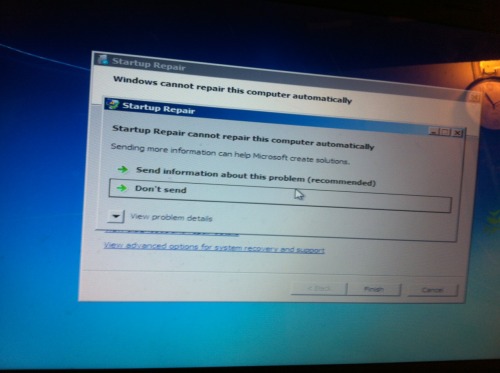
tumblr_mtl4enbsA91sasan7o1_500.jpg


As you can imagine, I sent the information then shut down the laptop and restarted it.

I attempted going through the safe mode by pressing f8. Although the options all came up on the screen, when I pressed onto safemode it brought me back to the blue screen and the pop up.

After searching around for a little bit, I quickly found that other people had this problem. At this point I've spent three hours going through different solutions.

So I'm not suggested the same solutions I've already tried, here is a list of what I've already tried:
  • Disabling the system repair
  • Command Prompt
  • Waiting for extended periods of time to attempt reboot and log on.
  • Safe mode.
  • This tutorial.

As I have assignments on my laptop and plenty of photos, I need to keep my files on and not restore my laptop to original settings, or anything of the sort.

Until I have a solution, I'm staying at home to restart all of my assignments.

-- If anybody can offer any sort of advice it would be greatly appreciated.
Cheers.
 

My Computer My Computer

At a glance

Windows 7, 32bit
Computer type
PC/Desktop
Computer Manufacturer/Model Number
Asus
OS
Windows 7, 32bit
Now first thing is dont panic, as long as your HDD has not failed then all your files are there and recoverable

Have a read through this thread, it basically covers pretty much all options to get the system working again
http://www.sevenforums.com/tutorials/219533-troubleshooting-windows-7-failure-boot.html

If you need your files in a hurry and dont have time to fix your machine then you can transfer your files to a usb drive if you have one
you have two options to do this either from a command prompt or from a bootable linux disk (this is probably easiest but will require access to another machine)
this will explain how http://www.sevenforums.com/tutorial...ate-live-cd-dvd-usb-use-emergency-backup.html
 

My Computer My Computer

At a glance

Win7 Ultimate X64Intel i5 3570K8GB DDR3 1600Onboard
Computer type
PC/Desktop
Computer Manufacturer/Model Number
Pauly Special
OS
Win7 Ultimate X64
CPU
Intel i5 3570K
Motherboard
Gigabyte Z77X-DS3H
Memory
8GB DDR3 1600
Graphics Card(s)
Onboard
Sound Card
Onboard
Screen Resolution
1280x1024
Hard Drives
Samsung 840 Evo SSD (OS)
1TB Spinner (Data)
PSU
800W Arctic
Case
Cooler Master
Cooling
3x120mm Fans
Keyboard
MS Wireless
Mouse
MS Wireless
Internet Speed
20M
One thing you could try, no promises this will work, but did you try to disable driver signature enforcement? Press F8 on start up and it is one of the options, if that is the solution there is ways to make windows start without driver signature enforcement all the time. Good luck!
 

My Computer My Computer

At a glance

Windows 7 Ultimate x64Intel i7-4770k OCed to 4.3ghzCorsair Vengeance 1600mhz 8GBRadeon HD7950 x2 in CrossfireX
Computer type
PC/Desktop
Computer Manufacturer/Model Number
Custom Built
OS
Windows 7 Ultimate x64
CPU
Intel i7-4770k OCed to 4.3ghz
Motherboard
Gigabyte GA-Z87X-OC
Memory
Corsair Vengeance 1600mhz 8GB
Graphics Card(s)
Radeon HD7950 x2 in CrossfireX
Sound Card
Realtek High Definition
Monitor(s) Displays
AOC 2243w
Screen Resolution
1920x1080
Hard Drives
1TB WD Black
1TB WD Green
PSU
Corsair HX850
Case
Corsair Obsidian 800D
Cooling
Corsair H80i
Keyboard
Boring HP need to upgrade
Mouse
Razer Deathadder 2013 edition
Internet Speed
30mb/s down 5mb/s up
Antivirus
AVG
Browser
Chrome
Hello!

Thanks to the two that did answer my questions. However, I ended up needing to change the entire hard drive all together. I'm not sure what caused the sudden damage to it since I hadn't moved my laptop from its spot on my desk for a week or two, but whatever had, had managed to damage it to the point of no repair.

The problem is solved. I've changed all of my files to the new hard drive, and I'm slowly getting back into the work of things.

Thank you so much!

This problem is closed.
 

My Computer My Computer

At a glance

Windows 7, 32bit
Computer type
PC/Desktop
Computer Manufacturer/Model Number
Asus
OS
Windows 7, 32bit
Hello!

Thanks to the two that did answer my questions. However, I ended up needing to change the entire hard drive all together. I'm not sure what caused the sudden damage to it since I hadn't moved my laptop from its spot on my desk for a week or two, but whatever had, had managed to damage it to the point of no repair.

The problem is solved. I've changed all of my files to the new hard drive, and I'm slowly getting back into the work of things.

Thank you so much!

This problem is closed.
Sorry I didn't get to help you with your problem. But I'm glad you got it fixed.

Also,

Welcome to SevenForums!
 

My Computer My Computer

At a glance

Windows 8 64bit ProfessionalIntel Q9400 Quad Core 2.66GhzG.Skill 4GB DDR3-1600NVidia GeForce 560GTX
Computer type
PC/Desktop
Computer Manufacturer/Model Number
Custom Built
OS
Windows 8 64bit Professional
CPU
Intel Q9400 Quad Core 2.66Ghz
Motherboard
Gigabyte
Memory
G.Skill 4GB DDR3-1600
Graphics Card(s)
NVidia GeForce 560GTX
Sound Card
On-board
Monitor(s) Displays
24" LCD
Screen Resolution
1920x1080
Hard Drives
160GB WD
WD Caviar Black 640GB
WD 500GB
WD 1TB
WD 1TB
PSU
Cooler Master 1300W Silent Pro
Case
Sunbeam Transformer Black
Cooling
Fans
Keyboard
Logitech G15 (Original Screen + 18G Keys)
Mouse
Logitech MX518
Internet Speed
10mbit up/down Fiber Optic
Browser
FireFox / Chrome
Other Info
SF is amazing!
Back
Top