Solved Windows 7 Network Window View Settings keep Changing by Themselves!!

Tweakit

New member
Power User
Local time
3:49 PM
Messages
75
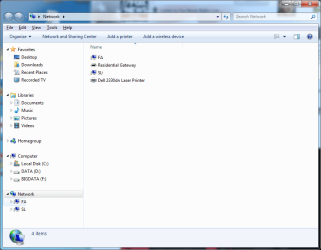
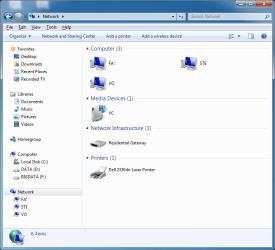
My computer is stable and error free except for the following quirky annoyance. When I open the network window the usual default settings make it look like the 1st attached picture. That's expected but quite often I’ll open it up and it will instead look like the 2nd attached picture which is undesired and unexpected. Sometimes the navigation pain will also disappear! No problem, I just go into the view settings and organize button and fix things up. The problem is that it doesn’t last long before the settings get messed up again! I’m not doing anything that I’m aware of to change the settings but it happens a few times a week all by itself!!:confused: I also notice a similar change of settings with the “uninstall a program” window and the “uninstall an update window.” Again, the settings can be corrected but what I can’t figure out is why or what is changing them to the non-standard appearance and how I can keep these settings the way I last left them.
Is there a fix for this quirky annoyance??
 

Attachments
  • EX1.png
    EX1.png
    89.7 KB · Views: 2
  • EX2.png
    EX2.png
    90.7 KB · Views: 1

My Computer

Computer type
PC/Desktop
Computer Manufacturer/Model Number
Custom Build
OS
Windows 7 professional 64 bit
CPU
i7-870
Motherboard
Gigabyte GA-P55-USB3 (rev 2)
Memory
G.Skill F3-10666CL9D-8GBRL; (8GB)
Graphics Card(s)
Radeon HD4670
Sound Card
on board
Monitor(s) Displays
Dell U2311H plus ASUS PB238
Screen Resolution
1080P (dual monitors)
Hard Drives
VelociRaptor WD1500HLHX 150GB (system)
2TB Samsung spinpoint (data)
596GB WD caviar blue (data)
PSU
FSP AS400 400W ATX2.31/EPS2.92
Case
Antec Sonata III 500
Cooling
CPU cooled by Rosewill HSF RCX-Z90-CP
Keyboard
Microsoft ergonomic PS-2
Mouse
Logitech M510
Internet Speed
very fast via cable
Antivirus
Microsoft Security Essentials
Browser
Chrome and IE10
Other Info
Also have hauppauge TV Card HVR-1600
CPU, case and GPU Fans are controlled by SpeedFan.

My Computer

Computer type
PC/Desktop
Computer Manufacturer/Model Number
Custom Built
OS
Windows 10 Pro
CPU
AMD Ryzen 5 2400G Processor with Radeon RX Vega 11 Graphics
Motherboard
ASRock X470 Master SLI/AC AM4 AMD Promontory X470 SATA 6Gb/s
Memory
G.SKILL Ripjaws V Series 16GB (2 x 8GB) 288-Pin DDR4 SDRAM D
Graphics Card(s)
2047MB NVIDIA GeForce GTX 1060 6GB (EVGA)
Sound Card
Motherboard Built in
Monitor(s) Displays
Acer R240HY bidx 23.8-Inch IPS HDMI DVI VGA (1920 x 1080) Wi
Screen Resolution
1920 x 1080
Hard Drives
1TB Sandisk SSD PLUS (Main drive)
500 GB Seagate 7200 RPM (Games)
500 GB Western Digital 7200 RPM (Virtual Machines)
PSU
CORSAIR TX Series TX650M 650W 80+ Gold Modular Power Supply
Case
CORSAIR CARBIDE SPEC-02 Mid-Tower Gaming Case, Red LED Fan
Cooling
220mm, two 120mm, and four 60mm fans
Keyboard
Wired Dell keyboard
Mouse
Wireless Logitech mouse
Internet Speed
250mb down, 30mb up
Antivirus
Panda Cloud Antivirus
Browser
Chrome-ish x64
Other Info
Your awesome for reading this.
Please Confirm

Just want to make sure I understand. I should go to control panel-Appearance and Personalization-folder options; select view tab as attached and click "restore defaults" at lower right. Is this your suggestion?
 

Attachments

  • ss1.png
    ss1.png
    45.2 KB · Views: 39

My Computer

Computer type
PC/Desktop
Computer Manufacturer/Model Number
Custom Build
OS
Windows 7 professional 64 bit
CPU
i7-870
Motherboard
Gigabyte GA-P55-USB3 (rev 2)
Memory
G.Skill F3-10666CL9D-8GBRL; (8GB)
Graphics Card(s)
Radeon HD4670
Sound Card
on board
Monitor(s) Displays
Dell U2311H plus ASUS PB238
Screen Resolution
1080P (dual monitors)
Hard Drives
VelociRaptor WD1500HLHX 150GB (system)
2TB Samsung spinpoint (data)
596GB WD caviar blue (data)
PSU
FSP AS400 400W ATX2.31/EPS2.92
Case
Antec Sonata III 500
Cooling
CPU cooled by Rosewill HSF RCX-Z90-CP
Keyboard
Microsoft ergonomic PS-2
Mouse
Logitech M510
Internet Speed
very fast via cable
Antivirus
Microsoft Security Essentials
Browser
Chrome and IE10
Other Info
Also have hauppauge TV Card HVR-1600
CPU, case and GPU Fans are controlled by SpeedFan.
No that is something else. You could do reset folders. Restore defaults is for the advanced settings.


I suggest viewing the tutorial and downloading the bat file to do it. After downloading it, right click and run as administrator. I believe it covers more then what that does there.

My above post is a link. Click it to view the tutorial.
 

My Computer

Computer type
PC/Desktop
Computer Manufacturer/Model Number
Custom Built
OS
Windows 10 Pro
CPU
AMD Ryzen 5 2400G Processor with Radeon RX Vega 11 Graphics
Motherboard
ASRock X470 Master SLI/AC AM4 AMD Promontory X470 SATA 6Gb/s
Memory
G.SKILL Ripjaws V Series 16GB (2 x 8GB) 288-Pin DDR4 SDRAM D
Graphics Card(s)
2047MB NVIDIA GeForce GTX 1060 6GB (EVGA)
Sound Card
Motherboard Built in
Monitor(s) Displays
Acer R240HY bidx 23.8-Inch IPS HDMI DVI VGA (1920 x 1080) Wi
Screen Resolution
1920 x 1080
Hard Drives
1TB Sandisk SSD PLUS (Main drive)
500 GB Seagate 7200 RPM (Games)
500 GB Western Digital 7200 RPM (Virtual Machines)
PSU
CORSAIR TX Series TX650M 650W 80+ Gold Modular Power Supply
Case
CORSAIR CARBIDE SPEC-02 Mid-Tower Gaming Case, Red LED Fan
Cooling
220mm, two 120mm, and four 60mm fans
Keyboard
Wired Dell keyboard
Mouse
Wireless Logitech mouse
Internet Speed
250mb down, 30mb up
Antivirus
Panda Cloud Antivirus
Browser
Chrome-ish x64
Other Info
Your awesome for reading this.
Thanks andrew129260. I didn’t realize your post had a link but I’ve been there now. I haven’t run the batch file since it sounds like it simply automates the process of setting all folder views to their default settings. If I’m wrong about that, please let me know.
Instead, I went to the folders in question and selected tools-folder options-View and under Folder views, I pressed Reset Folders. As expected, this returned the view settings to the normal expected view. The problem is that it didn’t stay like that! When I booted up the next morning the Network View looked like the 2nd screen shot in my opening post! A mere few hours later it returned itself to normal! It’s as though there is a gremlin in the computer that insists on spontaneously messing with the folder view options. Clearly, I can easily restore defaults, but the issue is getting those default settings to stay put! Again if running the bat file will do more than automate the reset process then let me know and I’ll give it a try. Thanks again and help if you can!
 

My Computer

Computer type
PC/Desktop
Computer Manufacturer/Model Number
Custom Build
OS
Windows 7 professional 64 bit
CPU
i7-870
Motherboard
Gigabyte GA-P55-USB3 (rev 2)
Memory
G.Skill F3-10666CL9D-8GBRL; (8GB)
Graphics Card(s)
Radeon HD4670
Sound Card
on board
Monitor(s) Displays
Dell U2311H plus ASUS PB238
Screen Resolution
1080P (dual monitors)
Hard Drives
VelociRaptor WD1500HLHX 150GB (system)
2TB Samsung spinpoint (data)
596GB WD caviar blue (data)
PSU
FSP AS400 400W ATX2.31/EPS2.92
Case
Antec Sonata III 500
Cooling
CPU cooled by Rosewill HSF RCX-Z90-CP
Keyboard
Microsoft ergonomic PS-2
Mouse
Logitech M510
Internet Speed
very fast via cable
Antivirus
Microsoft Security Essentials
Browser
Chrome and IE10
Other Info
Also have hauppauge TV Card HVR-1600
CPU, case and GPU Fans are controlled by SpeedFan.

My Computer

Computer type
PC/Desktop
Computer Manufacturer/Model Number
Custom Built
OS
Windows 10 Pro
CPU
AMD Ryzen 5 2400G Processor with Radeon RX Vega 11 Graphics
Motherboard
ASRock X470 Master SLI/AC AM4 AMD Promontory X470 SATA 6Gb/s
Memory
G.SKILL Ripjaws V Series 16GB (2 x 8GB) 288-Pin DDR4 SDRAM D
Graphics Card(s)
2047MB NVIDIA GeForce GTX 1060 6GB (EVGA)
Sound Card
Motherboard Built in
Monitor(s) Displays
Acer R240HY bidx 23.8-Inch IPS HDMI DVI VGA (1920 x 1080) Wi
Screen Resolution
1920 x 1080
Hard Drives
1TB Sandisk SSD PLUS (Main drive)
500 GB Seagate 7200 RPM (Games)
500 GB Western Digital 7200 RPM (Virtual Machines)
PSU
CORSAIR TX Series TX650M 650W 80+ Gold Modular Power Supply
Case
CORSAIR CARBIDE SPEC-02 Mid-Tower Gaming Case, Red LED Fan
Cooling
220mm, two 120mm, and four 60mm fans
Keyboard
Wired Dell keyboard
Mouse
Wireless Logitech mouse
Internet Speed
250mb down, 30mb up
Antivirus
Panda Cloud Antivirus
Browser
Chrome-ish x64
Other Info
Your awesome for reading this.
OK, I'll give this a try. About the bat file though; it looks like all it does is to delete several registry keys.
Is that right?
Are they then regenerated when windows restarts?
 

My Computer

Computer type
PC/Desktop
Computer Manufacturer/Model Number
Custom Build
OS
Windows 7 professional 64 bit
CPU
i7-870
Motherboard
Gigabyte GA-P55-USB3 (rev 2)
Memory
G.Skill F3-10666CL9D-8GBRL; (8GB)
Graphics Card(s)
Radeon HD4670
Sound Card
on board
Monitor(s) Displays
Dell U2311H plus ASUS PB238
Screen Resolution
1080P (dual monitors)
Hard Drives
VelociRaptor WD1500HLHX 150GB (system)
2TB Samsung spinpoint (data)
596GB WD caviar blue (data)
PSU
FSP AS400 400W ATX2.31/EPS2.92
Case
Antec Sonata III 500
Cooling
CPU cooled by Rosewill HSF RCX-Z90-CP
Keyboard
Microsoft ergonomic PS-2
Mouse
Logitech M510
Internet Speed
very fast via cable
Antivirus
Microsoft Security Essentials
Browser
Chrome and IE10
Other Info
Also have hauppauge TV Card HVR-1600
CPU, case and GPU Fans are controlled by SpeedFan.
Last edited:

My Computer

Computer type
Laptop
Computer Manufacturer/Model Number
Employer provided Dell Latitude
OS
W7 Pro SP1 64bit
CPU
i7
Memory
8GB
Graphics Card(s)
Intel HD Graphics
Hard Drives
crappy SSD
Antivirus
Employer mandated Symantec Endpoint Protection
Browser
Pale Moon 64bit, IE11 64bit & Chrome 64bit
OK, Thanks much for the good information. I will give this a try and follow up with the results!
 

My Computer

Computer type
PC/Desktop
Computer Manufacturer/Model Number
Custom Build
OS
Windows 7 professional 64 bit
CPU
i7-870
Motherboard
Gigabyte GA-P55-USB3 (rev 2)
Memory
G.Skill F3-10666CL9D-8GBRL; (8GB)
Graphics Card(s)
Radeon HD4670
Sound Card
on board
Monitor(s) Displays
Dell U2311H plus ASUS PB238
Screen Resolution
1080P (dual monitors)
Hard Drives
VelociRaptor WD1500HLHX 150GB (system)
2TB Samsung spinpoint (data)
596GB WD caviar blue (data)
PSU
FSP AS400 400W ATX2.31/EPS2.92
Case
Antec Sonata III 500
Cooling
CPU cooled by Rosewill HSF RCX-Z90-CP
Keyboard
Microsoft ergonomic PS-2
Mouse
Logitech M510
Internet Speed
very fast via cable
Antivirus
Microsoft Security Essentials
Browser
Chrome and IE10
Other Info
Also have hauppauge TV Card HVR-1600
CPU, case and GPU Fans are controlled by SpeedFan.
I ran the bat file a few days ago. If the problem were still present, it would likely have returned by now so I’m pretty sure it’s fixed!
My thanks to andrew129260 and UsernameIssues for the detailed help with this.
Much appreciated!!
 

My Computer

Computer type
PC/Desktop
Computer Manufacturer/Model Number
Custom Build
OS
Windows 7 professional 64 bit
CPU
i7-870
Motherboard
Gigabyte GA-P55-USB3 (rev 2)
Memory
G.Skill F3-10666CL9D-8GBRL; (8GB)
Graphics Card(s)
Radeon HD4670
Sound Card
on board
Monitor(s) Displays
Dell U2311H plus ASUS PB238
Screen Resolution
1080P (dual monitors)
Hard Drives
VelociRaptor WD1500HLHX 150GB (system)
2TB Samsung spinpoint (data)
596GB WD caviar blue (data)
PSU
FSP AS400 400W ATX2.31/EPS2.92
Case
Antec Sonata III 500
Cooling
CPU cooled by Rosewill HSF RCX-Z90-CP
Keyboard
Microsoft ergonomic PS-2
Mouse
Logitech M510
Internet Speed
very fast via cable
Antivirus
Microsoft Security Essentials
Browser
Chrome and IE10
Other Info
Also have hauppauge TV Card HVR-1600
CPU, case and GPU Fans are controlled by SpeedFan.
You are welcome.

If you create/use/delete lots of folder names, then this problem will return. Just run the batch file again.

Each compressed (ZIPPED) file that you open via Windows (file) Explorer also clutters up this area of the registry.

In my opinion, MS should automatically remove the info pertaining to folders that have been removed.
 

My Computer

Computer type
Laptop
Computer Manufacturer/Model Number
Employer provided Dell Latitude
OS
W7 Pro SP1 64bit
CPU
i7
Memory
8GB
Graphics Card(s)
Intel HD Graphics
Hard Drives
crappy SSD
Antivirus
Employer mandated Symantec Endpoint Protection
Browser
Pale Moon 64bit, IE11 64bit & Chrome 64bit
No problem, have a great day!
 

My Computer

Computer type
PC/Desktop
Computer Manufacturer/Model Number
Custom Built
OS
Windows 10 Pro
CPU
AMD Ryzen 5 2400G Processor with Radeon RX Vega 11 Graphics
Motherboard
ASRock X470 Master SLI/AC AM4 AMD Promontory X470 SATA 6Gb/s
Memory
G.SKILL Ripjaws V Series 16GB (2 x 8GB) 288-Pin DDR4 SDRAM D
Graphics Card(s)
2047MB NVIDIA GeForce GTX 1060 6GB (EVGA)
Sound Card
Motherboard Built in
Monitor(s) Displays
Acer R240HY bidx 23.8-Inch IPS HDMI DVI VGA (1920 x 1080) Wi
Screen Resolution
1920 x 1080
Hard Drives
1TB Sandisk SSD PLUS (Main drive)
500 GB Seagate 7200 RPM (Games)
500 GB Western Digital 7200 RPM (Virtual Machines)
PSU
CORSAIR TX Series TX650M 650W 80+ Gold Modular Power Supply
Case
CORSAIR CARBIDE SPEC-02 Mid-Tower Gaming Case, Red LED Fan
Cooling
220mm, two 120mm, and four 60mm fans
Keyboard
Wired Dell keyboard
Mouse
Wireless Logitech mouse
Internet Speed
250mb down, 30mb up
Antivirus
Panda Cloud Antivirus
Browser
Chrome-ish x64
Other Info
Your awesome for reading this.
Back
Top