
Hello,
after much debate with my boss i convinced him to upgrade a few of our PCs to Windows 7 professionsal.
But I have a problem.....
all the icons in my accessories foler are not there and the links broken.
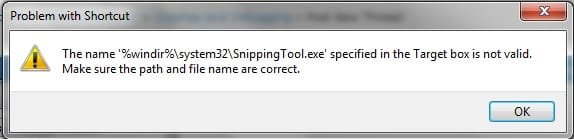
if i try to launch, say the snipping tool i get the following error message.....
the name '%windir&\snippingtool.exe' specified in the target box is not valid. Make sure the path and file name are correct.
if i go into the properties and change the path to C:\System32......
the application will run however the icon is still lost.
I also have a problem if i goto control panel>programs and features and click on the turn windows features on/off tab
does anyone know how to fix these issues???
they are very annoying especially as i have only had the OS installed for 1 DAY!!!!!!!!!
Thanks
Iain

hello
i have windows 7 professionsal
it has been installed for 1 day
all of a sudden i noticed the icons in my accessories folder had been lost and the programs wouldnt open.
i went to control panel>programs and features
clicked the turn windows features on or off tab and get the same type of error message im getting with the application folder
windows cannot find '%sysroot%\system32\optionalfeatures.exe' make sure you typed the name correctly then try again.
does anyone know how to resolve this issue???
it is very annoying!
Thanks
Iain
after much debate with my boss i convinced him to upgrade a few of our PCs to Windows 7 professionsal.
But I have a problem.....
all the icons in my accessories foler are not there and the links broken.
if i try to launch, say the snipping tool i get the following error message.....
the name '%windir&\snippingtool.exe' specified in the target box is not valid. Make sure the path and file name are correct.
if i go into the properties and change the path to C:\System32......
the application will run however the icon is still lost.
I also have a problem if i goto control panel>programs and features and click on the turn windows features on/off tab
does anyone know how to fix these issues???
they are very annoying especially as i have only had the OS installed for 1 DAY!!!!!!!!!
Thanks
Iain
hello
i have windows 7 professionsal
it has been installed for 1 day
all of a sudden i noticed the icons in my accessories folder had been lost and the programs wouldnt open.
i went to control panel>programs and features
clicked the turn windows features on or off tab and get the same type of error message im getting with the application folder
windows cannot find '%sysroot%\system32\optionalfeatures.exe' make sure you typed the name correctly then try again.
does anyone know how to resolve this issue???
it is very annoying!
Thanks
Iain
Attachments
Last edited by a moderator:
My Computer
- OS
- windows 7 pro
