
Solved Windows 7 screwed up partition letters

sdt

New member
Local time
9:52 PM
Messages
6
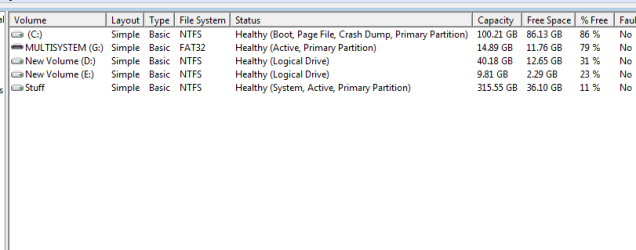
the partition details of my drive are attached.
it is a single 500 gb disk..


as you can see c: is set as boot,pagefile,crash dump,primary

and a partition is called Stuff it is set as System,Active

now the problem is that

1) how can i shift system and active to c: ?
2) why didnt windows 7 assign a drive letter to partition called stuff during installation?
and why is it hidden??

also when i was re installing xp its setup showed.. c: as f: and now i cant even go back to xp.

can someone help?

thanks
 

Attachments
  • partition.png
    partition.png
    6.4 KB · Views: 15
Last edited:

My Computer My Computer

At a glance

windows 7 x64
Computer type
PC/Desktop
OS
windows 7 x64
why didnt windows 7 assign a drive letter to partition called stuff during installation?
and why is it hidden??

The answer to both - because it is the system partition.

You can make C system if you like.

Very quick with commands, but might be easier for you to use easybvd.

http://www.sevenforums.com/tutorials/209885-bootmgr-move-c-easybcd.html

It is normal for windows (xp ) installer to show drive letters differently.
 

My Computers My Computers

  • At a glance

    7 X64i5 84002x8gb 3200mhz
    Computer type
    PC/Desktop
    OS
    7 X64
    CPU
    i5 8400
    Motherboard
    gigabyte b365m ds3h
    Memory
    2x8gb 3200mhz
    Hard Drives
    various
    PSU
    pure power 11 400w cm
    Case
    Coolermaster
    Cooling
    cryorig m9i
  • At a glance

    7x64g54008gb ddr4 2400
    Computer type
    PC/Desktop
    OS
    7x64
    CPU
    g5400
    Motherboard
    ga b365m ds3h
    Memory
    8gb ddr4 2400
    PSU
    xfx pro 450w
  • Like
Reactions: sdt
why didnt windows 7 assign a drive letter to partition called stuff during installation?
and why is it hidden??

The answer to both - because it is the system partition.

You can make C system if you like.

Very quick with commands, but might be easier for you to use easybvd.

http://www.sevenforums.com/tutorials/209885-bootmgr-move-c-easybcd.html

It is normal for windows (xp ) installer to show drive letters differently.


that was very useful. the active partition is now c:

the system partition is still being shown as stuff partition, how can this be moved to c:?
 

My Computer My Computer

At a glance

windows 7 x64
Computer type
PC/Desktop
OS
windows 7 x64
Mark stuff inactive:

Rt click it in disk mgmt and give it a letter, e.g S

Elevated command:

diskpart
sel vol S
inact
exi

Then reboot
 

My Computers My Computers

  • At a glance

    7 X64i5 84002x8gb 3200mhz
    Computer type
    PC/Desktop
    OS
    7 X64
    CPU
    i5 8400
    Motherboard
    gigabyte b365m ds3h
    Memory
    2x8gb 3200mhz
    Hard Drives
    various
    PSU
    pure power 11 400w cm
    Case
    Coolermaster
    Cooling
    cryorig m9i
  • At a glance

    7x64g54008gb ddr4 2400
    Computer type
    PC/Desktop
    OS
    7x64
    CPU
    g5400
    Motherboard
    ga b365m ds3h
    Memory
    8gb ddr4 2400
    PSU
    xfx pro 450w
Mark stuff inactive:

Rt click it in disk mgmt and give it a letter, e.g S

Elevated command:

diskpart
sel vol S
inact
exi

Then reboot

it is inactive. i marked it h: it is showing it to be inactive but system still. safe to reboot now?
 

My Computer My Computer

At a glance

windows 7 x64
Computer type
PC/Desktop
OS
windows 7 x64
Yes, reboot
 

My Computers My Computers

  • At a glance

    7 X64i5 84002x8gb 3200mhz
    Computer type
    PC/Desktop
    OS
    7 X64
    CPU
    i5 8400
    Motherboard
    gigabyte b365m ds3h
    Memory
    2x8gb 3200mhz
    Hard Drives
    various
    PSU
    pure power 11 400w cm
    Case
    Coolermaster
    Cooling
    cryorig m9i
  • At a glance

    7x64g54008gb ddr4 2400
    Computer type
    PC/Desktop
    OS
    7x64
    CPU
    g5400
    Motherboard
    ga b365m ds3h
    Memory
    8gb ddr4 2400
    PSU
    xfx pro 450w
Any reason why you cut off the drive map so we don't even know which HD those partitions are on? Disk Management - Post a Screen Capture Image - Windows 7 Help Forums

Would be nice to see it as there may be other problems.

BTW you lose the REpair console from F8 Boot Tools menu when you move the System files manually which is why it's best to use Startup Repair - Run up to 3 Separate Times to cover all parameters.

thanks problem was already solved took me time to reply. there is only 1 500gb disk besides a pendrive thats why half a screenshot.
 

My Computer My Computer

At a glance

windows 7 x64
Computer type
PC/Desktop
OS
windows 7 x64
Back
Top