
soundandfission
New member
- Local time
- 7:14 AM
- Messages
- 1
Hi there, I am hoping someone could help me out or send me to a similar thread that has had a similar problem to what I am having.
Yesterday, I installed SWTOR on my Dell Optiplex 760 desktop forgetting that my monitor could not support the graphics. Once the screen went black with a message stating it could not support it, I restarted the computer. Now the computer is stuck in an infinite loop on this systems restore program called "Genuine Windows Software".
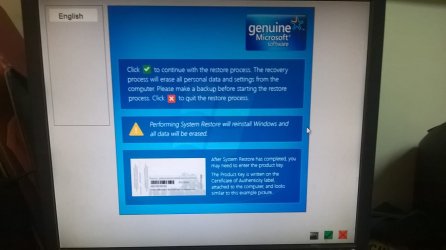
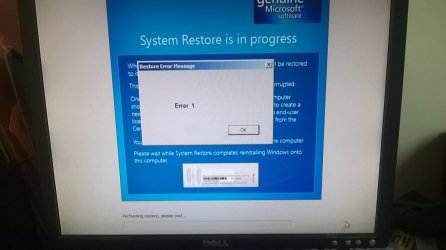
When I click the green boxed check on the lower right hand side, it pulls up a display box that reads "Error 1". When I click okay, it restarts the computer and goes to the same thing again! When I click the red boxed x, it restarts the computer and sends me back to the same thing again!
I tried going through safe mode, safe mode with networking, safe mode with command prompt, and when I do, it loads like it is about to go through safe mode, but then reroutes back to the same genuine windows software screen.
I can only open command prompt once I get to the genuine software screen. I typed in c: and I got a message that said "The volume does not contain a recognized file system. Please make sure that all required file system drivers are loaded and that the volume is not corrupted."

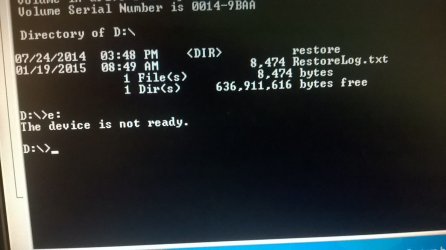
I type in d: and it work s. So I type in dir and it says "volume in drive D is system"
Directory of D:\
07/24/2014 03:48 PM <DIR> restore
01/19/2015 08:49 AM 8,474 RestoreLog.text
1 File (s) 8,474 bytes
1 Dir(s). 636,911,616 bytes free
When I tried typing e: , it said device was not ready.
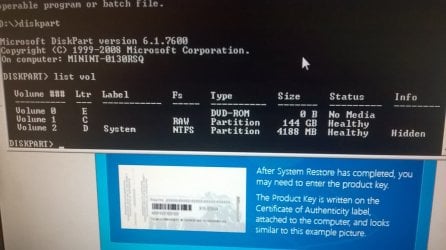
I typed in disk part and then list vol and got,
Volume ### Ltr. Label. Fs. Type. Size status. Info
Volume 0. E. DVD-ROM 0 B. No media
Volume 1. C. RAW. Partition. 144 GB. healthy
Volume 2. D. System. NTFS. Partition. 4188 MB. Healthy. Hidden
Is there anything else I can do? I am going nuts trying to figure this out. I can't even get to the screen where you can choose a previous restore date to go back to. Has anyone else gone through this or know how to fix it? Is it a virus or just a defect in the Windows 7 operating system? Do I need to just go buy Windows 7 home premium and reinstall it? ( the computer is a refurbished model that already had windows 7 installed).
I am more than willing to give more information if needed to help fix this. Thank you all for your time.
Yesterday, I installed SWTOR on my Dell Optiplex 760 desktop forgetting that my monitor could not support the graphics. Once the screen went black with a message stating it could not support it, I restarted the computer. Now the computer is stuck in an infinite loop on this systems restore program called "Genuine Windows Software".
When I click the green boxed check on the lower right hand side, it pulls up a display box that reads "Error 1". When I click okay, it restarts the computer and goes to the same thing again! When I click the red boxed x, it restarts the computer and sends me back to the same thing again!
I tried going through safe mode, safe mode with networking, safe mode with command prompt, and when I do, it loads like it is about to go through safe mode, but then reroutes back to the same genuine windows software screen.
I can only open command prompt once I get to the genuine software screen. I typed in c: and I got a message that said "The volume does not contain a recognized file system. Please make sure that all required file system drivers are loaded and that the volume is not corrupted."
I type in d: and it work s. So I type in dir and it says "volume in drive D is system"
Directory of D:\
07/24/2014 03:48 PM <DIR> restore
01/19/2015 08:49 AM 8,474 RestoreLog.text
1 File (s) 8,474 bytes
1 Dir(s). 636,911,616 bytes free
When I tried typing e: , it said device was not ready.
I typed in disk part and then list vol and got,
Volume ### Ltr. Label. Fs. Type. Size status. Info
Volume 0. E. DVD-ROM 0 B. No media
Volume 1. C. RAW. Partition. 144 GB. healthy
Volume 2. D. System. NTFS. Partition. 4188 MB. Healthy. Hidden
Is there anything else I can do? I am going nuts trying to figure this out. I can't even get to the screen where you can choose a previous restore date to go back to. Has anyone else gone through this or know how to fix it? Is it a virus or just a defect in the Windows 7 operating system? Do I need to just go buy Windows 7 home premium and reinstall it? ( the computer is a refurbished model that already had windows 7 installed).
I am more than willing to give more information if needed to help fix this. Thank you all for your time.
My Computer
- Computer type
- PC/Desktop
- Computer Manufacturer/Model Number
- Dell Optiplex 760
- OS
- Windows 7 home premium 64 bit
