Solved Windows 7 Ultimate Freezing NVIDIA Open GL Driver - exception

badstrref

New member
Local time
11:23 PM
Messages
4
I just got this new computer fixed up and I've had it for about three weeks. It has a quad core and a NVIDIA GeForce GTX 960 graphics card.

I have no way of telling when the thing is going to freeze, it seems to be completely random. When it does freeze however sometimes it'll just last for no more than five seconds, and other times it'll last for five minutes.. just frozen and unresponsive with the same repetitive noise reverberating in my headphones. Sometimes the sound does come through though but it's as if it's slowed down 1000 percent. Also if it lasts long enough the internet on my computer phases out as well.. which seems strange, because it gives me this error if it ends up lasting long enough. I also down graded from win10 to win7 when I first got the machine.. so I'm not sure if that had something to do with the problems I'm having now. My drivers are updated, I've checked several times.

"NVIDIA OpenGL Driver

Unable to recover from a kernel exception. The application must close.

Error Code 3 (subcode 2)"
 

Attachments
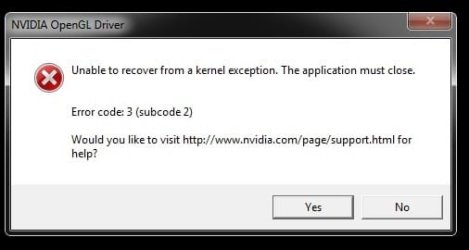
  • ERROR.jpg
    ERROR.jpg
    13.2 KB · Views: 25
Last edited:

My Computer My Computer

Computer type
PC/Desktop
Computer Manufacturer/Model Number
Custom
OS
Windows 7 Ultimate 64x
CPU
Quad Core Intel(R) i5-4589 CPU 3.30GHz
Memory
14 gigs? I think
Graphics Card(s)
NVIDIA GeForce GTX 960
Screen Resolution
1920x1080
Case
very case
Cooling
such cool
Mouse
dark grey fur and a long white tail
Internet Speed
good, I guess
Antivirus
yes
Other Info
I am a pleb.
You need to wipe the drive and do a clean install of 7, no more problems after that.

Tell us, where did you get this Windows 7 Ultimate installer, all the ones we see here are counterfeit or hacked.

Do you have a genuine key ?

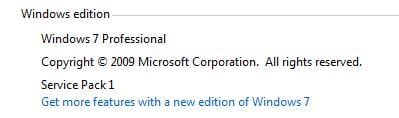
Where is Service Pack 1 ?

If not, we can`t help you. :(

Also, what is a GTC 960 (your specs need editing) :) The C is next to the X, happens all the time ;)
 

My Computer My Computer

Computer type
PC/Desktop
Computer Manufacturer/Model Number
Skylake Special #666
OS
Windows 10 Pro x64
CPU
Intel Core i7 6700K
Motherboard
Asus Sabertooth Z170 Mark 1
Memory
GSkill TridentZ RGB 16GB 3600 16-16-16-36
Graphics Card(s)
EVGA GTX 980 Ti SC x2
Sound Card
Realtek High Definition
Monitor(s) Displays
AOC G2460PG
Screen Resolution
1920 x 1080 144Hz
Hard Drives
Samsung 860 Pro 256GB, Seagate Barracuda 4TB x2
PSU
EVGA 1000 P2, EVGA White Custom Braided Cables
Case
Corsair Vengeance C70 Gunmetal Black
Cooling
Corsair H100i v2, Corsair ML120 x2, Thermal Grizzly Kryonaut
Keyboard
Logitech G910 Orion Spectrum
Mouse
Logitech G700s
Internet Speed
Verizon Fios Quantum Gateway 75/75
Antivirus
Windows Defender, Malwarebytes Free 3.8.3
Browser
Chrome
Other Info
Corsair SP120 x4, LG Blu-ray Drive, Durabrand HT-395 100 Watt Dolby Digital Amp, Corsair H2100 Wireless 7.1 Headset
The copy of windows ultimate I got was installed (apparently) by a technician, the guy who fixed my computer. It has a genuine key.. though it's possible that it's counterfeit or hacked, I don't really know.

I think you may be right, there are a few windows programs on my computer that appear to be corrupted. The install could be ****ed I guess.

The thing that bugs me a lot about this is the freezing is sporadic. I just turned my tower over on its side and doesn't seem to be giving me anymore issues. >.> It totally doesn't make sense to me, the reason I did it though is because I have this gigantic fan under the video card and it's weighing it down and causing it to bend.. just slightly, but I still feel like that's really bad.

I'll keep things posted, I really want to fix this problem permanently because it's crippling my computer when it does happen. I'm reinstalling a fresh version(from my own CD, premium home edition) soon.

I'm embarrassed to say this but I'm not sure what you mean by, "Where is service pack 1", where can I find that on my computer? In the windows folder somewhere?

Thanks for the help.
 
Last edited:

My Computer My Computer

Computer type
PC/Desktop
Computer Manufacturer/Model Number
Custom
OS
Windows 7 Ultimate 64x
CPU
Quad Core Intel(R) i5-4589 CPU 3.30GHz
Memory
14 gigs? I think
Graphics Card(s)
NVIDIA GeForce GTX 960
Screen Resolution
1920x1080
Case
very case
Cooling
such cool
Mouse
dark grey fur and a long white tail
Internet Speed
good, I guess
Antivirus
yes
Other Info
I am a pleb.
What I mean by that is, what don`t your specs says Windows 7 Ultimate Service Pack 1, all later Windows 7 installers have Service Pack 1 included, if not then you`d have to download it through windows update, which is a waste of time.

If someone installed windows for you, where is the Certificate of Authenticity ?

By law they have to affix one to the computer, if you bought windows it should come with one, that will have your activation key (25 digit alpha-numeric code) and it will also tell you what version of windows it`s for. Then you can either use your disc (if you have the right version) or download a fresh iso file and burn that to dvd, so you`ll have a brand new perfect Windows 7 installer DVD.

Here`s the site and a program to burn the iso file to dvd at no more then x4 speed. You need a blank dvd and a dvd burner. You want 7 Ultimate SP1 x64 if that`s what you have a key for.

Microsoft DigitalRiver Mirror

Free ISO Burner

and as far as that nvidia error message, download the latest drivers, version 361.43 and do a custom clean install of the video drivers.

Install the drivers and read every window and you`ll see exactly what I mean.

Drivers | GeForce

And how can you have 14 GB of memory ? That is the craziest number I`ve ever heard of, you`ll want to have 4, 8, 16, 32 etc, unless you have triple channel which is virtually extinct.

You can telll if you have Service Pack 1 by looking at the top of the Computer Properties page

Start>Right Click Computer>Click Properties............ Also, here`s a pic of a COA, which all XP, Vista, and Windows 7 PC`s should have.
 

Attachments

  • Capture.JPG
    Capture.JPG
    14.2 KB · Views: 15
  • COA-Certificate-of-Authenticity.gif
    COA-Certificate-of-Authenticity.gif
    707.8 KB · Views: 15

My Computer My Computer

Computer type
PC/Desktop
Computer Manufacturer/Model Number
Skylake Special #666
OS
Windows 10 Pro x64
CPU
Intel Core i7 6700K
Motherboard
Asus Sabertooth Z170 Mark 1
Memory
GSkill TridentZ RGB 16GB 3600 16-16-16-36
Graphics Card(s)
EVGA GTX 980 Ti SC x2
Sound Card
Realtek High Definition
Monitor(s) Displays
AOC G2460PG
Screen Resolution
1920 x 1080 144Hz
Hard Drives
Samsung 860 Pro 256GB, Seagate Barracuda 4TB x2
PSU
EVGA 1000 P2, EVGA White Custom Braided Cables
Case
Corsair Vengeance C70 Gunmetal Black
Cooling
Corsair H100i v2, Corsair ML120 x2, Thermal Grizzly Kryonaut
Keyboard
Logitech G910 Orion Spectrum
Mouse
Logitech G700s
Internet Speed
Verizon Fios Quantum Gateway 75/75
Antivirus
Windows Defender, Malwarebytes Free 3.8.3
Browser
Chrome
Other Info
Corsair SP120 x4, LG Blu-ray Drive, Durabrand HT-395 100 Watt Dolby Digital Amp, Corsair H2100 Wireless 7.1 Headset
Just a thought and if reinstalling Windows is not ideal for you, I saw that you mentioned that you had checked for the latest graphics drivers but I'm getting a feeling that you haven't performed a full uninstall, am I correct?

If yes then I would recommend that you run Revo Uninstaller, reboot and reinstall the Nvidia drivers.
 

My Computer My Computer

Computer type
PC/Desktop
Computer Manufacturer/Model Number
Custom build
OS
Windows 7 Home Premium
CPU
i5-3570k
Motherboard
ASUS Sabertooth z77
Memory
16 GB DDR3 G Skill Sniper
Graphics Card(s)
GIGABYTE GeForce GTX 970 GV-N970WF3OC-4GD
Monitor(s) Displays
ASUS ROG PG278Q
Screen Resolution
2560x1440@60Hz/120Hz/144Hz
Hard Drives
56GB KINGSTON SVP200S37A60G
512GB Crucial MX100
1863GB Seagate ST2000DM001-1CH164
2795GB Seagate ST3000DM001-9YN166
PSU
Corsair GS800
Case
Storm Trooper Stryker White
Keyboard
Logitech G910 Orion Spark
Mouse
Logitech G502
Antivirus
MSE
Browser
Firefox/Chrome
Other Info
Logitech G633
Logitech Mouse Matt
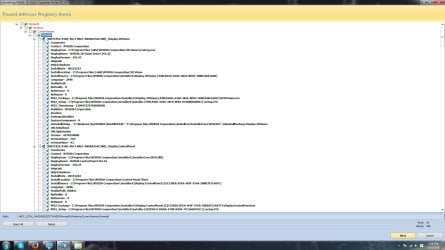
Is it this thing?

And also, thanks BorisTheAnimal, does that fix registry problems or something? I'll try that too.

I tried using that program, but I think it would be better for me to just use CCleaner because it automatically removes registry items that I don't need, but here it's asking me which ones I want to remove and I could remove something that I need.. :[

Sorry for asking so many questions, I have a screenshot of what I'm looking at.
 

Attachments

  • derp.jpg
    derp.jpg
    11.5 KB · Views: 10
  • delete nvidia drivers.jpg
    delete nvidia drivers.jpg
    153.5 KB · Views: 1
Last edited:

My Computer My Computer

Computer type
PC/Desktop
Computer Manufacturer/Model Number
Custom
OS
Windows 7 Ultimate 64x
CPU
Quad Core Intel(R) i5-4589 CPU 3.30GHz
Memory
14 gigs? I think
Graphics Card(s)
NVIDIA GeForce GTX 960
Screen Resolution
1920x1080
Case
very case
Cooling
such cool
Mouse
dark grey fur and a long white tail
Internet Speed
good, I guess
Antivirus
yes
Other Info
I am a pleb.
I'll mark this as solved for now.. I haven't experienced any issues after I reinstalled the drivers so maybe that did something. Thanks for all the help again.
 

My Computer My Computer

Computer type
PC/Desktop
Computer Manufacturer/Model Number
Custom
OS
Windows 7 Ultimate 64x
CPU
Quad Core Intel(R) i5-4589 CPU 3.30GHz
Memory
14 gigs? I think
Graphics Card(s)
NVIDIA GeForce GTX 960
Screen Resolution
1920x1080
Case
very case
Cooling
such cool
Mouse
dark grey fur and a long white tail
Internet Speed
good, I guess
Antivirus
yes
Other Info
I am a pleb.
Back
Top