
Solved Windows 7 Update Error Code 8000FFFF

Benjamin O

New member
Hello there. I'm running Windows 7 Home Premium SP1 64bit.
I've been having issues trying to update windows recently, so I've come requesting assistance.

The Error:
Code 8000FFFF

I've run SURT and SFC Scan, and the SFC scan detected corruption that it could not fix.
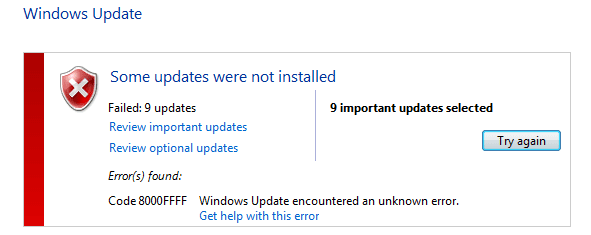
UpdateError.png

CBS.zip
https://www.dropbox.com/s/bieyidgcq9vgdga/CBS.zip?dl=0
[MediaFire download isn't working properly at the moment, so I have dropbox up]

My internet is slower than most so I only included the log files in the download, if there was something else specific or you need to look at all the files (152Mb zip) I can upload those.
EDIT: uploaded the full CBS.zip
 
Last edited:

My Computer

Computer type
Laptop
Computer Manufacturer/Model Number
ASUS - G75VW
OS
Windows 7 Home Premium SP1 64-bit
CPU
Intel i7-3610QM 2.30GHz (8 CPUs)
Memory
16GB DDR3
Graphics Card(s)
Nvidia GeForce GTX 660M
Screen Resolution
1920 x 1080
Hard Drives
SATA 750GB
Mouse
Gila Gaming Mouse
Internet Speed
Download: 1.50Mbits ~ Upload: 0.75Mbits ~ (On a good day)
Antivirus
Avast
Browser
Chrome
Hello Benjamin and welcome to Seven Forums.

My usual disclaimer: I'm not an expert at anything. :)
However, I recently began having problems with updates very similar to yours. I poked around and found out that a Windows Update from May 7 (KB3022345) was causing issues for a lot of people. See this previous Forum thread:

http://www.sevenforums.com/windows-...7-update-kb3022345-causing-corrupt-files.html

I uninstalled and hid the offending update and ran the Microsoft Fixit tool. It solved my problems.

https://support.microsoft.com/en-us/kb/971058

Another possibility that might help is if you have a System Restore Point from before the issues began. You could try restoring your computer to that earlier time.

http://www.sevenforums.com/tutorials/700-system-restore.html

Hopefully others will jump in with additional suggestions.
 

My Computer

Computer type
Laptop
Computer Manufacturer/Model Number
Sony Vaio VPCEB47GM Laptop
OS
Win 7 Pro 64-bit
CPU
Intel i5 2.4 Ghz
Memory
8GB DDR3
Graphics Card(s)
Intel HD 3000
Sound Card
IDT High Definition
Monitor(s) Displays
15.6 WGXA Anti-Glare LED
Screen Resolution
1280x800
Hard Drives
640Gb 7200rpm
Antivirus
MSE
Browser
Opera (primary) with IE9 backup
I currently do not have that particular windows update installed, and I have hidden it. I've also run the Fixit tool and the problem still persists.

Unfortunately, I do not have any restore points to speak of. Might there be something else I could try? I'd like to avoid a full repair install and/or clean install if possible.
 

My Computer

Computer type
Laptop
Computer Manufacturer/Model Number
ASUS - G75VW
OS
Windows 7 Home Premium SP1 64-bit
CPU
Intel i7-3610QM 2.30GHz (8 CPUs)
Memory
16GB DDR3
Graphics Card(s)
Nvidia GeForce GTX 660M
Screen Resolution
1920 x 1080
Hard Drives
SATA 750GB
Mouse
Gila Gaming Mouse
Internet Speed
Download: 1.50Mbits ~ Upload: 0.75Mbits ~ (On a good day)
Antivirus
Avast
Browser
Chrome
a 150MB+ CBS folder is going to take me a while to download over my dongle - I'll post back later once I've managed to get it!

Unfortunately the FFFF error is a specific one - that means that Windows really has no clue about what caused the problem :(

If you've not already included it, please upload the C:\Windows\windowsupdate.log file
 

My Computer

Computer type
Laptop
Computer Manufacturer/Model Number
Asus K52F or Lenovo B51-80
OS
Win 7 x64 Home Premium (and x86 VirtualBox VM)/Win10
CPU
i3 370M/i7 6500U
Motherboard
Asus/Lenovo
Memory
8GB - finally :)/8GB
Graphics Card(s)
it's an i3, dude!/dual Intel&nVidia
Sound Card
onboard
Monitor(s) Displays
15.6" built-in
Screen Resolution
1366x768/1920x1080
Hard Drives
750GB Seagate internal
Sundry external drives attached to other computers on the local network
1TB SSD on the Lenovo
PSU
n/a
Internet Speed
as much as I can get - usually on a dongle/phone, so <1MB/s
Antivirus
MSE/Defender
Browser
IE11/12/Edge/Chrome/FF(if I must)
Here's the CheckSUR summary (in part)
Code:
Summary:
Seconds executed: 2195
 Found 89 errors
  CSI Manifest Missing Total count: 24
  CBS MUM Missing Total count: 65
Unavailable repair files:
 winsxs\manifests\amd64_4c299f82247ab74adf4ebba8dbe0176b_31bf3856ad364e35_6.1.7601.23040_none_e0a5da7f24597591.manifest
 winsxs\manifests\amd64_36fd557704f3e2760250ebc94b9b54cb_31bf3856ad364e35_6.1.7601.18839_none_c3d8fd9bdd1f76e6.manifest
 winsxs\manifests\amd64_8fbd8aaca8533caf2d3bc5e5f99edd42_31bf3856ad364e35_6.1.7601.23040_none_95e9ed21753aecd8.manifest
 winsxs\manifests\amd64_4c206e8a10459f0fa97ccf7a242861b6_b77a5c561934e089_6.1.7601.22740_none_f4e1b759e0282f05.manifest
 winsxs\manifests\x86_microsoft-windows-p..ncetoolscommandline_31bf3856ad364e35_6.1.7601.23040_none_638fd7a7765109fc.manifest
 winsxs\manifests\amd64_4c1dd62fb224d029f779f59bdb7179fd_b03f5f7f11d50a3a_6.1.7601.22617_none_5677835ed7c69e8a.manifest
 winsxs\manifests\x86_microsoft-windows-tracedatahelper_31bf3856ad364e35_6.1.7601.23040_none_fecf2d3949aa3367.manifest
 winsxs\manifests\x86_microsoft-windows-ncrypt-dll_31bf3856ad364e35_6.1.7601.18738_none_5fd40dd14fead8db.manifest
 winsxs\manifests\amd64_4c253a075255396cf4b4e71b7514bba5_b03f5f7f11d50a3a_6.1.7601.18410_none_34ae4af8ee7d0555.manifest
 winsxs\manifests\amd64_7bfc0ce0d3d09029f65a1f3315df4d79_31bf3856ad364e35_6.1.7601.23040_none_4cbd20c89b382fb3.manifest
 winsxs\manifests\x86_microsoft-windows-ncrypt-dll_31bf3856ad364e35_6.1.7601.18714_none_5fe5ac814fde3b9d.manifest
 winsxs\manifests\amd64_526c83ee01c94ef35b4aa888ebbb9eaa_31bf3856ad364e35_6.1.7601.18839_none_4a2e23d1209b221b.manifest
 winsxs\manifests\amd64_edad7b3d0f76430ba8c403c066112bbc_31bf3856ad364e35_6.1.7601.23040_none_f3b42e00704a7bcc.manifest
 winsxs\manifests\x86_microsoft-windows-tracedatahelper_31bf3856ad364e35_6.1.7601.18839_none_fe598ad2307c2879.manifest
 winsxs\manifests\x86_microsoft-windows-ncrypt-dll_31bf3856ad364e35_6.1.7601.18839_none_5fd510014fe9ef59.manifest
 winsxs\manifests\x86_microsoft-windows-ncrypt-dll_31bf3856ad364e35_6.1.7601.18741_none_5fc23bdf4ff9436b.manifest
 winsxs\manifests\amd64_4c181ff20038bcd87d377c4fb4d4d626_31bf3856ad364e35_6.1.7601.22750_none_f4f4423c10bef1a2.manifest
 winsxs\manifests\x86_microsoft-windows-security-credssp_31bf3856ad364e35_6.1.7601.18839_none_c5aeebdeffdde587.manifest
 winsxs\manifests\x86_microsoft-windows-ncrypt-dll_31bf3856ad364e35_6.1.7601.18606_none_5ff27b1b4fd45533.manifest
 winsxs\manifests\x86_microsoft-windows-ncrypt-dll_31bf3856ad364e35_6.1.7601.18779_none_5fa9ce6b500a61f6.manifest
 winsxs\manifests\amd64_4c3559a12530bd75d085acd2e24958b9_31bf3856ad364e35_6.1.7601.22736_none_7e5b581a4a7f9e40.manifest
 winsxs\manifests\amd64_0a85f08bcff84692303182a348341c5a_31bf3856ad364e35_6.1.7601.18839_none_1360fc47fd44fd4d.manifest
 winsxs\manifests\x86_microsoft-windows-p..ncetoolscommandline_31bf3856ad364e35_6.1.7601.18839_none_631a35405d22ff0e.manifest
 winsxs\manifests\x86_microsoft-windows-msauditevtlog_31bf3856ad364e35_6.1.7601.18839_none_c93934bdd6bb5572.manifest
 servicing\packages\Package_112_for_KB3003743~31bf3856ad364e35~amd64~~6.1.1.1.mum
 servicing\packages\Package_112_for_KB3004394~31bf3856ad364e35~amd64~~6.1.1.0.mum
 servicing\packages\Package_112_for_KB3004394~31bf3856ad364e35~amd64~~6.1.2.0.mum
 servicing\packages\Package_112_for_KB3011780~31bf3856ad364e35~amd64~~6.1.1.5.mum
 servicing\packages\Package_112_for_KB3022345~31bf3856ad364e35~amd64~~6.1.1.2.mum
 servicing\packages\Package_112_for_KB3033929~31bf3856ad364e35~amd64~~6.1.1.1.mum
 servicing\packages\Package_115_for_KB3022345~31bf3856ad364e35~amd64~~6.1.1.2.mum
 servicing\packages\Package_117_for_KB3022345~31bf3856ad364e35~amd64~~6.1.1.2.mum
 servicing\packages\Package_119_for_KB3022345~31bf3856ad364e35~amd64~~6.1.1.2.mum
 servicing\packages\Package_134_for_KB2949927~31bf3856ad364e35~amd64~~6.1.1.5.mum
 servicing\packages\Package_135_for_KB2949927~31bf3856ad364e35~amd64~~6.1.1.5.mum
 servicing\packages\Package_135_for_KB3022345~31bf3856ad364e35~amd64~~6.1.1.2.mum
 servicing\packages\Package_136_for_KB2949927~31bf3856ad364e35~amd64~~6.1.1.5.mum
 servicing\packages\Package_137_for_KB2949927~31bf3856ad364e35~amd64~~6.1.1.5.mum
 servicing\packages\Package_138_for_KB2949927~31bf3856ad364e35~amd64~~6.1.1.5.mum
 servicing\packages\Package_139_for_KB2949927~31bf3856ad364e35~amd64~~6.1.1.5.mum
 servicing\packages\Package_139_for_KB3022345~31bf3856ad364e35~amd64~~6.1.1.2.mum
 servicing\packages\Package_13_for_KB2990214~31bf3856ad364e35~amd64~~6.1.1.38.mum
 servicing\packages\Package_140_for_KB2949927~31bf3856ad364e35~amd64~~6.1.1.5.mum
 servicing\packages\Package_140_for_KB3022345~31bf3856ad364e35~amd64~~6.1.1.2.mum
 servicing\packages\Package_142_for_KB3022345~31bf3856ad364e35~amd64~~6.1.1.2.mum
 servicing\packages\Package_143_for_KB3022345~31bf3856ad364e35~amd64~~6.1.1.2.mum
 servicing\packages\Package_144_for_KB3022345~31bf3856ad364e35~amd64~~6.1.1.2.mum
 servicing\packages\Package_145_for_KB3022345~31bf3856ad364e35~amd64~~6.1.1.2.mum
 servicing\packages\Package_146_for_KB2633952~31bf3856ad364e35~amd64~~6.1.1.0.mum
 servicing\packages\Package_146_for_KB3022345~31bf3856ad364e35~amd64~~6.1.1.2.mum
 servicing\packages\Package_146_for_KB3033929~31bf3856ad364e35~amd64~~6.1.1.1.mum
 servicing\packages\Package_147_for_KB2633952~31bf3856ad364e35~amd64~~6.1.1.0.mum
 servicing\packages\Package_148_for_KB2633952~31bf3856ad364e35~amd64~~6.1.1.0.mum
 servicing\packages\Package_148_for_KB3022345~31bf3856ad364e35~amd64~~6.1.1.2.mum
 servicing\packages\Package_149_for_KB2633952~31bf3856ad364e35~amd64~~6.1.1.0.mum
 servicing\packages\Package_149_for_KB3022345~31bf3856ad364e35~amd64~~6.1.1.2.mum
 servicing\packages\Package_14_for_KB2894844~31bf3856ad364e35~amd64~~6.1.1.1.mum
 servicing\packages\Package_14_for_KB2990214~31bf3856ad364e35~amd64~~6.1.1.38.mum
 servicing\packages\Package_14_for_KB3037574~31bf3856ad364e35~amd64~~6.1.1.0.mum
 servicing\packages\Package_150_for_KB2633952~31bf3856ad364e35~amd64~~6.1.1.0.mum
 servicing\packages\Package_150_for_KB3022345~31bf3856ad364e35~amd64~~6.1.1.2.mum
 servicing\packages\Package_151_for_KB2633952~31bf3856ad364e35~amd64~~6.1.1.0.mum
 servicing\packages\Package_151_for_KB3022345~31bf3856ad364e35~amd64~~6.1.1.2.mum
 servicing\packages\Package_152_for_KB2633952~31bf3856ad364e35~amd64~~6.1.1.0.mum
 servicing\packages\Package_152_for_KB3022345~31bf3856ad364e35~amd64~~6.1.1.2.mum
 servicing\packages\Package_153_for_KB2633952~31bf3856ad364e35~amd64~~6.1.1.0.mum
 servicing\packages\Package_154_for_KB2633952~31bf3856ad364e35~amd64~~6.1.1.0.mum
 servicing\packages\Package_155_for_KB2633952~31bf3856ad364e35~amd64~~6.1.1.0.mum
 servicing\packages\Package_156_for_KB2633952~31bf3856ad364e35~amd64~~6.1.1.0.mum
 servicing\packages\Package_156_for_KB3033929~31bf3856ad364e35~amd64~~6.1.1.1.mum
 servicing\packages\Package_157_for_KB2633952~31bf3856ad364e35~amd64~~6.1.1.0.mum
 servicing\packages\Package_250_for_KB3022345~31bf3856ad364e35~amd64~~6.1.1.2.mum
 servicing\packages\Package_77_for_KB3011780~31bf3856ad364e35~amd64~~6.1.1.5.mum
 servicing\packages\Package_77_for_KB3022345~31bf3856ad364e35~amd64~~6.1.1.2.mum
 servicing\packages\Package_77_for_KB3023562~31bf3856ad364e35~amd64~~6.1.1.2.mum
 servicing\packages\Package_77_for_KB3023607~31bf3856ad364e35~amd64~~6.1.1.0.mum
 servicing\packages\Package_77_for_KB3033929~31bf3856ad364e35~amd64~~6.1.1.1.mum
 servicing\packages\Package_77_for_KB3046049~31bf3856ad364e35~amd64~~6.1.1.0.mum
 servicing\packages\Package_84_for_KB3022345~31bf3856ad364e35~amd64~~6.1.1.2.mum
 servicing\packages\Package_85_for_KB3022345~31bf3856ad364e35~amd64~~6.1.1.2.mum
 servicing\packages\Package_86_for_KB3004375~31bf3856ad364e35~amd64~~6.1.3.1.mum
 servicing\packages\Package_86_for_KB3004394~31bf3856ad364e35~amd64~~6.1.1.0.mum
 servicing\packages\Package_86_for_KB3004394~31bf3856ad364e35~amd64~~6.1.2.0.mum
 servicing\packages\Package_86_for_KB3022345~31bf3856ad364e35~amd64~~6.1.1.2.mum
 servicing\packages\Package_86_for_KB3033929~31bf3856ad364e35~amd64~~6.1.1.1.mum
 servicing\packages\Package_86_for_KB3035131~31bf3856ad364e35~amd64~~6.1.1.1.mum
 servicing\packages\Package_87_for_KB3022345~31bf3856ad364e35~amd64~~6.1.1.2.mum
 servicing\packages\Package_88_for_KB3022345~31bf3856ad364e35~amd64~~6.1.1.2.mum
 servicing\packages\Package_89_for_KB3022345~31bf3856ad364e35~amd64~~6.1.1.2.mum

I'll post a fix protocol later.
 

My Computer

Computer type
Laptop
Computer Manufacturer/Model Number
Asus K52F or Lenovo B51-80
OS
Win 7 x64 Home Premium (and x86 VirtualBox VM)/Win10
CPU
i3 370M/i7 6500U
Motherboard
Asus/Lenovo
Memory
8GB - finally :)/8GB
Graphics Card(s)
it's an i3, dude!/dual Intel&nVidia
Sound Card
onboard
Monitor(s) Displays
15.6" built-in
Screen Resolution
1366x768/1920x1080
Hard Drives
750GB Seagate internal
Sundry external drives attached to other computers on the local network
1TB SSD on the Lenovo
PSU
n/a
Internet Speed
as much as I can get - usually on a dongle/phone, so <1MB/s
Antivirus
MSE/Defender
Browser
IE11/12/Edge/Chrome/FF(if I must)
I've uploaded a file - bnoaa.zip - to my OneDrive at Noel's OneDrive
Please download and save it.
Right-click on the downloaded file, and select Extract all…
Extract to the default location - which will create a new folder bnoaa in the same place.
Open this folder - there should be two folders inside it (Manifests, and Packages)

Copy the content of the Packages folder to the folder
C:\Windows\Temp\CheckSur\Servicing\Packages

And the content of the manifests folder (.manifest files) into this folder:

C:\Windows\Temp\CheckSur\Winsxs\Manifests

Now run the CheckSUR tool again (it may take a while)

Post the new CheckSUR.log file, and the CheckSUR.persist.log file.
 

My Computer

Computer type
Laptop
Computer Manufacturer/Model Number
Asus K52F or Lenovo B51-80
OS
Win 7 x64 Home Premium (and x86 VirtualBox VM)/Win10
CPU
i3 370M/i7 6500U
Motherboard
Asus/Lenovo
Memory
8GB - finally :)/8GB
Graphics Card(s)
it's an i3, dude!/dual Intel&nVidia
Sound Card
onboard
Monitor(s) Displays
15.6" built-in
Screen Resolution
1366x768/1920x1080
Hard Drives
750GB Seagate internal
Sundry external drives attached to other computers on the local network
1TB SSD on the Lenovo
PSU
n/a
Internet Speed
as much as I can get - usually on a dongle/phone, so <1MB/s
Antivirus
MSE/Defender
Browser
IE11/12/Edge/Chrome/FF(if I must)

My Computer

Computer type
Laptop
Computer Manufacturer/Model Number
ASUS - G75VW
OS
Windows 7 Home Premium SP1 64-bit
CPU
Intel i7-3610QM 2.30GHz (8 CPUs)
Memory
16GB DDR3
Graphics Card(s)
Nvidia GeForce GTX 660M
Screen Resolution
1920 x 1080
Hard Drives
SATA 750GB
Mouse
Gila Gaming Mouse
Internet Speed
Download: 1.50Mbits ~ Upload: 0.75Mbits ~ (On a good day)
Antivirus
Avast
Browser
Chrome
Much better - I didn't have all the right versions, though, apparently...
Code:
Summary:
Seconds executed: 1638
 Found 91 errors
 Fixed 88 errors
  CSI Manifest Missing Total count: 24
  Fixed: CSI Manifest Missing.  Total count: 24
  CSI Payload File Missing Total count: 1
  Fixed: CSI Payload File Missing.  Total count: 1
  CBS MUM Missing Total count: 65
  Fixed: CBS MUM Missing.  Total count: 62
  Fixed: CBS Paired File.  Total count: 62
  CSI Store Directory Missing Total count: 1
  Fixed: CSI Store Directory Missing.  Total count: 1
Unavailable repair files:
 servicing\packages\Package_155_for_KB2633952~31bf3856ad364e35~amd64~~6.1.1.0.mum
 servicing\packages\Package_77_for_KB3023607~31bf3856ad364e35~amd64~~6.1.1.0.mum
 servicing\packages\Package_77_for_KB3046049~31bf3856ad364e35~amd64~~6.1.1.0.mum
 servicing\packages\Package_155_for_KB2633952~31bf3856ad364e35~amd64~~6.1.1.0.cat
 servicing\packages\Package_77_for_KB3023607~31bf3856ad364e35~amd64~~6.1.1.0.cat
 servicing\packages\Package_77_for_KB3046049~31bf3856ad364e35~amd64~~6.1.1.0.cat

I'll have to go on a hunt for those!

Back when I've found them.
 

My Computer

Computer type
Laptop
Computer Manufacturer/Model Number
Asus K52F or Lenovo B51-80
OS
Win 7 x64 Home Premium (and x86 VirtualBox VM)/Win10
CPU
i3 370M/i7 6500U
Motherboard
Asus/Lenovo
Memory
8GB - finally :)/8GB
Graphics Card(s)
it's an i3, dude!/dual Intel&nVidia
Sound Card
onboard
Monitor(s) Displays
15.6" built-in
Screen Resolution
1366x768/1920x1080
Hard Drives
750GB Seagate internal
Sundry external drives attached to other computers on the local network
1TB SSD on the Lenovo
PSU
n/a
Internet Speed
as much as I can get - usually on a dongle/phone, so <1MB/s
Antivirus
MSE/Defender
Browser
IE11/12/Edge/Chrome/FF(if I must)
..wasn't as hard as I thought!


I've uploaded a file - bnoab.zip - to my OneDrive at Noel's OneDrive
Please download and save it.
Right-click on the downloaded file, and select Extract all…
Extract to the default location - which will create a new folder bnoab in the same place.
Open this folder - there should be one folder inside it (Packages)

Copy the content of the Packages folder to the folder
C:\Windows\Temp\CheckSur\Servicing\Packages

Now run the CheckSUR tool again (it may take a while)

Post the new CheckSUR.log file, and the CheckSUR.persist.log file.

Then run the SFC /SCANNOW again, and post the new CBS.log file (only!) - zipped please.
 

My Computer

Computer type
Laptop
Computer Manufacturer/Model Number
Asus K52F or Lenovo B51-80
OS
Win 7 x64 Home Premium (and x86 VirtualBox VM)/Win10
CPU
i3 370M/i7 6500U
Motherboard
Asus/Lenovo
Memory
8GB - finally :)/8GB
Graphics Card(s)
it's an i3, dude!/dual Intel&nVidia
Sound Card
onboard
Monitor(s) Displays
15.6" built-in
Screen Resolution
1366x768/1920x1080
Hard Drives
750GB Seagate internal
Sundry external drives attached to other computers on the local network
1TB SSD on the Lenovo
PSU
n/a
Internet Speed
as much as I can get - usually on a dongle/phone, so <1MB/s
Antivirus
MSE/Defender
Browser
IE11/12/Edge/Chrome/FF(if I must)

My Computer

Computer type
Laptop
Computer Manufacturer/Model Number
ASUS - G75VW
OS
Windows 7 Home Premium SP1 64-bit
CPU
Intel i7-3610QM 2.30GHz (8 CPUs)
Memory
16GB DDR3
Graphics Card(s)
Nvidia GeForce GTX 660M
Screen Resolution
1920 x 1080
Hard Drives
SATA 750GB
Mouse
Gila Gaming Mouse
Internet Speed
Download: 1.50Mbits ~ Upload: 0.75Mbits ~ (On a good day)
Antivirus
Avast
Browser
Chrome
Great! here's the CheckSUR summary again...
Code:
Summary:
Seconds executed: 333
 Found 3 errors
 Fixed 3 errors
  CBS MUM Missing Total count: 3
  Fixed: CBS MUM Missing.  Total count: 3
  Fixed: CBS Paired File.  Total count: 3

...so that's happy, at least - now we just have to deal with the SFC problems (if any!)


It'll have to wait a while, though - I have to go out now
 

My Computer

Computer type
Laptop
Computer Manufacturer/Model Number
Asus K52F or Lenovo B51-80
OS
Win 7 x64 Home Premium (and x86 VirtualBox VM)/Win10
CPU
i3 370M/i7 6500U
Motherboard
Asus/Lenovo
Memory
8GB - finally :)/8GB
Graphics Card(s)
it's an i3, dude!/dual Intel&nVidia
Sound Card
onboard
Monitor(s) Displays
15.6" built-in
Screen Resolution
1366x768/1920x1080
Hard Drives
750GB Seagate internal
Sundry external drives attached to other computers on the local network
1TB SSD on the Lenovo
PSU
n/a
Internet Speed
as much as I can get - usually on a dongle/phone, so <1MB/s
Antivirus
MSE/Defender
Browser
IE11/12/Edge/Chrome/FF(if I must)

My Computer

Computer type
Laptop
Computer Manufacturer/Model Number
ASUS - G75VW
OS
Windows 7 Home Premium SP1 64-bit
CPU
Intel i7-3610QM 2.30GHz (8 CPUs)
Memory
16GB DDR3
Graphics Card(s)
Nvidia GeForce GTX 660M
Screen Resolution
1920 x 1080
Hard Drives
SATA 750GB
Mouse
Gila Gaming Mouse
Internet Speed
Download: 1.50Mbits ~ Upload: 0.75Mbits ~ (On a good day)
Antivirus
Avast
Browser
Chrome
Here'sthe results....
Code:
 Line 869684: 2015-05-31 09:37:45, Info                  CSI    00000813 [SR] Repairing 3 components
 Line 869685: 2015-05-31 09:37:45, Info                  CSI    00000814 [SR] Beginning Verify and Repair transaction
 Line 869688: 2015-05-31 09:37:45, Info                  CSI    00000816 [SR] Cannot repair member file [l:22{11}]"autochk.exe" of Microsoft-Windows-Autochk, Version = 6.1.7601.17514, pA = PROCESSOR_ARCHITECTURE_AMD64 (9), Culture neutral, VersionScope = 1 nonSxS, PublicKeyToken = {l:8 b:31bf3856ad364e35}, Type neutral, TypeName neutral, PublicKey neutral in the store, hash mismatch
 Line 869691: 2015-05-31 09:37:45, Info                  CSI    00000818 [SR] Cannot repair member file [l:22{11}]"PINTLGB.IMD" of Microsoft-Windows-IME-Simplified-Chinese-Core, Version = 6.1.7601.17514, pA = PROCESSOR_ARCHITECTURE_AMD64 (9), Culture neutral, VersionScope = 1 nonSxS, PublicKeyToken = {l:8 b:31bf3856ad364e35}, Type neutral, TypeName neutral, PublicKey neutral in the store, hash mismatch
 Line 869694: 2015-05-31 09:37:45, Info                  CSI    0000081a [SR] Cannot repair member file [l:20{10}]"DDORes.dll" of Microsoft-Windows-DDORes, Version = 6.1.7600.16385, pA = PROCESSOR_ARCHITECTURE_INTEL (0), Culture neutral, VersionScope = 1 nonSxS, PublicKeyToken = {l:8 b:31bf3856ad364e35}, Type neutral, TypeName neutral, PublicKey neutral in the store, hash mismatch

This looks almost as bad as it actually is :(


I'll post a fix protocol when I can.
 

My Computer

Computer type
Laptop
Computer Manufacturer/Model Number
Asus K52F or Lenovo B51-80
OS
Win 7 x64 Home Premium (and x86 VirtualBox VM)/Win10
CPU
i3 370M/i7 6500U
Motherboard
Asus/Lenovo
Memory
8GB - finally :)/8GB
Graphics Card(s)
it's an i3, dude!/dual Intel&nVidia
Sound Card
onboard
Monitor(s) Displays
15.6" built-in
Screen Resolution
1366x768/1920x1080
Hard Drives
750GB Seagate internal
Sundry external drives attached to other computers on the local network
1TB SSD on the Lenovo
PSU
n/a
Internet Speed
as much as I can get - usually on a dongle/phone, so <1MB/s
Antivirus
MSE/Defender
Browser
IE11/12/Edge/Chrome/FF(if I must)
I've uploaded a file - bnoac.zip - to my OneDrive at Noel's OneDrive
Please download and save it.

Right-click on the saved file and select Extract all...
Change the target to C:\ and click on Extract
Close all windows (it would be a good idea to print these instructions!)

Now reboot to the Repair Environment - as soon as the machine restarts, start tapping F8 - this should bring up the Advanced Boot Menu, at the top of which should be the option 'Repair my Computer'
Pick that
You'll have to log in with your username and password.

Pick the option to use a Command Prompt
At the prompt type
DIR C:\bnoac
hit the enter key - if you get a 'Not Found' error try
DIR D:\bnoac
or
DIR E:\bnoac


The drive letter in use when you find the folder will need to be substituted (for<drive>) into the following command...


XCOPY <drive>:\bnoac <drive>:\windows\winsxs /y /i /s /v /h


(e.g. XCOPY P:\wfire P:\windows\winsxs /y /i /s /v /h )


run the command (it should take almost no time) and when the prompt returns, type
EXIT
and hit the Enter key to exit Command Prompt - reboot to Normal Mode Windows.

Now run SFC /SCANNOW in an Elevated Command Prompt
then reboot and upload the new CBS.log file to your reply
 

My Computer

Computer type
Laptop
Computer Manufacturer/Model Number
Asus K52F or Lenovo B51-80
OS
Win 7 x64 Home Premium (and x86 VirtualBox VM)/Win10
CPU
i3 370M/i7 6500U
Motherboard
Asus/Lenovo
Memory
8GB - finally :)/8GB
Graphics Card(s)
it's an i3, dude!/dual Intel&nVidia
Sound Card
onboard
Monitor(s) Displays
15.6" built-in
Screen Resolution
1366x768/1920x1080
Hard Drives
750GB Seagate internal
Sundry external drives attached to other computers on the local network
1TB SSD on the Lenovo
PSU
n/a
Internet Speed
as much as I can get - usually on a dongle/phone, so <1MB/s
Antivirus
MSE/Defender
Browser
IE11/12/Edge/Chrome/FF(if I must)
Restarted to the Advanced Boot Menu, once there, I found no option to 'Repair my Computer'.. :(
The top option was Safe Mode
 

My Computer

Computer type
Laptop
Computer Manufacturer/Model Number
ASUS - G75VW
OS
Windows 7 Home Premium SP1 64-bit
CPU
Intel i7-3610QM 2.30GHz (8 CPUs)
Memory
16GB DDR3
Graphics Card(s)
Nvidia GeForce GTX 660M
Screen Resolution
1920 x 1080
Hard Drives
SATA 750GB
Mouse
Gila Gaming Mouse
Internet Speed
Download: 1.50Mbits ~ Upload: 0.75Mbits ~ (On a good day)
Antivirus
Avast
Browser
Chrome
In that case, you'll need to either create a Repair disk or use a Windows 7 install disk to access the repair option.
Do you have a proper Windows disk, or only Recovery media?
 

My Computer

Computer type
Laptop
Computer Manufacturer/Model Number
Asus K52F or Lenovo B51-80
OS
Win 7 x64 Home Premium (and x86 VirtualBox VM)/Win10
CPU
i3 370M/i7 6500U
Motherboard
Asus/Lenovo
Memory
8GB - finally :)/8GB
Graphics Card(s)
it's an i3, dude!/dual Intel&nVidia
Sound Card
onboard
Monitor(s) Displays
15.6" built-in
Screen Resolution
1366x768/1920x1080
Hard Drives
750GB Seagate internal
Sundry external drives attached to other computers on the local network
1TB SSD on the Lenovo
PSU
n/a
Internet Speed
as much as I can get - usually on a dongle/phone, so <1MB/s
Antivirus
MSE/Defender
Browser
IE11/12/Edge/Chrome/FF(if I must)
Unfortunately I do not have a proper disc, as I bought the PC with the OS pre-installed and it didn't come with a disc for repairs.

How might I go about creating one?
 

My Computer

Computer type
Laptop
Computer Manufacturer/Model Number
ASUS - G75VW
OS
Windows 7 Home Premium SP1 64-bit
CPU
Intel i7-3610QM 2.30GHz (8 CPUs)
Memory
16GB DDR3
Graphics Card(s)
Nvidia GeForce GTX 660M
Screen Resolution
1920 x 1080
Hard Drives
SATA 750GB
Mouse
Gila Gaming Mouse
Internet Speed
Download: 1.50Mbits ~ Upload: 0.75Mbits ~ (On a good day)
Antivirus
Avast
Browser
Chrome

My Computer

Computer type
Laptop
Computer Manufacturer/Model Number
Asus K52F or Lenovo B51-80
OS
Win 7 x64 Home Premium (and x86 VirtualBox VM)/Win10
CPU
i3 370M/i7 6500U
Motherboard
Asus/Lenovo
Memory
8GB - finally :)/8GB
Graphics Card(s)
it's an i3, dude!/dual Intel&nVidia
Sound Card
onboard
Monitor(s) Displays
15.6" built-in
Screen Resolution
1366x768/1920x1080
Hard Drives
750GB Seagate internal
Sundry external drives attached to other computers on the local network
1TB SSD on the Lenovo
PSU
n/a
Internet Speed
as much as I can get - usually on a dongle/phone, so <1MB/s
Antivirus
MSE/Defender
Browser
IE11/12/Edge/Chrome/FF(if I must)
I started going through the process, had the disc in, clicked Create disc, and a message appeared stating that windows did not have the files necessary to create a repair disc and that I need to put in a windows installation disc if I want to continue, which I don't have.

Do I have to obtain a windows installation disc at this point if I want to proceed with repairs?
 

My Computer

Computer type
Laptop
Computer Manufacturer/Model Number
ASUS - G75VW
OS
Windows 7 Home Premium SP1 64-bit
CPU
Intel i7-3610QM 2.30GHz (8 CPUs)
Memory
16GB DDR3
Graphics Card(s)
Nvidia GeForce GTX 660M
Screen Resolution
1920 x 1080
Hard Drives
SATA 750GB
Mouse
Gila Gaming Mouse
Internet Speed
Download: 1.50Mbits ~ Upload: 0.75Mbits ~ (On a good day)
Antivirus
Avast
Browser
Chrome
Oh Heck - never mind, there is an alternative way to do the changes.
I'll post the protocol with a new patch a little later.
 

My Computer

Computer type
Laptop
Computer Manufacturer/Model Number
Asus K52F or Lenovo B51-80
OS
Win 7 x64 Home Premium (and x86 VirtualBox VM)/Win10
CPU
i3 370M/i7 6500U
Motherboard
Asus/Lenovo
Memory
8GB - finally :)/8GB
Graphics Card(s)
it's an i3, dude!/dual Intel&nVidia
Sound Card
onboard
Monitor(s) Displays
15.6" built-in
Screen Resolution
1366x768/1920x1080
Hard Drives
750GB Seagate internal
Sundry external drives attached to other computers on the local network
1TB SSD on the Lenovo
PSU
n/a
Internet Speed
as much as I can get - usually on a dongle/phone, so <1MB/s
Antivirus
MSE/Defender
Browser
IE11/12/Edge/Chrome/FF(if I must)
Back
Top