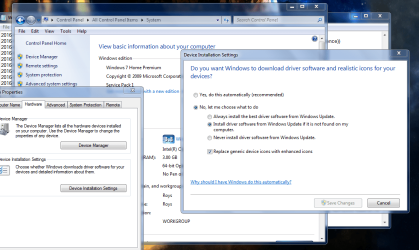
Friends we have a desktop with an otherwise clean, well-functioning Windows 7 installation, having one peculiar problem I've only seen a few posts on, at Microsoft's forums [left unresolved].
Regardless of the Settings in Win Update, the system automatically downloads and attempts installation of whatever is being pushed out. Again - I have tried a couple of different settings to NOT INSTALL until I manually permit, but it matters not. We're trying to prevent the repetitive FAILED install of one commonly-failing item: the SMBUS driver on a AMD-based HP Pavilion platform. Unless I get a "live" list of updates waiting to be installed, I cannot invoke the marking of that one errant update as "never install". [Frankly, it should be in the Optional list anyway, not in the "Important" list.]
How do I stop wupdate from installing everything in the "Important" list auto?
EDIT: This: https://answers.microsoft.com/en-us...is-first/28147a5f-b0b0-480b-bed9-834a2da7a375
is correct in stating "Microsoft does not know what the best hardware drivers are for your system and will often send driver updates that will cause your system to malfunction or not work at all". But they will stick SOME hardware drivers in the "Important List" randomly anyway [no idea how/why ]
Regardless of the Settings in Win Update, the system automatically downloads and attempts installation of whatever is being pushed out. Again - I have tried a couple of different settings to NOT INSTALL until I manually permit, but it matters not. We're trying to prevent the repetitive FAILED install of one commonly-failing item: the SMBUS driver on a AMD-based HP Pavilion platform. Unless I get a "live" list of updates waiting to be installed, I cannot invoke the marking of that one errant update as "never install". [Frankly, it should be in the Optional list anyway, not in the "Important" list.]
How do I stop wupdate from installing everything in the "Important" list auto?
EDIT: This: https://answers.microsoft.com/en-us...is-first/28147a5f-b0b0-480b-bed9-834a2da7a375
is correct in stating "Microsoft does not know what the best hardware drivers are for your system and will often send driver updates that will cause your system to malfunction or not work at all". But they will stick SOME hardware drivers in the "Important List" randomly anyway [no idea how/why ]
My Computer
At a glance
Windows XP Pro SP3, Windows 7 Pro 32-bit, Win...Pentium 4 3.2GHz, Pentium 4 3.4GHz 64bit, Atom,4GB matched, 1GB, 2.5GB, 4.0 GBGeforce 8400 GS and others
- Computer Manufacturer/Model Number
- HP DC7600, HP DC7600[2], HP DC7100, Samsung NC10
- OS
- Windows XP Pro SP3, Windows 7 Pro 32-bit, Windows 7 Ultimate 64bit, Windows XP Home SP3
- CPU
- Pentium 4 3.2GHz, Pentium 4 3.4GHz 64bit, Atom,
- Motherboard
- Dunno
- Memory
- 4GB matched, 1GB, 2.5GB, 4.0 GB
- Graphics Card(s)
- Geforce 8400 GS and others
- Sound Card
- RealteK ALC260 and others
- Monitor(s) Displays
- Asus HD
- Screen Resolution
- 1920x1080
- Hard Drives
- WD Caviar 640gb SATA
- Cooling
- We Be Cool