windows 7 will not shut down

Pantz

New member
Member
VIP
Local time
9:28 AM
Messages
318
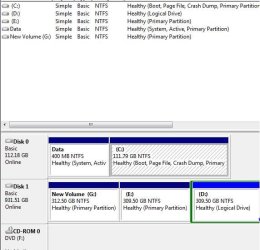
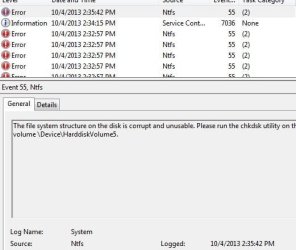
Hello again, well my windows 7 will not shut down normally, i have to do a manual shut down, and on the restart it check my C drive and says unspecific error on drive C, 766f6xxxxxxxx

i checked my event logger and it say volume 5 is corrupt and unusable

how do i fix my shutdown issue, and my C drive is an SSD drive, i dont think i should be running chkdsk on a SSD drive ?


thanks in advance
 

Attachments
  • windows error.JPG
    windows error.JPG
    33.9 KB · Views: 25
  • Windows HD.JPG
    Windows HD.JPG
    48.9 KB · Views: 25

My Computer My Computer

Computer type
PC/Desktop
Computer Manufacturer/Model Number
Personal build
OS
Genuine windows 7X64
CPU
AMD 8320 FX Processor
Motherboard
Asus Sabertoothe 990 FX R2.0 AM2+/AM2 AMD MB
Memory
8 Gigs Corsair Vengance DDR3 1886 MHZ
Graphics Card(s)
EVGA GTX 750 Ti FTW
Sound Card
On board
Monitor(s) Displays
ASUS VE247H 24 inch
Screen Resolution
HDMI
Hard Drives
Samsung 120GB 2.5-inch SSD 840 SATA III
PSU
Corsair 750 Watts
Case
Gigabyte case
Cooling
Zellman CNPS 10 Extreme
Internet Speed
50megs
Antivirus
AVG Free
Well Pantz see this http://www.sevenforums.com/tutorials/96938-check-disk-chkdsk-read-event-viewer-log.html it states at the top not to run a chkdsk on a SSD. Now I have in the past without seeing this first and I have not had a problem with that drive but perhaps I was lucky.:p

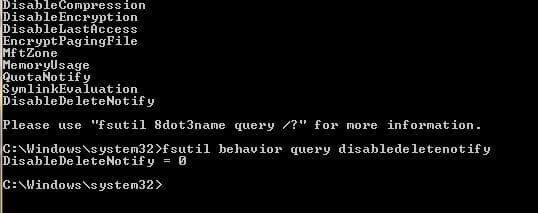
Now the TRIM if I am not badly mistaken I seem you remember that 7 sees the SSD and does it but you can check in the command prompt in any case
Here is some info for you http://www.sevenforums.com/tutorials/70822-ssd-tweaks-optimizations-windows-7-a.html and

Make Sure TRIM Is Enabled for Your Solid State Drive in Windows 7 for Better Performance

PS I meant to add run this anyway
http://www.sevenforums.com/tutorials/1538-sfc-scannow-command-system-file-checker.html
 

My Computer My Computer

Computer type
PC/Desktop
Computer Manufacturer/Model Number
Own build (new) Desk1 / Asus ROG Win 7 / Desk2 1st build
OS
Desk1 7 Home Prem / Desk2 10 Pro / Main lap Asus ROG 10 Pro 2 laptop Toshiba 7 Pro Asus P2520 7 & 10
CPU
Desk1 i5 3750K / Laptop i7 GTX 860M / Desk2 i5 2500
Motherboard
Desk1 Asus P877-V / Desk2 Gigabyte H67 UD3H / Laptop ?
Memory
Desk1 8GB (1866) / Desk2 16GB (1333) / Laptop 8Gb DDR3
Graphics Card(s)
Desk 1& 2NVidia GTX 650 & Laptops on board Intel
Sound Card
Desk 1 & 2 -XONAR DG Realtek High Def audio Laptop
Monitor(s) Displays
Desk 1 Benq HD 2450 / Desk2 Philips 24" / Laptop 17.5"
Screen Resolution
1920x1080 D1 & D2 & Laptop 1
Hard Drives
Desk1 Samsung 120GB 830 SSD
Asus ROG 256GB 850 Pro SSD
Desk2 Samsung 840 256 SSD
Toshiba 120GB EVO
PSU
Desk 1 Corsair HX 1050/ Laptop ? / Desk 2 Corsair HX 650
Case
Desk 1 Cooler HAF XM ? Toshiba laptop / Desk2 Coolermaster
Cooling
Fans on all Desk1 -2 Desk2 - all Coolermasters 5 Laptop ?
Keyboard
Desk 1 MS Sidewinder X6 Desk 2 MS Sidewinder X 4
Mouse
Desk 1&2 - Gigabyte MS 900 gamer - laptop - Logitec wireless
Internet Speed
ADSL2+
Other Info
One other Desktop (tester) and spare Toshba laptop both with SSD's
Running Kaspersky 2016 ISS on all machines config'd identically
Logitec audio stereo systems on each machine (x3)
Canon MG5250MFC
Router/modem TP-Link running WPA2SK
Hello, thanks for the reply, did not think i was going to get one LOL, well i ran the command

fsutil behavior query DisableDeleteNotify, and it came back with a value of 0. which means my TRIM for my SSD is on,

i also ran SFC/ SCANNOW and it did not find any errors, i also ran a system repair because i was still getting the " CHECK DISK " error on a restart, that seems to have fix the check disk issue on a boot up, but i am not sure as of yet,

i am considering doing a Image Restore from march of 2013 when i made an Image of a Clean Windows 7 Install

or is it better just to do i Clean install of 7.?
 

Attachments

  • TRIM.JPG
    TRIM.JPG
    21.4 KB · Views: 15

My Computer My Computer

Computer type
PC/Desktop
Computer Manufacturer/Model Number
Personal build
OS
Genuine windows 7X64
CPU
AMD 8320 FX Processor
Motherboard
Asus Sabertoothe 990 FX R2.0 AM2+/AM2 AMD MB
Memory
8 Gigs Corsair Vengance DDR3 1886 MHZ
Graphics Card(s)
EVGA GTX 750 Ti FTW
Sound Card
On board
Monitor(s) Displays
ASUS VE247H 24 inch
Screen Resolution
HDMI
Hard Drives
Samsung 120GB 2.5-inch SSD 840 SATA III
PSU
Corsair 750 Watts
Case
Gigabyte case
Cooling
Zellman CNPS 10 Extreme
Internet Speed
50megs
Antivirus
AVG Free

My Computer My Computer

Computer type
PC/Desktop
Computer Manufacturer/Model Number
Own build (new) Desk1 / Asus ROG Win 7 / Desk2 1st build
OS
Desk1 7 Home Prem / Desk2 10 Pro / Main lap Asus ROG 10 Pro 2 laptop Toshiba 7 Pro Asus P2520 7 & 10
CPU
Desk1 i5 3750K / Laptop i7 GTX 860M / Desk2 i5 2500
Motherboard
Desk1 Asus P877-V / Desk2 Gigabyte H67 UD3H / Laptop ?
Memory
Desk1 8GB (1866) / Desk2 16GB (1333) / Laptop 8Gb DDR3
Graphics Card(s)
Desk 1& 2NVidia GTX 650 & Laptops on board Intel
Sound Card
Desk 1 & 2 -XONAR DG Realtek High Def audio Laptop
Monitor(s) Displays
Desk 1 Benq HD 2450 / Desk2 Philips 24" / Laptop 17.5"
Screen Resolution
1920x1080 D1 & D2 & Laptop 1
Hard Drives
Desk1 Samsung 120GB 830 SSD
Asus ROG 256GB 850 Pro SSD
Desk2 Samsung 840 256 SSD
Toshiba 120GB EVO
PSU
Desk 1 Corsair HX 1050/ Laptop ? / Desk 2 Corsair HX 650
Case
Desk 1 Cooler HAF XM ? Toshiba laptop / Desk2 Coolermaster
Cooling
Fans on all Desk1 -2 Desk2 - all Coolermasters 5 Laptop ?
Keyboard
Desk 1 MS Sidewinder X6 Desk 2 MS Sidewinder X 4
Mouse
Desk 1&2 - Gigabyte MS 900 gamer - laptop - Logitec wireless
Internet Speed
ADSL2+
Other Info
One other Desktop (tester) and spare Toshba laptop both with SSD's
Running Kaspersky 2016 ISS on all machines config'd identically
Logitec audio stereo systems on each machine (x3)
Canon MG5250MFC
Router/modem TP-Link running WPA2SK
I would run Hard Disk Sentinel on your ssd drive and check the health report. It well give you a lot more info than the MS tools. HDS support pages are very helpful with disk problems.
 

My Computer My Computer

Computer type
PC/Desktop
Computer Manufacturer/Model Number
Custom, Dell and Lenono LT's
OS
Win8/8.1,Win7-U64, Vista U64, uncounted Linux distor's
CPU
AMD and Intell, 9590, 8350, i5 3570k
Motherboard
CFVFZ, GA990FXA, Z77e-itx
Memory
Corsair G Skill
Graphics Card(s)
Crossfired Sapphire HD 7950 Vapor-X, ASUS R9 280X TOP
Sound Card
Realtek ALC889
Monitor(s) Displays
ViewSonic VX2770SMH 27" / ViewSonic VX2433 LCD 24"
Screen Resolution
1080i HD
Hard Drives
Samsung SSD 840 Pro
OCZ Agility 3's
OCZ Vector's
WD's Blue, red, green, Velociraptors
Seagate USB3 & Hybrid's
ASUS Blu-Ray
ASUS DVD
PSU
Corsair AX1200i, Seasonice 850 Gold
Case
Cooler Master HAF 922 & HAF 932, Lian Li Train case.
Cooling
Air, Glacer 240L expanded, custom EK loop with duel D5's
Keyboard
Microsoft SideWinder X4 USB Keyboard / Logitech 250 PS2
Mouse
Logitech G500 / MS wireless 5000
Internet Speed
Best of 5ms / 75+ dn / 12+ up More or less.
Antivirus
MS esentials-MalwareBytes
Browser
Firefox Chromebook
I would run Hard Disk Sentinel on your ssd drive and check the health report. It well give you a lot more info than the MS tools. HDS support pages are very helpful with disk problems.
Actually M wouldn't he be better using the SSD brand utility?? - just a thought.

NB I just saw the Samsung Magician for example
 

My Computer My Computer

Computer type
PC/Desktop
Computer Manufacturer/Model Number
Own build (new) Desk1 / Asus ROG Win 7 / Desk2 1st build
OS
Desk1 7 Home Prem / Desk2 10 Pro / Main lap Asus ROG 10 Pro 2 laptop Toshiba 7 Pro Asus P2520 7 & 10
CPU
Desk1 i5 3750K / Laptop i7 GTX 860M / Desk2 i5 2500
Motherboard
Desk1 Asus P877-V / Desk2 Gigabyte H67 UD3H / Laptop ?
Memory
Desk1 8GB (1866) / Desk2 16GB (1333) / Laptop 8Gb DDR3
Graphics Card(s)
Desk 1& 2NVidia GTX 650 & Laptops on board Intel
Sound Card
Desk 1 & 2 -XONAR DG Realtek High Def audio Laptop
Monitor(s) Displays
Desk 1 Benq HD 2450 / Desk2 Philips 24" / Laptop 17.5"
Screen Resolution
1920x1080 D1 & D2 & Laptop 1
Hard Drives
Desk1 Samsung 120GB 830 SSD
Asus ROG 256GB 850 Pro SSD
Desk2 Samsung 840 256 SSD
Toshiba 120GB EVO
PSU
Desk 1 Corsair HX 1050/ Laptop ? / Desk 2 Corsair HX 650
Case
Desk 1 Cooler HAF XM ? Toshiba laptop / Desk2 Coolermaster
Cooling
Fans on all Desk1 -2 Desk2 - all Coolermasters 5 Laptop ?
Keyboard
Desk 1 MS Sidewinder X6 Desk 2 MS Sidewinder X 4
Mouse
Desk 1&2 - Gigabyte MS 900 gamer - laptop - Logitec wireless
Internet Speed
ADSL2+
Other Info
One other Desktop (tester) and spare Toshba laptop both with SSD's
Running Kaspersky 2016 ISS on all machines config'd identically
Logitec audio stereo systems on each machine (x3)
Canon MG5250MFC
Router/modem TP-Link running WPA2SK
Hello again, i have NOT run CHKDSK on my SSD ....

I dont have that much data on my SSD. about 50Gigs... just OS and a few Programs.

i have run Samsung magic for my SSD. and it says every thing is OK.

i did not get the OS checking my C:\ on my last Reboot, so i think its all ok for now

Thanks in advance,
 

My Computer My Computer

Computer type
PC/Desktop
Computer Manufacturer/Model Number
Personal build
OS
Genuine windows 7X64
CPU
AMD 8320 FX Processor
Motherboard
Asus Sabertoothe 990 FX R2.0 AM2+/AM2 AMD MB
Memory
8 Gigs Corsair Vengance DDR3 1886 MHZ
Graphics Card(s)
EVGA GTX 750 Ti FTW
Sound Card
On board
Monitor(s) Displays
ASUS VE247H 24 inch
Screen Resolution
HDMI
Hard Drives
Samsung 120GB 2.5-inch SSD 840 SATA III
PSU
Corsair 750 Watts
Case
Gigabyte case
Cooling
Zellman CNPS 10 Extreme
Internet Speed
50megs
Antivirus
AVG Free
No worries mate and in case you were wondering I wasn't hinting at you had run a chkdsk on the drive so please don't take offense - upper case in here usually mean someone is a bit peed off or wants to make a point very clear in stronger than normal terms hence why I say that.

Keep us update how you go. You might like this too. http://www.sevenforums.com/tutorials/11728-optimize-windows-7-a.html
 

My Computer My Computer

Computer type
PC/Desktop
Computer Manufacturer/Model Number
Own build (new) Desk1 / Asus ROG Win 7 / Desk2 1st build
OS
Desk1 7 Home Prem / Desk2 10 Pro / Main lap Asus ROG 10 Pro 2 laptop Toshiba 7 Pro Asus P2520 7 & 10
CPU
Desk1 i5 3750K / Laptop i7 GTX 860M / Desk2 i5 2500
Motherboard
Desk1 Asus P877-V / Desk2 Gigabyte H67 UD3H / Laptop ?
Memory
Desk1 8GB (1866) / Desk2 16GB (1333) / Laptop 8Gb DDR3
Graphics Card(s)
Desk 1& 2NVidia GTX 650 & Laptops on board Intel
Sound Card
Desk 1 & 2 -XONAR DG Realtek High Def audio Laptop
Monitor(s) Displays
Desk 1 Benq HD 2450 / Desk2 Philips 24" / Laptop 17.5"
Screen Resolution
1920x1080 D1 & D2 & Laptop 1
Hard Drives
Desk1 Samsung 120GB 830 SSD
Asus ROG 256GB 850 Pro SSD
Desk2 Samsung 840 256 SSD
Toshiba 120GB EVO
PSU
Desk 1 Corsair HX 1050/ Laptop ? / Desk 2 Corsair HX 650
Case
Desk 1 Cooler HAF XM ? Toshiba laptop / Desk2 Coolermaster
Cooling
Fans on all Desk1 -2 Desk2 - all Coolermasters 5 Laptop ?
Keyboard
Desk 1 MS Sidewinder X6 Desk 2 MS Sidewinder X 4
Mouse
Desk 1&2 - Gigabyte MS 900 gamer - laptop - Logitec wireless
Internet Speed
ADSL2+
Other Info
One other Desktop (tester) and spare Toshba laptop both with SSD's
Running Kaspersky 2016 ISS on all machines config'd identically
Logitec audio stereo systems on each machine (x3)
Canon MG5250MFC
Router/modem TP-Link running WPA2SK
Back
Top