Windows 7x64 startup task/service removal

goopy

New member
Member
VIP
Local time
5:01 AM
Messages
138
Greetings.
I'm trying to remove a nasty W7x64 startup task/service but can't seem to be able to find it. Tried Startup, Services, HKLM/.../Wow6432Node/, HKLM/.../run/, HKCU/.../run/ to no avail , and msconfig does not report it. What are the other possible locations?
Many thanks and best regards,
 

My Computer My Computer

At a glance

Windows 7 Ultimate x86
Computer type
PC/Desktop
OS
Windows 7 Ultimate x86
Hi goopy,

You have been asked several times by different members to update your system specifications. This is for your benefit so that we can help you by giving you the correct advice based on your specifications!

Update System Specifications

Please update your system specifications in your UserCP => Edit System Spec setup. It will help us to help you!

This SevenForums tutorial [Published by Brink and written by CyberZeus] uses an automated tool which makes this task very easy and quick to do. Click here => System Info - See Your System Specs.

Thanks.
 

My Computer My Computer

At a glance

Win 7 HP SP1 64-bit Vista HB SP2 32-bit Linux...Intel(R) Pentium(R) CPU P6200 @ 2.13GHz4.00 GBIntel(R) Graphics Media Accelerator HD
Computer type
Laptop
Computer Manufacturer/Model Number
Fujitsu LIFEBOOK
OS
Win 7 HP SP1 64-bit Vista HB SP2 32-bit Linux Mint 18.3
CPU
Intel(R) Pentium(R) CPU P6200 @ 2.13GHz
Motherboard
FUJITSU FJNBB06
Memory
4.00 GB
Graphics Card(s)
Intel(R) Graphics Media Accelerator HD
Sound Card
[1] Realtek High Definition Audio [2] Intel(R) Display Audio
Screen Resolution
1366 x 768 x 32 bits (4294967296 colors) @ 59 Hz
Hard Drives
TOSHIBA MK5076GSX
Antivirus
AVG FREE
Hi goopy,
I'm trying to remove a nasty W7x64 startup task/service but can't seem to be able to find it. Tried Startup, Services, HKLM/.../Wow6432Node/, HKLM/.../run/, HKCU/.../run/ to no avail , and msconfig does not report it.

What is the name of the startup task / service?
 

My Computer My Computer

At a glance

Win 7 HP SP1 64-bit Vista HB SP2 32-bit Linux...Intel(R) Pentium(R) CPU P6200 @ 2.13GHz4.00 GBIntel(R) Graphics Media Accelerator HD
Computer type
Laptop
Computer Manufacturer/Model Number
Fujitsu LIFEBOOK
OS
Win 7 HP SP1 64-bit Vista HB SP2 32-bit Linux Mint 18.3
CPU
Intel(R) Pentium(R) CPU P6200 @ 2.13GHz
Motherboard
FUJITSU FJNBB06
Memory
4.00 GB
Graphics Card(s)
Intel(R) Graphics Media Accelerator HD
Sound Card
[1] Realtek High Definition Audio [2] Intel(R) Display Audio
Screen Resolution
1366 x 768 x 32 bits (4294967296 colors) @ 59 Hz
Hard Drives
TOSHIBA MK5076GSX
Antivirus
AVG FREE
Greetings Paul,

1. Would you be kind enough to provide a list of all locations where startup tasks/services can be found?
2. You could try installing samsung magician. It's quite benign and does provide an option for removal from startup.

Many thanks and best regards,
 

My Computer My Computer

At a glance

Windows 7 Ultimate x86
Computer type
PC/Desktop
OS
Windows 7 Ultimate x86
Hi goopy,

1. Would you be kind enough to provide a list of all locations where startup tasks/services can be found?
2. You could try installing samsung magician. It's quite benign and does provide an option for removal from startup.

[1] Can you please tell us the name of the startup task / service?
[2] It is not me that needs the help!
 

My Computer My Computer

At a glance

Win 7 HP SP1 64-bit Vista HB SP2 32-bit Linux...Intel(R) Pentium(R) CPU P6200 @ 2.13GHz4.00 GBIntel(R) Graphics Media Accelerator HD
Computer type
Laptop
Computer Manufacturer/Model Number
Fujitsu LIFEBOOK
OS
Win 7 HP SP1 64-bit Vista HB SP2 32-bit Linux Mint 18.3
CPU
Intel(R) Pentium(R) CPU P6200 @ 2.13GHz
Motherboard
FUJITSU FJNBB06
Memory
4.00 GB
Graphics Card(s)
Intel(R) Graphics Media Accelerator HD
Sound Card
[1] Realtek High Definition Audio [2] Intel(R) Display Audio
Screen Resolution
1366 x 768 x 32 bits (4294967296 colors) @ 59 Hz
Hard Drives
TOSHIBA MK5076GSX
Antivirus
AVG FREE
Hi All,
Greets,

I understand what you are dealing with. Make a System Image & try these Utilities. They are very powerful tools. So, use them carefully.
Avoid touching Registry as long as you are not sure!

1. You should try Autoruns (M$) in first place.

2. If you are trying to find out problematic things. You can also try Process Explorer (M$) & Process Monitor (M$)

3. Here is some help : Schooling Autoruns & Other Sysinternals (M$) Utilities

4. You can also try using AdwCleaner ( by Malwarebytes )

Just To Mention :
You are not supposed to remove everything that is detected/listed in the AdwCleaner. You have to be selective! You should be very sure what thing(s) you want to remove otherwise you will be removing false positives & will get in real trouble.
While dealing with SysInternals Utilities, you will only get in trouble by your own mistake(s)!

Rest is up to you ;)

Thanks & Regards. ...
 

My Computer My Computer

At a glance

Windows 7 Ultimate x32 With Sp1 + Vista Ultim...Intel Mobile Core 2 Duo T5750 @ 2.00GHz Merom...2.00GB Dual-Channel DDR2 @ 332MHz (5-5-5-15)Mobile Intel(R) 965 Express Chipset Family
Computer type
Laptop
Computer Manufacturer/Model Number
hp compaq presario c795VU notebook pc
OS
Windows 7 Ultimate x32 With Sp1 + Vista Ultimate x32 with Sp1 & Sp2 !!
CPU
Intel Mobile Core 2 Duo T5750 @ 2.00GHz Merom 65nm Technolog
Motherboard
Hewlett-Packard 30D9 (CPU)
Memory
2.00GB Dual-Channel DDR2 @ 332MHz (5-5-5-15)
Graphics Card(s)
Mobile Intel(R) 965 Express Chipset Family
Sound Card
High Definition Audio Device
Monitor(s) Displays
LP154WX4-TLCB on Mobile Intel 965 Express Chipset Family
Screen Resolution
1280x800 @ 60Hz
Hard Drives
149GB Western Digital WDC WD1600BEVS-60VAT0 ATA Device (SATA)
Keyboard
Standard 101/102-Key or Microsoft Natural PS/2 Key + HP QLB
Mouse
ALPS pointing device
Antivirus
Kaspersky AV 2017(Win 7) & AVG AntiVirus Free 2016 (VISTA)
Browser
google chrome
Hi Goopy,

It might also be in Task scheduler LOCAL or prefetch.

If Autoruns fails to find it run this tool - note some AV's report it as malware IT IS NOT frequently used by Malware fighters in security forums, including Malwarebytes

copy/paste both reports

Download Farbar Recovery Scan Tool

select the applicable 32/64 download


Roy
 

My Computer My Computer

At a glance

W7 home premium 32bit/W7HP 64bit/w10 tp insid...E5300 dual core3gbNvidia Geforce 7100 Nforce 630i
Computer type
PC/Desktop
Computer Manufacturer/Model Number
medionl/Aspire 6930G/acer x55a
OS
W7 home premium 32bit/W7HP 64bit/w10 tp insider ring
CPU
E5300 dual core
Motherboard
medion MS7366
Memory
3gb
Graphics Card(s)
Nvidia Geforce 7100 Nforce 630i
Monitor(s) Displays
avixc
Internet Speed
n (isp resticted to 72)
Antivirus
mse/pands
Browser
palemoon
Other Info
Belkin Fd7050 n USB using Railink RT2870 drivers, more upto date
Hi Goopy,

It might also be in Task scheduler LOCAL or prefetch.

If Autoruns fails to find it run this tool - note some AV's report it as malware IT IS NOT frequently used by Malware fighters in security forums, including Malwarebytes

copy/paste both reports

Download Farbar Recovery Scan Tool

select the applicable 32/64 download


Roy
Thanks for the kind reply, Roy. You're a genius.
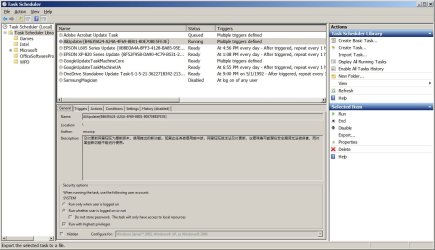
All the culprits are there in the Task Scheduler, including the nasty chinese ones that cannot be stopped.
What do I do to remove these from running at startup?
Many thanks and best regards,
 

Attachments

  • taskscheduler.jpg
    taskscheduler.jpg
    136.5 KB · Views: 1
  • aliupdate.jpg
    aliupdate.jpg
    131.1 KB · Views: 1

My Computer My Computer

At a glance

Windows 7 Ultimate x86
Computer type
PC/Desktop
OS
Windows 7 Ultimate x86
Hi Goopy

Good catch there then.

Just highlight each one, there's an option to delete, see that in your screenshot, right hand side

If that fails HIGHLY unlikely, we can remove them with the other tool i asked you to run

Please run it anyway AFTER a reboot copy/post both logs,see below, note Farbar = FRST


Im somewhat concerned, they may have spawned other processes -
(it might have been installed via the Yandex browser)

Post the results in the BleepingComputers Malware section- I'm no malware expert
Virus, Trojan, Spyware, and Malware Removal Help Forum - BleepingComputer.com

cross reference this thread, i'll keep an eye on it, im a member there too


In regard to your other thread re MBR/EUFI
it does sound like theres something wrong with your boot manager files
run SFC/scannow
and read this tutorial
Bootmgr is missing - Fix

Are you dual booting by any chance


Roy
 
Last edited:

My Computer My Computer

At a glance

W7 home premium 32bit/W7HP 64bit/w10 tp insid...E5300 dual core3gbNvidia Geforce 7100 Nforce 630i
Computer type
PC/Desktop
Computer Manufacturer/Model Number
medionl/Aspire 6930G/acer x55a
OS
W7 home premium 32bit/W7HP 64bit/w10 tp insider ring
CPU
E5300 dual core
Motherboard
medion MS7366
Memory
3gb
Graphics Card(s)
Nvidia Geforce 7100 Nforce 630i
Monitor(s) Displays
avixc
Internet Speed
n (isp resticted to 72)
Antivirus
mse/pands
Browser
palemoon
Other Info
Belkin Fd7050 n USB using Railink RT2870 drivers, more upto date
Hi All,
Greets,

torchwood : Great Stuff Sir, Thanks.

goopy : Now that its sure you have infections.

1. Please Image your system first of all, It may help you if you get in problem while troubleshooting :
See : Macrium Reflect Free


2. While troubleshooting follow the seniors in first place!
I suggest to give some space in between using different utilities to actually make out the things but at times, it may be crucial to run utilities in quick succession one after another to eliminate an infection & stop it from coming back.

3. If the things don't work for you, ( You may restore the system image if you feel like & ) use rescue disks because the infections are best removed when they are Offline!
In my personal opinion here : not to use multiple things in quick succession to actually make out what is working for you & what is doing the damage.
Bootable Antivirus Rescue CDs for Offline Scanning
Good ones in my opinion : Bitdefender , ESET, Kaspersky, Windows Defender Offline.
And/OR
You can use Kyhi Sir's Win 10 Recovery Media and run Malwarebytes, SUPERAntiSpyware , ESET' Free Online Scanner , etc. from there.


Thanks & Regards. ...
 
Last edited:

My Computer My Computer

At a glance

Windows 7 Ultimate x32 With Sp1 + Vista Ultim...Intel Mobile Core 2 Duo T5750 @ 2.00GHz Merom...2.00GB Dual-Channel DDR2 @ 332MHz (5-5-5-15)Mobile Intel(R) 965 Express Chipset Family
Computer type
Laptop
Computer Manufacturer/Model Number
hp compaq presario c795VU notebook pc
OS
Windows 7 Ultimate x32 With Sp1 + Vista Ultimate x32 with Sp1 & Sp2 !!
CPU
Intel Mobile Core 2 Duo T5750 @ 2.00GHz Merom 65nm Technolog
Motherboard
Hewlett-Packard 30D9 (CPU)
Memory
2.00GB Dual-Channel DDR2 @ 332MHz (5-5-5-15)
Graphics Card(s)
Mobile Intel(R) 965 Express Chipset Family
Sound Card
High Definition Audio Device
Monitor(s) Displays
LP154WX4-TLCB on Mobile Intel 965 Express Chipset Family
Screen Resolution
1280x800 @ 60Hz
Hard Drives
149GB Western Digital WDC WD1600BEVS-60VAT0 ATA Device (SATA)
Keyboard
Standard 101/102-Key or Microsoft Natural PS/2 Key + HP QLB
Mouse
ALPS pointing device
Antivirus
Kaspersky AV 2017(Win 7) & AVG AntiVirus Free 2016 (VISTA)
Browser
google chrome
Hi Goopy

Good catch there then.

Just highlight each one, there's an option to delete, see that in your screenshot, right hand side

If that fails HIGHLY unlikely, we can remove them with the other tool i asked you to run

Please run it anyway AFTER a reboot copy/post both logs,see below, note Farbar = FRST


Im somewhat concerned, they may have spawned other processes -
(it might have been installed via the Yandex browser)

Post the results in the BleepingComputers Malware section- I'm no malware expert
Virus, Trojan, Spyware, and Malware Removal Help Forum - BleepingComputer.com

cross reference this thread, i'll keep an eye on it, im a member there too


In regard to your other thread re MBR/EUFI
it does sound like theres something wrong with your boot manager files
run SFC/scannow
and read this tutorial
Bootmgr is missing - Fix

Are you dual booting by any chance


Roy
Thanks for the kind reply, Roy.
1. Anything catching your eye that makes you think there's malware at play?
2. I deleted all except the epson entries in the task scheduler, but that did not stop the three rouge processes from running at startup. They couldn't even be stopped. Any idea?
3. How do I read the report generated by FRST?
4. On the matter of MBR/GPT, it's an old fashion multi boot setup using the bios to select the physical boot drive. For some unknown reason, not all the boot options are available for selection if there's a mixture of MBR/GPT drives present. So the idea is to migrate everything to the newer standard if it can be done easily.

Many thanks and best regards,
 
Last edited:

My Computer My Computer

At a glance

Windows 7 Ultimate x86
Computer type
PC/Desktop
OS
Windows 7 Ultimate x86
Hi goopy,

if you HAVN't posted those logs at BleepingComputers, post here i'll give them a once over


Roy
 

My Computer My Computer

At a glance

W7 home premium 32bit/W7HP 64bit/w10 tp insid...E5300 dual core3gbNvidia Geforce 7100 Nforce 630i
Computer type
PC/Desktop
Computer Manufacturer/Model Number
medionl/Aspire 6930G/acer x55a
OS
W7 home premium 32bit/W7HP 64bit/w10 tp insider ring
CPU
E5300 dual core
Motherboard
medion MS7366
Memory
3gb
Graphics Card(s)
Nvidia Geforce 7100 Nforce 630i
Monitor(s) Displays
avixc
Internet Speed
n (isp resticted to 72)
Antivirus
mse/pands
Browser
palemoon
Other Info
Belkin Fd7050 n USB using Railink RT2870 drivers, more upto date
Hi All,
Greets,
goopy :

4. On the matter of MBR/GPT, it's an old fashion multi boot setup using the bios to select the physical boot drive. For some unknown reason, not all the boot options are available for selection if there's a mixture of MBR/GPT drives present. So the idea is to migrate everything to the newer standard if it can be done easily.

You did not mention. I thought its all well now. I understand the things & can definitely help you without any migration, keeping MBR & GPT disks all together.
but it would be great to migrate from MBR to GPT if the BIOS & Disk allow.

But I am unaware of your exact present status & requirement. So, please update it there!

Thanks & Regards. ...
 
Last edited:

My Computer My Computer

At a glance

Windows 7 Ultimate x32 With Sp1 + Vista Ultim...Intel Mobile Core 2 Duo T5750 @ 2.00GHz Merom...2.00GB Dual-Channel DDR2 @ 332MHz (5-5-5-15)Mobile Intel(R) 965 Express Chipset Family
Computer type
Laptop
Computer Manufacturer/Model Number
hp compaq presario c795VU notebook pc
OS
Windows 7 Ultimate x32 With Sp1 + Vista Ultimate x32 with Sp1 & Sp2 !!
CPU
Intel Mobile Core 2 Duo T5750 @ 2.00GHz Merom 65nm Technolog
Motherboard
Hewlett-Packard 30D9 (CPU)
Memory
2.00GB Dual-Channel DDR2 @ 332MHz (5-5-5-15)
Graphics Card(s)
Mobile Intel(R) 965 Express Chipset Family
Sound Card
High Definition Audio Device
Monitor(s) Displays
LP154WX4-TLCB on Mobile Intel 965 Express Chipset Family
Screen Resolution
1280x800 @ 60Hz
Hard Drives
149GB Western Digital WDC WD1600BEVS-60VAT0 ATA Device (SATA)
Keyboard
Standard 101/102-Key or Microsoft Natural PS/2 Key + HP QLB
Mouse
ALPS pointing device
Antivirus
Kaspersky AV 2017(Win 7) & AVG AntiVirus Free 2016 (VISTA)
Browser
google chrome
Back
Top