Solved Windows can not be installed to GPT Drive

oldendays

New member
Local time
8:44 AM
Messages
21
I followed a Webtutorial to Install Windows 7 on a Laptop that had been purchased with Windows 8 preinstalled. Making it a Dual Boot System. How to Dual Boot Pre installed Windows 8 with Windows 7

I created my Partition exactly as the Instructions Suggest. Yet when i boot from the USB disk , with the iso after starting to install windows 7 it asks what disk do you want it on. But then it says can not install windows on GPT Disk... partition.

I have read further solutions that say to convert the Disk to MBR with a third party software that doesnt loose data.... but that is statrting to make me nervous that later windows 8 will be corrupted and not operate. I wanted a Dual Boot system without Loosing windows 8. (if i converted the disk to mbr , would windows 8 still run or might fail because now it is an MBR disk?instead of gpt)

How could the Authour at Startpage not have included the necessary Tips to getting the Partition to accept windows 7 iso? This laptop of mine was a Lenova that had to have The bios set to Legacy instead of UEFI to even see the USB boot Drive. I dont know if that is a problem.here..
 

My Computer My Computer

At a glance

windows 7
Computer type
PC/Desktop
OS
windows 7
I don't dual-boot [use rehabbed computers], all I can offer is that what I see as a possible issue is that both versions of Windows have to be installed the same way, according to what the BIOS is set for. You see, the information in the BIOS sets up the computer/devices and the OS/Operating System reads the BIOS to know what it has to work with and the BIOS probably would have to be changed at each bootup to accommodate the desired version.

One of the changes with Win8/8.1 OEM version is the licensing code is not directly available to the user like the Retail version which comes with a sticker/label with the code [at least my Custom Desktop did]. Both of my Win8.1 Notebooks, my wife's Notebook and my Tablet have no such sticker.
 

My Computer My Computer

At a glance

Windows 7 Ultimate 64-bit, Windows 8.1 64-bit...
Computer type
PC/Desktop
Computer Manufacturer/Model Number
Customs, Dell, Gateway, HP, Toshiba, Acer, ASUS
OS
Windows 7 Ultimate 64-bit, Windows 8.1 64-bit, Mac OS X 10.10, Linux Mint 17, Windows 10 Pro TP
Keyboard
Microsoft
Mouse
Microsoft
The article in my link to Startpage.... says it is done dual boot without problems. There is possibly a reason my factory windows 8 drive was Partitioned Gpt instead of MBR.

Someone here must know what the trick is even if i have to get a thirdparty app and format to MBR without the data loss of windows 8.... and then add windows 7 ..

then at some point later in time i will deystroy windows 8...... and wait for windows for seniors to come out....!
 

My Computer My Computer

At a glance

windows 7
Computer type
PC/Desktop
OS
windows 7
It's clear that the Windows 8 PC has a UEFI BIOS' which uses a GPT disk format. To install Win7 on that you must boot it's installer as a UEFI device. If using flash stick it must be formatted specially using Option One in UEFI Bootable USB Flash Drive - Create in Windows.

Also in BIOS setup it must have all UEFI enabled but Secure Boot disabled as that only works for Windows 8, which should still work. Downgrade Windows 8 to Windows 7

Report back results with any errors.
 
Rufus says that my Windows ISO in not in the needed EFI format . I need another ISO that is in EfI Format...or change rufus target to bios

i changed the rufus target to bios and now it says i need a efi iso image.

I tried converting the DRIVE to MBR using datalossless aoemi but the program says i have more than 4 partitions on the drive and so can not convert. If i knew for sure what was on the other Factory installed drives i could delete the rest and with just four partitions Convert. But i am not that good to think i couldnt make a mistake. I put my Lenova onestep backup files on a partition. But i still dont know i wouldnt create another laptop coffee table. I would imagine the unkown factory partitions could be deleted, probably a backup of windows 8 on file... But Pcs are so different from when we were younger, i am not sure if i could delete hidden drives...

So i prefer to stay on the Suggestion oF rufus option 1...gpt on uefi.. and getting the ISO to an EFI format..
 
Last edited:

My Computer My Computer

At a glance

windows 7
Computer type
PC/Desktop
OS
windows 7
You'd have to wipe the hard drive to convert it to MBR, then reinstall Windows 8. You might need to do that anyway if your UEFI firmware will not allow a Dual Boot using UEFI as is the case with a dwindling number of BIOS'.

How was your ISO obtained? Do you know how it was modified so that Rufus rejects it? Do you have access to a pristine ISO for your licensed version of Win7? You can extract it from DVD using ImgBUrn as discussed in Step 1 of Clean Reinstall Windows 7 but then I would use the DVD if you have an drive.

What version of Win7 do you own? Do you have the Product Key?
 
Since Windows 8 Came on this Laptop and the Bios says to select uefi only for 64 bit or Legacy support for Other os . Boot uefi first or legacy. Are the few related bios options. I am nervous as to wether MBR drive would work with the Bios from Lenova. It is an updated bios.2013.
Maby then Windows 8 would demand GPT!.


I dont even have a Backup copy of Windows 8, I was supposed to make a backup from the PC . I relied on windows backup from Lenova instead.

Windows 7 64 preactivated came from isohunt.com. i created the usb flashdrive with windows dvd downlad tool. because rufus would not work.

I would be pretty damn nervous doing a full Format on this Laptop, as then I could only hope the windows disk would work. So many times i have seen pcs have problems at that time. But then they were deskptops that could have hardrives easily changed!

I am out of ideas... I cant even see paying a Repair shop to fix this. If i had to buy two new copies of windows. I do have the Keys for windows 8 and 7.. but not the orginal disks. I have since heard that they can be downloaded from an old Microsoft Channel in Full Copies of the orginal free. Maby that will have to be a next step.

I really dont think windows 10 upgrade will stop me from wanting windows 7 back , for a long time.
 
Last edited:

My Computer My Computer

At a glance

windows 7
Computer type
PC/Desktop
OS
windows 7
Why are you using a preactivated Win7 torrent which is modified to bypass activation to steal the OS? I thought you said you have a Win7 Product Key. If so I just explained that obtaining legitimate or safe ISO for reinstall is discussed in Step 1 of Clean Reinstall Windows 7. Did you read it? Once you have confirmed the media it must be written to stick using Rufus from Option One of UEFI Bootable USB Flash Drive - Create in Windows then booted as a UEFI device.

Instead of going on about "what you heard" why don't you ask us as this is the top tech forums on the web where we handle these cases by the thousands, successfully in every case where there is cooperation.

Once you have confirmed media, Secure Boot must be disabled in BIOS setup, UEFI enabled with UEFI to boot first. Then the media must be booted as a UEFI device.

If it still fails we need to see pictures of the BIOS settings choices for UEFI, EFI, CSM, Legacy BIOS, UEFI/Legacy First to boot, Secure Boot and any other related settings. You can attach pictures using the paper clip icon in reply box.

You can easily Clean Install - Windows 8 using media provided in Windows 8 and Windows 8.1 ISO - Download or Create .

I asked you what version of Win7 you actually own. Do you have a DVD drive on the PC?
 
I had windows 7 on an older pc, but that is unplugged and i am wheelchair bound. SO it would likely be fall until i can get that plugged in and the key i have was likely for windows 7 home and i want to install windows 7 ultimate. So we may as well say i dont effectively have the os and key right now. Maby i could find one second hand online.

I did set the bios to not use secure boot. However with uefi only mode selected, the usb flash drive was not recognized.. so i had to enable legacy mode to load the flash.

From what i read, windows 7 should install on a GPT drive. That is an option. I shouldnt have to convert to MBR.

I will need a few days break from trying to solve this. I am too disabled. I will post again. Someday. Someone will try again then i hope.
 

My Computer My Computer

At a glance

windows 7
Computer type
PC/Desktop
OS
windows 7
We need a New Microsoft.

I just tried the Licencse from my Laptop with windows premium 7 and when i entered the licencse number at microsoft software recovery. I just get a message saying there is an error , and no special characters are allowed. I reentered it 3 times , counting oem as oem and not 0em.
 

My Computer My Computer

At a glance

windows 7
Computer type
PC/Desktop
OS
windows 7
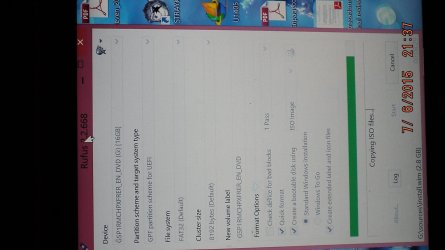
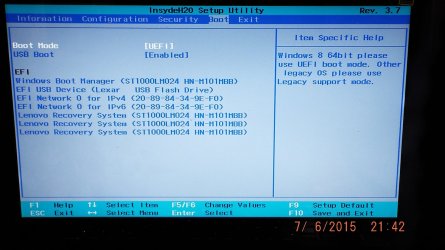
Ok , I am Installing Windows Premium and start the pictures included here, showing rufus with making the ISO with the settings of Option One for making a bootable disk.

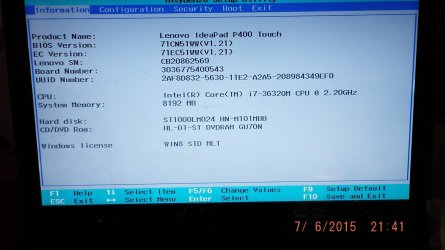
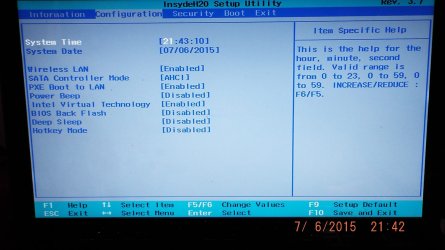
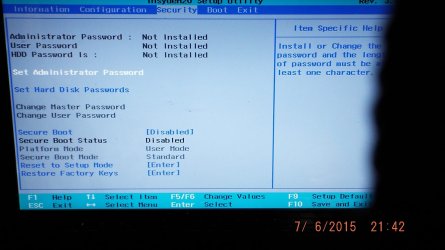
Then I show my Bios, all pages.
With the settings you said to make... secure boot off, with uefi .

I do not have any setting called CSM.

I tried booting with those settings and the flash iso was not recognized. It booted right into windows8.
 

Attachments

  • DSCF1108.JPG
    DSCF1108.JPG
    190.2 KB · Views: 0
  • DSCF1109.JPG
    DSCF1109.JPG
    191.8 KB · Views: 0
  • DSCF1110.JPG
    DSCF1110.JPG
    206.7 KB · Views: 0
  • DSCF1111.JPG
    DSCF1111.JPG
    192.1 KB · Views: 0
  • DSCF1112.JPG
    DSCF1112.JPG
    219.1 KB · Views: 0
  • DSCF1113.JPG
    DSCF1113.JPG
    195.1 KB · Views: 0

My Computer My Computer

At a glance

windows 7
Computer type
PC/Desktop
OS
windows 7

My Computer My Computer

At a glance

Windows 10 Pro x64Intel Core i7 6700KGSkill TridentZ RGB 16GB 3600 16-16-16-36EVGA GTX 980 Ti SC x2
Computer type
PC/Desktop
Computer Manufacturer/Model Number
Skylake Special #666
OS
Windows 10 Pro x64
CPU
Intel Core i7 6700K
Motherboard
Asus Sabertooth Z170 Mark 1
Memory
GSkill TridentZ RGB 16GB 3600 16-16-16-36
Graphics Card(s)
EVGA GTX 980 Ti SC x2
Sound Card
Realtek High Definition
Monitor(s) Displays
AOC G2460PG
Screen Resolution
1920 x 1080 144Hz
Hard Drives
Samsung 860 Pro 256GB, Seagate Barracuda 4TB x2
PSU
EVGA 1000 P2, EVGA White Custom Braided Cables
Case
Corsair Vengeance C70 Gunmetal Black
Cooling
Corsair H100i v2, Corsair ML120 x2, Thermal Grizzly Kryonaut
Keyboard
Logitech G910 Orion Spectrum
Mouse
Logitech G700s
Internet Speed
Verizon Fios Quantum Gateway 75/75
Antivirus
Windows Defender, Malwarebytes Free 3.8.3
Browser
Chrome
Other Info
Corsair SP120 x4, LG Blu-ray Drive, Durabrand HT-395 100 Watt Dolby Digital Amp, Corsair H2100 Wireless 7.1 Headset
The Stick does show up there in the BIOS as EFI USB device:

365051d1436233799t-windows-can-not-installed-gpt-drive-dscf1112.jpg


So it appears formatted correctly and now needs to be accessed via Windows 8 if it isn't allowing BIOS Boot menu key access.

To boot the EFI flash stick follow the steps here to access Startup Options Menu - Boot to in Windows 8. Use Option 3 to enter the menu via Windows 8, until you are able to choose EFI Flash stick from this menu:

25995d1375907393t-startup-options-menu-boot-windows-8-a-use_a_device.jpg


Once you boot the EFI Flash stick you'll need to go through the steps to Clean Install Windows 7 to a partition you have already made room for on the drive. If you already formatted the space you made for Windows 7, delete it and create and format it again using the WIn7 installation media.

Report back any errors verbatim.
 
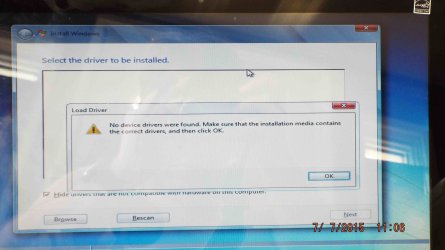
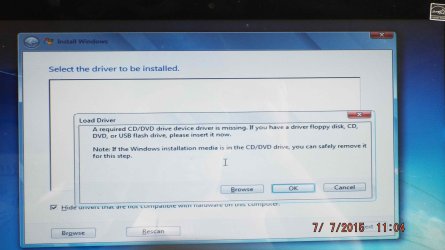
Ok, I restarted the laptop with the Use a Device option. It booted the Flash drive and started the Windows software. Then when I clicked on Install Windows.... The Very next screen Gave an Error message seen in the picture.
 

Attachments

  • DSCF1117.jpg
    DSCF1117.jpg
    474.3 KB · Views: 2
  • DSCF1118.jpg
    DSCF1118.jpg
    495.3 KB · Views: 0

My Computer My Computer

At a glance

windows 7
Computer type
PC/Desktop
OS
windows 7

Make sure that you connect the Windows 7 USB flash drive to the USB 2.0 port. If the Windows 7 USB flash drive is plugged into the USB 3.0 port, you will receive the following error message "A required CD/DVD drive device driver is missing", because the Windows 7 installation media does not contain USB 3.0 drivers.
 

My Computer My Computer

At a glance

Windows 8.1/10 x64Intel Core i5-3230M8 GBIntel HD Graphics 4000
Computer type
Laptop
Computer Manufacturer/Model Number
Lenovo IdeaPad G580
OS
Windows 8.1/10 x64
CPU
Intel Core i5-3230M
Memory
8 GB
Graphics Card(s)
Intel HD Graphics 4000
Antivirus
Windows Defender, EMET, standard user account
Browser
Internet Explorer
Yes that was exactly the problem Genet, put the Flash Drive in the USb 2.0 port not the 3.0.
It installed Windows Premium and I now have the Dual Boot Win8/7 system.
Just like GregRocker said.
That was Tricky, many thanks. I do have one new issue with windows 7 premium that i will post in the Same installation Forum.

I know how a post is better closed , when it is solved.
 

My Computer My Computer

At a glance

windows 7
Computer type
PC/Desktop
OS
windows 7
Back
Top