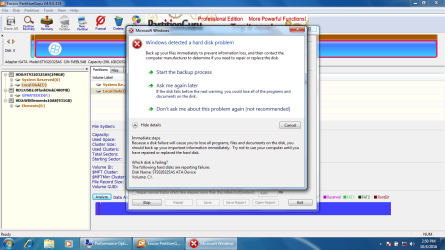
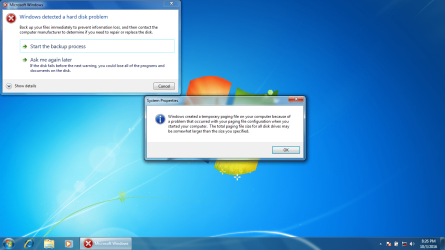
Windows detected a Hard disk problem

anton

New member
Local time
8:08 PM
Messages
34
Eassos PartitionGuru Disk Verify Result:

Disk: HD0:ST9320325AS(298GB)
Cylinder Range: 0 - 38913 (Total cylnders count: 38913)
Time: 2016-10-04 15:59:23

27 bad track areas found. The detailed bad track information is as follows:

Cyl. Head Sec. Sec. Count Elapsed Time(ms) result Error


801 Not Detect Not Detect Not Detect 27394 Not repaired IO Device Timeout.

835 Not Detect Not Detect Not Detect 24149 Not repaired IO Device Timeout.

864 Not Detect Not Detect Not Detect 3307 Not repaired IO Device Timeout.

992 Not Detect Not Detect Not Detect 25958 Not repaired IO Device Timeout.

1029 Not Detect Not Detect Not Detect 27628 Not repaired IO Device Timeout.

1090 Not Detect Not Detect Not Detect 3230 Not repaired IO Device Timeout.

1124 Not Detect Not Detect Not Detect 4415 Not repaired IO Device Timeout.

1158 Not Detect Not Detect Not Detect 4165 Not repaired IO Device Timeout.

1279 Not Detect Not Detect Not Detect 28158 Not repaired IO Device Timeout.

1346 Not Detect Not Detect Not Detect 4774 Not repaired IO Device Timeout.

1408 Not Detect Not Detect Not Detect 17644 Not repaired IO Device Timeout.

1409 Not Detect Not Detect Not Detect 11981 Not repaired IO Device Timeout.

1410 Not Detect Not Detect Not Detect 6739 Not repaired IO Device Timeout.

1443 Not Detect Not Detect Not Detect 11076 Not repaired IO Device Timeout.

1447 Not Detect Not Detect Not Detect 6973 Not repaired IO Device Timeout.

1504 Not Detect Not Detect Not Detect 21310 Not repaired IO Device Timeout.

1506 Not Detect Not Detect Not Detect 44367 Not repaired IO Device Timeout.

1507 Not Detect Not Detect Not Detect 13588 Not repaired IO Device Timeout.

1534 Not Detect Not Detect Not Detect 33541 Not repaired IO Device Timeout.

1538 Not Detect Not Detect Not Detect 17238 Not repaired IO Device Timeout.

1572 Not Detect Not Detect Not Detect 7067 Not repaired IO Device Timeout.

1600 Not Detect Not Detect Not Detect 7582 Not repaired IO Device Timeout.

1638 Not Detect Not Detect Not Detect 15537 Not repaired IO Device Timeout.

1639 Not Detect Not Detect Not Detect 7722 Not repaired IO Device Timeout.

1665 Not Detect Not Detect Not Detect 31949 Not repaired IO Device Timeout.

1731 Not Detect Not Detect Not Detect 25772 Not repaired IO Device Timeout.

2148 Not Detect Not Detect Not Detect 36707 Not repaired IO Device Timeout.


SeaTools Enterprise diagnostic log file:


03-Oct-2016 17:57:53 SeaTools Enterprise diagnostic 03-Oct-2016 17:57:57 Device(s) found during bus scan: 03-Oct-2016 17:57:57 No HBA has been detected 03-Oct-2016 17:58:02 Device(s) found during bus scan: 03-Oct-2016 17:58:02 No HBA has been detected 03-Oct-2016 17:58:12 Entering Advanced diagnostic section 03-Oct-2016 17:58:26 Device(s) found during bus scan: 03-Oct-2016 17:58:26 No HBA has been detected


Instructions For Fixing Hard Disk Errors:
We strongly recommend that you backup your computer to avoid potential data loss.
After you have backed up your computer, you should contact your computer manufacturer or other hardware technical support to determine if the disk with errors needs to be repaired or replaced.
We recommend that you store these printed instructions together with the media used to back up your data (for example, the CDs or USB flash drive used to store your backup), so that everything you need to fix your computer is in one place.
The following information is provided to help the hardware technical support person diagnose the hard disk with errors.
Disk Name: ST9320325AS ATA Device Volume: C:\


Please advise!
 

Attachments
  • HDD PROBLEM.png
    HDD PROBLEM.png
    238.3 KB · Views: 8
  • ui8t67t7u.png
    ui8t67t7u.png
    80.5 KB · Views: 4
Last edited:

My Computer

Computer type
Laptop
Computer Manufacturer/Model Number
MSI
OS
Microsoft Windows 7 Home Premium 64-bit SP1
CPU
Intel Core i3 330M @ 2.13GHz Arrandale 32nm Technology
Motherboard
Micro-Star International MS-1688 (CPU 1)
Memory
4.00 GB Dual-Channel DDR3 @ 531MHz (7-7-7-20)
Graphics Card(s)
Generic PnP Monitor (1366x768@60Hz) and Intel Graphics Media
Sound Card
Realtek High Definition Audio
Monitor(s) Displays
Generic PnP Monitor on Intel Graphics Media Accelerator HD
Screen Resolution
1366x768 pixels
Hard Drives
466GB Western Digital WDC WD5000BEVT-22ZAT0 ATA Device (SATA)
Antivirus
Microsoft security essentials
Browser
Firefox
Hello Anton mate sooner rather than later you should use this Imaging with free Macrium

I don't really understand what that Seatools report is going on about but a quick look around for that HBA suggests to me there may be something wrong with it's controller - I stand to be corrected of course.

I would be investing in anew drive myself but it is your budget mate.
 

My Computer

Computer type
PC/Desktop
Computer Manufacturer/Model Number
Own build (new) Desk1 / Asus ROG Win 7 / Desk2 1st build
OS
Desk1 7 Home Prem / Desk2 10 Pro / Main lap Asus ROG 10 Pro 2 laptop Toshiba 7 Pro Asus P2520 7 & 10
CPU
Desk1 i5 3750K / Laptop i7 GTX 860M / Desk2 i5 2500
Motherboard
Desk1 Asus P877-V / Desk2 Gigabyte H67 UD3H / Laptop ?
Memory
Desk1 8GB (1866) / Desk2 16GB (1333) / Laptop 8Gb DDR3
Graphics Card(s)
Desk 1& 2NVidia GTX 650 & Laptops on board Intel
Sound Card
Desk 1 & 2 -XONAR DG Realtek High Def audio Laptop
Monitor(s) Displays
Desk 1 Benq HD 2450 / Desk2 Philips 24" / Laptop 17.5"
Screen Resolution
1920x1080 D1 & D2 & Laptop 1
Hard Drives
Desk1 Samsung 120GB 830 SSD
Asus ROG 256GB 850 Pro SSD
Desk2 Samsung 840 256 SSD
Toshiba 120GB EVO
PSU
Desk 1 Corsair HX 1050/ Laptop ? / Desk 2 Corsair HX 650
Case
Desk 1 Cooler HAF XM ? Toshiba laptop / Desk2 Coolermaster
Cooling
Fans on all Desk1 -2 Desk2 - all Coolermasters 5 Laptop ?
Keyboard
Desk 1 MS Sidewinder X6 Desk 2 MS Sidewinder X 4
Mouse
Desk 1&2 - Gigabyte MS 900 gamer - laptop - Logitec wireless
Internet Speed
ADSL2+
Other Info
One other Desktop (tester) and spare Toshba laptop both with SSD's
Running Kaspersky 2016 ISS on all machines config'd identically
Logitec audio stereo systems on each machine (x3)
Canon MG5250MFC
Router/modem TP-Link running WPA2SK
Hi,

I cannot boot Imaging with free Macrium via my laptop's CD-ROM Drive.

When I reboot my pc, appears this message:

A winpeshl.ini file is present but no commands were successfully launched. This could caused by incorrect formating or an invalid executable name.

X:\windows\system32

Now, I reboot again with Windows 7 installation Disk on my CD-ROM Drive and I managed to restart my laptop BY SELECTING command prompt on SAFE MODE:

I see this:
C:\WINDOWS\SYSTEM32

Should I download and try to run?: Macrium Reflect Free

please advise!

Thanks
 
Last edited:

My Computer

Computer type
Laptop
Computer Manufacturer/Model Number
MSI
OS
Microsoft Windows 7 Home Premium 64-bit SP1
CPU
Intel Core i3 330M @ 2.13GHz Arrandale 32nm Technology
Motherboard
Micro-Star International MS-1688 (CPU 1)
Memory
4.00 GB Dual-Channel DDR3 @ 531MHz (7-7-7-20)
Graphics Card(s)
Generic PnP Monitor (1366x768@60Hz) and Intel Graphics Media
Sound Card
Realtek High Definition Audio
Monitor(s) Displays
Generic PnP Monitor on Intel Graphics Media Accelerator HD
Screen Resolution
1366x768 pixels
Hard Drives
466GB Western Digital WDC WD5000BEVT-22ZAT0 ATA Device (SATA)
Antivirus
Microsoft security essentials
Browser
Firefox
Anton, your disk is dying. Save your data. Boot with a Linux USB flash drive and copy your data to another external drive.
 

My Computers

System One System Two

  • Computer type
    PC/Desktop
    Computer Manufacturer/Model Number
    custom build
    OS
    Windows 7 HP 64
    CPU
    i5 6600K - 800MHz to 4200MHz
    Motherboard
    GA-Z170-HD3P
    Memory
    4+4G GSkill DDR4 3000
    Graphics Card(s)
    IG - Intel 530
    Monitor(s) Displays
    Samsung 226BW
    Screen Resolution
    1680x1050
    Hard Drives
    (1) -1 SM951 – 128GB M.2 AHCI PCIe SSD drive for Windows 7 and Lubuntu
    (2) -1 WD SATA 3 - 1T for Data
    (3) -1 WD SATA 3 - 1T for backup
    PSU
    Thermaltake 450W TR2 gold
    Keyboard
    Old and good Chicony mechanical keyboard
    Mouse
    Logitech mX performance - 9 buttons (had to disable some)
    Internet Speed
    500Mb/s
    Browser
    Firefox 64
    Other Info
    TinyWall firewall
  • Computer type
    Laptop
    System Manufacturer/Model Number
    Asus Q550LF
    OS
    Windows 7 Pro
    CPU
    i7-4500U 800MHz to 3.0GHz
    Motherboard
    Asus Q550LF
    Memory
    (4+4)G DDR3 1600
    Graphics Card(s)
    IG intel 4400 + NVIDIA GeForce GT 745M
    Sound Card
    Realtek
    Monitor(s) Displays
    LG Display LP156WF4-SPH1
    Screen Resolution
    1920 x 1080
    Hard Drives
    BX500 120G SSD for Windows and programs +
    1T HDD for data
    Internet Speed
    500 Mb/s
    Browser
    Firefox
    Other Info
    TinyWall firewall
Yep do as Megahertz has suggested and here is my little easy one to try
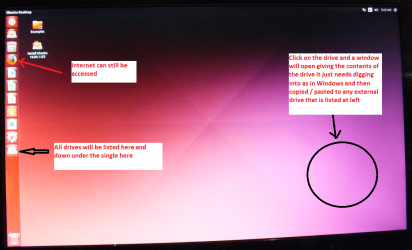
BOOTABLE UBUNTU
Make a bootable Ubuntu disk Get Ubuntu | Download | Ubuntu
Set the BIOS to boot from the optical when the machine boots it will show you a screen with TRY or INSTALL > select TRY not INSTALL
When it is finished - it takes very little time you will get a screen like in the pic .
Open the drive you want > User and dig down until you get to the data / settings you may be able to copy / paste the material you want to an external source or other installed drive doing this.
I am not sure if it will but I have recovered tons of data etc using this method both on "dead" or just plain drives that you cannot get data from using Windows.
Here is another obne but I find the Ubuntu quicker and easier to set up Emergency Kit - save your files from a dead OS
 

Attachments

  • UBUNTU SCREEN X2.PNG
    UBUNTU SCREEN X2.PNG
    272.7 KB · Views: 0

My Computer

Computer type
PC/Desktop
Computer Manufacturer/Model Number
Own build (new) Desk1 / Asus ROG Win 7 / Desk2 1st build
OS
Desk1 7 Home Prem / Desk2 10 Pro / Main lap Asus ROG 10 Pro 2 laptop Toshiba 7 Pro Asus P2520 7 & 10
CPU
Desk1 i5 3750K / Laptop i7 GTX 860M / Desk2 i5 2500
Motherboard
Desk1 Asus P877-V / Desk2 Gigabyte H67 UD3H / Laptop ?
Memory
Desk1 8GB (1866) / Desk2 16GB (1333) / Laptop 8Gb DDR3
Graphics Card(s)
Desk 1& 2NVidia GTX 650 & Laptops on board Intel
Sound Card
Desk 1 & 2 -XONAR DG Realtek High Def audio Laptop
Monitor(s) Displays
Desk 1 Benq HD 2450 / Desk2 Philips 24" / Laptop 17.5"
Screen Resolution
1920x1080 D1 & D2 & Laptop 1
Hard Drives
Desk1 Samsung 120GB 830 SSD
Asus ROG 256GB 850 Pro SSD
Desk2 Samsung 840 256 SSD
Toshiba 120GB EVO
PSU
Desk 1 Corsair HX 1050/ Laptop ? / Desk 2 Corsair HX 650
Case
Desk 1 Cooler HAF XM ? Toshiba laptop / Desk2 Coolermaster
Cooling
Fans on all Desk1 -2 Desk2 - all Coolermasters 5 Laptop ?
Keyboard
Desk 1 MS Sidewinder X6 Desk 2 MS Sidewinder X 4
Mouse
Desk 1&2 - Gigabyte MS 900 gamer - laptop - Logitec wireless
Internet Speed
ADSL2+
Other Info
One other Desktop (tester) and spare Toshba laptop both with SSD's
Running Kaspersky 2016 ISS on all machines config'd identically
Logitec audio stereo systems on each machine (x3)
Canon MG5250MFC
Router/modem TP-Link running WPA2SK
Thanks but I do not want to save my data. I would like to fix/repair my current C: drive bad sectors if this is possible.

If I manage to repair my C drive, then I would like to reinstall a fresh copy of WINDOWS.

Now, I am on C:\WINDOWS\SYSTEM32.
 
Last edited:

My Computer

Computer type
Laptop
Computer Manufacturer/Model Number
MSI
OS
Microsoft Windows 7 Home Premium 64-bit SP1
CPU
Intel Core i3 330M @ 2.13GHz Arrandale 32nm Technology
Motherboard
Micro-Star International MS-1688 (CPU 1)
Memory
4.00 GB Dual-Channel DDR3 @ 531MHz (7-7-7-20)
Graphics Card(s)
Generic PnP Monitor (1366x768@60Hz) and Intel Graphics Media
Sound Card
Realtek High Definition Audio
Monitor(s) Displays
Generic PnP Monitor on Intel Graphics Media Accelerator HD
Screen Resolution
1366x768 pixels
Hard Drives
466GB Western Digital WDC WD5000BEVT-22ZAT0 ATA Device (SATA)
Antivirus
Microsoft security essentials
Browser
Firefox
HDDs do not last forever. Once bad sectors have started appearing it signifies the end of life. Bad sectors cannot be repaired. You have to discard the drive. Buy a new drive and install Windows afresh.

Have you made the Recovery Disks for your laptop?

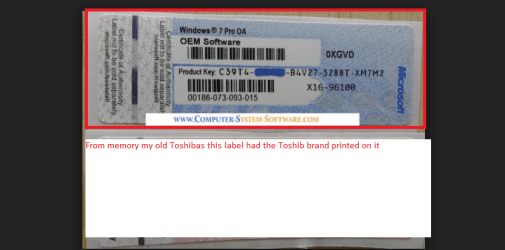
If you haven't made, then you should use the the product iD in the Certificate of Authenticty sticker to activate Windows after installation.
 

My Computer

OS
Windows 7 Home Premium 32 bit
Thanks!

Where can I find a boot disk or/and Recovery Disks for TOSHIBA Satellite L650-13P?
 

My Computer

Computer type
Laptop
Computer Manufacturer/Model Number
MSI
OS
Microsoft Windows 7 Home Premium 64-bit SP1
CPU
Intel Core i3 330M @ 2.13GHz Arrandale 32nm Technology
Motherboard
Micro-Star International MS-1688 (CPU 1)
Memory
4.00 GB Dual-Channel DDR3 @ 531MHz (7-7-7-20)
Graphics Card(s)
Generic PnP Monitor (1366x768@60Hz) and Intel Graphics Media
Sound Card
Realtek High Definition Audio
Monitor(s) Displays
Generic PnP Monitor on Intel Graphics Media Accelerator HD
Screen Resolution
1366x768 pixels
Hard Drives
466GB Western Digital WDC WD5000BEVT-22ZAT0 ATA Device (SATA)
Antivirus
Microsoft security essentials
Browser
Firefox
Thanks!

Where can I find a boot disk or/and Recovery Disks for TOSHIBA Satellite L650-13P?

Normally there is a disk partition to create the disks from an application on the system. Now it's too late as you can't run Windows an even if you could, you can't trust as your disk has bad sectors.
You can install Win 7 using a Win 7 installation disk, use the key that is attached to your laptop and download the drives from Toshiba site.
The ISO can be got from here Microsoft Windows and Office ISO Download Tool Microsoft Windows and Office ISO Download Tool
 
Last edited:

My Computers

System One System Two

  • Computer type
    PC/Desktop
    Computer Manufacturer/Model Number
    custom build
    OS
    Windows 7 HP 64
    CPU
    i5 6600K - 800MHz to 4200MHz
    Motherboard
    GA-Z170-HD3P
    Memory
    4+4G GSkill DDR4 3000
    Graphics Card(s)
    IG - Intel 530
    Monitor(s) Displays
    Samsung 226BW
    Screen Resolution
    1680x1050
    Hard Drives
    (1) -1 SM951 – 128GB M.2 AHCI PCIe SSD drive for Windows 7 and Lubuntu
    (2) -1 WD SATA 3 - 1T for Data
    (3) -1 WD SATA 3 - 1T for backup
    PSU
    Thermaltake 450W TR2 gold
    Keyboard
    Old and good Chicony mechanical keyboard
    Mouse
    Logitech mX performance - 9 buttons (had to disable some)
    Internet Speed
    500Mb/s
    Browser
    Firefox 64
    Other Info
    TinyWall firewall
  • Computer type
    Laptop
    System Manufacturer/Model Number
    Asus Q550LF
    OS
    Windows 7 Pro
    CPU
    i7-4500U 800MHz to 3.0GHz
    Motherboard
    Asus Q550LF
    Memory
    (4+4)G DDR3 1600
    Graphics Card(s)
    IG intel 4400 + NVIDIA GeForce GT 745M
    Sound Card
    Realtek
    Monitor(s) Displays
    LG Display LP156WF4-SPH1
    Screen Resolution
    1920 x 1080
    Hard Drives
    BX500 120G SSD for Windows and programs +
    1T HDD for data
    Internet Speed
    500 Mb/s
    Browser
    Firefox
    Other Info
    TinyWall firewall
Yes mate and now might be the time to get an SSD to install from the important thing is that you get the correct ISO for the activation code on that sticker on your machine.
So if you have a sticker that says 7 Pro 64bit then just make sure you download the correct ISO from that site and then use the code.
The alternative is buy another OEM but hey that is a last resort.

The pic you probably know anyway but my old Toshibas have the Toshiba name on the label.
 

Attachments

  • COA.PNG
    COA.PNG
    68.1 KB · Views: 3

My Computer

Computer type
PC/Desktop
Computer Manufacturer/Model Number
Own build (new) Desk1 / Asus ROG Win 7 / Desk2 1st build
OS
Desk1 7 Home Prem / Desk2 10 Pro / Main lap Asus ROG 10 Pro 2 laptop Toshiba 7 Pro Asus P2520 7 & 10
CPU
Desk1 i5 3750K / Laptop i7 GTX 860M / Desk2 i5 2500
Motherboard
Desk1 Asus P877-V / Desk2 Gigabyte H67 UD3H / Laptop ?
Memory
Desk1 8GB (1866) / Desk2 16GB (1333) / Laptop 8Gb DDR3
Graphics Card(s)
Desk 1& 2NVidia GTX 650 & Laptops on board Intel
Sound Card
Desk 1 & 2 -XONAR DG Realtek High Def audio Laptop
Monitor(s) Displays
Desk 1 Benq HD 2450 / Desk2 Philips 24" / Laptop 17.5"
Screen Resolution
1920x1080 D1 & D2 & Laptop 1
Hard Drives
Desk1 Samsung 120GB 830 SSD
Asus ROG 256GB 850 Pro SSD
Desk2 Samsung 840 256 SSD
Toshiba 120GB EVO
PSU
Desk 1 Corsair HX 1050/ Laptop ? / Desk 2 Corsair HX 650
Case
Desk 1 Cooler HAF XM ? Toshiba laptop / Desk2 Coolermaster
Cooling
Fans on all Desk1 -2 Desk2 - all Coolermasters 5 Laptop ?
Keyboard
Desk 1 MS Sidewinder X6 Desk 2 MS Sidewinder X 4
Mouse
Desk 1&2 - Gigabyte MS 900 gamer - laptop - Logitec wireless
Internet Speed
ADSL2+
Other Info
One other Desktop (tester) and spare Toshba laptop both with SSD's
Running Kaspersky 2016 ISS on all machines config'd identically
Logitec audio stereo systems on each machine (x3)
Canon MG5250MFC
Router/modem TP-Link running WPA2SK
Thanks a lot!
 

My Computer

Computer type
Laptop
Computer Manufacturer/Model Number
MSI
OS
Microsoft Windows 7 Home Premium 64-bit SP1
CPU
Intel Core i3 330M @ 2.13GHz Arrandale 32nm Technology
Motherboard
Micro-Star International MS-1688 (CPU 1)
Memory
4.00 GB Dual-Channel DDR3 @ 531MHz (7-7-7-20)
Graphics Card(s)
Generic PnP Monitor (1366x768@60Hz) and Intel Graphics Media
Sound Card
Realtek High Definition Audio
Monitor(s) Displays
Generic PnP Monitor on Intel Graphics Media Accelerator HD
Screen Resolution
1366x768 pixels
Hard Drives
466GB Western Digital WDC WD5000BEVT-22ZAT0 ATA Device (SATA)
Antivirus
Microsoft security essentials
Browser
Firefox
Back
Top