Windows Dock Themes.......

DJROD

House Music DJ
Where can i find some nice Dock themes. I want one of those nice long Docks with customizable icons. Anywhere on here. Thanks.
 

My Computer

Computer Manufacturer/Model Number
HP Pavillion a6767c Desktop
OS
Windows 7 Ultimate 64 bit
CPU
Intel Pentium E5300 (W) 2.6 GHz (65W)
Motherboard
Asus
Memory
6GB
Monitor(s) Displays
20 Inch Acer Monitor
Screen Resolution
1680 x 1050
Hard Drives
640GB
Keyboard
Logitech S510 Wireless Keyboard & Mouse
Mouse
Logitech S510 Wireless Keyboard & Mouse
Other Info
Also have the HP G60-235DX Notebook which i use mostly everyday.

Ok...i was looking around...does Rocketdock work with Windows 7 64 bit? Ive seen no. But thought u guys may know a way.
 

My Computer

Computer Manufacturer/Model Number
HP Pavillion a6767c Desktop
OS
Windows 7 Ultimate 64 bit
CPU
Intel Pentium E5300 (W) 2.6 GHz (65W)
Motherboard
Asus
Memory
6GB
Monitor(s) Displays
20 Inch Acer Monitor
Screen Resolution
1680 x 1050
Hard Drives
640GB
Keyboard
Logitech S510 Wireless Keyboard & Mouse
Mouse
Logitech S510 Wireless Keyboard & Mouse
Other Info
Also have the HP G60-235DX Notebook which i use mostly everyday.

My Computer

Computer type
PC/Desktop
Computer Manufacturer/Model Number
Self Build
OS
MS Windows 7 Professional 64-bit SP1
CPU
AMD FX(tm)-6100 Six-Core Processor Socket AM3+ (942)
Motherboard
ASUSTeK COMPUTER INC. SABERTOOTH 990FX (AM3r2)
Memory
8.00 GB Dual-Channel DDR3 @ 802MHz (11-11-11-36) 1.5Volts
Graphics Card(s)
NVIDIA GeForce GTX 560 Ti
Sound Card
Onboard Realtek HD
Monitor(s) Displays
shimian (1920x1080@60Hz)
Screen Resolution
1920*1080
Hard Drives
OCZ-AGIL ITY3 SATA Disk Device 120GB
PSU
Corsair TX 750
Case
Corsair
Cooling
WaterCooled
Keyboard
Microsoft Wired
Mouse
Logitech USB Optical TiltWheel Mouse
Internet Speed
Realtek PCIe GBE Family Controller 20MB*1MB
Antivirus
Avast
Browser
Firefox
Other Info
150GB Internal Hard Drive for Backing Up Important Files -
Hauppauge Nova-DT Dual DVB-T Tuner Device (+IR) -
USB PC Camera with Mic (SN9C105)
Ok...i was looking around...does Rocketdock work with Windows 7 64 bit? Ive seen no. But thought u guys may know a way.
RocketDock runs just fine on my Windows 7 Ultimate x64; I've had a couple games that didn't want to launch correctly (FoFiX for one), but I think those just had a problem with the way RocketDock's shortcuts work.

Others you could try are ObjectDock (there is a free version) and Winstep Nexus, both of those run perfectly under Windows 7.
 

My Computer

Computer type
PC/Desktop
OS
Win 10 x64 Pro x64 / Ubuntu 15.10 x64
CPU
Intel i7-4960X
Motherboard
Asus Rampage IV Black Edition
Memory
4x8GB Corsair Dominator Platinum @2400MHz 10-12-12-31
Graphics Card(s)
2x MSI GTX780Ti 3GB (SLI)
Sound Card
Onboard SupremeFX (Cirrus Logic CS4398)
Monitor(s) Displays
3x LG Cinema 27" IPS LED (27MP65)
Screen Resolution
[1920x1080]x3
Hard Drives
Crucial M500 120GB, Crucial M500 480GB, Toshiba DT01ACA200 2TB
PSU
CoolerMaster V1000
Case
Corsair Obsidian 750D
Cooling
ThermalTake Water 3.0 Extreme, 4xSP120, 3xAF120
Keyboard
Moshi Luna
Mouse
Logitech G700s / Roccat Tyon
Internet Speed
4Mb uncapped ADSL (Afrihost)
Antivirus
MS Security Essentials
Browser
Chrome... Duh. (:
Thanks people. I hate objectdock. Use to use that. I still have Plus. I hate the corners. I like the flat square look on the ends like the Rocketdock. Ill try that now. I was already looking thru the add ons Anthony. Real nice. If i run into a plm...ill hit back here. Thanks you 2.
 

My Computer

Computer Manufacturer/Model Number
HP Pavillion a6767c Desktop
OS
Windows 7 Ultimate 64 bit
CPU
Intel Pentium E5300 (W) 2.6 GHz (65W)
Motherboard
Asus
Memory
6GB
Monitor(s) Displays
20 Inch Acer Monitor
Screen Resolution
1680 x 1050
Hard Drives
640GB
Keyboard
Logitech S510 Wireless Keyboard & Mouse
Mouse
Logitech S510 Wireless Keyboard & Mouse
Other Info
Also have the HP G60-235DX Notebook which i use mostly everyday.
No problem, I have had no issues with Rocket Dock. Here is a screen shot of mine at the moment, with icons I made for myself!!
 

Attachments

  • Console One Desktop.png
    Console One Desktop.png
    1.8 MB · Views: 93

My Computer

Computer type
PC/Desktop
Computer Manufacturer/Model Number
Self Build
OS
MS Windows 7 Professional 64-bit SP1
CPU
AMD FX(tm)-6100 Six-Core Processor Socket AM3+ (942)
Motherboard
ASUSTeK COMPUTER INC. SABERTOOTH 990FX (AM3r2)
Memory
8.00 GB Dual-Channel DDR3 @ 802MHz (11-11-11-36) 1.5Volts
Graphics Card(s)
NVIDIA GeForce GTX 560 Ti
Sound Card
Onboard Realtek HD
Monitor(s) Displays
shimian (1920x1080@60Hz)
Screen Resolution
1920*1080
Hard Drives
OCZ-AGIL ITY3 SATA Disk Device 120GB
PSU
Corsair TX 750
Case
Corsair
Cooling
WaterCooled
Keyboard
Microsoft Wired
Mouse
Logitech USB Optical TiltWheel Mouse
Internet Speed
Realtek PCIe GBE Family Controller 20MB*1MB
Antivirus
Avast
Browser
Firefox
Other Info
150GB Internal Hard Drive for Backing Up Important Files -
Hauppauge Nova-DT Dual DVB-T Tuner Device (+IR) -
USB PC Camera with Mic (SN9C105)
Thats a nice desktop right there Anthony. Nice n clean.

One small question...when i download the add on icons....its zipped. When i click it to open...will it automatically go into the Rocketdock folder...or what do i have to do from here to use em. Thanks again man.
 

My Computer

Computer Manufacturer/Model Number
HP Pavillion a6767c Desktop
OS
Windows 7 Ultimate 64 bit
CPU
Intel Pentium E5300 (W) 2.6 GHz (65W)
Motherboard
Asus
Memory
6GB
Monitor(s) Displays
20 Inch Acer Monitor
Screen Resolution
1680 x 1050
Hard Drives
640GB
Keyboard
Logitech S510 Wireless Keyboard & Mouse
Mouse
Logitech S510 Wireless Keyboard & Mouse
Other Info
Also have the HP G60-235DX Notebook which i use mostly everyday.
Unzip em, then place them in the relevant folder at this location: C:\Program Files (x86)\RocketDock
 

My Computer

Computer type
PC/Desktop
Computer Manufacturer/Model Number
Self Build
OS
MS Windows 7 Professional 64-bit SP1
CPU
AMD FX(tm)-6100 Six-Core Processor Socket AM3+ (942)
Motherboard
ASUSTeK COMPUTER INC. SABERTOOTH 990FX (AM3r2)
Memory
8.00 GB Dual-Channel DDR3 @ 802MHz (11-11-11-36) 1.5Volts
Graphics Card(s)
NVIDIA GeForce GTX 560 Ti
Sound Card
Onboard Realtek HD
Monitor(s) Displays
shimian (1920x1080@60Hz)
Screen Resolution
1920*1080
Hard Drives
OCZ-AGIL ITY3 SATA Disk Device 120GB
PSU
Corsair TX 750
Case
Corsair
Cooling
WaterCooled
Keyboard
Microsoft Wired
Mouse
Logitech USB Optical TiltWheel Mouse
Internet Speed
Realtek PCIe GBE Family Controller 20MB*1MB
Antivirus
Avast
Browser
Firefox
Other Info
150GB Internal Hard Drive for Backing Up Important Files -
Hauppauge Nova-DT Dual DVB-T Tuner Device (+IR) -
USB PC Camera with Mic (SN9C105)
Yea...i was dragging them in one by one just now. I see the icons there. Gotta restart right in order for it to show up?
 

My Computer

Computer Manufacturer/Model Number
HP Pavillion a6767c Desktop
OS
Windows 7 Ultimate 64 bit
CPU
Intel Pentium E5300 (W) 2.6 GHz (65W)
Motherboard
Asus
Memory
6GB
Monitor(s) Displays
20 Inch Acer Monitor
Screen Resolution
1680 x 1050
Hard Drives
640GB
Keyboard
Logitech S510 Wireless Keyboard & Mouse
Mouse
Logitech S510 Wireless Keyboard & Mouse
Other Info
Also have the HP G60-235DX Notebook which i use mostly everyday.
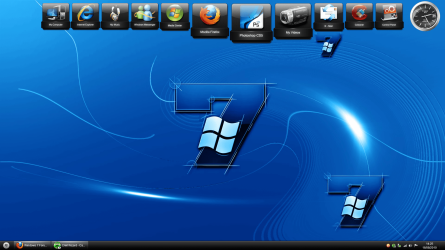
Once the icons are in the relevant folder, right click the dock icon you want changing then choose icon settings then pick the icon from the location on the left. you don't need to reboot for it to show up, it should be instant!
 

My Computer

Computer type
PC/Desktop
Computer Manufacturer/Model Number
Self Build
OS
MS Windows 7 Professional 64-bit SP1
CPU
AMD FX(tm)-6100 Six-Core Processor Socket AM3+ (942)
Motherboard
ASUSTeK COMPUTER INC. SABERTOOTH 990FX (AM3r2)
Memory
8.00 GB Dual-Channel DDR3 @ 802MHz (11-11-11-36) 1.5Volts
Graphics Card(s)
NVIDIA GeForce GTX 560 Ti
Sound Card
Onboard Realtek HD
Monitor(s) Displays
shimian (1920x1080@60Hz)
Screen Resolution
1920*1080
Hard Drives
OCZ-AGIL ITY3 SATA Disk Device 120GB
PSU
Corsair TX 750
Case
Corsair
Cooling
WaterCooled
Keyboard
Microsoft Wired
Mouse
Logitech USB Optical TiltWheel Mouse
Internet Speed
Realtek PCIe GBE Family Controller 20MB*1MB
Antivirus
Avast
Browser
Firefox
Other Info
150GB Internal Hard Drive for Backing Up Important Files -
Hauppauge Nova-DT Dual DVB-T Tuner Device (+IR) -
USB PC Camera with Mic (SN9C105)
By the way...ive been trying to get my signature on here....this is the 1st forum that it wont show up. I see it in my user CP...but its not showing up on here. I put it in like i always do at the other forums..same way...but its not showing. Strange.
 

My Computer

Computer Manufacturer/Model Number
HP Pavillion a6767c Desktop
OS
Windows 7 Ultimate 64 bit
CPU
Intel Pentium E5300 (W) 2.6 GHz (65W)
Motherboard
Asus
Memory
6GB
Monitor(s) Displays
20 Inch Acer Monitor
Screen Resolution
1680 x 1050
Hard Drives
640GB
Keyboard
Logitech S510 Wireless Keyboard & Mouse
Mouse
Logitech S510 Wireless Keyboard & Mouse
Other Info
Also have the HP G60-235DX Notebook which i use mostly everyday.
Start a fresh post in the Sig thread If you cant work it out, I'm sure someone will help.

Have you figured how to configure Rocketdock?
 

My Computer

Computer type
PC/Desktop
Computer Manufacturer/Model Number
Self Build
OS
MS Windows 7 Professional 64-bit SP1
CPU
AMD FX(tm)-6100 Six-Core Processor Socket AM3+ (942)
Motherboard
ASUSTeK COMPUTER INC. SABERTOOTH 990FX (AM3r2)
Memory
8.00 GB Dual-Channel DDR3 @ 802MHz (11-11-11-36) 1.5Volts
Graphics Card(s)
NVIDIA GeForce GTX 560 Ti
Sound Card
Onboard Realtek HD
Monitor(s) Displays
shimian (1920x1080@60Hz)
Screen Resolution
1920*1080
Hard Drives
OCZ-AGIL ITY3 SATA Disk Device 120GB
PSU
Corsair TX 750
Case
Corsair
Cooling
WaterCooled
Keyboard
Microsoft Wired
Mouse
Logitech USB Optical TiltWheel Mouse
Internet Speed
Realtek PCIe GBE Family Controller 20MB*1MB
Antivirus
Avast
Browser
Firefox
Other Info
150GB Internal Hard Drive for Backing Up Important Files -
Hauppauge Nova-DT Dual DVB-T Tuner Device (+IR) -
USB PC Camera with Mic (SN9C105)
Yes and no. With objectdock it was just drag whatever into the dock and it worked. For example....i right clicked on "My Music" in the dock to change it to AIM. The AIm icon was there....but when i would click it...My Music would open.
 

My Computer

Computer Manufacturer/Model Number
HP Pavillion a6767c Desktop
OS
Windows 7 Ultimate 64 bit
CPU
Intel Pentium E5300 (W) 2.6 GHz (65W)
Motherboard
Asus
Memory
6GB
Monitor(s) Displays
20 Inch Acer Monitor
Screen Resolution
1680 x 1050
Hard Drives
640GB
Keyboard
Logitech S510 Wireless Keyboard & Mouse
Mouse
Logitech S510 Wireless Keyboard & Mouse
Other Info
Also have the HP G60-235DX Notebook which i use mostly everyday.
Well to change that, right click the icon again, then choose 'add item' then 'file' then browse to the relevant program .exe ;)
 

My Computer

Computer type
PC/Desktop
Computer Manufacturer/Model Number
Self Build
OS
MS Windows 7 Professional 64-bit SP1
CPU
AMD FX(tm)-6100 Six-Core Processor Socket AM3+ (942)
Motherboard
ASUSTeK COMPUTER INC. SABERTOOTH 990FX (AM3r2)
Memory
8.00 GB Dual-Channel DDR3 @ 802MHz (11-11-11-36) 1.5Volts
Graphics Card(s)
NVIDIA GeForce GTX 560 Ti
Sound Card
Onboard Realtek HD
Monitor(s) Displays
shimian (1920x1080@60Hz)
Screen Resolution
1920*1080
Hard Drives
OCZ-AGIL ITY3 SATA Disk Device 120GB
PSU
Corsair TX 750
Case
Corsair
Cooling
WaterCooled
Keyboard
Microsoft Wired
Mouse
Logitech USB Optical TiltWheel Mouse
Internet Speed
Realtek PCIe GBE Family Controller 20MB*1MB
Antivirus
Avast
Browser
Firefox
Other Info
150GB Internal Hard Drive for Backing Up Important Files -
Hauppauge Nova-DT Dual DVB-T Tuner Device (+IR) -
USB PC Camera with Mic (SN9C105)
Im laffin this is being so tricky. NOW...i have a real AIM in the dock....but the space is blank. Nothing there. I tried to right click then add the icon....wont show up. But when i click the blank space in the dock...AIM opens. Know what i mean?
 

My Computer

Computer Manufacturer/Model Number
HP Pavillion a6767c Desktop
OS
Windows 7 Ultimate 64 bit
CPU
Intel Pentium E5300 (W) 2.6 GHz (65W)
Motherboard
Asus
Memory
6GB
Monitor(s) Displays
20 Inch Acer Monitor
Screen Resolution
1680 x 1050
Hard Drives
640GB
Keyboard
Logitech S510 Wireless Keyboard & Mouse
Mouse
Logitech S510 Wireless Keyboard & Mouse
Other Info
Also have the HP G60-235DX Notebook which i use mostly everyday.
Got it. Had to close the dock then reopened. It was acting looney. Wouldnt let me drag things in til AFTER i closed an opened it. Thanks alot bro for the help.
 

My Computer

Computer Manufacturer/Model Number
HP Pavillion a6767c Desktop
OS
Windows 7 Ultimate 64 bit
CPU
Intel Pentium E5300 (W) 2.6 GHz (65W)
Motherboard
Asus
Memory
6GB
Monitor(s) Displays
20 Inch Acer Monitor
Screen Resolution
1680 x 1050
Hard Drives
640GB
Keyboard
Logitech S510 Wireless Keyboard & Mouse
Mouse
Logitech S510 Wireless Keyboard & Mouse
Other Info
Also have the HP G60-235DX Notebook which i use mostly everyday.
Oh OK No Problem!!
 

My Computer

Computer type
PC/Desktop
Computer Manufacturer/Model Number
Self Build
OS
MS Windows 7 Professional 64-bit SP1
CPU
AMD FX(tm)-6100 Six-Core Processor Socket AM3+ (942)
Motherboard
ASUSTeK COMPUTER INC. SABERTOOTH 990FX (AM3r2)
Memory
8.00 GB Dual-Channel DDR3 @ 802MHz (11-11-11-36) 1.5Volts
Graphics Card(s)
NVIDIA GeForce GTX 560 Ti
Sound Card
Onboard Realtek HD
Monitor(s) Displays
shimian (1920x1080@60Hz)
Screen Resolution
1920*1080
Hard Drives
OCZ-AGIL ITY3 SATA Disk Device 120GB
PSU
Corsair TX 750
Case
Corsair
Cooling
WaterCooled
Keyboard
Microsoft Wired
Mouse
Logitech USB Optical TiltWheel Mouse
Internet Speed
Realtek PCIe GBE Family Controller 20MB*1MB
Antivirus
Avast
Browser
Firefox
Other Info
150GB Internal Hard Drive for Backing Up Important Files -
Hauppauge Nova-DT Dual DVB-T Tuner Device (+IR) -
USB PC Camera with Mic (SN9C105)
Back
Top