Windows Explorer dates not as expected.

redtuiop

New member
Local time
11:53 PM
Messages
92
Location
Belfast, N. Ireland UK
I apologise if this seems a foolish question, but I'm getting vexed with a simple issue in Windows Explorer. I do manual backups by newest dates but find that while the files themselves are dated correctly, the root folders don't e.g. if I have a folder say General, & then 10 subfolders, and I know that various files have been saved in any number of those subfolders so figure I'd rather just save the General folder - the date will show something in 2012 rather than recently. Means I invariably have to drill my way down to determine which subfolders have got updated files.

While I appreciate that I'm backing up regardless, I'm just more curious about why the root folder never updates itself date wise? And is it something I can somehow change maybe?

Thanks.
 

My Computer

Computer type
PC/Desktop
Computer Manufacturer/Model Number
Generic
OS
Win 7 64bit SP2?
CPU
Intel G2030 3GHz
Motherboard
Gigabyte Motherboard GA-H61M
Memory
4 Gb
Graphics Card(s)
OnBoard
Sound Card
OnBoard
Monitor(s) Displays
BenQ GL2250
Screen Resolution
1920 x 1080
Hard Drives
3 x SATA (500, 1000, 2000)
PSU
460W Coolermaster
Case
Coolermaster
Cooling
3 x Fans
Keyboard
Microsoft Ergonomic 4000
Mouse
Kensington Trackball
Internet Speed
100 Gb
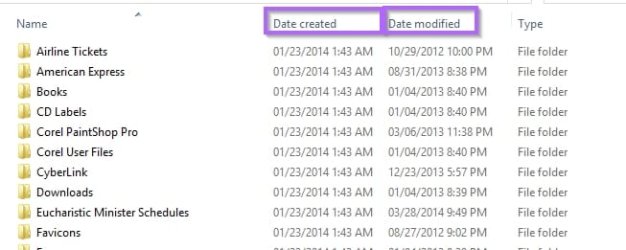
Are you showing the Created date or the Modified date?

ExplorerDates.jpg
 

My Computer

Computer type
PC/Desktop
Computer Manufacturer/Model Number
Lenovo IdeaCenter 450
OS
Windows 10 Pro X64
CPU
Intel Quad Core i7-4770 @ 3.4Ghz
Memory
16.0GB PC3-12800 DDR3 SDRAM 1600 MHz
Graphics Card(s)
Intel Integrated HD Graphics
Sound Card
Realtek HD Audio
Monitor(s) Displays
HP 22" LCD
Screen Resolution
1680 x 1050
Hard Drives
250GB Samsung EVO SATA-3 SSD
2TB Seagate ST2000DM001 SATA-2
1.5TB Seagate ST3150041AS SATA
Keyboard
Dell USB
Mouse
Lenovo USB
Internet Speed
Cable via Road Runner 3MB Upload, 30MB Download
Antivirus
Windows Defender, MBAM Pro, MBAE
Browser
Seamonkey
Other Info
UEFI/GPT
PLDS DVD-RW DH16AERSH
When a new file or folder is created the date of the immediate parent folder will be updated. The date of higher level folders will not be effected. Updating an existing file will not change the parent folders date. I am quite certain this cannot be changed.

The modified date on a folder refers to when the folder itself was modified, not the files it contains.
 

My Computer

Computer type
PC/Desktop
Computer Manufacturer/Model Number
HP
OS
Windows 7 Pro 64 bit
CPU
Xeon W3520
Memory
8 GB
Graphics Card(s)
Nvidia Geforce 210
The modified date on a folder refers to when the folder itself was modified, not the files it contains.

I did some testing and that appears to be true, bummer.
 

My Computer

Computer type
PC/Desktop
Computer Manufacturer/Model Number
Lenovo IdeaCenter 450
OS
Windows 10 Pro X64
CPU
Intel Quad Core i7-4770 @ 3.4Ghz
Memory
16.0GB PC3-12800 DDR3 SDRAM 1600 MHz
Graphics Card(s)
Intel Integrated HD Graphics
Sound Card
Realtek HD Audio
Monitor(s) Displays
HP 22" LCD
Screen Resolution
1680 x 1050
Hard Drives
250GB Samsung EVO SATA-3 SSD
2TB Seagate ST2000DM001 SATA-2
1.5TB Seagate ST3150041AS SATA
Keyboard
Dell USB
Mouse
Lenovo USB
Internet Speed
Cable via Road Runner 3MB Upload, 30MB Download
Antivirus
Windows Defender, MBAM Pro, MBAE
Browser
Seamonkey
Other Info
UEFI/GPT
PLDS DVD-RW DH16AERSH
Ahhh...

Thanks so much guys - all your info is hugely helpful. I wasn't aware that folder dates wouldn't change if the content changes within them - makes it rather hard to see what's new when I sort by date for backups, without then having to drill down to the files.

Course it could be that perhaps I need to think again how I manage my hundreds of folders/subfolders etc, & see if I can find some better means of managing my files.

Alternatively - any suggestions for a good FREE backup program that would negate all this hassle for me :D??
 

My Computer

Computer type
PC/Desktop
Computer Manufacturer/Model Number
Generic
OS
Win 7 64bit SP2?
CPU
Intel G2030 3GHz
Motherboard
Gigabyte Motherboard GA-H61M
Memory
4 Gb
Graphics Card(s)
OnBoard
Sound Card
OnBoard
Monitor(s) Displays
BenQ GL2250
Screen Resolution
1920 x 1080
Hard Drives
3 x SATA (500, 1000, 2000)
PSU
460W Coolermaster
Case
Coolermaster
Cooling
3 x Fans
Keyboard
Microsoft Ergonomic 4000
Mouse
Kensington Trackball
Internet Speed
100 Gb
Macrium Reflect Free is a very good and well thought of here.

The first backup would be a full backup that includes everything. The next backups would be incremental, backing up just new or changed files and folders.

If you want to backup just specific folders and files then Microsoft's Synctoy would work or a not free program like Mirror Folder (I've been using this for many years) will do it.
 

My Computer

Computer type
PC/Desktop
Computer Manufacturer/Model Number
Lenovo IdeaCenter 450
OS
Windows 10 Pro X64
CPU
Intel Quad Core i7-4770 @ 3.4Ghz
Memory
16.0GB PC3-12800 DDR3 SDRAM 1600 MHz
Graphics Card(s)
Intel Integrated HD Graphics
Sound Card
Realtek HD Audio
Monitor(s) Displays
HP 22" LCD
Screen Resolution
1680 x 1050
Hard Drives
250GB Samsung EVO SATA-3 SSD
2TB Seagate ST2000DM001 SATA-2
1.5TB Seagate ST3150041AS SATA
Keyboard
Dell USB
Mouse
Lenovo USB
Internet Speed
Cable via Road Runner 3MB Upload, 30MB Download
Antivirus
Windows Defender, MBAM Pro, MBAE
Browser
Seamonkey
Other Info
UEFI/GPT
PLDS DVD-RW DH16AERSH
Back
Top