Windows Fonts all thin and faded looking in Windows 7

mtamborra

New member
Local time
12:33 PM
Messages
4
Hi All,

I just got a new laptop. It's a dell like my last one and it is connected to the same docking station, and same 2 monitors as my old one. They both are Windows 7 64-bit. The fonts for things like web browsers, windows explorer and some 3rd party apps are horribly faded looking and really straining on the eyes. The whites are super bright and the thin font makes it harder to see.

I tried to do that "truetype" font thing in control panel and that helps with some of the headers, but most fonts still look horrible even though I chose the darkest option for all of them.

Here are some examples ("old" is from the old laptop where everything looked fine and "new" is from the new one where it all looks faded). All of these screenshots were taken on the same monitor.

example_1.png


example_2.png


example3.png


example4.png


example6.png


So its the same monitors, same version of windows, same font style and type it seems but just thinner and more faded and I can't figure out why. Please help

Thanks
Mike
 

My Computer My Computer

At a glance

Windows 7 64-bitInterl Core i58 GB RAMHD Intel Graphics 5500
Computer type
Laptop
Computer Manufacturer/Model Number
Dell Latitude Laptop
OS
Windows 7 64-bit
CPU
Interl Core i5
Memory
8 GB RAM
Graphics Card(s)
HD Intel Graphics 5500
Browser
chrome/IE/Firefox
Welcome to our forum mtamborra.

This could be helpful.

Start Orb.
Type in Clear Type
When Adjust Clear Type Text shows, tick on it and follow the instructions.

Let us know if it helps.
 

My Computer My Computer

At a glance

Windows 10 Pro. 64/ version 1709 Windows 7 Pr...Intel i7-6800K @ 4.3Corsair Platinum 16 gig @2400EVGA GTX 1070 OC
Computer type
PC/Desktop
Computer Manufacturer/Model Number
Home made Desktop
OS
Windows 10 Pro. 64/ version 1709 Windows 7 Pro/64
CPU
Intel i7-6800K @ 4.3
Motherboard
ASUS X-99 Deluxe II
Memory
Corsair Platinum 16 gig @2400
Graphics Card(s)
EVGA GTX 1070 OC
Monitor(s) Displays
Asus 27" LED LCD/VE278Q
Screen Resolution
1920-1080 or 1280-720 HDMI
Hard Drives
INTEL SSD 730-240 Gb Sata 3.0/
PSU
EVGA Platium 1200W
Case
Phanteks Luxe Tempered Glass 8 fans/ one radiator
Cooling
XSPC/ Water Cooled CPU
Keyboard
Das 4 Professional
Mouse
Logitech M705/MX Anywhere 2-S
Internet Speed
100 mbits
Antivirus
Microsoft Security Essentials/ Malwarebytes Premium 3.0/ SAS
Browser
I.E. 11 default/Firefox/ ISP Time Warner Cable/Spectrum
Other Info
LG BluRay Burner/
Sound system-KLipsch-THX/
Icy Dock ssd Hot Swap bays.
Hi Layback

I tried this already. I typed "truetype" in my thread but meant to say "cleartype". Its already on with the darkest options selected for all the boxes. I turned it off for a sec to see the difference and it looks extra horrible with it turned off.

I also updated the graphics driver on the dell site but it was already the most current. I also found an older thread on here about a similar issue and downloaded someone's "aerobold" windows 7 theme and installed it, but that just made headers bold and most of the main fonts ( like the one inside this box i'm typing in) are still very faded.
 

My Computer My Computer

At a glance

Windows 7 64-bitInterl Core i58 GB RAMHD Intel Graphics 5500
Computer type
Laptop
Computer Manufacturer/Model Number
Dell Latitude Laptop
OS
Windows 7 64-bit
CPU
Interl Core i5
Memory
8 GB RAM
Graphics Card(s)
HD Intel Graphics 5500
Browser
chrome/IE/Firefox
I really can't give any more suggestion. I have my reasons. Sorry.

Hopefully others will drop by and maybe help.
 

My Computer My Computer

At a glance

Windows 10 Pro. 64/ version 1709 Windows 7 Pr...Intel i7-6800K @ 4.3Corsair Platinum 16 gig @2400EVGA GTX 1070 OC
Computer type
PC/Desktop
Computer Manufacturer/Model Number
Home made Desktop
OS
Windows 10 Pro. 64/ version 1709 Windows 7 Pro/64
CPU
Intel i7-6800K @ 4.3
Motherboard
ASUS X-99 Deluxe II
Memory
Corsair Platinum 16 gig @2400
Graphics Card(s)
EVGA GTX 1070 OC
Monitor(s) Displays
Asus 27" LED LCD/VE278Q
Screen Resolution
1920-1080 or 1280-720 HDMI
Hard Drives
INTEL SSD 730-240 Gb Sata 3.0/
PSU
EVGA Platium 1200W
Case
Phanteks Luxe Tempered Glass 8 fans/ one radiator
Cooling
XSPC/ Water Cooled CPU
Keyboard
Das 4 Professional
Mouse
Logitech M705/MX Anywhere 2-S
Internet Speed
100 mbits
Antivirus
Microsoft Security Essentials/ Malwarebytes Premium 3.0/ SAS
Browser
I.E. 11 default/Firefox/ ISP Time Warner Cable/Spectrum
Other Info
LG BluRay Burner/
Sound system-KLipsch-THX/
Icy Dock ssd Hot Swap bays.
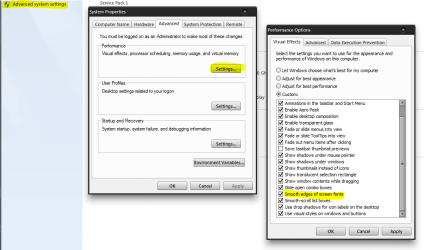
Does turning off the smoothing of fonts help or just make it worse?
System, Advanced system settings.
 

Attachments

  • fonts.PNG
    fonts.PNG
    42.8 KB · Views: 3

My Computer My Computer

At a glance

10 Pro x64Ryzen 9 3900X64GB(4x16GB) DDR4EVGA 1080ti FTW3
Computer type
PC/Desktop
Computer Manufacturer/Model Number
Custom
OS
10 Pro x64
CPU
Ryzen 9 3900X
Motherboard
Asrock x370 Tachi
Memory
64GB(4x16GB) DDR4
Graphics Card(s)
EVGA 1080ti FTW3
Sound Card
ASUS Xonar Essence STX (V4 Bursons), ODAC rev B, NFB-11, O2
Monitor(s) Displays
3xASUS PB278Q/R, Optoma HD142X
Screen Resolution
3x1440p, 1080p
Hard Drives
512GB 850 EVO(OS, Programs)
4TB (Movies)
3TB (Downloads)
3TB (Programs)
1TB HDD (Games)
2x6TB R1 (videos)
PSU
AX760
Case
Fractal Define R5
Cooling
NH-D15S
Keyboard
Massdrop Ctrl with Box Navy's
Mouse
G903, Alioth XXL Mat
Internet Speed
280/40
Antivirus
MBAM, ESET
Browser
Canary 64 Bit
Other Info
I also own a Thinkpad P50 Xeon 4K, X220T, X1C5
Turning off the clear type fonts makes it even worse. I've also experimented with different windows 7 themes but they only seem to make the text of headers larger and more bold, the stuff inside, like chat boxes, spreadsheets, text inside of web browsers still looks very faded. I've tried lots of stuff at this point and open to any suggestions. Including manually changing all fonts in the registry (trying to avoid this) if need be
 

My Computer My Computer

At a glance

Windows 7 64-bitInterl Core i58 GB RAMHD Intel Graphics 5500
Computer type
Laptop
Computer Manufacturer/Model Number
Dell Latitude Laptop
OS
Windows 7 64-bit
CPU
Interl Core i5
Memory
8 GB RAM
Graphics Card(s)
HD Intel Graphics 5500
Browser
chrome/IE/Firefox
Turning off the clear type fonts makes it even worse. I've also experimented with different windows 7 themes but they only seem to make the text of headers larger and more bold, the stuff inside, like chat boxes, spreadsheets, text inside of web browsers still looks very faded. I've tried lots of stuff at this point and open to any suggestions. Including manually changing all fonts in the registry (trying to avoid this) if need be

So it is faded on all fonts all the time?

EDIT: try this from How to Reset Windows 7 to its default font for the whole system? - Super User

1. Open Fonts by clicking the Start button, clicking Control Panel, clicking Appearance and Personalization, and then clicking Fonts.
2. In the left pane, click Font settings.
3. Click Restore default font settings.
 
Last edited:

My Computer My Computer

At a glance

10 Pro x64Ryzen 9 3900X64GB(4x16GB) DDR4EVGA 1080ti FTW3
Computer type
PC/Desktop
Computer Manufacturer/Model Number
Custom
OS
10 Pro x64
CPU
Ryzen 9 3900X
Motherboard
Asrock x370 Tachi
Memory
64GB(4x16GB) DDR4
Graphics Card(s)
EVGA 1080ti FTW3
Sound Card
ASUS Xonar Essence STX (V4 Bursons), ODAC rev B, NFB-11, O2
Monitor(s) Displays
3xASUS PB278Q/R, Optoma HD142X
Screen Resolution
3x1440p, 1080p
Hard Drives
512GB 850 EVO(OS, Programs)
4TB (Movies)
3TB (Downloads)
3TB (Programs)
1TB HDD (Games)
2x6TB R1 (videos)
PSU
AX760
Case
Fractal Define R5
Cooling
NH-D15S
Keyboard
Massdrop Ctrl with Box Navy's
Mouse
G903, Alioth XXL Mat
Internet Speed
280/40
Antivirus
MBAM, ESET
Browser
Canary 64 Bit
Other Info
I also own a Thinkpad P50 Xeon 4K, X220T, X1C5
Does turning off the smoothing of fonts help or just make it worse?
System, Advanced system settings.

Hi, thanks for the tip. I tried turning that off but it seems to make them even more faded.
 

My Computer My Computer

At a glance

Windows 7 64-bitInterl Core i58 GB RAMHD Intel Graphics 5500
Computer type
Laptop
Computer Manufacturer/Model Number
Dell Latitude Laptop
OS
Windows 7 64-bit
CPU
Interl Core i5
Memory
8 GB RAM
Graphics Card(s)
HD Intel Graphics 5500
Browser
chrome/IE/Firefox
Back
Top