Windows Live Mail can send but can't retrieve email from webmail site

philwarner

New member
Local time
8:22 AM
Messages
3
Location
North West Arkansas
On March 21st my Windows Live Mail stopped retrieving email from my CenturyLink email account and started giving a message that it can't send or receive mail due to an unknown error and it shows error Id 0x80004005.

I've tried setting my account details to those on my wife's laptop which is still receiving emails (although it also pops a similar error message) and I've been able to send emails from my laptop but still can't recieve them there. I've also spent hours on the phone with CenturyLink tech folks who have each suggested different settings in server names and ports, none of which have worked, and who finally suggested calling another phone number which turned out to be a subscription only PC fix-it site.

I've uninstalled Wundows Live Mail and deleted any left over Windows Mail folders left in the Program files and Program(x86) files and reinstalled WinLiveMail using a newly downloaded wlsetup-web.exe Windows Essentials installer, and I am back to exactly the same WinLiveMail situation not retrieving email and popping the same error message copied below.

Unable to send or receive messages for the Phil's Email account. An unknown error has occurred.
Server: 'pop.centurytel.net'
Windows Live Mail Error ID: 0x80004005
Protocol: POP3
Port: 110
Secure(SSL): No

Any help to get WLM to retrieve emails again will be greatly appreciated. CenturyLink has been no help so far.
 

My Computer My Computer

At a glance

Win7 Home Premium 64 bitDualCore Intel Core i3 350M, 2266 MHz (17 x 133)Total 3890 MBChip Type Intel(R) HD Graphics (Core i3)
Computer type
Laptop
Computer Manufacturer/Model Number
Toshiba Satellite A665
OS
Win7 Home Premium 64 bit
CPU
DualCore Intel Core i3 350M, 2266 MHz (17 x 133)
Motherboard
CPU Type DualCore Intel Core i3 350M, 2266 MHz (17 x 133)
Memory
Total 3890 MB
Graphics Card(s)
Chip Type Intel(R) HD Graphics (Core i3)
Hard Drives
Manufacturer Seagate
Hard Disk Name Momentus 7200.4 500420
Formatted Capacity 500 GB
Rotational Speed 7200 RPM
Interface SATA-II
Antivirus
Avira
Browser
FireFox
Hi Phil, welcome to Seven Forums.
change Secure(SSL) : to Yes. This will cause port number 110 to change to 995. If this fails, try using IMAP
 

My Computer My Computer

At a glance

Win7 H.Prem. 32bit+SP1
Computer Manufacturer/Model Number
Look in my Signature.
OS
Win7 H.Prem. 32bit+SP1
set SSL to yes and port to 995

Roderunner wrote:
"Hi Phil, welcome to Seven Forums.
change Secure(SSL) : to Yes. This will cause port number 110 to change to 995. If this fails, try using IMAP"

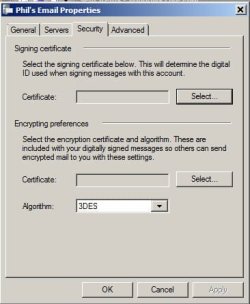
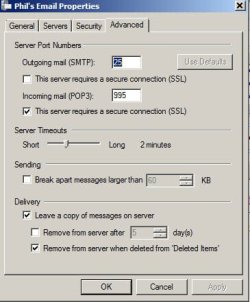
I made the change and I can still send emails, but get the same error message trying to retrieve. The text in the window that pops up goes quickly from "connecting" to "receiving a list of messages from the server" to the "some errors occurred..." and the "unable to send or receive..." and the Windows Live Mail error ID 0x80004005. The "receiving a list..." message goes by so fast that my wording may not be exact here, but you get the idea.

Where do I try using IMAP? Do I type it in where the setup now says POP3? It has always been POP3 before when it was working and my Wife's laptop settings are POP3. Originally the incoming mail server was mail.so.centurytel.net and one tech had me change it to pop.centurytel.net and another to pop.centurylink.net, none of which worked. (Centurytel had a name change to centurylink about a year ago, but did not require an email name change nor a name change in the settings at the time).

One thing I did not mention was that in the weeks before WinLiveMail stopped retreiving email, It had several times downloaded every email on the server multiple times and had filled my WLM inbox with 3 to 4 copies of old emails totaling some 400 to 500 emails and I had to spend quite some time deleting them.
 

Attachments

  • WinLiveMail account settings - security.jpg
    WinLiveMail account settings - security.jpg
    23.4 KB · Views: 18
  • WinLiveMail account settings - advanced.jpg
    WinLiveMail account settings - advanced.jpg
    24.4 KB · Views: 18
Last edited by a moderator:

My Computer My Computer

At a glance

Win7 Home Premium 64 bitDualCore Intel Core i3 350M, 2266 MHz (17 x 133)Total 3890 MBChip Type Intel(R) HD Graphics (Core i3)
Computer type
Laptop
Computer Manufacturer/Model Number
Toshiba Satellite A665
OS
Win7 Home Premium 64 bit
CPU
DualCore Intel Core i3 350M, 2266 MHz (17 x 133)
Motherboard
CPU Type DualCore Intel Core i3 350M, 2266 MHz (17 x 133)
Memory
Total 3890 MB
Graphics Card(s)
Chip Type Intel(R) HD Graphics (Core i3)
Hard Drives
Manufacturer Seagate
Hard Disk Name Momentus 7200.4 500420
Formatted Capacity 500 GB
Rotational Speed 7200 RPM
Interface SATA-II
Antivirus
Avira
Browser
FireFox
Wondering if your AV is the cause, as a quick check turn it off send message between You-wife's account
(script blocking currently enabled?)

Roy
 

My Computer My Computer

At a glance

W7 home premium 32bit/W7HP 64bit/w10 tp insid...E5300 dual core3gbNvidia Geforce 7100 Nforce 630i
Computer type
PC/Desktop
Computer Manufacturer/Model Number
medionl/Aspire 6930G/acer x55a
OS
W7 home premium 32bit/W7HP 64bit/w10 tp insider ring
CPU
E5300 dual core
Motherboard
medion MS7366
Memory
3gb
Graphics Card(s)
Nvidia Geforce 7100 Nforce 630i
Monitor(s) Displays
avixc
Internet Speed
n (isp resticted to 72)
Antivirus
mse/pands
Browser
palemoon
Other Info
Belkin Fd7050 n USB using Railink RT2870 drivers, more upto date
Ho Phil,
I never liked ISP providers email, I refer Gmail. I suggest opening a new Gmail account, then access your current mail website and forward all to your new account.
Will look for other help in mean time, as it's my feeding time.

coffeetime.gif
 

My Computer My Computer

At a glance

Win7 H.Prem. 32bit+SP1
Computer Manufacturer/Model Number
Look in my Signature.
OS
Win7 H.Prem. 32bit+SP1
I couldn't change the old account from POP3 to IMAP but I did figure out that I could create another account using IMAP in lieu of POP3 and that account seems to be working although sometimes i get just the email headers and have to click "here" to down load the message, and sometimes it has trouble sending email and I have to shutdown and restart which seems to get it going again. I have both accounts active and the POP3 continues to throw the error message.

Now I am trying to find where to set up the filters I had for the POP3 account to send some emails to certain folders, but I seem to have seen in my search for IMAP information that it may not have the same functions available as POP3. In any case I am getting my emails on my laptop now, albet in a different account and I need to copy or move anything I needto keep in my old "sent" folder to my new "sent" folder of some other folder before I remove the POP3 account.

One question about IMAP. Can I have it just look at just the in box of the webmail site or must I keep "all folders" checked and have it look at all folder each time I click "update all" in WLM?
 

My Computer My Computer

At a glance

Win7 Home Premium 64 bitDualCore Intel Core i3 350M, 2266 MHz (17 x 133)Total 3890 MBChip Type Intel(R) HD Graphics (Core i3)
Computer type
Laptop
Computer Manufacturer/Model Number
Toshiba Satellite A665
OS
Win7 Home Premium 64 bit
CPU
DualCore Intel Core i3 350M, 2266 MHz (17 x 133)
Motherboard
CPU Type DualCore Intel Core i3 350M, 2266 MHz (17 x 133)
Memory
Total 3890 MB
Graphics Card(s)
Chip Type Intel(R) HD Graphics (Core i3)
Hard Drives
Manufacturer Seagate
Hard Disk Name Momentus 7200.4 500420
Formatted Capacity 500 GB
Rotational Speed 7200 RPM
Interface SATA-II
Antivirus
Avira
Browser
FireFox
Thats what ive got set on Thunderbird, just got to set it up that way, i also have the option to show new in toolbar or play sound.

Filters might be on the server option.

Roy
 

My Computer My Computer

At a glance

W7 home premium 32bit/W7HP 64bit/w10 tp insid...E5300 dual core3gbNvidia Geforce 7100 Nforce 630i
Computer type
PC/Desktop
Computer Manufacturer/Model Number
medionl/Aspire 6930G/acer x55a
OS
W7 home premium 32bit/W7HP 64bit/w10 tp insider ring
CPU
E5300 dual core
Motherboard
medion MS7366
Memory
3gb
Graphics Card(s)
Nvidia Geforce 7100 Nforce 630i
Monitor(s) Displays
avixc
Internet Speed
n (isp resticted to 72)
Antivirus
mse/pands
Browser
palemoon
Other Info
Belkin Fd7050 n USB using Railink RT2870 drivers, more upto date
Back
Top